
MSBA-220 · Lesson 8 of 12 · 19 min
Compliance for Teams: retention, DLP and eDiscovery
▶ Video coming soon A video version of this lesson is on the way.
Corvallin's privacy officer arrived at the planning meeting with a question nobody in IT could answer. A former client's family had asked for every record the agency held about their mother, and the agency's lawyer wanted to know whether Teams chats counted. "If a nurse wrote about her in a chat two years ago," the privacy officer asked, "do we still have it? Should we? And could we find it if we did?"
Compliance is about keeping what must be kept, deleting what should be deleted, stopping sensitive information from going where it should not, and finding content when the law requires it. In Microsoft 365 these jobs belong to Microsoft Purview, and Teams content is covered by Purview just like email and documents. The MS-700 study guide asks administrators to specify retention policies, data loss prevention policies and information barriers, to identify use cases for communication compliance and insider risk management, and to identify licensing requirements. Within the course outline this lesson also covers eDiscovery and audit.
Why Teams compliance is different
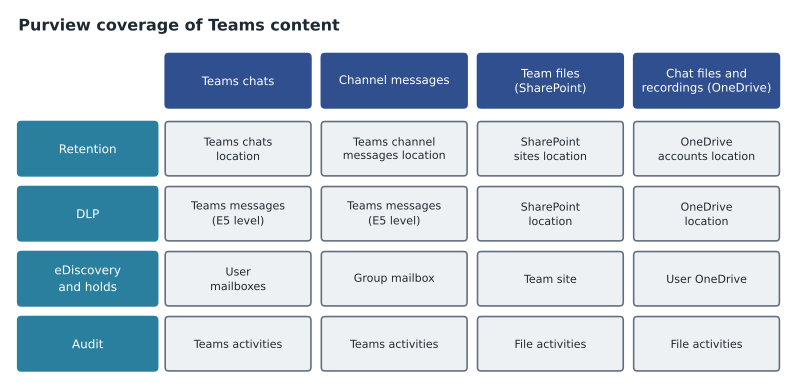
Teams content is spread across services, as lesson 1 showed. Messages live in the Teams chat service with compliance copies in Exchange Online mailboxes; files live in SharePoint and OneDrive; recordings live in OneDrive or SharePoint. Purview works on the stored copies, which is why a retention policy for Teams messages and a retention policy for SharePoint files are separate settings, and why both are needed to cover a team fully.
Retention policies for Teams
A retention policy keeps content for a set period, deletes it after a set period, or keeps it and then deletes it. For Teams, Purview offers separate retention locations for Teams channel messages and Teams chats, which Microsoft has extended to cover interactions with Copilot. Files shared in Teams are covered by the SharePoint sites and OneDrive accounts locations, and meeting recordings stored in OneDrive or SharePoint are covered the same way.
A policy can include all users or teams, or be scoped to specific users, Microsoft 365 groups or adaptive scopes built on attributes such as department. Retention for Teams messages can be set as short as one day, but deletion is not instant: Microsoft documents that it can take several days after the retention period ends for messages to disappear from the Teams client.
| Corvallin retention policy | Locations | Setting |
|---|---|---|
| Clinical Teams Retention | Teams channel messages for teams labelled Clinical Confidential; their SharePoint sites | Retain for 10 years after creation, then delete |
| General Chat Retention | Teams chats for all users | Retain for 2 years, then delete |
| General Channel Retention | Teams channel messages for all other teams | Retain for 3 years, then delete |
| Meeting recordings | OneDrive accounts and SharePoint sites, plus the Teams recording expiration setting | Recordings expire after 120 days by default; recordings that form part of a clinical record get a retention label |
The ten-year figure came from the agency's lawyer, who based it on the records retention requirements for health information custodians in the province and the agency's funding agreement, not from anything in Microsoft's defaults. Teodor's job was to implement the decision, not to make it.
When several retention policies apply to the same item, Purview resolves them with the principles of retention: retention wins over deletion; the longest retention period wins; an explicit inclusion wins over an implicit one for deletion; and the shortest deletion period wins among deletion settings. In practice this means that adding a longer retention policy can never cause content to be deleted sooner, which is reassuring when policies overlap.
Worked problem
Two policies on one chat message
A nurse's chat message about a client is covered by General Chat Retention, which keeps chats for 2 years and then deletes them. The nurse is also a member of a group included in a legal hold for a dispute that started this year. What happens to the message after 2 years?
Show solution
- Retention settings and holds take precedence over deletion.
- The 2-year policy would delete the message, but the hold requires it to be preserved.
- The message stays preserved in the compliance copy for as long as the hold applies, even if it disappears from the user's view.
- When the hold is released, the deletion setting takes effect.
Answer: The message is preserved while the hold applies and deleted afterwards under the 2-year policy.
Data loss prevention
Data loss prevention (DLP) policies detect sensitive information, such as health card numbers or bank account numbers, and act on it: showing a policy tip, blocking a message, blocking sharing with external people, or alerting an administrator. For Teams there are two parts. The Teams chat and channel messages location scans messages as they are sent. The SharePoint sites and OneDrive accounts locations protect files shared in Teams. When a Teams message is blocked, the sender sees a notice in place of the message and recipients see that it was blocked; the sender can see why and, if the policy allows, override with a justification.
Corvallin's Teams DLP policy detected provincial health card numbers and Canadian social insurance numbers. In chats with people outside the organization, messages containing either were blocked with a policy tip explaining that client identifiers must not be sent to external participants. Inside the organization, the policy showed a tip but allowed the message, because care staff legitimately discussed clients with each other.
Licensing matters here. DLP for files in SharePoint and OneDrive is included in Microsoft 365 E3, but DLP for Teams chat and channel messages needs Microsoft 365 E5, E5 Compliance or an equivalent add-on for the users covered. Corvallin bought E5 Compliance for the 60 staff who regularly worked with external partners and scoped the Teams DLP policy to them.
eDiscovery and holds
eDiscovery finds content for legal or regulatory purposes. Since the classic eDiscovery tools, Content search, eDiscovery (Standard) and eDiscovery (Premium), were retired between August 1 and September 1, 2025, Purview provides a single unified eDiscovery experience. Administrators with the right eDiscovery roles create a case, add data sources such as users' mailboxes and team sites, search with keywords and conditions, place holds to preserve content, review results and export them.
For Teams, searching a user's mailbox finds that user's chat messages, and searching a team's group mailbox and SharePoint site finds channel messages and files. Premium features, such as reconstructing Teams conversations into threads for review and advanced analytics, need Microsoft 365 E5 or E5 eDiscovery and Audit licensing.
The privacy officer's question had a clear answer once retention was in place. Corvallin kept chats for two years, so a two-year-old chat might or might not still exist depending on the date, but it could be found with a search of the nurse's mailbox in a new eDiscovery case. Whether the agency had to disclose it was the lawyer's decision; Teodor's part was making sure the search was reliable.
Information barriers
Information barriers prevent particular groups of users from communicating or collaborating with each other in Teams, SharePoint and OneDrive. They are used where rules or ethics require separation, such as between investment bankers and analysts, or between two groups working for clients with conflicting interests. Barriers are built from segments, defined by user attributes, and policies that block or allow communication between segments. Once in place, blocked users cannot find each other, chat, call or be added to the same team.
Information barriers need Microsoft 365 E5, E5 Compliance or an equivalent licence. Corvallin considered them for a joint venture with another agency, then decided that separate teams with container labels were enough. The study guide expects administrators to know when barriers are appropriate, not to deploy them everywhere.
Communication compliance and insider risk
Two other Purview solutions monitor behaviour rather than content locations. The study guide asks administrators to identify appropriate use cases for each.
| Solution | What it looks for | Example use case at Corvallin |
|---|---|---|
| Communication compliance | Messages in Teams, email and other channels that break policy: harassment, threats, sharing of sensitive information, regulatory conduct rules | Detecting abusive language toward staff in branch chats, with reviewers in HR |
| Insider risk management | Patterns of risky activity by users: downloading large amounts of data, exfiltration before leaving, sharing sensitive files externally | Alerting when a departing scheduler downloads the entire client list from a team site |
Both solutions are designed with privacy in mind. User names can be pseudonymized for reviewers, access is limited to specific role groups, and investigations follow defined workflows. Both need E5-level compliance licensing. Corvallin's HR director and privacy officer agreed a written purpose for each before anything was turned on, because monitoring staff communications without a clear reason would damage the trust the rollout depended on.
Audit
The Microsoft Purview audit log records Teams activities such as creating and deleting teams, adding members and guests, changing settings, and signing in. Audit (Standard) is on by default and keeps records for 180 days; Audit (Premium), with E5-level licensing, keeps records longer and adds high-value events. Teodor's alert policies from lesson 7 were built on audited activities, and the audit log was where he looked when someone asked who had deleted the real Nursing team.
| Feature | Included in Microsoft 365 E3 | Needs E5 or an E5 compliance add-on |
|---|---|---|
| Retention policies for Teams messages and files | Yes | |
| DLP for files in SharePoint and OneDrive | Yes | |
| DLP for Teams chat and channel messages | Yes | |
| eDiscovery cases, holds, search and export | Yes | |
| Premium eDiscovery review features | Yes | |
| Information barriers | Yes | |
| Communication compliance and insider risk management | Yes | |
| Audit (Standard), 180 days | Yes |
Retention labels and records
Retention policies apply broadly to locations. Retention labels apply to individual items, such as a document or an email, and can mark an item as a record, which prevents it from being edited or deleted until its retention period ends. Retention labels can be applied to files in Teams, because those files live in SharePoint and OneDrive, but they cannot be applied to Teams chat or channel messages themselves; messages are governed only by retention policies.
That difference shaped Corvallin's design. Clinical documents that formed part of a client's record, such as care plans saved in a branch team's Files tab, received a retention label called Client Record, which kept them for the full clinical retention period and marked them as records. Chat messages were treated as transient communication and kept for two years under the chat policy. Staff were told plainly, in training and in a pinned post, that anything that belonged in a client's record had to be saved as a document in the right place, not left in a chat.
| Retention policy | Retention label | |
|---|---|---|
| Applies to | Whole locations such as all Teams chats or selected teams | Individual items such as a file or email |
| Teams messages | Yes, through Teams locations | No |
| Files in Teams | Yes, through SharePoint and OneDrive locations | Yes, applied by users, defaults or auto-labelling |
| Can mark content as a record | No | Yes |
Planning compliance with the business
Compliance settings carry legal weight, so the planning process mattered as much as the technical work. Teodor met the privacy officer, the agency's lawyer and the HR director in a single workshop and walked through four questions for each kind of Teams content: how long must we keep it, when must we delete it, who must be able to find it, and what must never leave the organization. The answers became a one-page compliance matrix that mapped each decision to a Purview control and an owner.
The matrix also recorded what the agency decided not to do. It did not turn on communication compliance in the first year, because there was no specific problem to address. It did not use information barriers, because separate teams with labels were enough. Writing those decisions down meant that the next administrator, or an auditor, could see that they had been considered rather than missed.
Finally, Teodor tested every policy before relying on it. He created a test team covered by the clinical retention policy, posted messages and files, deleted some of them as a user, and confirmed through an eDiscovery search that the deleted items were still preserved. He sent a test message containing a fictitious client identifier to a test external account and confirmed that the DLP policy blocked it with the expected tip. A compliance control that has never been tested is only an assumption.
Common mistakes
MistakeCreating a retention policy for Teams chats and assuming files in those chats are covered.
InsteadChat files are in OneDrive; include the OneDrive accounts location too.
MistakeExpecting messages to vanish the moment the retention period ends.
InsteadDeletion from the client can take several days after the period ends.
MistakeLicensing Teams DLP on Microsoft 365 E3 alone.
InsteadDLP for Teams messages needs E5-level compliance licensing for covered users.
MistakeTurning on communication compliance without an agreed purpose.
InsteadAgree the purpose, reviewers and privacy controls with HR and privacy first.
Summary and key terms
- Purview protects Teams content where it is stored: Exchange compliance copies for messages, SharePoint and OneDrive for files and recordings.
- Retention policies have separate Teams channel message and Teams chat locations; the principles of retention resolve overlaps in favour of keeping content.
- DLP for Teams messages blocks or warns on sensitive information and needs E5-level licensing; DLP for files uses SharePoint and OneDrive locations.
- The unified Purview eDiscovery experience replaced classic eDiscovery in 2025 and searches mailboxes and sites for Teams content.
- Information barriers separate segments of users; communication compliance and insider risk management monitor behaviour for defined purposes.
- Audit (Standard) keeps Teams activity records for 180 days.
- Retention policy
- A Purview policy that keeps, deletes, or keeps then deletes content in chosen locations.
- Principles of retention
- The rules Purview uses when several retention settings apply to one item.
- Data loss prevention (DLP)
- Policies that detect and act on sensitive information in messages and files.
- Hold
- A preservation order in an eDiscovery case that stops content from being deleted.
- Information barrier
- A policy that prevents defined groups of users from communicating or collaborating.
- Communication compliance
- A Purview solution that detects policy-breaking messages for review.
Practice problems
Work each problem on paper first, then reveal the answer to check.
Which retention location covers files shared in a one-to-one Teams chat?
Show answer
OneDrive accounts, because chat files are stored in the sender's OneDrive.
Two retention policies apply: keep for 3 years, and keep for 7 years. How long is the content kept?
Show answer
Seven years, because the longest retention period wins.
Give one use case for insider risk management.
Show answer
Detecting a departing employee downloading large amounts of sensitive data.
Lesson quiz · 5 questions
Score 60% or more to complete this lesson.
Create a free account to save your progress, take quizzes and earn a certificate.