
MSBA-220 · Lesson 12 of 12 · 20 min
Case study: a Teams rollout for a school board
▶ Video coming soon A video version of this lesson is on the way.
Teodor's two children attend schools in the Kestrelmoor District School Board, a fictional district with 14 elementary schools, 4 secondary schools, about 11,000 students and 1,300 staff. In the autumn, the board asked parents with IT experience to join a technology advisory committee for its Teams relaunch, and Teodor volunteered. The board's IT lead, a former teacher named Tamsin Vellacott, sent him a short brief: "We switched Teams on in a hurry years ago. We want to do it properly this time, for staff and for classes. Tell us what we've missed."
This capstone applies everything in the course to a new organization. Work through each section and decide what you would recommend before reading Teodor's answer. The board is fictional, and its numbers are invented for the exercise, but every Teams feature and setting described is real.
The brief
| Area | What the board told the committee |
|---|---|
| People | 1,300 staff, including 900 teachers; about 11,000 students from kindergarten to grade 12 |
| Licences | Microsoft 365 A3 for staff; Microsoft 365 A1 for students |
| Current state | Teams on for everyone with default policies; 3,400 teams, many created by students; no naming or expiration rules |
| Goals | Class teams for every course; staff collaboration teams; safe meetings for remote learning days; board meetings streamed to the public |
| Constraints | Older schools with 100 Mbps connections; strict rules on student privacy; a small IT team of six |
| Partners | The municipal library and a regional college, which run joint programs with secondary schools |
Tamsin also mentioned a recent incident: students in one school had started Teams meetings on their own late at night, without a teacher, and parents had complained. Fixing that was the committee's first priority.
Architecture and licensing
Teodor began with lesson 1's questions. Which services does each scenario depend on, and do the licences cover them? Staff on Microsoft 365 A3 had Teams, Exchange, SharePoint and OneDrive, plus Entra ID P1 and Intune. Students on A1 had the web and mobile versions of the Office apps and Teams, with fewer administrative features. Education tenants also have School Data Sync, which reads class rosters from the student information system and creates class teams with the right teachers and students automatically. That answered the board's biggest workload problem before any policy was touched.
He recorded where class content would live: class team files in SharePoint, chat files in each sender's OneDrive, assignments in the Assignments app backed by SharePoint and OneDrive, and meeting recordings in the organizer's OneDrive. The board's privacy officer needed that table for the same reason Corvallin's had.
Policies for staff and students
The incident pointed straight at lesson 4. Every user had the Global (Org-wide default) policies, so students could do everything teachers could. Microsoft supplies education policy packages for roles such as primary and secondary students, higher education students and teachers, which bundle sensible defaults for meetings, messaging and apps. Teodor recommended using them as starting points, assigned through group policy assignment to security groups that School Data Sync and the identity system kept up to date.
| Policy area | Students | Teachers and staff |
|---|---|---|
| Meetings | Cannot create meetings or start meet-now meetings; cannot record; cannot present unless made a presenter; must wait in the lobby until a teacher joins | Can schedule and record meetings and control lobby and presenter settings |
| Messaging | Chat limited and supervised; cannot delete sent messages; no Giphy or stickers in younger grades | Full messaging |
| Apps | Only approved education apps pinned and allowed | Wider set of approved apps |
| Chat supervision | Supervised chat roles so students start chats only where a supervisor is present | Teachers act as supervisors |
With student meeting creation turned off and a lobby rule that held students until a teacher arrived, the late-night meetings could not happen again. Teodor stressed the precedence rule from lesson 4 to Tamsin's team: if anyone assigned a policy directly to a student account, it would override the group assignment, so direct assignments should be rare and documented.
Worked problem
Resolving overlapping group assignments
A secondary teacher, Mr. Okafor-Leduc, also takes an evening adult course run by the board and is therefore in two groups: All-Teachers, with the meeting policy Teacher-Meetings at rank 1, and Adult-Learners, with Student-Meetings at rank 3. He has no direct assignment. Which meeting policy applies, and what should the board do if adult learners need different settings from teachers?
Show solution
- No direct assignment, so compare group ranks.
- Rank 1 beats rank 3, so Teacher-Meetings applies to him.
- If adult learners need their own policy, create Adult-Meetings and assign it to Adult-Learners at a rank below All-Teachers.
- Teachers who are also adult learners keep Teacher-Meetings, which is the intended outcome.
Answer: Teacher-Meetings applies; keep teacher groups ranked above learner groups.
Network readiness
Remote learning days were the board's biggest network worry, but Teodor pointed out that the school buildings mattered too: on regular days, classes in a library or a gym sometimes joined assemblies and guest speakers through Teams. Using lesson 3's figures, he ran the numbers for one older elementary school.
Worked problem
An assembly at an older school
The school has a 100 Mbps connection. For a virtual author visit, 18 classrooms join the same meeting from classroom laptops connected to classroom displays, each receiving video at the recommended meeting level of 4,000 kbps down and sending audio only at 58 kbps up. Does the connection cope, and what would you recommend?
Show solution
- Download: 18 x 4,000 = 72,000 kbps, or 72 Mbps.
- Upload: 18 x 58 = 1,044 kbps, or about 1 Mbps.
- Download uses about 72 percent of the 100 Mbps link, leaving little room for everything else the school is doing.
- Option: stream the visit as a Teams town hall to the classrooms, using an eCDN if the board licenses one, or join from fewer rooms and gather classes together.
Answer: It fits, but only just. Use a town hall, an eCDN or fewer joining rooms for large school-wide events.
He also recommended the readiness tools: the Network Planner with personas for classrooms and offices, the Network Assessment Tool at each building, and the Microsoft 365 network connectivity test for staff working from home on remote learning days. QoS on the board's managed switches and Wi-Fi would protect classroom audio from video streaming and downloads.
External collaboration
The joint programs with the library and the regional college needed a decision from lesson 5. Teodor recommended external access limited to the two partner domains so that staff could chat and meet with partner staff, and shared channels with B2B direct connect for the joint program coordinators, so that college staff could work in one channel from their own tenant without becoming guests. Guest access for students was not needed at all and would stay off for student-facing teams through sensitivity labels. Unmanaged Teams accounts would be blocked, because the board could not verify who was behind them.
Governance
With 3,400 existing teams, governance from lesson 6 was urgent. Teodor's recommendations formed a short list:
| Control | Recommendation | Why |
|---|---|---|
| Who can create teams | Staff only, through a Team Creators group containing all staff; students cannot create teams | Class teams come from School Data Sync; student-created teams caused most of the clutter |
| Naming policy | Prefix with the school code; blocked words list including Principal, Board and Official | Makes ownership obvious and stops impersonation |
| Expiration | 365 days for staff collaboration teams; class teams managed by the school-year cycle instead | Class teams are archived at year end by policy, not left to expire |
| Archiving | Archive all class teams at the end of each school year, with sites read-only | Keeps work available for reference and appeals |
| Owners | At least two staff owners for every staff team | Teams survive staff moving schools |
| Cleanup | Archive student-created teams with no activity in 180 days, then delete after a term | Restorable for 30 days after deletion if a mistake is made |
Security and compliance
For security, following lesson 7, Teodor recommended MFA and Conditional Access for all staff targeting the Office 365 application group, app protection policies for staff phones, and container sensitivity labels so that student-facing teams could never have guests. A3 does not include Defender for Office 365, so he suggested budgeting for it at least for staff, given that phishing in chat was rising across the sector. For meetings, standard meeting policies were enough for classes; Teams Premium features were not needed.
For compliance, following lesson 8, the board's records officer had to set retention periods based on the district's records schedule and education privacy law. Teodor's role was to show what could be done: separate retention policies for Teams chats and channel messages, SharePoint and OneDrive retention for class files, and eDiscovery cases for the rare investigations. DLP for Teams messages would need A5 or a compliance add-on, so he recommended starting with DLP for files, which A3 covers, and reviewing after a year.
Because the board is a public body, its records and privacy obligations come from provincial legislation on education records and on access to information and protection of privacy. The committee's report said plainly that the retention periods had to come from the board's records officer and legal advisers, and that Teams would simply implement them.
Devices, scripts and monitoring
Classrooms used shared laptops connected to displays, so Teodor recommended provisioning the new Teams client with the bootstrapper through Intune, as Corvallin had. The board's two boardrooms, used for public board meetings, would get Teams Rooms Pro licences; the 18 schools' meeting rooms could use Teams Rooms Basic, which is free for up to 25 rooms. Public board meetings would run as Teams town halls.
Lesson 10's scripts would carry most of the governance load for a six-person IT team: a nightly report of teams with fewer than two owners, a year-end script to archive class teams, and batch policy assignments for corrections. For monitoring, following lesson 11, he proposed a termly report with active users by school, poor-stream rates by building from the Call Quality Dashboard with building data uploaded, governance counts and upcoming Message center changes.
The rollout plan
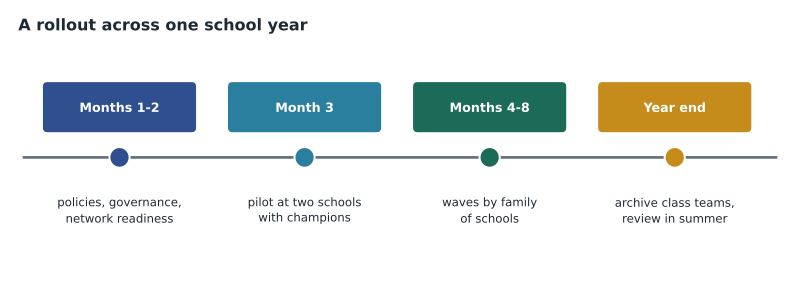
Following lesson 2, Teodor suggested a pilot in one secondary school and one elementary school, with two teacher champions in each, before waves by family of schools. Training for teachers would be short and scenario-based: setting up a class meeting safely, posting and collecting an assignment, and using the lobby. Students would learn the rules from their teachers in the first week of each course.
The committee's report
Teodor's final report to the board fitted on two pages. Its first page listed eight decisions: assign education policy packages through groups; turn off meeting creation for students and hold them in the lobby; create class teams through School Data Sync; restrict team creation to staff and apply naming and expiration rules; archive class teams every year; limit external access to partner domains and use shared channels for joint programs; protect sign-in and staff phones with Conditional Access and app protection; and set retention from the records schedule. The second page listed who owned each decision and when it would be reviewed.
Tamsin read it and asked one more question: "What do we do first on Monday?" Teodor's answer came from the incident: "Assign the student meeting policy. Everything else can wait a week. That can't."
Checking the plan against the course
Before sending the report, Teodor checked it against the twelve topics of the course, one line each, to make sure nothing had been missed. Architecture and dependencies: storage and licensing mapped. Rollout and adoption: scenarios, pilot, champions and waves. Network: bandwidth tested for events and readiness tools named. Org-wide settings and policies: education packages through groups. Guest and external access: partner domains and shared channels. Governance: creation, naming, expiration and archiving. Security: Conditional Access, app protection and labels. Compliance: retention from the records schedule, DLP for files. Clients and devices: bootstrapper and room licences. PowerShell: owner reports and year-end archiving. Monitoring: a termly report. The list showed one gap, which he filled before sending: a named owner on the board's staff for each decision, so that the plan would outlive the committee.
Common mistakes
MistakeLeaving students on the Global (Org-wide default) meeting policy.
InsteadAssign student policies through groups so that students cannot create or run meetings unsupervised.
MistakeLetting class teams expire under a generic expiration policy.
InsteadArchive class teams at year end on the school calendar.
MistakeChoosing retention periods inside IT.
InsteadGet retention periods from the records officer and legal advisers; IT implements them.
MistakeInviting partner staff as guests into student-facing teams.
InsteadUse external access or shared channels for partners, and block guests from student teams with labels.
Summary and key terms
- Start a Teams plan by mapping scenarios to the services and licences they depend on.
- Use role-based policy packages assigned through groups, with direct assignment only for documented exceptions.
- Check network capacity for real events and use town halls or eCDN for large audiences.
- Choose external access, guest access or shared channels for each partner relationship.
- Combine creation rules, naming, expiration, archiving and owner rules to keep teams tidy.
- Layer identity security, threat protection, labels and retention, with retention periods set by records owners.
- Automate governance with scripts and report adoption, quality and governance regularly.
- School Data Sync
- An education service that creates class teams and memberships from the student information system.
- Class team
- A team type in Teams for Education with features for teachers and students.
- Education policy package
- A Microsoft-supplied bundle of Teams policies for education roles.
- Supervised chat
- Education chat settings that require a supervisor to be present in student chats.
- Town hall
- A Teams event type for broadcasting to large audiences.
- Year-end archive
- Archiving class teams at the end of the school year to keep them read-only.
Practice problems
Work each problem on paper first, then reveal the answer to check.
Which single change stops students from holding unsupervised meetings?
Show answer
Assigning a student meeting policy that prevents creating meetings and holds students in the lobby until a teacher joins.
Why should class teams be archived instead of left to an expiration policy?
Show answer
Their lifecycle follows the school year, and archiving keeps the work available read-only.
Which collaboration option suits college staff who coordinate a joint program with the board?
Show answer
A shared channel using B2B direct connect, so they work from their own tenant.
Lesson quiz · 5 questions
Score 60% or more to complete this lesson.
Create a free account to save your progress, take quizzes and earn a certificate.