
MSBA-220 · Lesson 2 of 12 · 19 min
Planning a rollout and adoption
▶ Video coming soon A video version of this lesson is on the way.
Corvallin's first attempt at Teams had been a switch, not a rollout. People had been given the app and left to work it out, and three years later the agency had 214 teams, many with a single member, care coordinators who still emailed spreadsheets because they did not trust the Files tab, and a branch in which nobody used Teams at all. Ines Duvernay-Sato wanted the second attempt to be different. "Technology is the easy part," she told Teodor. "The hard part is getting a home-care nurse with forty minutes between visits to change how she talks to her coordinator."
This lesson covers how to plan a Teams rollout or relaunch: building the business case around real scenarios, assembling the right people, running a pilot, measuring success, training and communicating, and keeping adoption going after launch. These are not purely soft skills. The MS-700 exam expects administrators to plan deployments, and Microsoft's own guidance treats adoption planning as part of the technical project.
Start with scenarios, not features
A rollout plan that lists features, such as channels, meetings and apps, gives people nothing to aim for. A plan built on scenarios describes a job someone does today and how Teams will make it better. Teodor and Ines interviewed a coordinator, two nurses, a scheduler, the payroll lead and Dr. Marguerite Ostrander-Bey, the clinical director, and came back with five scenarios.
| Scenario | Today | With Teams |
|---|---|---|
| Daily huddle in each branch | Phone tree and a whiteboard photo emailed at 8 a.m. | A 10-minute Teams meeting in the branch team, with the huddle notes in a pinned channel tab |
| Changes to a client's visit schedule | Phone calls and voicemail between scheduler and nurse | A post in the branch scheduling channel that tags the nurse, with mobile notification |
| Clinical policy updates | A PDF emailed to all staff, rarely read | An announcement post in an org-wide policy team, with acknowledgement tracked in a form |
| Case conference with a physician's office | Conference call with dial-in codes | A Teams meeting with an external attendee, recorded with consent |
| New staff onboarding | Binders and shadow shifts | An onboarding team with a channel per cohort and recorded orientation sessions |
Each scenario has a measurable outcome, which turns adoption from a feeling into something that can be checked. For the huddle scenario, success meant every branch holding its huddle in Teams four days a week within six weeks. For scheduling, it meant fewer voicemails to the scheduling line, which the phone system could already count.
Who needs to be involved
Microsoft's adoption guidance, published on its adoption site, recommends a small set of roles for any collaboration rollout, and Corvallin filled each one deliberately.
| Role | Responsibility | At Corvallin |
|---|---|---|
| Executive sponsor | Sets the vision, removes obstacles, uses Teams visibly | The chief executive, who agreed to run her monthly all-staff update as a Teams town hall |
| Project lead | Owns the plan, timeline and decisions | Ines Duvernay-Sato |
| Technical lead | Configures the tenant, policies and network | Teodor Klimaszewski, with Felix Okonkwo-Reyes for network and voice |
| Service desk | Prepares for questions, writes support articles, reports trends | Ama Owusu-Pratt and her team |
| Business stakeholders | Define scenarios and success measures for their area | Dr. Ostrander-Bey for clinical work, the payroll lead, the branch managers |
| Champions | Volunteers who help colleagues and feed back problems | Two per branch and three at head office |
| Privacy and compliance | Approve data handling, retention and guest access | The privacy officer |
Champions deserve special attention. A champion is an ordinary user, not an IT person, who learns Teams a little ahead of colleagues and becomes the first person they ask. Champions work because people take advice from someone who does their job. Corvallin chose care coordinators and nurses rather than office managers, gave them early access in the pilot, a monthly call with Teodor and a private channel where they could raise problems.
The phases of a rollout
There is no single correct sequence, but most successful rollouts move through recognizable phases. Corvallin used four.
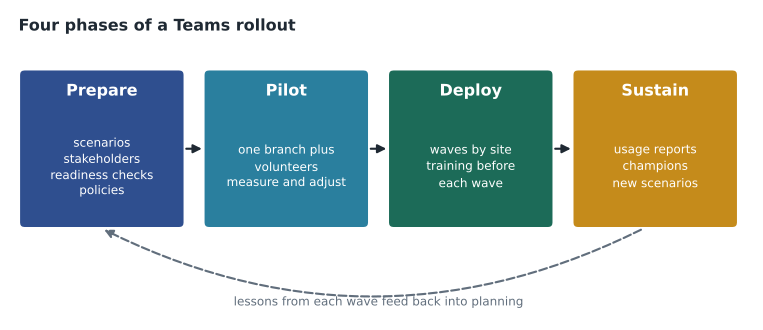
Prepare. Confirm licences, network readiness and identity settings; decide governance rules such as who may create teams; set org-wide policies; design the first teams and channels for the scenarios; write the communications plan; brief the service desk. The Teams admin center includes planning aids such as the Network Planner, covered in lesson 3, and Microsoft's documentation describes Advisor for Teams as a tool that checks the tenant's configuration before a rollout.
Pilot. Choose a group that represents real work, including at least one sceptic. Corvallin piloted with the North Branch, which had about 60 staff and the worst connectivity, plus 15 head office volunteers. A pilot with only enthusiastic head office staff would have proved nothing about whether Teams worked in a client's kitchen over a mobile connection.
Deploy. Roll out in waves, usually by location or department, with training timed just before each wave goes live. Each wave starts only when the previous one has met its exit criteria and the service desk has absorbed its questions.
Sustain. Adoption decays if nobody looks after it. Keep the champions network running, review usage reports monthly, retire scenarios that did not work and add new ones. Lesson 11 covers the reports.
Worked problem
Sizing the pilot and the champion network
Corvallin has about 450 staff: 120 at head office and 330 across four branches. Ines wants one champion for roughly every 25 users, with at least two per branch. The North Branch has 62 staff. How many champions does the North Branch need, and about how many does the agency need in total?
Show solution
- North Branch: 62 divided by 25 is 2.48, so round up to 3 champions; that is above the minimum of 2.
- Whole agency: 450 divided by 25 is 18 champions.
- Check the minimum: four branches times 2 is 8, which 18 already exceeds.
- Spread the 18 roughly in proportion to staff: about 5 at head office and about 13 across the branches.
Answer: The North Branch needs 3 champions, and the agency needs about 18 in total.
Readiness checks before the pilot
Before any user is invited, the technical team works through a readiness list. Most of the items are covered in detail later in the course, but they belong in the plan from the start because a pilot that fails on a technical issue destroys trust quickly.
| Area | Check | Lesson |
|---|---|---|
| Licensing | Every pilot user has Teams and Exchange Online; extra features have their licences | 1 |
| Network | Bandwidth and ports for each site; VPN split tunnelling for remote users | 3 |
| Identity and access | MFA and Conditional Access cover Teams sign-in on mobile devices | 7 |
| Policies | Org-wide meeting, messaging and app settings agreed; policy packages for roles | 4 |
| External collaboration | Guest access and external access decided and configured | 5 |
| Governance | Team creation rules, naming policy, expiration and archiving | 6 |
| Compliance | Retention and data loss prevention for Teams agreed with the privacy officer | 8 |
| Clients and devices | New Teams deployed to managed PCs; mobile app approved for staff phones | 9 |
| Support | Service desk articles and escalation path ready | 11 |
Communication and training
People need to know what is changing, why, when, and where to get help. Corvallin's communications plan had four messages. The first, from the chief executive, explained the reason: less time on the phone tree, more time with clients. The second, two weeks before each wave, told staff what would change for their role. The third, on launch day, gave three things to do first: join your branch team, turn on mobile notifications, and post in the huddle channel. The fourth, a month later, shared early results and thanked the champions.
Training worked best when it was short and tied to scenarios. Instead of a two-hour tour of Teams, nurses got a 20-minute session on the mobile app covering exactly what they needed for scheduling and huddles. Coordinators got a longer session on channels, files and meetings. Teodor recorded each session and posted it in the onboarding team, and Microsoft's adoption site supplied ready-made end-user guides that he adapted with Corvallin's own screenshots.
Ama's team prepared for the inevitable questions. They wrote short support articles for the ten problems they expected most often, from notifications not appearing on Android phones to files opening in the browser instead of the desktop app, and created a Teams channel where champions could flag new problems for the service desk.
Measuring success
Teodor agreed the measures with each scenario owner before the pilot started, so that nobody could redefine success afterwards. The usage reports in the Teams admin center and the Microsoft 365 admin center show active users, messages, meetings and device types over time, and some adoption reporting is available in the Microsoft 365 admin center as well. Usage numbers alone can mislead, though. Two hundred chat messages a day might mean people love Teams, or that they are using it to complain about the phone tree. Corvallin paired each number with a short survey and a monthly conversation with the champions.
| Measure | Source | Target after six weeks |
|---|---|---|
| Active Teams users in pilot group | Teams usage report | At least 90 percent of pilot users active weekly |
| Branch huddles held in Teams | Meeting counts for the branch team, plus branch manager confirmation | Four days a week |
| Voicemails to the scheduling line | Existing phone system report | Down by a third |
| Staff confidence | Three-question survey | Most staff agree they can find what they need in Teams |
| Service desk tickets about Teams | Ticketing system | Falling after week two |
When adoption stalls
During the pilot, one coordinator kept emailing schedules even though everyone else had moved to the channel. Her champion found the reason in a five-minute conversation: on her laptop, Teams opened files in the browser, which she disliked, so she had stopped opening them. The fix was a client setting, not a training course. Teodor learned to treat stalled adoption as a symptom to investigate rather than resistance to overcome.
Common causes of stalled adoption include notifications that are too noisy or too quiet, too many teams with unclear purposes, file locations that confuse people, poor call quality on a particular network, and leaders who keep using email for the things Teams was meant to replace. Each has a technical or organizational fix, and most of them appear later in this course.
Planning for frontline workers
Most of Corvallin's staff were frontline workers: they spent their days with clients, not at desks, and used shared or personal phones. Microsoft designs specific features and licences for this group, and the rollout plan treated them as a separate audience. Microsoft 365 F3 includes Teams, and features such as the Shifts app for schedules, Approvals for simple requests and the Walkie Talkie app for push-to-talk voice are aimed at frontline work. Teams also supports a frontline deployment tool in the Teams admin center that creates teams for many locations at once from a list, which suited an organization with several branches.
The frontline plan had three differences from the head office plan. Training happened at the start of shifts, in 15-minute sessions led by champions, because nurses could not attend a scheduled course. The app setup policy pinned only the few apps frontline staff needed, so the mobile app looked simple on day one. And notifications were tuned with care: Teams lets each user set quiet hours on mobile, and the branch managers encouraged staff to use them, because the fastest way to lose a nurse's trust was a scheduling notification at midnight.
Managing change for the people who resist it
Every rollout meets resistance, and most of it is reasonable. At Corvallin, the strongest objections came from a long-serving coordinator at the East Branch who had run the branch's schedule by phone for twelve years without a missed visit. She did not want to learn a new tool, and she did not trust that a message in a channel would be read as reliably as a phone call. Rather than overruling her, Ines asked her to join the pilot as a sceptic and report anything that failed. Her reports were the most useful the project received: one led to the priority notification setting for urgent schedule changes, and another to a rule that urgent changes are always followed by a phone call until the receiver acknowledges them in Teams.
By the end of the deploy phase she had become an informal champion for the East Branch, not because she had been persuaded by slides but because the tool had been changed to meet her standard. Ines described the lesson to the leadership team in one sentence: adoption is something you earn by fixing what people tell you is broken.
Common mistakes
MistakePlanning the rollout around a list of Teams features.
InsteadPlan around real scenarios with measurable outcomes, then choose the features that support them.
MistakePiloting only with enthusiastic head office volunteers.
InsteadPilot with a representative group, including a site with weak connectivity and some sceptics.
MistakeTreating usage numbers as proof of success.
InsteadPair usage reports with surveys and conversations with champions and stakeholders.
MistakeEnding the project at launch.
InsteadPlan a sustain phase with champions, monthly reviews and new scenarios.
Summary and key terms
- Build the rollout around scenarios that describe real work and have measurable outcomes.
- Fill the key roles: executive sponsor, project and technical leads, service desk, business stakeholders, champions and privacy.
- Move through prepare, pilot, deploy in waves, and sustain, with exit criteria for each wave.
- Complete readiness checks for licensing, network, identity, policies, governance, compliance, clients and support before inviting users.
- Keep communication and training short, role-based and tied to scenarios.
- Agree measures in advance and combine usage reports with surveys and champion feedback.
- Scenario
- A description of a real job and how Teams will improve it, with a measurable outcome.
- Champion
- A volunteer user who helps colleagues adopt Teams and reports problems.
- Executive sponsor
- The senior leader who sets the vision and models the new way of working.
- Pilot
- A limited first deployment to a representative group to test and adjust the plan.
- Wave
- One stage of a phased deployment, usually by location or department.
- Exit criteria
- Conditions a pilot or wave must meet before the next one starts.
Practice problems
Work each problem on paper first, then reveal the answer to check.
Why should a pilot include a branch with weak connectivity?
Show answer
Because a pilot must test real working conditions; problems with poor networks would otherwise appear only after full rollout.
Give one reason usage reports alone can mislead.
Show answer
High message counts show activity, not whether people find Teams useful or whether it replaced the old process.
What does a champion do that a trainer does not?
Show answer
A champion works alongside colleagues every day, answers quick questions and feeds problems back to the project team.
Lesson quiz · 5 questions
Score 60% or more to complete this lesson.
Create a free account to save your progress, take quizzes and earn a certificate.