
MSBA-220 · Lesson 4 of 12 · 19 min
Org-wide settings and policies
▶ Video coming soon A video version of this lesson is on the way.
When Teodor opened the policy pages in the Teams admin center for the first time, he found that nothing had ever been customized. Every user at Corvallin, from the chief executive to a home-care aide on a shared tablet, had exactly the same meeting, messaging and app settings: the defaults Microsoft ships. Some were fine. Others were not. Anyone could record any meeting, including case conferences that discussed clients, and anyone could install almost any app from the Teams store.
This lesson explains how Teams is configured at two levels. Org-wide settings apply to the whole tenant and have only one value. Policies control what individual users can do, and different users can have different policies. The MS-700 study guide asks administrators to plan and manage update policies, create and manage policy packages, and plan and configure policy assignment for users and groups, so this lesson covers each in turn.
Org-wide settings
Org-wide settings are found in several places in the Teams admin center, mainly under Teams settings, External collaboration and Meetings. They switch whole features on or off for everyone, or set tenant-wide behaviour. Typical examples include:
| Setting area | Examples | Why it is org-wide |
|---|---|---|
| Teams settings | Email integration with channels, which cloud storage providers appear in the Files area, search by name scope, the Org tab | These shape the tenant as a whole, not individual users |
| External access | Whether users can chat and meet with people in other Teams organizations or with unmanaged Teams accounts | Federation is a relationship between tenants (lesson 5) |
| Guest access | Whether guests can be added to teams at all, and tenant-wide guest capabilities | A tenant-level switch, refined by policies (lesson 5) |
| Meeting settings | Anonymous users joining meetings, email invitation branding, network QoS markings | Affects every meeting the tenant hosts |
| Calling and voice settings | Emergency addresses, network topology, phone numbers | Infrastructure shared by all users (MSBA-222 and MSBA-230) |
Because org-wide settings affect everyone at once, Ines required a short change record for each one: what was changed, why, who approved it and how to undo it. When Teodor turned off third-party cloud storage options in the Files area, the record noted that the agency allowed only SharePoint and OneDrive for client information, so other storage options would only confuse people.
Policies and the Global (Org-wide default) policy
A policy is a named group of settings for one area of Teams. There are policy types for meetings, messaging, apps, calling, live captions, voice routing, updates and more. Each policy type comes with a built-in policy called Global (Org-wide default). Any user who has not been given another policy of that type gets the global policy. Administrators then create custom policies for groups of users who need something different.
| Policy type | What it controls | Corvallin custom policy |
|---|---|---|
| Meeting policy | Recording, transcription, who can present, lobby behaviour, chat in meetings, content sharing | Clinical-Meetings: recording off by default, lobby for everyone outside the organization |
| Messaging policy | Editing and deleting sent messages, read receipts, Giphy and stickers, priority notifications, chat translation | Frontline-Messaging: priority notifications on, Giphy content rating strict |
| App setup policy | Which apps are pinned to the app bar and installed for users | Frontline-Setup: pins Shifts, Approvals and the branch team |
| App permission policy or app availability | Which apps users can install and use | Approved apps only (lesson 7 and MSBA-221) |
| Calling policy | Call forwarding, voicemail, delegation, call park | Used once Teams Phone arrives |
| Update policy | Whether users see Teams public preview features | IT-Preview for the IT team only |
Teodor learned an important habit early: change the global policy only for settings that should apply to almost everyone, and use custom policies for exceptions. If the global meeting policy is too restrictive, every exception needs a custom policy; if it is too open, every sensitive group needs one. Corvallin tightened a few global defaults, such as disabling Giphy content rated above strict, and left the rest as Microsoft ships them.
Assigning policies to users and groups
Custom policies can be assigned in four main ways. Direct assignment gives a policy to an individual user, from the user's page or a policy's page. Batch assignment gives a policy to many users at once by selecting them in the admin center or by PowerShell. Group policy assignment gives a policy to a security group, distribution list or Microsoft 365 group, so that anyone who joins the group receives it automatically. Policy packages assign several policies of different types at once.
Group assignment is the most manageable approach for most organizations, because it follows group membership instead of needing an administrator every time someone joins. Each group assignment has a rank. When a user belongs to several groups with assignments of the same policy type, the assignment with the highest rank, which is the lowest rank number, wins.
Policy precedence
Because a user can receive a policy in several ways, Teams uses a precedence order to decide which one is in effect. The order is simple to state and important to remember for the exam.
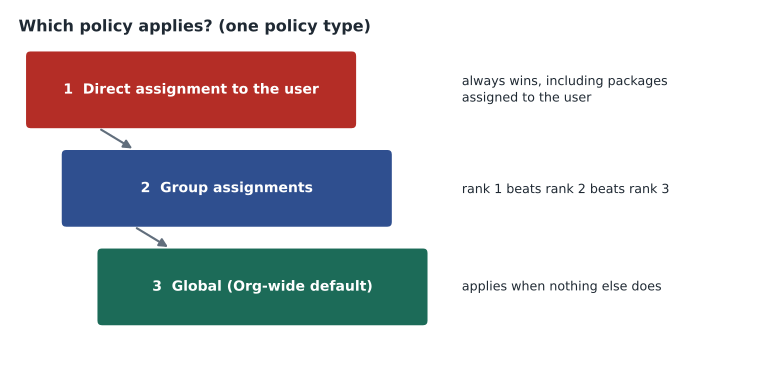
If a user has a policy assigned directly, that policy is in effect regardless of any group assignments. If not, the group assignment with the highest rank among the user's groups applies. If neither exists, the user gets the Global (Org-wide default) policy. Direct assignment includes assignments made through a policy package to that user. To check what a user actually has, open the user in the Teams admin center and look at the Policies tab, which shows each effective policy and how it was assigned.
Worked problem
Working out the effective meeting policy
Dr. Marguerite Ostrander-Bey is a member of two security groups. Clinical-Leads has a group assignment of the meeting policy Clinical-Meetings at rank 1. All-Head-Office has a group assignment of Standard-Meetings at rank 2. Teodor has not assigned her any meeting policy directly. Which meeting policy is in effect, and what changes if Teodor later assigns her Executive-Meetings directly?
Show solution
- Check for a direct assignment: none, so look at group assignments.
- Compare ranks: Clinical-Meetings has rank 1, which is higher than rank 2.
- Clinical-Meetings is in effect.
- If Executive-Meetings is assigned directly, direct assignment takes precedence over any group assignment.
Answer: Clinical-Meetings applies now; after a direct assignment, Executive-Meetings applies.
Policy packages
A policy package is a collection of predefined policies and policy settings for a role, assigned together. Microsoft supplies packages for common roles, including education roles, frontline workers and managers, and healthcare roles such as healthcare clinical worker and healthcare information worker. Administrators can also create custom policy packages that bundle their own custom policies.
Corvallin was an obvious fit. Teodor reviewed the healthcare clinical worker package and found it close to what nurses needed, but he preferred a custom package so that the policy names matched the agency's own conventions. He created a package called Corvallin-Frontline containing Clinical-Meetings, Frontline-Messaging and Frontline-Setup, and assigned it to the security group for branch care staff. When a new nurse was added to that group by the HR onboarding process, she received all three policies within hours, with no ticket to IT.
| Assignment method | Best for | Watch out for |
|---|---|---|
| Direct to a user | True exceptions, such as one executive | Overrides every group assignment and is easy to forget |
| Batch | A one-time change for many users | Does not follow future joiners |
| Group assignment with rank | Roles and departments | Plan ranks so overlapping groups resolve correctly |
| Policy package | Several policy types for one role | Packages assigned directly count as direct assignments |
Policy changes are not instant. Microsoft documents that new assignments and changes to policies can take hours to reach users, and group assignments for large groups can take longer. Ama's team added a line to their support articles: after a policy change, ask the user to sign out and back in, and give it until the next day before escalating.
Managing policies with PowerShell
Every policy type has matching cmdlets in the MicrosoftTeams module. Their names follow a pattern: New-, Set-, Get- and Remove- with the policy type, and Grant- to assign. Group assignments use a separate set of cmdlets.
# Create a custom meeting policy based on the global defaults
New-CsTeamsMeetingPolicy -Identity 'Clinical-Meetings' -AllowCloudRecording $false

# Assign it directly to one user
Grant-CsTeamsMeetingPolicy -Identity 'teodor.k@corvallin.example' -PolicyName 'Clinical-Meetings'

# Assign it to a security group with rank 1
New-CsGroupPolicyAssignment -GroupId 'Clinical-Leads@corvallin.example' -PolicyType TeamsMeetingPolicy -PolicyName 'Clinical-Meetings' -Rank 1

# See which policies a user effectively has and where they came from
Get-CsUserPolicyAssignment -Identity 'marguerite.ob@corvallin.example'
Setting a policy back to the default for a user means granting it with a null policy name, which removes the direct assignment so that group or global policies apply again. Teodor wrote these commands into a short runbook so that Felix could use them without memorizing parameters.
Update policies
Teams update policies control whether users can see public preview features before they are generally available. In an update policy, the setting to show preview features can be turned on, turned off, or left to follow the Office update channel the user's Microsoft 365 Apps are on. Separately, the Microsoft 365 admin center lets organizations put chosen users on Targeted release for Microsoft 365 changes.
Corvallin created an IT-Preview update policy for the IT team and two champions, so that they would meet new features before everyone else and could update the support articles in time. All other users stayed on the global update policy with preview features off, because a care coordinator in the middle of a shift should not be surprised by a moved button.
The Message center in the Microsoft 365 admin center announces upcoming Teams changes, usually with a date and an action, if any is required. Teodor set up weekly digest emails of Teams-tagged posts and reviewed them each Monday with Felix.
Designing a policy model
Before creating any custom policies, Teodor wrote a short policy model: a table of the roles at Corvallin, what each role needed from Teams, and which policies would deliver it. Doing this on paper first stopped the common drift into dozens of one-off policies with names like Meeting-Policy-2 that nobody can explain a year later.
| Role | Group | Meeting policy | Messaging policy | App setup policy |
|---|---|---|---|---|
| Branch care staff | Branch-Care-Staff | Clinical-Meetings | Frontline-Messaging | Frontline-Setup |
| Clinical leads | Clinical-Leads | Clinical-Meetings | Global | Global |
| Head office staff | All-Head-Office | Standard-Meetings | Global | Global |
| IT team | IT-Team | Global | Global | IT-Setup |
| Everyone else | none | Global | Global | Global |
The model also set naming rules: policies named for the role or purpose, never for a person; a short description on every custom policy explaining why it exists; and a review every six months to merge or delete policies that were no longer needed. Ines added one more rule: any direct assignment to an individual had to be recorded in the change log with a reason and an end date, because direct assignments override everything else and are the most common reason a user's experience does not match the model.
Common policy settings worth reviewing
Microsoft's defaults are reasonable for most organizations, but a few settings deserve a deliberate decision because they affect privacy, security or how people work. Corvallin's review covered these:
| Policy and setting | Default behaviour | Corvallin decision |
|---|---|---|
| Meeting: who can bypass the lobby | People in the organization and invited guests typically join directly | Everyone outside the organization waits in the lobby for clinical meetings |
| Meeting: cloud recording | Allowed | Off by default for clinical meetings; organizers turn it on with consent |
| Meeting: transcription | Allowed in many configurations | Allowed, because staff with hearing loss rely on it |
| Messaging: delete sent messages | Allowed | Allowed, with retention policies preserving compliance copies |
| Messaging: read receipts | User controlled | User controlled |
| Messaging: Giphy content rating | Moderate | Strict |
Deleting a sent message is a good example of how policies and compliance interact. A user who deletes a message removes it from the chat for everyone, but if a retention policy covers that chat, Purview keeps a compliance copy for the retention period. Teodor explained this at the leadership meeting because the HR director had worried that staff could destroy evidence by deleting messages. They could not, once retention was in place.
Testing a policy before rollout
Every new custom policy was tested before it reached real users. Teodor assigned it to a test account and to his own account, waited for it to apply, and checked the behaviour in the Teams client on a laptop and a phone. For meeting policies, he scheduled a test meeting with Felix joining as an external participant from a personal account, to confirm the lobby behaved as designed. Only then was the policy assigned to its group. The test took an hour; the alternative was discovering a mistake when forty nurses could not join their huddle.
Common mistakes
MistakeEditing the Global (Org-wide default) policy for every special case.
InsteadKeep the global policy for settings almost everyone should have, and create custom policies for exceptions.
MistakeExpecting a group assignment to override a direct assignment.
InsteadDirect assignment always wins; remove it if group assignment should apply.
MistakeGiving two overlapping groups the same rank and hoping for the best.
InsteadPlan ranks so the more specific group has the higher rank (lower number).
MistakeAssuming a policy change applies immediately.
InsteadAllow time for changes to reach users, and ask users to sign out and back in.
Summary and key terms
- Org-wide settings apply to the whole tenant; policies control what individual users can do.
- Every policy type has a Global (Org-wide default) policy that applies when no other policy is assigned.
- Policies can be assigned directly, in batches, to groups with a rank, or as policy packages.
- Precedence: direct assignment, then the highest-ranked group assignment, then the global default.
- Policy packages bundle several policy types for a role; Microsoft supplies packages and you can build custom ones.
- Update policies decide who sees public preview features; Message center announces upcoming changes.
- Org-wide setting
- A tenant-level Teams setting with a single value for everyone.
- Global (Org-wide default) policy
- The built-in policy of each type that applies when no other is assigned.
- Group policy assignment
- Assigning a policy to a group so members receive it automatically, resolved by rank.
- Rank
- The priority of a group policy assignment; rank 1 wins over rank 2.
- Policy package
- A set of policies of different types assigned together for a role.
- Update policy
- A policy that controls whether users see Teams public preview features.
Practice problems
Work each problem on paper first, then reveal the answer to check.
A user has a direct meeting policy and is in a group with a rank 1 meeting policy. Which applies?
Show answer
The direct assignment.
Why is group policy assignment usually better than batch assignment for a department?
Show answer
Group assignment follows membership, so new members receive the policy automatically.
What does a Teams update policy control?
Show answer
Whether users can see Teams public preview features.
Lesson quiz · 5 questions
Score 60% or more to complete this lesson.
Create a free account to save your progress, take quizzes and earn a certificate.