
MSBA-220 · Lesson 1 of 12 · 21 min
Teams architecture and dependencies
▶ Video coming soon A video version of this lesson is on the way.
Corvallin Home Care had used Microsoft Teams for three years without ever planning it. During a busy winter someone had switched it on, nurses and care coordinators had started chatting, and the agency had simply kept going. Now, with about 450 staff, a head office in Halifax and four branch offices, Ines Duvernay-Sato, the IT manager, wanted Teams run on purpose. She asked Teodor Klimaszewski, the agency's Microsoft 365 administrator, to lead the work, with Felix Okonkwo-Reyes looking after the network and voice side and Ama Owusu-Pratt bringing the help desk's view of what actually goes wrong for users.
Teodor started where any Teams administrator should start: with the question of what Teams actually is. "People think of Teams as an app," Ines told him at their first planning meeting. "From where we sit it is a hub on top of almost everything else we pay for. If you change a SharePoint setting or an Exchange policy, you change Teams. If you don't understand that, you will spend the next year chasing problems in the wrong admin center."
This lesson explains how Teams is built, which Microsoft 365 services it depends on, where each kind of Teams content is stored, how Teams is licensed today and which admin centers and roles an administrator uses. Everything later in the course, from guest access to retention policies, makes more sense once this picture is clear.
Teams as a hub on Microsoft 365
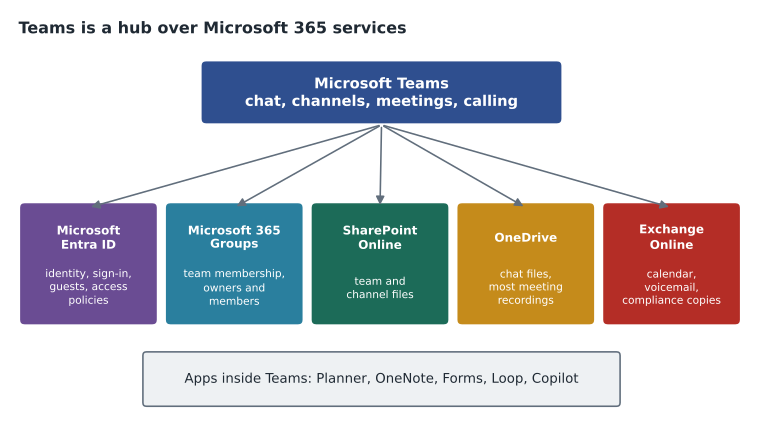
Microsoft Teams is a collaboration and communication service that combines persistent chat, channel conversations, file sharing, online meetings, events and, with the right licences, telephony. Very little of that capability lives in Teams alone. Teams is an experience layered over a set of Microsoft 365 services, each of which keeps doing its own job and keeps its own settings.
Microsoft Entra ID is the identity platform underneath. Every Teams user is an Entra ID user object, every sign-in is an Entra ID authentication, and Conditional Access policies decide whether a sign-in from a given device or location is allowed. Guests who join a team become guest user objects in Entra ID. Delete or block a user in Entra ID and their Teams access ends with it.
Microsoft 365 Groups provide membership. Every team is backed by a Microsoft 365 group. When you create a team, Teams creates or uses a group; when you add a member to the team, you add a member to the group. Group settings, such as who may create groups, naming rules and expiration, therefore control teams too. Lesson 6 covers those controls in detail.
SharePoint Online stores team files. Each team has a SharePoint site, and each standard channel gets a folder in that site's document library. Private and shared channels are different: each gets its own separate SharePoint site so that its files can have their own membership. SharePoint sharing settings and SharePoint retention policies therefore shape what users can do with files in Teams.
OneDrive stores files shared in one-to-one and group chats. When Ama sends a care schedule to a colleague in a chat, the file is uploaded to Ama's OneDrive in a folder named Microsoft Teams Chat Files, and the colleague is given permission to it. Recordings of most meetings are also saved to the organizer's OneDrive, while recordings of channel meetings go to the channel's SharePoint folder.
Exchange Online handles calendars, meeting invitations and voicemail, and it holds compliance copies of chat and channel messages so that retention, eDiscovery and holds can work on them. The Teams calendar is the user's Exchange calendar. A user who has no Exchange Online mailbox loses features such as the Teams calendar and the ability to schedule meetings from Teams.
Teams also brings in other services as apps: Planner for tasks, OneNote for notebooks, Forms for quick polls, Loop components for shared live content and Copilot where the organization has licensed it. Each has its own storage and its own settings, but each appears inside Teams as a tab, an app or a message extension.
Where Teams stores content
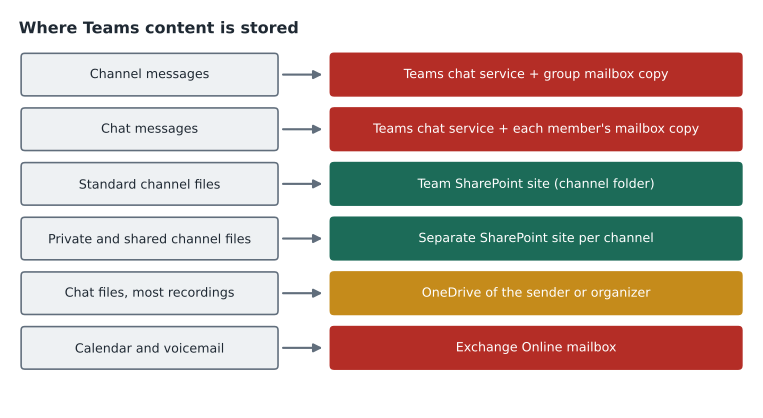
The MS-700 exam asks administrators to identify where Teams stores content, and Corvallin's privacy officer would ask the same question in plainer words: if a nurse types a client's name into Teams, where does it go? Teodor built a table for the planning document so that nobody would have to guess.
| Content | Where it is stored | What controls it |
|---|---|---|
| Channel messages (standard channels) | The Teams chat service, with compliance copies in the team's group mailbox in Exchange Online | Teams messaging policies, Purview retention for Teams channel messages |
| One-to-one and group chat messages | The Teams chat service, with compliance copies in each participant's Exchange Online mailbox | Teams messaging policies, Purview retention for Teams chats |
| Files posted in a standard channel | A folder for the channel in the team's SharePoint site | SharePoint sharing settings and site permissions |
| Files posted in a private or shared channel | A separate SharePoint site created for that channel | That channel site's membership and sharing settings |
| Files shared in chat | The sender's OneDrive, in the Microsoft Teams Chat Files folder | OneDrive sharing settings |
| Recordings and transcripts of meetings outside channels | The organizer's OneDrive (or the person who started the recording) | Meeting policies, OneDrive retention, recording expiration |
| Recordings of channel meetings | The channel's folder in SharePoint | Meeting policies, SharePoint retention |
| Calendars, meetings and voicemail | Exchange Online mailboxes | Exchange settings and Teams meeting and voice policies |
| Wiki-style notes and notebooks | OneNote notebooks stored in SharePoint | SharePoint permissions |
Two consequences follow from this table, and both matter at Corvallin. First, protecting Teams means protecting SharePoint, OneDrive and Exchange, because most of the sensitive content is in them. A sensitivity label on a team, a data loss prevention policy for SharePoint or a retention policy for OneDrive all apply to Teams content even though they are configured elsewhere. Second, data location matters. Microsoft stores a tenant's core Teams data in the geography chosen when the tenant was created, and many Canadian and American organizations check that their data sits in the right country before they put client information into chat.
Corvallin's tenant was created with a Canadian billing address, so its core customer data, including Teams messages and files, is stored in Microsoft's Canada geography. Dr. Marguerite Ostrander-Bey, the clinical director, still asked Teodor to confirm this in the Microsoft 365 admin center under the organization's data location settings before the planning document went to the board, because provincial health privacy rules expect the agency to know where personal health information is kept.
Teams licensing today
Licensing is the next dependency, and it has changed more than once in recent years. For many years Teams was simply included in Microsoft 365 and Office 365 suites. Following competition complaints in Europe, Microsoft began selling suites without Teams, first in the European Economic Area and then, from April 2024, worldwide for new customers buying Enterprise suites. Customers who wanted Teams added a separate Teams Enterprise licence.
On September 12, 2025, Microsoft announced a further change as part of commitments accepted by the European Commission. From November 1, 2025, new customers worldwide can again buy Microsoft 365 and Office 365 Enterprise suites that include Teams, and suites without Teams remain available. Microsoft committed to a minimum price difference between the two versions of each suite, for example 8 euros, or about 8.55 US dollars, a user a month between Microsoft 365 E3 with Teams and without it, and to keep the US dollar differences steady for the seven years the commitments run. Business suites such as Microsoft 365 Business Basic, Standard and Premium continue to be offered with and without Teams too.
For an administrator, the practical point is simple: before planning features, check exactly which licences users hold. A user with a suite that excludes Teams, and no Teams Enterprise add-on, will not have Teams at all. A user with Teams may still lack features that need extra licences, such as Teams Premium for advanced meeting protection and branded events, Teams Phone for calling, Audio Conferencing for dial-in numbers, or Teams Rooms licences for meeting room devices.
| Need | Typical licence |
|---|---|
| Chat, channels, meetings, webinars at the standard level | A Microsoft 365 or Office 365 suite with Teams, or a suite without Teams plus Teams Enterprise |
| Advanced meeting protection, branded meetings and town halls with more features | Teams Premium add-on |
| Making and receiving phone calls on the public network | Teams Phone (included in Microsoft 365 E5, otherwise an add-on) plus a calling plan, Operator Connect or Direct Routing |
| Dial-in numbers for meetings | Audio Conferencing (included with some suites and available as an add-on) |
| Shared meeting room devices | Teams Rooms Basic or Teams Rooms Pro, assigned to the room's resource account |
| Shared desk phones and common area phones | Teams Shared Devices |
Corvallin's licences told a mixed story. Head office staff had Microsoft 365 E3 bought before April 2024, so their Teams was included. Front-line care workers in the branches had Microsoft 365 F3, which includes Teams but has smaller mailboxes and no desktop Office apps. Felix's small group of schedulers had been added during 2024 on a suite without Teams, and someone had bought Teams Enterprise separately for them. Teodor recorded all three cases, because later decisions about meetings and calling would depend on them.
Admin centers and PowerShell
Teams is managed mainly in the Teams admin center, at admin.teams.microsoft.com. It holds settings for teams, users, meetings, messaging, apps, voice, devices, locations and analytics. Because Teams depends on other services, administrators regularly visit other portals too.
| Portal | Used for in a Teams deployment |
|---|---|
| Teams admin center | Teams-specific policies and settings: meetings, messaging, apps, external access, guest access, devices, voice, usage reports and call analytics |
| Microsoft 365 admin center | Users, licences, Microsoft 365 group settings, service health, Message center and organization-wide settings |
| Microsoft Entra admin center | Identities, external collaboration settings, Conditional Access, cross-tenant access for shared channels, access reviews |
| SharePoint admin center | Sharing settings for SharePoint and OneDrive, site management for team sites |
| Microsoft Purview portal | Sensitivity labels, retention, data loss prevention, eDiscovery, information barriers and audit |
| Microsoft Defender portal | Threat policies such as Safe Links and Safe Attachments for Teams |
Almost everything in the Teams admin center can also be done with the MicrosoftTeams PowerShell module, and some settings are available only there. Connecting is one command; since version 7.9.0, released in July 2026, Connect-MicrosoftTeams signs in through Web Account Manager on Windows by default. Lesson 10 covers PowerShell in depth.
Install-Module -Name MicrosoftTeams -Scope CurrentUser
Connect-MicrosoftTeams
Get-CsTenant | Select-Object DisplayName, TenantId
Teams administrator roles
Microsoft Entra ID includes several built-in roles for Teams, so that people can be given only the access their job needs. Ines insisted on this. Under the old arrangement, three people had been Global Administrators simply because nobody had looked at the alternatives.
| Role | What it allows |
|---|---|
| Teams Administrator | Manage all of Teams: settings, policies, teams and the Microsoft 365 groups behind them, plus voice and devices |
| Teams Communications Administrator | Manage meetings and calling features: phone numbers, voice policies, meeting policies, conference bridges |
| Teams Communications Support Engineer | Troubleshoot communication problems with full access to call details in call analytics |
| Teams Communications Support Specialist | Troubleshoot communication problems with call details limited to the user being investigated |
| Teams Devices Administrator | Manage Teams devices such as Teams Rooms, phones and displays in the Teams admin center |
| Teams Telephony Administrator | Manage telephony features such as phone numbers, emergency addresses and calling plans |
Corvallin settled on a simple split. Teodor became a Teams Administrator. Felix received Teams Communications Administrator, because he would handle meetings and voice. Ama and one colleague on the help desk received Teams Communications Support Specialist so they could look at a single caller's problem without seeing everyone's call history. Northlight AV, the outside firm that installs meeting rooms, would be given Teams Devices Administrator for the duration of each project, and Ines planned to make that assignment time-limited through Privileged Identity Management.
Worked problem
Choosing the least-privileged role
Ama needs to investigate why one home-care nurse's calls keep dropping. She should see that nurse's call records and nothing more, and she must not be able to change any policy. Which role should she get?
Show solution
- List what the task needs: read access to one user's call details in call analytics, no ability to change settings.
- Teams Administrator and Teams Communications Administrator can both change settings, so they are too broad.
- Teams Communications Support Engineer can see full call details for all users, which is more than the task needs.
- Teams Communications Support Specialist shows call details for the user being investigated, which matches the task.
Answer: Teams Communications Support Specialist is the least-privileged role that fits.
Teams clients
Users reach Teams through several clients, and all of them talk to the same cloud service. The new Teams desktop app runs on Windows and macOS and has replaced the classic Teams app, which Microsoft has retired. The web app runs in current versions of Edge, Chrome, Firefox and Safari. Mobile apps run on iOS and Android, and they are what most of Corvallin's home-care staff use between client visits. Teams also runs on shared devices such as Teams Rooms, desk phones and panels, and inside virtual desktops through Azure Virtual Desktop, Windows 365 and Citrix with an optimized media path. Lesson 9 returns to clients and devices.
Because everything is in the cloud, a user can start a chat on a phone in a client's driveway and continue it at a desk in the branch office. That convenience is also why governance matters: content follows the person, so policies have to follow the person too.
Why this matters for planning
At the end of the first week, Teodor wrote three planning rules into Corvallin's Teams document, and he kept coming back to them for the rest of the project. First, every Teams decision has an owner in another service: identity in Entra ID, files in SharePoint and OneDrive, mail and calendar in Exchange, compliance in Purview. Second, licences decide features, so check them before promising anything. Third, give each person the smallest admin role that lets them do their job.
Ines added a fourth rule of her own: write down where things are stored. The care staff would ask, the privacy office would ask, and one day an auditor would ask. Having the answer ready, in a table that matched what Microsoft documents, was worth the afternoon it took.
Common mistakes
MistakeTreating Teams as a standalone app with its own storage.
InsteadTeams stores files in SharePoint and OneDrive and keeps compliance copies of messages in Exchange Online; settings in those services affect Teams.
MistakeAssuming every Microsoft 365 suite includes Teams.
InsteadSuites are sold with and without Teams; check each user's licences, including any Teams Enterprise add-on.
MistakeMaking helpers Global Administrators so they can fix Teams problems.
InsteadUse the Teams-specific roles, such as Teams Communications Support Specialist, and make temporary access time-limited.
MistakeExpecting private channel files to sit in the team's main SharePoint site.
InsteadEach private and shared channel gets its own SharePoint site with its own membership.
Summary and key terms
- Teams is a hub over Microsoft 365 services: Entra ID for identity, Microsoft 365 Groups for membership, SharePoint and OneDrive for files, and Exchange Online for calendars, voicemail and compliance copies of messages.
- Standard channel files live in the team's SharePoint site; private and shared channels each get their own site; chat files live in the sender's OneDrive.
- Since November 1, 2025, new customers worldwide can buy Enterprise suites with or without Teams; suites without Teams need Teams Enterprise for users to have Teams.
- Extra features need extra licences: Teams Premium, Teams Phone, Audio Conferencing, Teams Rooms and Teams Shared Devices.
- Teams is managed in the Teams admin center and with the MicrosoftTeams PowerShell module, alongside the Microsoft 365, Entra, SharePoint, Purview and Defender portals.
- Built-in Teams roles let administrators give the least privilege a task needs.
- Microsoft 365 group
- The membership object behind every team, shared with SharePoint, Exchange and Planner.
- Compliance copy
- A copy of a Teams message kept in an Exchange Online mailbox so retention and eDiscovery can work on it.
- Teams Enterprise
- The standalone Teams licence used with suites sold without Teams.
- Teams admin center
- The web portal at admin.teams.microsoft.com for Teams settings and policies.
- Teams Communications Support Specialist
- A role that can troubleshoot calls with details limited to the user being investigated.
- New Teams
- The current Teams desktop app for Windows and macOS, which replaced the classic client.
Practice problems
Work each problem on paper first, then reveal the answer to check.
A user shares a file in a group chat. Where is the file stored?
Show answer
In the sender's OneDrive, in the Microsoft Teams Chat Files folder, with permissions granted to the chat members.
Why can a change in SharePoint sharing settings break file sharing in Teams?
Show answer
Because team and channel files are stored in SharePoint, so SharePoint sharing settings apply to them.
A new customer buys Microsoft 365 E3 without Teams. What must be added for users to use Teams?
Show answer
A Teams Enterprise licence for each user who needs Teams.
Lesson quiz · 5 questions
Score 60% or more to complete this lesson.
Create a free account to save your progress, take quizzes and earn a certificate.