
MSBA-220 · Lesson 6 of 12 · 22 min
Teams governance: creation, naming and expiration
▶ Video coming soon A video version of this lesson is on the way.
Teodor exported a list of Corvallin's teams and found 214 of them. Thirty-one had a single member. Nineteen were called some version of "Test". Four were called "Nursing", and nobody could say which one was real. Eleven had no owner at all, because their owners had left the agency. "This is what no governance looks like," Ines said. "Not chaos exactly. Just clutter that makes people stop trusting the tool."
Governance is the set of rules that decides who can create teams, what they are called, how long they live and what happens at the end of their lives. The MS-700 study guide lists a long series of governance skills: identifying licensing requirements for lifecycle management, configuring settings for Microsoft 365 group creation, configuring expiration and naming policies, archiving and deleting teams, restoring deleted groups, and using access reviews. This lesson covers each of them.
Licensing for lifecycle features
Several governance features come from Microsoft Entra ID rather than from Teams, and they need Microsoft Entra ID P1 licences or better for the users they apply to. Microsoft 365 E3 and E5 and Microsoft 365 Business Premium include Entra ID P1; Microsoft 365 E5 includes P2. Access reviews need Microsoft Entra ID P2 or Microsoft Entra ID Governance.
| Feature | Configured in | Licence needed |
|---|---|---|
| Restricting who can create Microsoft 365 groups | Entra group settings, through Microsoft Graph PowerShell | Entra ID P1 for the people in the allowed group |
| Naming policy (prefixes, suffixes, blocked words) | Microsoft Entra admin center, Groups, Naming policy | Entra ID P1 for members of affected groups |
| Expiration policy | Microsoft Entra admin center, Groups, Expiration | Entra ID P1 for members of affected groups |
| Access reviews of team membership | Microsoft Entra ID Governance | Entra ID P2 or Entra ID Governance |
| Archiving, deleting and restoring teams | Teams admin center, Entra and Microsoft 365 admin centers | No extra licence |
| Sensitivity labels for teams | Microsoft Purview | Included in suites such as Microsoft 365 E3 and Business Premium |
Corvallin's head office users had Microsoft 365 E3, which includes Entra ID P1. The branch staff on Microsoft 365 F3 did not have P1, so Teodor bought a small number of Entra ID P1 licences to cover branch members of governed teams. He noted the decision in the planning document, because licensing gaps for governance features are easy to miss and an auditor would ask.
Controlling who can create teams
By default, any user can create a Microsoft 365 group, and therefore any user can create a team. Many organizations keep that default, because self-service creation is part of what makes Teams useful. Others restrict creation to a security group of trained people. The restriction is an Entra ID group setting, not a Teams setting, and it applies everywhere groups can be created: Teams, Outlook, SharePoint and Planner.
Corvallin chose a middle path. Anyone could request a team through a simple form, and members of a Team Creators security group, which included the champions, branch managers and IT, could create teams directly. Global Administrators, Teams Administrators and other privileged roles can always create groups regardless of the restriction.
# Restrict Microsoft 365 group creation to one security group (Microsoft Graph PowerShell)
Connect-MgGraph -Scopes 'Directory.ReadWrite.All','Group.Read.All'
$groupId = (Get-MgGroup -Filter "displayName eq 'Team Creators'").Id
$params = @{
  templateId = '62375ab9-6b52-47ed-826b-58e47e0e304b'   # Group.Unified settings template
  values = @(
    @{ name = 'EnableGroupCreation';         value = 'false' }
    @{ name = 'GroupCreationAllowedGroupId'; value = $groupId }
  )
}
New-MgBetaDirectorySetting -BodyParameter $params
Restricting creation without offering an alternative usually backfires. People who need a team and cannot get one quickly will share files by email or use an unapproved service. Corvallin's request form promised a new team within one working day, and Teodor tracked that promise in the monthly report.
Templates for consistent teams
Team templates give new teams a predefined set of channels, tabs and apps. Microsoft supplies templates for common scenarios, including several for healthcare such as coordinating patient care, and administrators can create custom templates in the Teams admin center under Teams, Team templates. Template policies control which templates users see when creating a team.
Teodor built a Corvallin Branch template with channels for Huddles, Scheduling, Clinical Updates and Staff Room, and a Corvallin Project template with channels for Planning, Decisions and Files. Every branch team rebuilt in the relaunch used the branch template, so a nurse moving between branches found the same structure everywhere.
Naming policy
A naming policy for Microsoft 365 groups enforces consistent names and blocks inappropriate words. It has two parts. A prefix-suffix policy adds fixed text or user attributes, such as department or office, before or after every new group name. A blocked words list rejects names containing words the organization does not allow, such as words that suggest a group is official when it is not. The policy is set in the Microsoft Entra admin center under Groups, then Naming policy.
| Element | Example at Corvallin | Result |
|---|---|---|
| Fixed prefix | CHC- | CHC-Wound Care Working Group |
| Attribute suffix | [Office] | CHC-Huddles-North Branch |
| Blocked words | CEO, Board, Payroll, Official | A user cannot create a group named Board Updates |
The naming policy applies when users create or edit groups in Teams, Outlook, SharePoint and other workloads. It does not apply to some administrator roles, including Global Administrators and the groups administrators they create, so administrators must follow the convention by habit. Users see the final name while they type, which reduces confusion. Corvallin kept the policy short: a fixed prefix and a short blocked-words list. Long attribute-based names had made teams hard to read on phones during the pilot.
Expiration policy
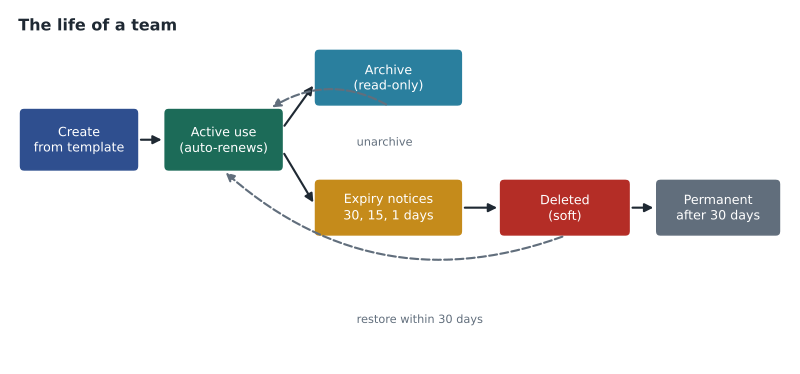
An expiration policy gives Microsoft 365 groups, and therefore teams, a lifetime. Before a group expires, its owners receive email notifications asking them to renew it, at 30 days, 15 days and 1 day before expiry. If a group is active, for example because members have posted in its channels, opened files or visited the team, it is renewed automatically without asking. If nobody renews an inactive group, it is deleted when it expires and can be restored for 30 days.
The policy is set in the Microsoft Entra admin center under Groups, then Expiration. The lifetime can be 180 days, 365 days or a custom number of days of at least 30, and the policy can apply to all Microsoft 365 groups or to selected ones. Groups without owners send their notifications to an email address the administrator chooses.
Worked problem
When will a team expire?
Corvallin sets a 180-day expiration policy for project teams. The CHC-Fall Prevention Pilot team was created on March 2, 2026, and nobody used it after April. When will its owners receive the first renewal notice, and what happens if nobody responds?
Show solution
- Expiry date: March 2, 2026 plus 180 days is August 29, 2026.
- The first notice goes 30 days before: July 30, 2026. Further notices follow 15 days and 1 day before expiry.
- Because the team has had no activity, it will not auto-renew.
- If nobody renews it, the group and its team are deleted on August 29 and can be restored until about September 28, 2026.
Answer: First notice on July 30, 2026; without renewal the team is deleted on August 29 and stays restorable for 30 days.
Archiving teams
When a project ends but its conversations and files should be kept for reference, archiving is often better than deleting. An archived team becomes read-only: members can still see and search its channels and files, but nobody can post, and the team moves to an archived section of the team list. When archiving, an owner or administrator can also make the team's SharePoint site read-only for members. An archived team can be unarchived at any time, which restores normal use.
Archiving is available to team owners in the Teams client and to administrators in the Teams admin center under Teams, Manage teams. Administrators can archive several teams at once there, or use PowerShell with Set-TeamArchivedState. Archiving does not remove a team from retention policies, so archived content is still protected and still discoverable.
Deleting and restoring teams
Deleting a team deletes its Microsoft 365 group, which places the group, its mailbox, its SharePoint site and its other resources into a soft-deleted state for 30 days. During that window an administrator can restore the group from the Microsoft Entra admin center or the Microsoft 365 admin center, under deleted groups, and the team returns with its channels, conversations and files. After 30 days the deletion is permanent, except for any content that a retention policy or hold preserves in Microsoft Purview.
Ama's team got their first restore request two weeks into the relaunch, when a branch manager cleaned up teams with too much enthusiasm and deleted the real Nursing team along with three empty ones. Teodor restored it from the Microsoft 365 admin center in a few minutes. Afterwards he added a step to the cleanup procedure: archive first, delete only after a month of no complaints.
# Archive a team and make its SharePoint site read-only for members
Set-TeamArchivedState -GroupId $teamId -Archived:$true -SetSpoSiteReadOnlyForMembers:$true

# List soft-deleted Microsoft 365 groups and restore one (Microsoft Graph PowerShell)
Get-MgDirectoryDeletedItemAsGroup | Select-Object DisplayName, Id, DeletedDateTime
Restore-MgDirectoryDeletedItem -DirectoryObjectId $deletedGroupId
Owners, ownerless teams and access reviews
Every team should have at least two owners, so that it survives one person leaving. Microsoft 365 includes an ownerless group policy in the Microsoft 365 admin center that asks active members of a group with no owner to accept ownership. Corvallin turned it on and set a governance rule of two owners for every team, checked in a monthly report.
Microsoft Entra access reviews can ask team owners, at a set interval, to confirm that each member and guest still needs access. For teams that hold sensitive information, such as Clinical Leadership, Corvallin ran quarterly reviews of all members. For other teams, it reviewed only guests. The study guide asks when to use access reviews; the short answer is when membership must be reconfirmed regularly, especially for sensitive teams and external users.
A governance plan in one page
Governance controls only work when people understand them. Ines asked Teodor to write the rules in plain language on a single page and post it in the IT help team that every staff member could see. It answered the questions people actually asked: how do I get a new team, what should I call it, how long will it last, what happens when my project ends, and who do I ask if I deleted something by mistake.
| Question | Corvallin answer |
|---|---|
| How do I get a new team? | Branch managers, champions and IT can create teams; anyone else fills in the request form and gets a team within one working day |
| What should it be called? | Names start with CHC- automatically; choose a clear purpose such as CHC-Wound Care Working Group |
| How long does it last? | Project teams are reviewed every 180 days; active teams renew automatically |
| How many owners? | At least two, so the team survives someone leaving |
| What happens at the end? | The owner archives the team; IT deletes archived teams after a term if nobody objects |
| I deleted a team by mistake | Contact the help desk within 30 days; it can be restored |
Cleaning up existing sprawl
Rules for new teams did nothing about the 214 that already existed. Teodor ran the cleanup as a small project with three steps. First, he exported every team with its owners, member count, creation date and last activity, using the usage report and the PowerShell script from lesson 10. Second, he sorted them into groups: active teams with clear owners, which stayed; teams with no activity for six months, whose owners were asked whether to archive; ownerless teams, whose most active members were asked to take ownership or agree to archiving; and obvious test teams with a single member, which were archived immediately.
Third, after a month, archived teams that nobody had asked about were deleted, with the 30-day restore window as a safety net. Of the 214 teams, 96 remained active, 71 were archived and kept for reference, and 47 were deleted. Only one restore request came in, for a team that turned out to hold a branch's only copy of an old policy manual; Teodor restored it, moved the manual to the policy library and archived the team again.
Worked problem
How many teams will need an owner action?
After the cleanup, Corvallin has 96 active teams. The monthly owner report shows 9 teams with one owner and 2 with no owner. The governance rule is at least two owners per team. How many teams need an owner change, and what share of active teams is that?
Show solution
- Teams below the rule: 9 with one owner plus 2 with none, which is 11.
- Share of active teams: 11 divided by 96 is about 0.115.
- As a percentage: about 11.5 percent.
- Action: ask each single owner to add a second owner, and apply the ownerless group policy to the two ownerless teams.
Answer: 11 teams, about 11.5 percent of active teams, need an owner change.
The cleanup changed how people used Teams. With four Nursing teams merged into one clearly named team, and test teams gone, the team list in the client became something staff could scan in seconds. Ama's help desk saw questions like "which team do I post in?" drop sharply in the following month.
Common mistakes
MistakeRestricting team creation without offering a fast way to request one.
InsteadPair any restriction with a simple request process and a promised turnaround.
MistakeExpecting the naming policy to rename existing teams.
InsteadIt applies when groups are created or renamed; existing names stay until edited.
MistakeDeleting old teams that might be needed later.
InsteadArchive first; delete only when sure, and remember the 30-day restore window.
MistakeForgetting Entra ID P1 licences for naming and expiration policies.
InsteadCheck that members of affected groups are covered.
Summary and key terms
- Group creation restrictions, naming policies and expiration policies are Entra ID features that need Entra ID P1; access reviews need P2 or Entra ID Governance.
- Restricting creation is an Entra directory setting that applies to every workload, and privileged admin roles are exempt.
- Team templates create consistent channels, tabs and apps.
- Naming policies add prefixes or suffixes and block words; they apply to users, not to some admin roles.
- Expiration policies renew active groups automatically and notify owners at 30, 15 and 1 day before deleting inactive ones.
- Archived teams are read-only and can be unarchived; deleted groups can be restored for 30 days.
- At least two owners, the ownerless group policy and access reviews keep teams accountable.
- Naming policy
- An Entra ID policy that adds prefixes or suffixes to group names and blocks chosen words.
- Expiration policy
- An Entra ID policy that gives groups a lifetime and asks owners to renew inactive ones.
- Team template
- A predefined structure of channels, tabs and apps for new teams.
- Archived team
- A read-only team that can still be searched and later unarchived.
- Soft-deleted group
- A deleted Microsoft 365 group that can be restored for 30 days.
- Access review
- A scheduled check in which owners or members confirm that access is still needed.
Practice problems
Work each problem on paper first, then reveal the answer to check.
A team created on January 10 falls under a 180-day expiration policy and is never used. When does the first renewal notice go out?
Show answer
30 days before the expiry date of July 9, which is June 9.
What happens to an active team under an expiration policy?
Show answer
It is renewed automatically because of its activity.
For how long can a deleted Microsoft 365 group be restored?
Show answer
30 days.
Lesson quiz · 5 questions
Score 60% or more to complete this lesson.
Create a free account to save your progress, take quizzes and earn a certificate.