
MSAZ-321 · Lesson 5 of 12 · 20 min
Activator and alerts
▶ Video coming soon A video version of this lesson is on the way.
The live stream had been running since Tuesday afternoon, November 10, and on Thursday morning, November 12, Ines built the alerts. The dashboard showed the freezers; Activator would tell someone when one went wrong. Facilities had sent two requirements: the on-call technician must hear about a warm unit within ten minutes, and the alert must not cry wolf, because, as their lead put it, the third false alarm at four in the morning is the one people start ignoring.
What Activator does
Activator is the no-code event detection engine in Fabric Real-Time Intelligence. It watches data, evaluates rules, and starts actions when a condition or pattern is detected. Stateless rules on streaming data respond in well under a second; rules that aggregate over time respond when their window closes. Activator is bound to a Fabric capacity, and pay-as-you-go charges accrue only while rules are running.
Activator thinks in objects. An object is a thing being monitored, such as a freezer, a delivery van or a customer account, and events are grouped into objects by an id column. Ines's object was Refrigeration unit, keyed on UnitId, so each of the 14 units had its own independent state: a rule that fired for F-06 said nothing about F-02. Properties are the monitored values of an object, defined once and reused across rules: TemperatureC from each event, and a derived property, the average temperature over a ten-minute window. Rules combine a condition on properties with an action.
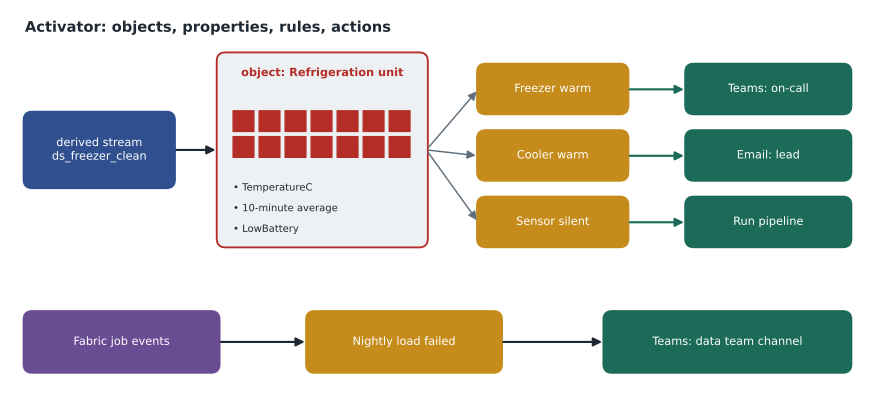
Sources Activator can watch
Eventstreams are the main source: Activator subscribes to one or more streams and evaluates each event as it arrives. Ines connected it to ds_freezer_clean, the derived stream she had published in MSAZ-320, so the alerts saw the same cleaned readings as the eventhouse. Activator can also watch Fabric events, such as items being created or changed in a workspace and job events like a pipeline failing or a semantic model refresh finishing; Azure events, such as a file arriving in Blob Storage; Power BI reports, evaluated after each semantic model refresh; and Real-Time dashboards. Newer sources in preview include business events and the results of SQL queries against a warehouse, evaluated on a schedule.
| Source | How Activator sees it | Hub use |
|---|---|---|
| Eventstream | Each event as it arrives | Freezer and cooler readings |
| Fabric job events | An event when a job succeeds or fails | Nightly load failure alert |
| Fabric workspace item events | An event when an item is created, changed or deleted | Not used yet |
| Azure events | For example, a blob created in a storage account | Planned: supplier price file arrives |
| Power BI report | Values after each semantic model refresh | Later: store sales below target |
| Real-Time dashboard | A tile's query results | Possible, but the stream is better here |
Conditions
Conditions come in two families. A stateless condition looks at each event on its own, such as a temperature above a value. A stateful condition remembers something about each object between events. Activator offers BECOMES, which fires when a value changes to a state, such as LowBattery becoming true; INCREASES and DECREASES, which fire when a value moves in a direction, optionally by at least an amount; EXIT RANGE, which fires when a value leaves a band; a heartbeat condition, which fires when no events arrive for an object for a set time; and conditions on aggregations over a lookback window, such as a ten-minute average.
One behaviour matters more than any other for alert fatigue: a rule fires when an object enters the new state, not continuously while it stays there. When F-06's average crossed minus 12, the rule would fire once, not every ten seconds for four hours. It would fire again only after the average had dropped back below and then risen again. Rules can also be previewed against historical data before they are started, to see how often they would have fired.
| Condition | Fires when | Freezer example |
|---|---|---|
| Stateless comparison | An event meets a test | A single reading above 0 degrees, a probe fault |
| BECOMES | A value changes into a state | LowBattery becomes true |
| INCREASES / DECREASES | A value moves up or down, optionally by an amount | Temperature increases by 5 degrees in 10 minutes |
| EXIT RANGE | A value leaves a band | Cooler leaves 0 to 5 degrees |
| Heartbeat | No events arrive for a set time | No reading from a unit for 5 minutes |
| Aggregation over a window | A summary over a lookback crosses a value | Ten-minute average above minus 12 |
The defrost problem
Ines's first draft of Freezer warm was simple: fire when a freezer's ten-minute average rises above minus 12. Before starting it, she previewed it against the previous two days of live data, and it would have fired at 4:20 a.m. on Wednesday for F-04. Nothing had been wrong. The freezers run an automatic defrost cycle every eight hours: heaters warm the evaporator coil for about a quarter of an hour, the cabinet air briefly reaches about minus 9, and the unit then cools back down. The food itself barely changes temperature during a short defrost, but the air sensor sees it.
# Two rules tested on a normal defrost and on F-06's failure night
import math
from datetime import datetime as dt, timedelta

def series(start, end, temp_at):
    out, t = [], start
    while t <= end:
        out.append((t, temp_at(t))); t += timedelta(seconds=10)
    return out

def defrost(t):                         # defrost starts at 4:00 a.m.
    m = (t - dt(2026, 11, 11, 4, 0)).total_seconds() / 60
    if 0 <= m < 12:  return -19 + 10 * m / 12
    if 12 <= m < 16: return -9.0
    if 16 <= m < 40: return -9 - 10 * (m - 16) / 24
    return -19.0

def failure(t):                         # compressor stops at 1:35 a.m.
    fail = dt(2026, 10, 17, 1, 35)
    if t < fail: return -19.0 + 0.4 * math.sin(t.minute / 9.5)
    return 21 - 40 * math.exp(-((t - fail).total_seconds() / 60) / 650)

def first_alert(readings, windows_needed):
    bins = {}
    for t, temp in readings:
        bins.setdefault(t.replace(minute=t.minute // 10 * 10, second=0), []).append(temp)
    run = 0
    for start, temps in sorted(bins.items()):
        run = run + 1 if sum(temps) / len(temps) > -12 else 0
        if run == windows_needed:
            return (start + timedelta(minutes=10)).strftime("%H:%M")
    return "no alert"

nights = {"defrost": series(dt(2026, 11, 11, 3, 0), dt(2026, 11, 11, 6, 0), defrost),
          "F-06 failure": series(dt(2026, 10, 17, 0, 0), dt(2026, 10, 17, 7, 40), failure)}
for need in (1, 2):
    label = "one window" if need == 1 else "two windows in a row"
    print(f"Rule with {label} above -12:")
    for name, readings in nights.items():
print(f" {name:13s} {first_alert(readings, need)}")Rule with one window above -12: defrost 04:20 F-06 failure 03:50 Rule with two windows in a row above -12: defrost no alert F-06 failure 04:00
What this code does
The program builds two nights of readings every ten seconds: a normal night with one defrost cycle that warms the cabinet air to minus 9 for a few minutes, and the night F-06's compressor failed. For each night it computes ten-minute averages and finds when each rule would first fire: a rule that needs one window above minus 12, and a rule that needs two windows in a row. The output shows the first rule raising a false alarm on the defrost night, and the second rule staying quiet then while still catching the real failure ten minutes later.
The output made the choice clear. The one-window rule fired on the defrost at 4:20 a.m. and on F-06 at 3:50. The two-window rule ignored the defrost, because only one ten-minute window, 4:10 to 4:20, averaged above minus 12, and it caught F-06 at 4:00 a.m., ten minutes later than the first rule. Facilities accepted ten minutes of delay in exchange for no defrost alarms. In Activator, Ines expressed the rule with the condition's occurrence settings, so that it fires only when the condition has held for two consecutive ten-minute windows, and noted that the exact wording of these settings in the editor changes between releases.
Worked problem
What does the extra window cost?
With the two-window rule, F-06's alert fires at 4:00 a.m. Delivery takes 5 minutes and the technician needs 45. When does the technician arrive, how much earlier than the 7:40 a.m. discovery is that, and how much warning is lost compared with the one-window rule?
Show solution
- Alert delivered: 4:00 + 0:05 = 4:05 a.m.
- Technician arrives: 4:05 + 0:45 = 4:50 a.m.
- Earlier than the shift: 7:40 − 4:50 = 2 hours 50 minutes.
- The one-window rule gave 3 hours, so the cost is 10 minutes.
Answer: The technician would arrive at 4:50 a.m., 2 hours 50 minutes early; avoiding defrost alarms costs 10 minutes of warning.
Actions
When a rule fires, Activator sends the event's details to the action and carries on monitoring without waiting for the action to finish. Notification actions send an email, a Teams message to a person, a group chat or a channel, or start a Power Automate flow, which can do almost anything else, such as raise a ticket in the facilities contractor's system. Fabric item actions run a pipeline, a notebook, a Spark job definition, a dataflow, a copy job or a user data function, passing values from the event as parameters. Messages are built from templates that can include property values, such as the unit id and the latest temperature.
| Rule | Condition | Action |
|---|---|---|
| Freezer warm | Ten-minute average above minus 12 for two windows in a row, freezers only | Teams message to the facilities on-call channel and email to the facilities lead |
| Cooler warm | Ten-minute average above 5 for two windows in a row, coolers only | Teams message to the facilities on-call channel |
| Sensor silent | No reading from a unit for 5 minutes (heartbeat) | Teams message to the data team and facilities |
| Low battery | LowBattery becomes true | Email to the facilities contractor |
| Nightly load failed | Fabric job event: pl_nightly_sales failed | Teams message to the data team channel |
The last rule belonged to the batch hub rather than the freezers, and it covered the DP-700 skill of configuring alerts for Fabric items. MSAZ-320 had added a Teams activity on the failure branch of pl_nightly_sales, which works only if the pipeline runs far enough to reach it. A rule on Fabric job events fires even if the pipeline fails in a way its own failure branch cannot catch, such as a problem starting at all. The two together gave belt and braces.
Heartbeats and silence
The Sensor silent rule needed thought. A heartbeat condition fires when an object stops sending events for a set time, but an object Activator has never seen cannot go silent, and an object that has been silent longer than the lookback window drops out of evaluation. In practice this meant two things. A new sensor would be watched only after it sent its first reading, which was fine. And if the whole stream stopped, every unit would go silent together; Ines wanted one message, not fourteen, so the Teams template listed the unit, and she asked facilities to read a burst of fourteen silent alerts as one stream outage. She also noted that the dashboard's stream health tile would show the same outage to anyone looking.
Testing and operating rules
Before starting each rule, Ines previewed it against the last two days of live data. Freezer warm, in its final form, would not have fired at all, which was right. Low battery would have fired once, for C-02, whose battery was at 18; facilities replaced it that afternoon. To test the whole chain end to end, a facilities technician placed cooler C-05's probe in a cup of tap water at 10:30 a.m.; two ten-minute windows later, at 10:50, the on-call channel received the Cooler warm message. The technician put the probe back, and the rule fired again only when, as a further test, he repeated it at 11:15, confirming that a rule does not re-fire while a unit stays in the alert state.
Rules are items in the workspace, so they follow the same lifecycle as everything else: kept in Git, promoted through the deployment pipeline, and stopped and started deliberately. Ines wrote a short runbook for facilities: what each message means, who acts, how to acknowledge it in the Teams channel and how to ask for a rule to be paused during planned maintenance, such as a deep clean, so that maintenance does not train people to ignore alerts.
Common mistakes
MistakeFire an alert on every event that is above a threshold.
InsteadUse stateful conditions; Activator fires on entry into the alert state, not continuously.
MistakeStart a rule without previewing it.
InsteadPreview against recent history to find false alarms, such as defrost cycles, first.
MistakeRely only on a pipeline's own failure branch.
InsteadAdd an Activator rule on Fabric job events to catch failures the pipeline cannot report.
MistakeAssume silence is safe.
InsteadAdd a heartbeat rule so a stopped sensor or stream is noticed.
Summary and key terms
- Activator detects conditions in data and starts actions, with sub-second response for stateless rules on streams.
- Objects group events by an id; properties are monitored values; rules combine conditions and actions.
- Sources include eventstreams, Fabric job and item events, Azure events, Power BI reports and Real-Time dashboards.
- Conditions include stateless tests, BECOMES, INCREASES, DECREASES, EXIT RANGE, heartbeats and windowed aggregations.
- Rules fire on entry into a state and can be previewed against history.
- Actions send email or Teams messages, start Power Automate flows, or run Fabric items such as pipelines and notebooks.
- Activator
- The Fabric engine that detects conditions in data and takes actions.
- Object (Activator)
- A monitored entity, such as a freezer, identified by an id column.
- Property (Activator)
- A monitored value of an object, reusable across rules.
- Rule
- A condition on an object's properties together with an action.
- Stateful condition
- A condition that depends on an object's earlier events, such as BECOMES or a heartbeat.
- Fabric job event
- An event Fabric emits when a job such as a pipeline run succeeds or fails.
Practice problems
Work each problem on paper first, then reveal the answer to check.
How does Activator know which events belong to F-06?
Show answer
Events are grouped into objects by the id column, UnitId.
Why did the one-window freezer rule cause trouble?
Show answer
Defrost cycles raised one ten-minute average above minus 12, a false alarm.
What did the two-window rule cost?
Show answer
Ten minutes of warning on a real failure.
Why add a job-event rule when the pipeline already has a failure branch?
Show answer
It fires even when the pipeline fails in a way its own branch cannot catch.
Does a rule fire repeatedly while a unit stays warm?
Show answer
No; it fires on entry into the state and again only after the unit leaves and re-enters it.
Lesson quiz · 5 questions
Score 60% or more to complete this lesson.
Create a free account to save your progress, take quizzes and earn a certificate.