
JS-101 · Lesson 9 of 12 · 23 min
Arrays and array methods
▶ Video coming soon A video version of this lesson is on the way.
Lucy's waiting lists had always lived on paper: one sheet per shift, names added at the bottom, crossed out from the top when a place opened. When Mira described the system, Gareth sketched it as a row of boxes on the whiteboard. "That is an array," he said. "An ordered list of values. You can add to the end, take from the front, look up the third name, sort them, count them. Arrays are how programs hold lists of anything: names, prices, shifts, orders. Today you learn to work with them the way a professional does."
This lesson covers creating arrays and reading their elements, adding and removing elements, searching, copying and slicing, and the powerful array methods forEach, map, filter, reduce, some, every and sort. It also explains why changing an array in one place can change it everywhere, and the newer methods that avoid that.
Creating arrays and reading elements
An array is an ordered list of values, written between square brackets with commas between the values. Each value is an element. Like the characters of a string, elements are numbered from 0, and the number is the element's index. The length property gives the number of elements, square brackets read an element, and at() reads one counting from the end with a negative number.
const waitingList = ['Amara', 'Dev', 'Lucy', 'Sam'];
console.log(waitingList);
console.log(waitingList.length);
console.log(waitingList[0]);
console.log(waitingList[2]);
console.log(waitingList.at(-1));
console.log(waitingList[10]);[ "Amara", "Dev", "Lucy", "Sam" ] 4 Amara Lucy Sam undefined
What this code does
The array holds four names in the order they joined the waiting list. Printing the whole array shows it in square brackets, and length gives 4. Index 0 is the first name, index 2 the third, at(-1) the last, and an index past the end gives undefined.
An array can hold values of any type, even a mixture, but in practice each array usually holds one kind of thing: all names, or all prices. An empty array is written []. Arrays can also hold other arrays, which is how programs represent grids, and objects, which Lesson 10 introduces.
Changing an array
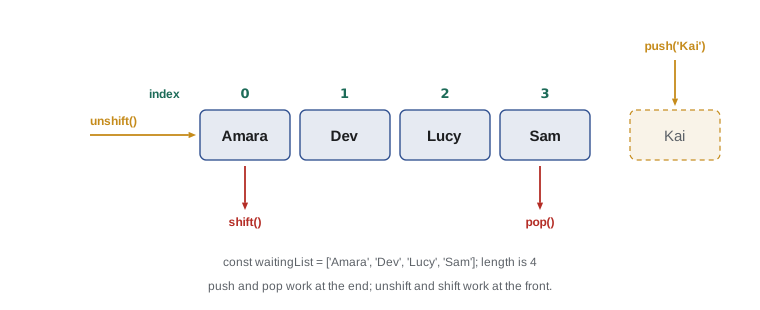
Unlike strings, arrays are mutable: they can be changed in place. You can replace an element by assigning to its index, and four methods add or remove elements at either end. push adds to the end and pop removes from the end; unshift adds to the front and shift removes from the front. pop and shift give back the element they removed.
const waitingList = ['Amara', 'Dev', 'Lucy'];
waitingList.push('Sam');
console.log(waitingList);
const nextUp = waitingList.shift();
console.log(`${nextUp} gets the place`);
console.log(waitingList);
waitingList[1] = 'Lucy T.';
console.log(waitingList);[ "Amara", "Dev", "Lucy", "Sam" ] Amara gets the place [ "Dev", "Lucy", "Sam" ] [ "Dev", "Lucy T.", "Sam" ]
What this code does
Sam joins the end of the waiting list with push. When a place opens, shift removes the first name, Amara, and gives it back, so the program can announce who got the place. Finally the element at index 1 is replaced, which changes the array in place.
The array waitingList was declared with const, yet it changed. const stops the name from being reassigned to a different array; it does not freeze the array itself. Elements can still be added, removed and replaced. That is exactly what you want for a list that grows and shrinks.
For changes in the middle of an array, splice(start, deleteCount, ...newItems) removes elements and optionally inserts new ones at the same place. It is powerful but easy to misuse, because it changes the array and its arguments are easy to mix up. The newer method toSpliced, added in ES2023, does the same job but gives back a changed copy and leaves the original alone.
Searching
Several methods look for values. includes(value) answers whether the value is present. indexOf(value) gives the index of its first appearance, or -1 if it is absent. For more complex searches, find and findIndex take a function that tests each element and give back the first element, or its index, for which the test is true. findLast, added in ES2023, searches from the end.
const names = ['Amara', 'Dev', 'Lucy', 'Sam'];
console.log('Dev waiting: ' + names.includes('Dev'));
console.log('Kai waiting: ' + names.includes('Kai'));
console.log(names.indexOf('Lucy'), names.indexOf('Kai'));

const hours = [3, 4, 2.5, 5, 3.5];
console.log(hours.find(h => h > 3.5));
console.log(hours.findIndex(h => h > 3.5));
console.log(hours.findLast(h => h < 3));Dev waiting: true Kai waiting: false 2 -1 4 1 2.5
What this code does
includes reports whether a name is on the list, and indexOf gives Lucy's position, 2, or -1 for a name that is missing. find gives the first shift longer than 3.5 hours, which is 4, and findIndex gives its index, 1. findLast searches from the end and finds 2.5, the last shift shorter than 3 hours.
The arrow functions passed to find and findIndex are callbacks, which you met in Lesson 8. The array method calls your function once for each element, passing the element as the argument, and uses the true-or-false result to decide what to do. That pattern is the key to every method in the rest of this lesson.
Looping over arrays
You already know the for...of loop, which visits each element in turn, and the counting for loop, which gives you each index. Arrays also have a forEach method, which calls a function for each element and passes the element and its index. All three work; for...of is often the clearest, and forEach is common in existing code.
const names = ['Amara', 'Dev', 'Lucy'];
for (const name of names) {
  console.log(`Welcome, ${name}`);
}
names.forEach((name, index) => {
  console.log(`${index + 1}. ${name}`);
});Welcome, Amara Welcome, Dev Welcome, Lucy 1. Amara 2. Dev 3. Lucy
What this code does
The for...of loop prints a welcome for each name. forEach calls the arrow function once per element and passes both the name and its index. Adding 1 to the index numbers the list from 1 instead of 0.
map: transforming every element
map builds a new array by calling a function on every element and collecting the results. The new array has the same length as the original, and the original is not changed. Use it whenever you want "the same list, but each item transformed": prices with tax added, names in capitals, minutes converted to hours.
const pricesCents = [550, 625, 200, 375];
const prices = pricesCents.map(c => (c / 100).toFixed(2));
console.log(prices);

const names = ['amara', 'dev', 'lucy'];
const badges = names.map(n => n.toUpperCase());
console.log(badges);
console.log(names);[ "5.50", "6.25", "2.00", "3.75" ] [ "AMARA", "DEV", "LUCY" ] [ "amara", "dev", "lucy" ]
What this code does
map calls the arrow function on each price in cents and collects the results, giving a new array of prices as text with two decimal places. The second map turns each name into capitals. Printing the original names array shows that map left it unchanged.
filter: keeping some elements
filter builds a new array containing only the elements for which a test function gives true. The result may be shorter than the original, or even empty. Use it for "only the items that match": shifts with open places, volunteers who are trained, orders over a certain amount.
const openPlaces = [0, 3, 0, 5, 1, 0, 2];
const days = ['Mon', 'Tue', 'Wed', 'Thu', 'Fri', 'Sat', 'Sun'];
const available = openPlaces.filter(p => p > 0);
console.log(available);
console.log(`${available.length} of ${openPlaces.length} days have places`);
const openDays = days.filter((day, i) => openPlaces[i] > 0);
console.log(openDays);[ 3, 5, 1, 2 ] 4 of 7 days have places [ "Tue", "Thu", "Fri", "Sun" ]
What this code does
The first filter keeps only the numbers above zero, giving the four days' open places. Comparing lengths shows that 4 of the 7 days have room. The second filter uses the index that filter also passes to its callback, keeping the day names whose matching count is above zero.
reduce: combining into one value
reduce combines all the elements of an array into a single value, such as a total. It takes a function with two parameters, usually called the accumulator and the current element, and a starting value. For each element, your function receives the running result so far and the element, and returns the new running result. It is the accumulator pattern from Lesson 7, packed into one method.
const hours = [3, 4, 2.5, 5, 3.5];
const total = hours.reduce((sum, h) => sum + h, 0);
console.log(`Total hours: ${total}`);
const longest = hours.reduce((max, h) => Math.max(max, h), -Infinity);
console.log(`Longest shift: ${longest}`);Total hours: 18 Longest shift: 5
What this code does
The first reduce starts the sum at 0 and adds each shift's hours in turn, giving 18. The second starts at minus infinity and keeps the larger of the running maximum and each element, giving 5. Each one replaces a loop with a single line.
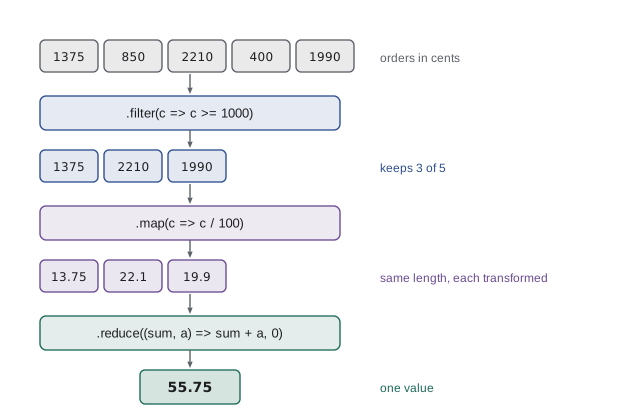
Always give reduce a starting value. Without one, it uses the first element as the start, which works for some sums but fails with an error on an empty array. Because filter and map return new arrays, the three methods can be chained into a pipeline that reads from left to right, as the next example shows.
const orders = [1375, 850, 2210, 400, 1990];
const bigOrdersTotal = orders
  .filter(cents => cents >= 1000)
  .map(cents => cents / 100)
  .reduce((sum, amount) => sum + amount, 0);
console.log(`Orders of 10 or more: ${bigOrdersTotal.toFixed(2)}`);Orders of 10 or more: 55.75
What this code does
The pipeline starts with five order totals in cents. filter keeps the three orders of at least 1000 cents, map converts each to dollars and reduce adds them up. The result, 55.75, is printed with two decimal places.
some and every
some answers whether at least one element passes a test; every answers whether all of them do. Both stop as soon as they know the answer. They are the array versions of || and &&.
const ages = [17, 22, 15, 34];
console.log('Anyone under 16: ' + ages.some(a => a < 16));
console.log('Everyone 14 or over: ' + ages.every(a => a >= 14));Anyone under 16: true Everyone 14 or over: true
What this code does
The array holds the ages of a group signing up together. some finds the 15-year-old, so the answer is true and the group cannot all work in the kitchen. every confirms that all four are old enough to volunteer somewhere.
Sorting
sort puts the elements of an array in order, and it changes the array in place. By default it converts the elements to strings and sorts them by character code. That works for simple lower-case words but gives surprising results for numbers, because as text '10' comes before '9'.
const places = [10, 9, 2, 25, 1];
places.sort();
console.log(places);
places.sort((a, b) => a - b);
console.log(places);
places.sort((a, b) => b - a);
console.log(places);[ 1, 10, 2, 25, 9 ] [ 1, 2, 9, 10, 25 ] [ 25, 10, 9, 2, 1 ]
What this code does
Sorting without a callback compares the numbers as text, so 10 and 25 land in the wrong places. A comparison function that returns a minus b sorts the numbers from smallest to largest. Returning b minus a reverses the order, from largest to smallest.
The comparison function receives two elements, a and b, and returns a negative number if a should come first, a positive number if b should, and 0 if their order does not matter. For numbers, a - b does exactly that. For text, use a.localeCompare(b), which follows the alphabetical rules of a language, so that capitals and accented names sort the way people expect.
const names = ['dev', 'Amara', 'Émile', 'lucy', 'Zoe'];
console.log(names.toSorted());
console.log(names.toSorted((a, b) => a.localeCompare(b)));
console.log(names);[ "Amara", "Zoe", "dev", "lucy", "Émile" ] [ "Amara", "dev", "Émile", "lucy", "Zoe" ] [ "dev", "Amara", "Émile", "lucy", "Zoe" ]
What this code does
Sorting by character code puts every capital letter before every small letter and puts the accented É after Z. Using localeCompare sorts the names alphabetically, as a person would. toSorted, added in ES2023, gives back a sorted copy, and the last line shows that the original array is unchanged.
ES2023 added four methods that return a changed copy instead of changing the original: toSorted, toReversed, toSpliced and with(index, value), which replaces one element. They are supported in all current browsers and in Node.js 20 and later. Prefer them when other parts of a program might still be using the original array.
Copies and references
Arrays raise a question that numbers and strings do not. When you write const copy = list;, you do not get a second array. You get a second name for the same array. Both names hold a reference, an address pointing to one array in memory, so a change made through either name is visible through both. This surprises nearly everybody once.
const monday = ['Amara', 'Dev'];
const tuesday = monday;
tuesday.push('Lucy');
console.log(monday);

const wednesday = [...monday];
wednesday.push('Sam');
console.log(monday);
console.log(wednesday);[ "Amara", "Dev", "Lucy" ] [ "Amara", "Dev", "Lucy" ] [ "Amara", "Dev", "Lucy", "Sam" ]
What this code does
tuesday is not a copy but another name for the monday array, so pushing Lucy through tuesday changes monday too. The spread syntax, three dots inside new square brackets, makes a real copy. Pushing Sam onto that copy leaves monday as it was.
The spread syntax, three dots before an array inside square brackets, spreads out its elements into a new array. It copies an array with [...list] and joins arrays with [...first, ...second]. slice() with no arguments also makes a copy. These are shallow copies: if the elements are themselves arrays or objects, the copy shares them with the original. JavaScript Programming II covers deep copies.
Comparisons follow the same rule. [1, 2] === [1, 2] is false, because the two arrays are different objects, even though they hold the same values. === on arrays asks "is this the very same array?", not "do these hold the same things?"
| Method | Changes the original? | Gives back |
|---|---|---|
| push, pop, shift, unshift | Yes | New length, or the removed element |
| splice | Yes | The removed elements |
| sort, reverse | Yes | The same array |
| map, filter | No | A new array |
| slice, concat, toSorted, toReversed, toSpliced, with | No | A new array |
| reduce, find, includes, indexOf, some, every, join | No | A single value |
Try it yourself
Shift hours report
The starter has an array of one volunteer's shift lengths. Using array methods rather than loops, print three lines: the total hours with reduce, the number of long shifts (4 hours or more) with filter, and the shifts sorted from longest to shortest with toSorted.
The expected output is Total: 21, Long shifts: 3 and Sorted: 5,4,4,3.5,2.5,2, where the sorted list is joined with commas using join(',').
const hours = [3.5, 4, 2.5, 5, 2, 4];
// Use reduce, filter and toSorted
Try it yourself
Tidy the sign-up list
The Input box holds volunteer names, one per line, typed carelessly. Read them all into an array with a while loop and push. Then use map to trim each name and give it a capital first letter, filter to drop empty lines, and toSorted with localeCompare to sort them.
Print the tidy names joined with , . For the given input the output is Amara, Dev, Lucy, Sam.
const raw = [];
let line = readline();
while (line !== null) {
  raw.push(line);
  line = readline();
}
// Tidy, filter and sort raw, then print it
Common mistakes
MistakeThe last element of list is list[list.length].
InsteadIndexes start at 0, so the last element is list[list.length - 1], or list.at(-1).
MistakeA const array cannot be changed.
Insteadconst stops reassignment of the name. The array's elements can still be added, removed and replaced.
Mistakeconst copy = list; makes a copy.
InsteadIt makes a second reference to the same array. Use [...list] or list.slice() for a copy.
Mistake[10, 9, 2].sort() gives [2, 9, 10].
Insteadsort compares as text by default and gives [10, 2, 9]. Use sort((a, b) => a - b).
Mistakemap changes the original array.
Insteadmap, filter and the to- methods return new arrays and leave the original unchanged.
Summary and key terms
- An array is an ordered, mutable list of elements, indexed from 0. length gives the number of elements and at() accepts negative indexes. push and pop work at the end, unshift and shift at the front, and splice in the middle. includes, indexOf, find, findIndex and findLast search. for...of and forEach visit each element. map transforms every element into a new array, filter keeps the elements that pass a test, and reduce combines them into one value, starting from a value you supply; they can be chained into a pipeline. some and every test whether any or all elements pass. sort changes the array and compares as text unless given a comparison function; use a - b for numbers and localeCompare for text.
- ES2023's toSorted, toReversed, toSpliced and with return copies.
- Arrays are held by reference: assignment shares the array, and spread or slice makes a shallow copy.
- array
- An ordered list of values, written in square brackets.
- element
- One value stored in an array.
- mutable
- Able to be changed in place, as arrays and objects are.
- callback
- A function passed to an array method, which calls it for each element.
- map
- An array method that builds a new array by transforming each element.
- filter
- An array method that builds a new array of the elements that pass a test.
- reduce
- An array method that combines all elements into a single value.
- comparison function
- A function given to sort that says which of two elements should come first.
- reference
- A value that points to an array or object rather than holding a copy of it.
- spread syntax
- Three dots that spread out an array's elements, used to copy or join arrays.
Practice problems
Work each problem on paper first, then reveal the answer to check.
What does ['a', 'b', 'c'].indexOf('c') give?
Show answer
2.
What does [1, 2, 3].map(n => n * 10) give?
Show answer
[10, 20, 30], in a new array.
Write an expression for the number of elements in prices greater than 5.
Show answer
prices.filter(p => p > 5).length.
Why should reduce always be given a starting value?
Show answer
Without one it uses the first element, which gives the wrong result for some calculations and an error on an empty array.
After const b = a; b.push(4); does a contain 4?
Show answer
Yes. b is another reference to the same array, not a copy.
Lesson quiz · 5 questions
Score 60% or more to complete this lesson.
Create a free account to save your progress, take quizzes and earn a certificate.