
JS-101 · Lesson 7 of 12 · 21 min
Loops
▶ Video coming soon A video version of this lesson is on the way.
At the end of each month, Lucy totals every volunteer's hours for the Food Hub's funding report. In the spreadsheet days, that meant a long column of numbers and a SUM formula. On the new system, the hours would arrive as a list of shift lengths, one per line, and Mira's program would have to add them up, however many there were. "You cannot write one line per shift," Gareth said. "Next month there might be 40 shifts, or 400. You need a way to say: do this for every one." That way is a loop.
A loop repeats a block of code. This lesson covers the while loop, the counting for loop and the for...of loop, the accumulator pattern for totals, counts and maximums, break and continue, the do...while loop, nested loops, and the mistakes that make loops run once too often or never stop.
The while loop
A while loop checks a condition, and if it is true, runs its block; then it checks the condition again, and runs the block again, and so on, until the condition is false. Each run of the block is called an iteration. Something inside the block must eventually make the condition false, or the loop will never end.
let openPlaces = 3;
while (openPlaces > 0) {
  console.log(`Booking made. Places left: ${openPlaces - 1}`);
  openPlaces--;
}
console.log('The shift is now full');Booking made. Places left: 2 Booking made. Places left: 1 Booking made. Places left: 0 The shift is now full
What this code does
The shift starts with 3 open places. Each iteration prints a message and takes one place away, so the condition is checked with 3, 2, 1 and finally 0. When it reaches 0 the condition is false, the loop stops and the last line is printed once.
The decrement openPlaces-- is what makes this loop finish. Delete that line and the condition stays true forever: an infinite loop. In a browser tab, an infinite loop freezes the page; in Node.js, the program never ends until you press Ctrl+C. The course runner stops any program after ten seconds and tells you why, so it is safe to make this mistake here. Try it once, so that you recognize it.
while is the natural loop when you do not know in advance how many iterations there will be, such as reading input until it runs out. In this course readline() gives back null when there are no more lines, which makes a tidy loop condition.
let total = 0;
let count = 0;
let line = readline();
while (line !== null) {
  total += Number(line);
  count++;
  line = readline();
}
console.log(`${count} shifts, ${total} hours`);5 shifts, 17.5 hours
What this code does
The Input box holds five shift lengths, one per line. The loop reads a line, adds its number to the running total, counts it and reads the next line, stopping when readline gives back null. The result is 5 shifts adding up to 17.5 hours, and the same code works for any number of lines.
Look at the shape of that loop: read once before the loop, then read again at the end of each iteration. That way the condition always tests the line that was just read, and the loop body never sees null.
The accumulator pattern
The variables total and count in that example are accumulators: variables created before a loop, updated in every iteration and used after it. Almost every loop that summarizes data follows the same three steps. Start with a value that means "nothing yet", update it with each item, then use the result.
| Goal | Start with | Update with each item | Use afterwards |
|---|---|---|---|
| Total | let total = 0 | total += item | total |
| Count | let count = 0 | count++ (perhaps only if a condition holds) | count |
| Largest value | let max = -Infinity | if (item > max) max = item | max |
| Smallest value | let min = Infinity | if (item < min) min = item | min |
| Average | a total and a count | both | total / count |
| Joined text | let text = '' | text += item | text |
Infinity and -Infinity are special number values larger and smaller than every other number. Starting a maximum at -Infinity guarantees that the first real item replaces it, whatever its value; starting at 0 would give the wrong answer if every item were negative.
The for loop
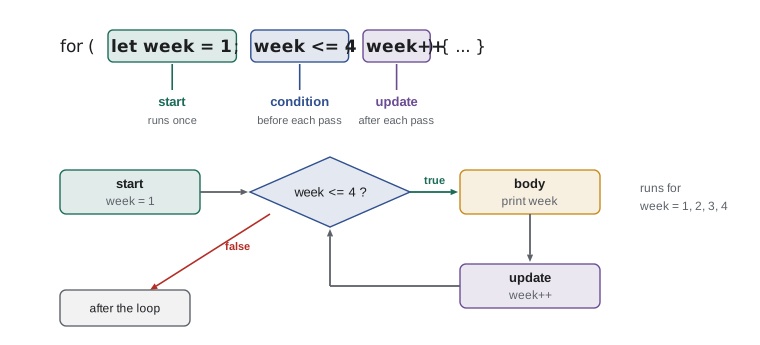
When you know how many times to repeat, or you need a counter, the for loop puts the three parts of counting on one line: a starting statement, a condition, and an update. They are separated by semicolons inside the parentheses. The start runs once, before the first iteration. The condition is checked before every iteration. The update runs after every iteration.
for (let week = 1; week <= 4; week++) {
  console.log(`Week ${week}: kitchen rota posted`);
}Week 1: kitchen rota posted Week 2: kitchen rota posted Week 3: kitchen rota posted Week 4: kitchen rota posted
What this code does
The counter week starts at 1. Before each iteration the loop checks that week is 4 or less, runs the block, and then adds 1. The block therefore runs for weeks 1, 2, 3 and 4, and the loop ends when week becomes 5.
The counter can start anywhere, stop anywhere and change by any step. for (let i = 10; i > 0; i -= 2) counts 10, 8, 6, 4, 2. Counters declared with let in the loop belong to the loop and disappear when it ends, so you can reuse the same name in the next loop. By long tradition, short loop counters are often called i, j and k; use a real name such as week or table when it makes the code clearer.
const guests = 75;
const seatsPerTable = 8;
const tables = Math.ceil(guests / seatsPerTable);
let seated = 0;
for (let table = 1; table <= tables; table++) {
  const atThisTable = Math.min(seatsPerTable, guests - seated);
  seated += atThisTable;
  console.log(`Table ${table}: ${atThisTable} guests`);
}
console.log(`Seated: ${seated}`);Table 1: 8 guests Table 2: 8 guests Table 3: 8 guests Table 4: 8 guests Table 5: 8 guests Table 6: 8 guests Table 7: 8 guests Table 8: 8 guests Table 9: 8 guests Table 10: 3 guests Seated: 75
What this code does
The loop runs once for each of the 10 tables needed for 75 guests. Each iteration seats either a full table of 8 or, at the last table, only the guests who are left, using Math.min to choose the smaller number. The running total confirms that all 75 guests have a seat.
A frequent bug in counting loops is the off-by-one error: running one time too many or too few. i <= 4 runs four times when i starts at 1, but five times when it starts at 0. When you write a loop, check it against the smallest case by hand: what happens on the first iteration, what happens on the last, and what happens when there is nothing to do at all?
Looping over items with for...of
Very often you do not care about a counter; you want each item in a collection. The for...of loop gives you each item of an array, or each character of a string, in turn. It reads almost like English: for each name of the list, do something.
const shifts = [3.5, 4, 3, 3.5, 3.5];
let total = 0;
let longest = -Infinity;
for (const hours of shifts) {
  total += hours;
  if (hours > longest) {
    longest = hours;
  }
}
console.log(`Total: ${total} hours`);
console.log(`Longest shift: ${longest} hours`);
console.log(`Average: ${(total / shifts.length).toFixed(2)} hours`);Total: 17.5 hours Longest shift: 4 hours Average: 3.50 hours
What this code does
The list holds five shift lengths, and the loop visits each one in turn as the constant hours. Two accumulators keep the running total and the longest shift seen so far. After the loop, the average is the total divided by the number of shifts, shown with two decimal places.
Each iteration of for...of gets a fresh constant, which is why const hours is allowed even though the value is different every time. Arrays are the subject of Lesson 9; you have already met them as the results of split. A string can be looped over in the same way, one character at a time, which is handy for counting particular characters.
const code = 'KIT-2026-SAT';
let digits = 0;
for (const ch of code) {
  if (ch >= '0' && ch <= '9') {
    digits++;
  }
}
console.log(`${code} contains ${digits} digits`);KIT-2026-SAT contains 4 digits
What this code does
The loop looks at each character of a shift code. A character between the digit 0 and the digit 9 in character order is a digit, so the counter goes up only for those. The code contains the four digits of the year, and the program reports 4.
break and continue
Two statements change the flow inside any loop. break ends the loop immediately, skipping any remaining iterations; it is useful when you are searching and have found what you need. continue skips the rest of the current iteration and moves on to the next one; it is useful for ignoring items that do not apply.
const places = [0, 0, 2, 5, 1];
const days = ['Mon', 'Tue', 'Wed', 'Thu', 'Fri'];
for (let i = 0; i < days.length; i++) {
  if (places[i] === 0) {
    console.log(`${days[i]}: full, skipping`);
    continue;
  }
  console.log(`First day with a place: ${days[i]}`);
  break;
}Mon: full, skipping Tue: full, skipping First day with a place: Wed
What this code does
Two lists line up days with the open places on each day, and the counter i is used as a position in both. Monday and Tuesday are full, so continue skips to the next day each time. Wednesday has places, so the program reports it and break ends the loop without looking at Thursday or Friday.
Used sparingly, break and continue make loops clearer. Used everywhere, they make the flow hard to follow. If a loop has several of each, consider rewriting the condition instead.
do...while
A do...while loop checks its condition after the block rather than before, so the block always runs at least once. That suits questions that must be asked before there is anything to check, such as asking for input until it is valid.
let answer;
do {
  answer = prompt('Shift length in hours (1 to 8): ');
} while (Number.isNaN(Number(answer)) || Number(answer) < 1 || Number(answer) > 8);
console.log(`Recorded ${answer} hours`);Shift length in hours (1 to 8): ten Shift length in hours (1 to 8): 12 Shift length in hours (1 to 8): 4 Recorded 4 hours
What this code does
The question is asked at least once, and again for as long as the answer is not a number from 1 to 8. The Input box supplies three answers: ten, which is not a number, 12, which is too large, and 4, which is accepted. The output shows each prompt with its answer and then the recorded value.
Nested loops
A loop can contain another loop. For each iteration of the outer loop, the inner loop runs all of its iterations. Nested loops are the natural way to work through a grid, such as the days of a week and the shifts within each day.
const days = ['Mon', 'Tue', 'Wed'];
const slots = ['9-12', '12-3'];
let count = 0;
for (const day of days) {
  let line = day + ':';
  for (const slot of slots) {
    line += ` ${slot}`;
    count++;
  }
  console.log(line);
}
console.log(`${count} shifts to fill`);Mon: 9-12 12-3 Tue: 9-12 12-3 Wed: 9-12 12-3 6 shifts to fill
What this code does
The outer loop visits three days and, for each day, the inner loop visits both time slots. The inner loop adds each slot to that day's line of text, which is printed when the inner loop ends. Three days times two slots gives 6 shifts in total.
Inner loops multiply the work: 3 days times 2 slots is 6 iterations, but 365 days times 24 hours is 8,760. That is fine for a computer, but it is worth knowing when a program becomes slow. Choose names carefully in nested loops, too: two counters called i and j are easy to mix up, while day and slot are not.
Choosing a loop
| Loop | Use it when | Example |
|---|---|---|
| for...of | You want each item of an array or string | Total every shift in a list |
| for | You need a counter or a fixed number of repeats | Number the tables 1 to 10 |
| while | You repeat until something happens, number unknown | Read input until it runs out |
| do...while | The block must run at least once | Ask until the answer is valid |
JavaScript also has a for...in loop, which visits the property names of an object rather than the items of an array. It belongs with objects in Lesson 10 and is easily confused with for...of, so remember the pair this way: of gives you the items, in gives you the keys. Lesson 9 adds array methods such as forEach, map and filter, which replace many loops with a single, clearer line.
Try it yourself
Monthly hours report
The Input box holds one volunteer's shift lengths for the month, one per line. Read them in a while loop until readline() gives back null, and print three lines: Shifts: N, Total hours: T and Longest shift: L.
For the given input the output is Shifts: 6, Total hours: 21 and Longest shift: 5. Your loop must work for any number of lines.
let count = 0;
let total = 0;
let longest = -Infinity;
let line = readline();
// Loop until line is null
Try it yourself
Countdown to the harvest dinner
Write a for loop that counts down the days before the harvest dinner, starting at the number in the Input box and finishing at 1, printing N days to go on each line. After the loop, print Dinner tonight!.
Use 1 day to go (singular) on the last line of the countdown. For the input 3 the output is 3 days to go, 2 days to go, 1 day to go, Dinner tonight!.
const start = Number(readline());
// Count down from start to 1
Common mistakes
MistakeThe loop will stop by itself eventually.
InsteadA while loop only stops when its condition becomes false. Make sure the block changes something the condition depends on.
Mistakefor (let i = 0; i <= 5; i++) runs five times.
InsteadIt runs six times, for 0 to 5. Use i < 5, or start at 1, for five iterations.
Mistakefor...of and for...in do the same thing.
Insteadfor...of gives the items of an array or string; for...in gives the property names of an object.
MistakeStarting a maximum at 0 always works.
InsteadIf every value is negative, 0 would wrongly win. Start at -Infinity or at the first item.
Mistakebreak skips one iteration.
Insteadbreak ends the whole loop. continue skips the rest of the current iteration.
Summary and key terms
- A loop repeats a block.
- A while loop checks its condition before each iteration and stops when it is false; something in the block must change the condition, or the loop is infinite.
- Reading input until readline gives null is a typical while loop.
- Accumulators such as totals, counts and maximums are set before a loop, updated inside it and used after it.
- A for loop has a start, a condition and an update, and suits counting. for...of visits each item of an array or each character of a string. break ends a loop early and continue skips to the next iteration. do...while always runs its block at least once.
- Nested loops run the inner loop completely for each outer iteration.
- Check loops for off-by-one errors on the first and last iterations.
- loop
- A statement that repeats a block of code.
- iteration
- One run of a loop's block.
- infinite loop
- A loop whose condition never becomes false, so it never ends.
- accumulator
- A variable updated in each iteration to build up a result, such as a total.
- for loop
- A loop with a start statement, a condition and an update in its header.
- for...of loop
- A loop that visits each item of an array or each character of a string.
- break
- A statement that ends a loop immediately.
- continue
- A statement that skips to the next iteration of a loop.
- off-by-one error
- A bug in which a loop runs one time too many or too few.
- nested loop
- A loop inside another loop.
Practice problems
Work each problem on paper first, then reveal the answer to check.
How many times does for (let i = 2; i < 10; i += 2) run, and with which values?
Show answer
Four times, with i equal to 2, 4, 6 and 8.
Why read the first line before a while loop that processes input?
Show answer
So that the condition can test that line; the loop then reads the next line at the end of each iteration.
What should a minimum accumulator start at?
Show answer
Infinity, or the first item, so that the first real value always replaces it.
What is the difference between break and continue?
Show answer
break ends the whole loop; continue ends only the current iteration and moves on to the next.
A loop of 12 months contains a loop of 4 weeks. How many times does the inner body run?
Show answer
48 times, 4 for each of the 12 months.
Lesson quiz · 5 questions
Score 60% or more to complete this lesson.
Create a free account to save your progress, take quizzes and earn a certificate.