
JS-101 · Lesson 10 of 12 · 24 min
Objects
▶ Video coming soon A video version of this lesson is on the way.
Paul Desrosiers sent the lunch counter menu as a photo of the whiteboard by the kitchen door: soup of the day 5.50, egg sandwich 6.25, chicken wrap 7.00, tea or coffee 2.00, cookie 1.50. Mira typed the names into one array and the prices into another, then realized the two lists would have to stay in exactly the same order forever, or a cookie would cost 7.00. "Each menu item is one thing with several facts about it," Gareth said. "A name, a price, maybe whether it is vegetarian. Don't split it into parallel lists. Keep the facts together. That is what objects are for."
An object groups related values under names. This lesson covers creating objects, reading and changing their properties, methods and the word this, looping over an object's properties, arrays of objects, nested objects and optional chaining, copying objects, and turning objects into text with JSON.
Creating an object
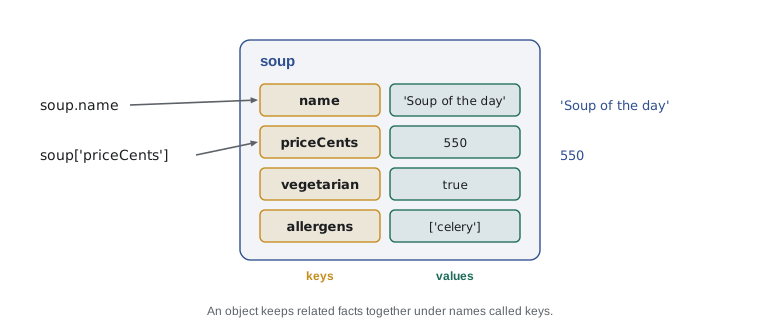
An object literal is written between curly braces. Inside, each property is a name, called the key, followed by a colon and a value, with commas between properties. The value can be any type: a number, a string, a boolean, an array, another object or a function. Keys are usually written like variable names.
const soup = {
  name: 'Soup of the day',
  priceCents: 550,
  vegetarian: true,
  allergens: ['celery'],
};
console.log(soup.name);
console.log(soup.priceCents);
console.log(soup.allergens);
console.log(`Vegetarian: ${soup.vegetarian}`);Soup of the day 550 [ "celery" ] Vegetarian: true
What this code does
One object holds four facts about the soup: its name, its price in cents, whether it is vegetarian and a list of allergens. Dot notation reads each property by its key. A template literal shows the vegetarian property as part of a sentence.
The trailing comma after the last property is allowed and is common modern style, because it means that adding a new property changes only one line. Objects are written across several lines when they have more than two or three properties, with each property on its own line and indented, as above.
Reading and changing properties
There are two ways to read a property. Dot notation, soup.name, is the everyday form. Bracket notation, soup['name'], takes the key as a string, which means the key can come from a variable or an expression. Use bracket notation when the key is only known while the program runs, or when it is not a valid identifier, such as a key with a space in it.
Reading a property that does not exist gives undefined, not an error. You can add a new property simply by assigning to it, change an existing one the same way, and remove one with the delete operator. Like arrays, objects declared with const can still have their properties changed; const only stops the name from being pointed at a different object.
const sandwich = { name: 'Egg sandwich', priceCents: 625 };
const field = 'priceCents';
console.log(sandwich[field]);
console.log(sandwich.calories);

sandwich.priceCents = 650;
sandwich.calories = 410;
console.log(sandwich);
delete sandwich.calories;
console.log(sandwich);
console.log('Has a price: ' + ('priceCents' in sandwich));625
undefined
{ name: "Egg sandwich", priceCents: 650, calories: 410 }
{ name: "Egg sandwich", priceCents: 650 }
Has a price: trueWhat this code does
Bracket notation reads the price using a key stored in a variable, and asking for a missing property gives undefined. Assigning changes the price and adds a calories property, which shows up when the object is printed. delete removes it again, and the in operator confirms that the object still has a priceCents key.
To check whether an object has a property, use the in operator or Object.hasOwn(object, key). Comparing with undefined is less reliable, because a property can exist and hold undefined.
Shorthand properties
When a variable already holds a value and the property should have the same name, you can write the name once. { name, priceCents } means { name: name, priceCents: priceCents }. This shorthand appears constantly in modern code, especially in functions that build objects.
function makeItem(name, priceCents) {
  return { name, priceCents };
}
const wrap = makeItem('Veggie wrap', 700);
const tea = makeItem('Tea or coffee', 200);
console.log(wrap);
console.log(tea);{ name: "Veggie wrap", priceCents: 700 }
{ name: "Tea or coffee", priceCents: 200 }What this code does
makeItem receives a name and a price and returns a new object built with shorthand properties. Each call creates a separate object. Printing them shows that the keys took the names of the variables.
Methods and this
A property whose value is a function is called a method. You have used many methods already: name.trim() calls the trim method of a string, and console.log calls the log method of the console object. Inside a method, the word this refers to the object the method was called on, so the method can use the object's other properties.
const order = {
  items: [550, 625, 200],
  tipCents: 0,
  subtotal() {
    return this.items.reduce((sum, c) => sum + c, 0);
  },
  addTip(rate) {
    this.tipCents = Math.round(this.subtotal() * rate);
  },
  total() {
    return this.subtotal() + this.tipCents;
  },
};
order.addTip(0.15);
console.log(`Subtotal: ${order.subtotal()}`);
console.log(`Tip: ${order.tipCents}`);
console.log(`Total: ${order.total()}`);Subtotal: 1375 Tip: 206 Total: 1581
What this code does
The order object holds a list of item prices in cents, a tip and three methods. Inside each method, this means the order itself, so subtotal can add up this.items and addTip can store a tip of 15 in 100 of the subtotal. The three lines print the subtotal, the tip and the total, all in cents.
Methods are written with the short form name() { ... }, which is the modern style. Be careful with arrow functions as methods: an arrow function does not get its own this, so this inside it does not refer to the object. Use the short method form for methods, and arrow functions inside them, as subtotal does with reduce. JavaScript Programming II returns to this and to classes, which build many objects of the same shape.
Looping over properties
Three built-in functions turn an object's properties into arrays. Object.keys(obj) gives the keys, Object.values(obj) gives the values, and Object.entries(obj) gives pairs, each a small array of a key and its value. Combined with for...of and the array methods from Lesson 9, they let you work through any object.
const openPlaces = { Mon: 0, Tue: 3, Wed: 0, Thu: 5, Fri: 1 };
console.log(Object.keys(openPlaces));
console.log(Object.values(openPlaces));
const totalOpen = Object.values(openPlaces).reduce((a, b) => a + b, 0);
console.log(`Open places this week: ${totalOpen}`);
for (const [day, places] of Object.entries(openPlaces)) {
  if (places > 0) {
    console.log(`${day}: ${places}`);
  }
}[ "Mon", "Tue", "Wed", "Thu", "Fri" ] [ 0, 3, 0, 5, 1 ] Open places this week: 9 Tue: 3 Thu: 5 Fri: 1
What this code does
The object maps each weekday to its number of open places. Object.keys and Object.values list the days and the numbers, and reduce adds the numbers to give 9. The loop goes through the entries and, for each pair, unpacks the day and the count into two constants, printing only the days with places.
The loop header for (const [day, places] of ...) uses destructuring: square brackets on the left unpack the two elements of each pair into two named constants. It is a convenient shorthand that JavaScript Programming II covers fully. The older for...in loop also visits an object's keys, but it can pick up inherited properties in some situations, so Object.keys and Object.entries are the clearer modern choice.
Arrays of objects
The real power comes from combining the two structures: an array of objects. Each object is one record, like one row of Lucy's spreadsheet, and the array is the whole table. Every array method from Lesson 9 now works on records: filter picks rows, map extracts or transforms columns, find looks up one record and reduce totals a column.
const menu = [
  { name: 'Soup of the day', priceCents: 550, vegetarian: true },
  { name: 'Egg sandwich', priceCents: 625, vegetarian: true },
  { name: 'Chicken wrap', priceCents: 700, vegetarian: false },
  { name: 'Tea or coffee', priceCents: 200, vegetarian: true },
  { name: 'Cookie', priceCents: 150, vegetarian: true },
];
const names = menu.map(item => item.name);
console.log(names);
const veg = menu.filter(item => item.vegetarian).map(item => item.name);
console.log(`Vegetarian: ${veg.join(', ')}`);
const wrap = menu.find(item => item.name === 'Chicken wrap');
console.log(`Wrap price: ${(wrap.priceCents / 100).toFixed(2)}`);
const cheapest = menu.toSorted((a, b) => a.priceCents - b.priceCents)[0];
console.log(`Cheapest: ${cheapest.name}`);[ "Soup of the day", "Egg sandwich", "Chicken wrap", "Tea or coffee", "Cookie" ] Vegetarian: Soup of the day, Egg sandwich, Tea or coffee, Cookie Wrap price: 7.00 Cheapest: Cookie
What this code does
The menu is an array of five objects, each with the same three properties. map pulls out the names, filter keeps the vegetarian items before map takes their names, and find looks up one item by name to show its price. Sorting a copy by price and taking the first element gives the cheapest item, the cookie.
Keeping each record's facts together removes the danger Mira spotted with parallel arrays. Sorting, filtering or adding an item keeps every name with its own price, because they travel as one object.
ES2024 added Object.groupBy, which sorts the records of an array into groups. You pass the array and a function that returns a group name for each record, and you get back an object whose keys are the group names and whose values are arrays of records. It is supported in current browsers and in Node.js 21 and later.
const shifts = [
  { day: 'Mon', type: 'grocery', hours: 3 },
  { day: 'Tue', type: 'kitchen', hours: 4 },
  { day: 'Wed', type: 'grocery', hours: 3.5 },
  { day: 'Sat', type: 'kitchen', hours: 5 },
];
const byType = Object.groupBy(shifts, s => s.type);
for (const [type, list] of Object.entries(byType)) {
  const hours = list.reduce((sum, s) => sum + s.hours, 0);
  console.log(`${type}: ${list.length} shifts, ${hours} hours`);
}grocery: 2 shifts, 6.5 hours kitchen: 2 shifts, 9 hours
What this code does
Four shift records are grouped by their type. Object.groupBy returns an object with a grocery key and a kitchen key, each holding an array of the matching shifts. The loop then counts and totals each group: 2 grocery shifts of 6.5 hours and 2 kitchen shifts of 9 hours.
Nested objects and optional chaining
Property values can themselves be objects or arrays, so data can be nested as deeply as it needs to be. A volunteer record might hold a contact object, which holds a phone number. You reach inner values by chaining dots: volunteer.contact.phone.
Nesting raises a risk. If contact is missing, volunteer.contact is undefined, and asking undefined for .phone stops the program with a TypeError. The optional chaining operator ?. solves this: volunteer.contact?.phone gives undefined instead of an error when contact is missing. Combine it with ?? from Lesson 4 to supply a friendly default.
const volunteers = [
  { name: 'Amara', contact: { phone: '555-0142', email: 'amara@example.com' } },
  { name: 'Dev', contact: { email: 'dev@example.com' } },
  { name: 'Sam' },
];
for (const v of volunteers) {
  const phone = v.contact?.phone ?? 'no phone';
  const email = v.contact?.email ?? 'no email';
  console.log(`${v.name}: ${phone}, ${email}`);
}Amara: 555-0142, amara@example.com Dev: no phone, dev@example.com Sam: no phone, no email
What this code does
Three volunteer records have different amounts of contact information, and Sam has no contact object at all. Optional chaining stops at a missing contact and gives undefined instead of an error, and ?? replaces undefined with a short message. Each line therefore prints whatever details exist for that volunteer.
Data from forms, files and other systems is often incomplete like this. Optional chaining lets a program read it safely without a long series of if checks. Do not use it everywhere, though: if a property should always be there, an error when it is missing tells you something is wrong, which is better than carrying on quietly.
Objects are references too
Objects behave like arrays when copied. Assigning an object to a second variable shares the same object. To make a copy, use the spread syntax inside curly braces, { ...item }, which copies all the properties into a new object; properties listed after the spread override the copied ones. Like the array version, it is a shallow copy, so nested objects are shared. The built-in structuredClone(obj) makes a deep copy, copying nested objects as well.
const soup = { name: 'Soup of the day', priceCents: 550, tags: ['hot'] };
const alias = soup;
alias.priceCents = 600;
console.log(soup.priceCents);

const special = { ...soup, name: 'Harvest soup' };
special.tags.push('seasonal');
console.log(special.name, soup.name);
console.log(soup.tags);

const independent = structuredClone(soup);
independent.tags.push('vegan');
console.log(soup.tags, independent.tags);600 Harvest soup Soup of the day [ "hot", "seasonal" ] [ "hot", "seasonal" ] [ "hot", "seasonal", "vegan" ]
What this code does
Changing the price through alias changes soup, because both names refer to one object. The spread copy gets its own name property, but pushing onto its tags list also changes the original, because a shallow copy shares the nested array. structuredClone copies the array too, so adding vegan to the independent copy leaves the original list alone.
JSON: objects as text
Objects live in a program's memory. To save them in a file, send them to a server or store them in the browser, they have to be turned into text. The standard format for this is JSON, short for JavaScript Object Notation. It looks almost exactly like an object literal, except that keys and strings must be in double quotes and functions are not allowed. JSON.stringify(value) turns a value into JSON text, and JSON.parse(text) turns JSON text back into a value.
const booking = { name: 'Amara', shift: 'Sat kitchen', hours: 4 };
const text = JSON.stringify(booking);
console.log(text);
console.log(typeof text);
const back = JSON.parse(text);
console.log(back.name, back.hours + 1);
console.log(JSON.stringify(booking, null, 2));{"name":"Amara","shift":"Sat kitchen","hours":4}
string
Amara 5
{
"name": "Amara",
"shift": "Sat kitchen",
"hours": 4
}What this code does
JSON.stringify turns the booking object into one line of text, with double quotes around every key and string. typeof confirms that the result is a string. JSON.parse rebuilds an object whose properties can be used again, and passing 2 as the third argument to stringify lays the text out over several lines with two-space indentation.
JSON is everywhere on the web: it is how most servers send data to pages, how settings files are written and how browsers store structured data. You will use it constantly in The DOM and Browser Events and in the PHP courses. JSON.parse stops with a SyntaxError if the text is not valid JSON, which Lesson 11 shows how to handle.
Try it yourself
Total a lunch order
The starter has the menu as an array of objects and an order as an array of item names. Use find to look up each ordered item in the menu and add its price to a total in cents. Print each item as Soup of the day: 5.50 and then Total: 16.75.
Keep the money in whole cents until you print it, and use toFixed(2) for the display.
const menu = [
  { name: 'Soup of the day', priceCents: 550 },
  { name: 'Egg sandwich', priceCents: 625 },
  { name: 'Tea or coffee', priceCents: 200 },
  { name: 'Cookie', priceCents: 150 },
];
const order = ['Soup of the day', 'Egg sandwich', 'Cookie', 'Cookie', 'Tea or coffee'];
let totalCents = 0;
// Look up each ordered item and add up the total
Try it yourself
Shift counts by volunteer
The Input box holds one volunteer name per line, one line for each shift worked this month. Build an object that counts the shifts for each name, then print one line per volunteer, in alphabetical order, in the form Amara: 3.
Use bracket notation with the name as the key: if the key is missing, start it at 0 with counts[name] = (counts[name] ?? 0) + 1.
const counts = {};
let name = readline();
while (name !== null) {
  // Count this name
  name = readline();
}
// Print the counts in alphabetical order
Common mistakes
Mistakeitem.price and item['price'] are different.
InsteadThey read the same property. Bracket notation takes the key as a string, so it can come from a variable.
MistakeReading a missing property causes an error.
InsteadIt gives undefined. The error comes when you read a property of that undefined, which ?. prevents.
Mistakeconst item = {...}; means item's properties cannot change.
Insteadconst only stops the name from being reassigned. Properties can be added, changed and deleted.
MistakeAn arrow function works the same as a method that uses this.
InsteadArrow functions do not get their own this. Write methods with the short name() { } form.
Mistake{ ...obj } makes a completely independent copy.
InsteadSpread makes a shallow copy; nested objects and arrays are shared. Use structuredClone for a deep copy.
Summary and key terms
- An object groups related values as properties, each a key and a value, written in curly braces.
- Dot notation reads a property; bracket notation takes the key as a string and can use a variable.
- Missing properties are undefined.
- Properties can be added, changed and deleted even on a const object, and in or Object.hasOwn checks whether one exists.
- Shorthand writes { name } for { name: name }.
- A method is a function property, and this inside it refers to the object; arrow functions do not have their own this.
- Object.keys, Object.values and Object.entries turn an object into arrays.
- Arrays of objects hold records, and the array methods filter, map, find and reduce work on them; Object.groupBy groups records.
- Optional chaining ?. reads nested properties safely.
- Objects are references: spread makes a shallow copy and structuredClone a deep one.
- JSON.stringify and JSON.parse convert between objects and JSON text.
- object
- A collection of named properties, written in curly braces.
- property
- A key and its value inside an object.
- key
- The name of a property.
- dot notation
- Reading a property with a dot, as in item.name.
- bracket notation
- Reading a property with a string key in square brackets, as in item[field].
- method
- A property whose value is a function.
- this
- Inside a method, the object the method was called on.
- optional chaining
- The ?. operator, which gives undefined instead of an error when the value before it is null or undefined.
- deep copy
- A copy that also copies nested objects and arrays, as structuredClone makes.
- JSON
- JavaScript Object Notation, the standard text format for data.
Practice problems
Work each problem on paper first, then reveal the answer to check.
How would you read the property named in the variable field from the object item?
Show answer
item[field], with bracket notation.
What does Object.keys({ a: 1, b: 2 }) give?
Show answer
The array [ 'a', 'b' ].
Why is an array of objects better than parallel arrays of names and prices?
Show answer
Each record keeps its facts together, so sorting or filtering can never separate a name from its price.
What does user.address?.city give when user has no address?
Show answer
undefined, without an error.
What does JSON.stringify({ n: 1 }) give?
Show answer
The string {"n":1}, with the key in double quotes.
Lesson quiz · 5 questions
Score 60% or more to complete this lesson.
Create a free account to save your progress, take quizzes and earn a certificate.