
JS-101 · Lesson 12 of 12 · 29 min
Capstone: a tip and order calculator
▶ Video coming soon A video version of this lesson is on the way.
On Monday, November 9, Paul Desrosiers came to the studio with a printed menu and a problem. The community kitchen's lunch counter is run by trainees in the Food Hub's job-skills program, and most of them are new to handling money. At the busiest moment of the day, between noon and one, they were adding up orders on paper, working out the tax on a phone, and guessing at the tip when a customer asked for 15 in 100 on top. Mistakes were common and the line was slow. "Could you make something simple for the counter tablet?" Paul asked. "Type in the order, get the total, the tax and a few tip choices. Nothing fancy."
Rhea gave the job to Mira, with Gareth as reviewer, and a deadline of Friday, when the kitchen would try it at the counter. Mira had four days and everything this course had taught her. This lesson follows her build from requirements to a tested program. Rather than introducing new language features, it shows how the pieces from Lessons 1 to 11 fit together into a real program, and how a developer plans, builds and checks one step at a time.
Requirements
Gareth's first rule for any project is to write down what the program must do before writing any code. Mira and Paul spent twenty minutes at the whiteboard and agreed on this list.
| Number | Requirement |
|---|---|
| R1 | The menu has five items, each with a short code, a name and a price. |
| R2 | The trainee types one line per item: a code and an optional quantity, such as SOUP 2. A blank line ends the order. |
| R3 | Codes are accepted in any capitals and with stray spaces. Quantities must be whole numbers from 1 to 20. |
| R4 | A line with an unknown code or a bad quantity is rejected with a clear message, and the rest of the order still works. |
| R5 | Tax is charged at 13 in 100, the Ontario HST rate, on the subtotal. |
| R6 | Tip choices of 10, 15 and 20 in 100 are shown, calculated on the subtotal before tax; the trainee then enters the customer's choice, or 0 for no tip. |
| R7 | The receipt lists each line, the subtotal, the tax, the tip and the total, with prices lined up in a column. |
| R8 | All amounts are exact to the cent. |
The tax rate came from the Food Hub's bookkeeper, who confirmed which rate the counter must charge; tax rules for food can be complicated, and a program should use the rate the business is told to charge rather than one a developer guesses. Requirement R6 reflects a common convention of calculating tips on the amount before tax, which Paul preferred. Writing the requirements down settled questions that would otherwise have surfaced on Friday, in front of a queue of hungry customers.
Planning the program
Next, Mira sketched the structure. A program is easier to build and test when it is split into small functions with one job each, and when the data is separate from the code that uses it. Her plan had four layers: the menu data, small calculation functions that are pure and easy to test, an input layer that reads and validates lines, and an output layer that prints the receipt.
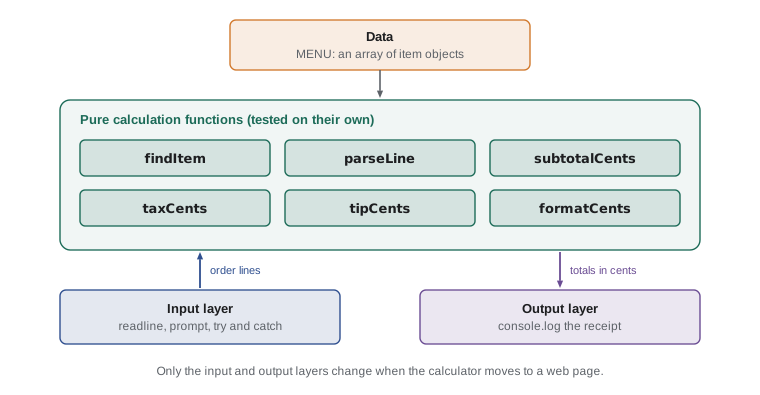
Two decisions shaped everything else. First, all money is stored in whole cents, as integers, and converted to dollars only when printed, because Lesson 4 showed that decimal fractions drift and whole numbers do not. Second, each order line becomes an object holding the menu item and the quantity, and the order is an array of those objects, so that reduce can total it in one line.
Step 1: the menu and money helpers
Mira started with the data and the smallest functions. Because the menu is an array of objects, adding an item later means adding one line. The tax rate is a constant in capitals at the very top, where anyone can find and change it.
const TAX_RATE = 0.13; // Ontario HST
const MENU = [
  { code: 'SOUP', name: 'Soup of the day', priceCents: 550 },
  { code: 'EGG', name: 'Egg sandwich', priceCents: 625 },
  { code: 'WRAP', name: 'Chicken wrap', priceCents: 700 },
  { code: 'DRINK', name: 'Tea or coffee', priceCents: 200 },
  { code: 'COOKIE', name: 'Cookie', priceCents: 150 },
];

function formatCents(cents) {
  return (cents / 100).toFixed(2);
}

for (const item of MENU) {
  console.log(`${item.code.padEnd(8)}${item.name.padEnd(18)}${formatCents(item.priceCents).padStart(6)}`);
}
console.log(`Tax rate: ${TAX_RATE * 100} in 100`);SOUP Soup of the day 5.50 EGG Egg sandwich 6.25 WRAP Chicken wrap 7.00 DRINK Tea or coffee 2.00 COOKIE Cookie 1.50 Tax rate: 13 in 100
What this code does
The menu is an array of five objects, each with a code, a name and a price in cents. The loop prints the menu as three neat columns using padEnd and padStart, with formatCents turning cents into a price with two decimals. The last line confirms the tax rate the program will use, 13 in 100.
Step 2: reading and checking an order line
The trickiest function is the one that turns a typed line such as soup 2 into an order line object. Requirement R3 says codes may arrive in any capitals and with stray spaces, and R4 says bad lines must be rejected with a message. Mira's parseLine trims the line and splits it on any run of spaces; the pattern /\s+/ passed to split means "one or more spaces or tabs", a regular expression that JavaScript Programming II covers properly. It then looks up the code with findItem, reads the quantity, defaulting to 1, and checks it. Any problem is reported by throwing an Error, so that the caller can catch it and show the message, as Lesson 11 described.
const TAX_RATE = 0.13; // Ontario HST

const MENU = [
  { code: 'SOUP', name: 'Soup of the day', priceCents: 550 },
  { code: 'EGG', name: 'Egg sandwich', priceCents: 625 },
  { code: 'WRAP', name: 'Chicken wrap', priceCents: 700 },
  { code: 'DRINK', name: 'Tea or coffee', priceCents: 200 },
  { code: 'COOKIE', name: 'Cookie', priceCents: 150 },
];

function formatCents(cents) {
  return (cents / 100).toFixed(2);
}

function findItem(code) {
  return MENU.find(item => item.code === code.trim().toUpperCase());
}

function parseLine(line) {
  const parts = line.trim().split(/\s+/);
  const item = findItem(parts[0]);
  if (!item) {
    throw new Error(`Unknown item code: ${parts[0]}`);
  }
  const quantity = parts.length > 1 ? Number(parts[1]) : 1;
  if (!Number.isInteger(quantity) || quantity < 1 || quantity > 20) {
    throw new Error(`Quantity must be a whole number from 1 to 20: ${parts[1]}`);
  }
  return { item, quantity };
}

function subtotalCents(order) {
  return order.reduce((sum, line) => sum + line.item.priceCents * line.quantity, 0);
}

function taxCents(subtotal) {
  return Math.round(subtotal * TAX_RATE);
}

function tipCents(subtotal, rate) {
  return Math.round(subtotal * rate);
}

const tests = [' soup 2 ', 'drink', 'Cookie 3', 'PIE 1', 'egg two', 'wrap 50'];
for (const text of tests) {
  try {
    const line = parseLine(text);
    console.log(`ok: ${line.quantity} x ${line.item.name}`);
  } catch (e) {
    console.log(`rejected: ${e.message}`);
  }
}ok: 2 x Soup of the day ok: 1 x Tea or coffee ok: 3 x Cookie rejected: Unknown item code: PIE rejected: Quantity must be a whole number from 1 to 20: two rejected: Quantity must be a whole number from 1 to 20: 50
What this code does
Six typed lines are passed to parseLine, each inside try so that a rejected line does not stop the others. The first three are accepted, even with odd spacing and capitals, and a missing quantity counts as 1. The last three are rejected with messages that say exactly what is wrong: an unknown code, a quantity that is not a number and a quantity over the limit of 20.
Testing parseLine on its own, with a list of awkward inputs, found two problems before they reached the counter. Mira's first version used split(' '), which turned two spaces into an empty piece, and accepted 2.5 as a quantity until she switched to Number.isInteger. Both fixes took a minute, because the function was small and tested in isolation.
Step 3: totals, tax and tips
With parsed lines in an array, the arithmetic is short. subtotalCents multiplies each item's price by its quantity and adds the results with reduce. taxCents and tipCents multiply and round to the nearest cent. Rounding happens once, at the end of each calculation, and every result is a whole number of cents, so requirement R8 holds automatically.
const TAX_RATE = 0.13; // Ontario HST

const MENU = [
  { code: 'SOUP', name: 'Soup of the day', priceCents: 550 },
  { code: 'EGG', name: 'Egg sandwich', priceCents: 625 },
  { code: 'WRAP', name: 'Chicken wrap', priceCents: 700 },
  { code: 'DRINK', name: 'Tea or coffee', priceCents: 200 },
  { code: 'COOKIE', name: 'Cookie', priceCents: 150 },
];

function formatCents(cents) {
  return (cents / 100).toFixed(2);
}

function findItem(code) {
  return MENU.find(item => item.code === code.trim().toUpperCase());
}

function parseLine(line) {
  const parts = line.trim().split(/\s+/);
  const item = findItem(parts[0]);
  if (!item) {
    throw new Error(`Unknown item code: ${parts[0]}`);
  }
  const quantity = parts.length > 1 ? Number(parts[1]) : 1;
  if (!Number.isInteger(quantity) || quantity < 1 || quantity > 20) {
    throw new Error(`Quantity must be a whole number from 1 to 20: ${parts[1]}`);
  }
  return { item, quantity };
}

function subtotalCents(order) {
  return order.reduce((sum, line) => sum + line.item.priceCents * line.quantity, 0);
}

function taxCents(subtotal) {
  return Math.round(subtotal * TAX_RATE);
}

function tipCents(subtotal, rate) {
  return Math.round(subtotal * rate);
}

const order = [parseLine('soup 2'), parseLine('egg'), parseLine('drink 2')];
const subtotal = subtotalCents(order);
const tax = taxCents(subtotal);
console.log(`Subtotal: ${formatCents(subtotal)}`);
console.log(`Tax: ${formatCents(tax)}`);
for (const rate of [0.10, 0.15, 0.20]) {
  const tip = tipCents(subtotal, rate);
  console.log(`Tip ${rate * 100}: ${formatCents(tip)}, total ${formatCents(subtotal + tax + tip)}`);
}Subtotal: 21.25 Tax: 2.76 Tip 10: 2.13, total 26.14 Tip 15: 3.19, total 27.20 Tip 20: 4.25, total 28.26
What this code does
An order of two soups, an egg sandwich and two drinks has a subtotal of 21.25. The tax at 13 in 100 is rounded to the nearest cent, 2.76. The loop then shows each of the three tip choices, worked out on the subtotal before tax, with the total the customer would pay for each.
Gareth checked the numbers by hand on a calculator, as every developer should for a program that handles money. Two soups at 5.50, one sandwich at 6.25 and two drinks at 2.00 make 21.25. The tax and tips agreed to the cent. Checking a few results by hand catches mistakes in the requirements as well as in the code: had Paul wanted tips on the total after tax, this is where it would have shown.
Step 4: the receipt
The receipt combines everything. The output layer is the only part of the program that prints, which keeps the calculation functions pure and testable. Each line is built with a template literal and padded to a fixed width, so that the prices line up in a column, as requirement R7 asks.
Step 5: the whole program
The final program reads the order lines with readline until it meets a blank line or runs out of input, collecting good lines and reporting bad ones. Then it shows the tip choices, reads the tip the customer chose, and prints the receipt. The Input box below holds a realistic order, including one mistake, a code that does not exist, and the customer's choice of a 15 tip.
const TAX_RATE = 0.13; // Ontario HST

const MENU = [
  { code: 'SOUP', name: 'Soup of the day', priceCents: 550 },
  { code: 'EGG', name: 'Egg sandwich', priceCents: 625 },
  { code: 'WRAP', name: 'Chicken wrap', priceCents: 700 },
  { code: 'DRINK', name: 'Tea or coffee', priceCents: 200 },
  { code: 'COOKIE', name: 'Cookie', priceCents: 150 },
];

function formatCents(cents) {
  return (cents / 100).toFixed(2);
}

function findItem(code) {
  return MENU.find(item => item.code === code.trim().toUpperCase());
}

function parseLine(line) {
  const parts = line.trim().split(/\s+/);
  const item = findItem(parts[0]);
  if (!item) {
    throw new Error(`Unknown item code: ${parts[0]}`);
  }
  const quantity = parts.length > 1 ? Number(parts[1]) : 1;
  if (!Number.isInteger(quantity) || quantity < 1 || quantity > 20) {
    throw new Error(`Quantity must be a whole number from 1 to 20: ${parts[1]}`);
  }
  return { item, quantity };
}

function subtotalCents(order) {
  return order.reduce((sum, line) => sum + line.item.priceCents * line.quantity, 0);
}

function taxCents(subtotal) {
  return Math.round(subtotal * TAX_RATE);
}

function tipCents(subtotal, rate) {
  return Math.round(subtotal * rate);
}

function receiptLine(label, cents) {
  return `${label.padEnd(24, '.')}${formatCents(cents).padStart(8)}`;
}

// Input layer: read order lines until a blank line or the end of input
const order = [];
let text = readline();
while (text !== null && text.trim() !== '') {
  try {
    order.push(parseLine(text));
  } catch (e) {
    console.log(`Skipped: ${e.message}`);
  }
  text = readline();
}

// Calculations
const subtotal = subtotalCents(order);
const tax = taxCents(subtotal);
console.log(`Tip choices: 10 = ${formatCents(tipCents(subtotal, 0.10))}, 15 = ${formatCents(tipCents(subtotal, 0.15))}, 20 = ${formatCents(tipCents(subtotal, 0.20))}`);
const choice = Number(prompt('Tip (0, 10, 15 or 20): '));
const tipRate = [0, 10, 15, 20].includes(choice) ? choice / 100 : 0;
const tip = tipCents(subtotal, tipRate);

// Output layer: the receipt
console.log('');
console.log('RIVERSIDE LUNCH COUNTER');
for (const line of order) {
  console.log(receiptLine(`${line.quantity} x ${line.item.name}`, line.item.priceCents * line.quantity));
}
console.log('-'.repeat(32));
console.log(receiptLine('Subtotal', subtotal));
console.log(receiptLine('Tax', tax));
console.log(receiptLine('Tip', tip));
console.log(receiptLine('TOTAL', subtotal + tax + tip));
console.log('Thank you! Tips support the youth garden.');Skipped: Unknown item code: PIE Tip choices: 10 = 2.13, 15 = 3.19, 20 = 4.25 Tip (0, 10, 15 or 20): 15 RIVERSIDE LUNCH COUNTER 2 x Soup of the day..... 11.00 1 x Egg sandwich........ 6.25 2 x Tea or coffee....... 4.00 -------------------------------- Subtotal................ 21.25 Tax..................... 2.76 Tip..................... 3.19 TOTAL................... 27.20 Thank you! Tips support the youth garden.
What this code does
The program reads four order lines and skips the one with an unknown code, explaining why. It shows the three tip choices for the subtotal, reads the customer's choice of 15 and works out the tip in cents. The receipt then lists each accepted line and the subtotal, tax, tip and total in a lined-up column, all exact to the cent.
Every requirement can be traced to a line of that program, and that is the point of writing them down first. R2 and R3 live in the reading loop and parseLine. R4 is the try and catch around each line. R5 is taxCents, R6 the tip choices and prompt, R7 receiptLine, and R8 the decision to keep everything in cents.
Look, too, at what the program does when the customer types something unexpected for the tip, such as 12: the includes check falls back to no tip rather than guessing. Paul and Mira agreed that a trainee would rather re-enter a tip than have the program invent one.
Step 6: testing before Friday
Before the trial, Gareth asked for tests of the pure functions, written with the small checkEqual helper from Lesson 8. Each test pins down one requirement with a known answer, chosen at the boundaries: the smallest and largest quantities, an order of one item, an empty order and a tip of zero.
const TAX_RATE = 0.13; // Ontario HST

const MENU = [
  { code: 'SOUP', name: 'Soup of the day', priceCents: 550 },
  { code: 'EGG', name: 'Egg sandwich', priceCents: 625 },
  { code: 'WRAP', name: 'Chicken wrap', priceCents: 700 },
  { code: 'DRINK', name: 'Tea or coffee', priceCents: 200 },
  { code: 'COOKIE', name: 'Cookie', priceCents: 150 },
];

function formatCents(cents) {
  return (cents / 100).toFixed(2);
}

function findItem(code) {
  return MENU.find(item => item.code === code.trim().toUpperCase());
}

function parseLine(line) {
  const parts = line.trim().split(/\s+/);
  const item = findItem(parts[0]);
  if (!item) {
    throw new Error(`Unknown item code: ${parts[0]}`);
  }
  const quantity = parts.length > 1 ? Number(parts[1]) : 1;
  if (!Number.isInteger(quantity) || quantity < 1 || quantity > 20) {
    throw new Error(`Quantity must be a whole number from 1 to 20: ${parts[1]}`);
  }
  return { item, quantity };
}

function subtotalCents(order) {
  return order.reduce((sum, line) => sum + line.item.priceCents * line.quantity, 0);
}

function taxCents(subtotal) {
  return Math.round(subtotal * TAX_RATE);
}

function tipCents(subtotal, rate) {
  return Math.round(subtotal * rate);
}

function checkEqual(label, actual, expected) {
  console.log(`${actual === expected ? 'ok  ' : 'FAIL'} ${label}`);
}

checkEqual('formatCents pads cents', formatCents(5), '0.05');
checkEqual('code is case-insensitive', parseLine('  Soup ').item.code, 'SOUP');
checkEqual('quantity defaults to 1', parseLine('drink').quantity, 1);
checkEqual('quantity 20 accepted', parseLine('egg 20').quantity, 20);
checkEqual('empty order is 0', subtotalCents([]), 0);
checkEqual('subtotal adds quantities', subtotalCents([parseLine('soup 2'), parseLine('cookie')]), 1250);
checkEqual('zero tip', tipCents(1250, 0), 0);
checkEqual('tip rounds to cents', tipCents(1375, 0.15), 206);

let rejected = 'no error';
try {
  parseLine('egg 21');
} catch (e) {
  rejected = 'error';
}
checkEqual('quantity 21 rejected', rejected, 'error');ok formatCents pads cents ok code is case-insensitive ok quantity defaults to 1 ok quantity 20 accepted ok empty order is 0 ok subtotal adds quantities ok zero tip ok tip rounds to cents ok quantity 21 rejected
What this code does
Nine checks call the calculator's functions with inputs whose correct answers are known, and each prints ok when the result matches. They cover the formatting of a few cents, the handling of capitals and spaces, the default and maximum quantity, an empty order, tip rounding and the rejection of a quantity over 20. All nine pass, so the functions are ready for the trial.
On Friday, November 13, the calculator ran on the counter tablet through the lunch rush. The trainees found it easy, with one request: the item codes were hard to remember, so Paul taped a list of them beside the screen. Lucy, who had come down to watch, asked whether her sign-up page could use the same approach. It could: the same skills, arranged around different data.
From the console to a web page
The calculator runs in the console, but on the counter tablet it will eventually live in a web page, with buttons for each menu item instead of typed codes. The good news is that almost none of the code has to change. MENU, parseLine, subtotalCents, taxCents, tipCents and formatCents work unchanged in a page. Only the input and output layers change: instead of readline and console.log, the page reads form fields and writes text into elements. The listing below gives a preview of the next course, The DOM and Browser Events; it needs a real page, so it cannot run here.
// counter.js: the same functions, connected to a page (preview of JS-110)
const order = [];
const totalEl = document.querySelector('#total');

document.querySelector('#add-soup').addEventListener('click', () => {
  order.push(parseLine('soup'));
  const subtotal = subtotalCents(order);
  totalEl.textContent = formatCents(subtotal + taxCents(subtotal));
});
This separation, pure logic in the middle and input and output at the edges, is one of the most valuable habits a developer can have. It is why Mira's functions could be tested in minutes, and it is why they will move to the page with hardly a change.
Try it yourself
Splitting the bill
Some customers share a table and want to split the bill evenly. Write splitCents(totalCents, people) that returns an array of whole-cent shares that add up exactly to totalCents. When the total does not divide evenly, the first few people pay one cent more.
For example, 1000 cents among 3 people gives [ 334, 333, 333 ]. The starter prints three examples; the expected output is shown in the tests.
function splitCents(totalCents, people) {
  // Work out the base share and the cents left over
  return [];
}

console.log(splitCents(1000, 3));
console.log(splitCents(2125, 2));
console.log(splitCents(900, 4));
Try it yourself
A quick total for the counter
Write a short calculator using the starter's menu and helpers. Read order lines with readline() until a blank line or the end of input, skipping any line that parseLine rejects. Then print Subtotal: , Tax: and Total: lines with two decimal places.
For the given input the output is Subtotal: 14.00, Tax: 1.82 and Total: 15.82.
const TAX_RATE = 0.13; // Ontario HST

const MENU = [
  { code: 'SOUP', name: 'Soup of the day', priceCents: 550 },
  { code: 'EGG', name: 'Egg sandwich', priceCents: 625 },
  { code: 'WRAP', name: 'Chicken wrap', priceCents: 700 },
  { code: 'DRINK', name: 'Tea or coffee', priceCents: 200 },
  { code: 'COOKIE', name: 'Cookie', priceCents: 150 },
];

function formatCents(cents) {
  return (cents / 100).toFixed(2);
}

function findItem(code) {
  return MENU.find(item => item.code === code.trim().toUpperCase());
}

function parseLine(line) {
  const parts = line.trim().split(/\s+/);
  const item = findItem(parts[0]);
  if (!item) {
    throw new Error(`Unknown item code: ${parts[0]}`);
  }
  const quantity = parts.length > 1 ? Number(parts[1]) : 1;
  if (!Number.isInteger(quantity) || quantity < 1 || quantity > 20) {
    throw new Error(`Quantity must be a whole number from 1 to 20: ${parts[1]}`);
  }
  return { item, quantity };
}

function subtotalCents(order) {
  return order.reduce((sum, line) => sum + line.item.priceCents * line.quantity, 0);
}

function taxCents(subtotal) {
  return Math.round(subtotal * TAX_RATE);
}

function tipCents(subtotal, rate) {
  return Math.round(subtotal * rate);
}

// Read the order, then print the three lines
Where to go next
In twelve lessons you have gone from your first console.log to a tested program that a real counter could use. You can store and transform data with variables, strings, arrays and objects; make decisions and repeat work; organize code into functions; and find and fix bugs methodically. Those are the foundations of every JavaScript program, from a two-line script to a large web application.
The next steps build directly on them. JavaScript Programming II goes deeper into functions and objects: scope and closures, higher-order functions, destructuring, classes, modules, error handling and JSON. The DOM and Browser Events connects your code to web pages, so that the calculator gets real buttons and Lucy's sign-up page can respond as volunteers type. Mira, for her part, has a page to build: Lucy's shift sign-up is next on the studio's list.
Common mistakes
MistakeStart by writing code, and work out the requirements as you go.
InsteadWrite the requirements down first. They settle questions early and give you something to test against.
MistakeStore prices as decimals such as 5.5 and round at the end.
InsteadStore whole cents. Integers add exactly; convert to dollars only for display.
MistakePrinting from inside the calculation functions saves time.
InsteadKeep calculations pure and print only in the output layer, so the functions can be tested and reused in a page.
MistakeOne bad order line should stop the program.
InsteadCatch errors per line, report them and carry on, so one typo does not lose a whole order.
MistakeIf the program runs, it is finished.
InsteadCheck results by hand and with tests at the boundaries before anyone relies on it.
Summary and key terms
- A real program starts with written requirements and a plan.
- The calculator separates data (the MENU array of objects), pure calculation functions (findItem, parseLine, subtotalCents, taxCents, tipCents, formatCents), an input layer that reads lines with readline and catches errors per line, and an output layer that prints a lined-up receipt.
- Money is kept in whole cents and rounded once per calculation, so totals are exact. parseLine validates codes and quantities and throws errors with clear messages.
- Tests with known answers at the boundaries check each function, and results are also checked by hand.
- Because the logic is separate from input and output, the same functions can later drive a web page.
- requirement
- A written statement of something a program must do.
- pure function
- A function whose result depends only on its arguments and that has no side effects.
- input layer
- The part of a program that reads and validates input.
- output layer
- The part of a program that presents results, such as printing a receipt.
- validation
- Checking input before using it, and rejecting it with a clear message if it is wrong.
- integer cents
- Money stored as a whole number of cents to avoid decimal drift.
- regular expression
- A pattern for matching text, such as /\s+/ for one or more spaces.
- boundary test
- A test that uses a value at the edge of the allowed range, where bugs are most likely.
- receipt
- The printed summary of an order, with each line and the totals.
- separation of concerns
- Organizing a program so that each part has one job, such as calculating or printing.
Practice problems
Work each problem on paper first, then reveal the answer to check.
Why does the calculator calculate the tip on the subtotal rather than on the total?
Show answer
Because that was Paul's requirement R6, following a common convention of tipping on the amount before tax.
Where would you change the tax rate?
Show answer
In the TAX_RATE constant at the top of the program.
What does parseLine(' Cookie ') give?
Show answer
An object with the cookie menu item and a quantity of 1.
Why is each order line read inside its own try and catch?
Show answer
So that a bad line is reported and skipped while the rest of the order is still processed.
Which parts of the calculator would change when it moves to a web page?
Show answer
Only the input and output layers; the data and the calculation functions stay the same.
Lesson quiz · 5 questions
Score 60% or more to complete this lesson.
Create a free account to save your progress, take quizzes and earn a certificate.