
JS-101 · Lesson 5 of 12 · 23 min
Strings and template literals
▶ Video coming soon A video version of this lesson is on the way.
By the first week of November, Lucy's test sign-up form had collected forty names, and Mira was looking at them in disbelief. Some were in capitals, some entirely in small letters, several had spaces at the start or end, and one volunteer had typed his name twice. "People type what they type," Gareth said. "Most of the data a web page handles is text: names, email addresses, messages, the words on buttons. A good page cleans the text up and builds clear messages from it. That is today's lesson."
This lesson shows how to write strings, including special characters, how to measure them and pick out characters, the most useful string methods, and template literals, the modern way to build text from values. It finishes with formatting numbers for display.
Writing strings
A string is a sequence of characters: letters, digits, spaces, punctuation, emoji, anything you can type. JavaScript accepts three kinds of quotation marks around a string. Single quotes '...' and double quotes "..." behave identically. Backticks, the slanted quotation marks usually found on the key to the left of 1, make a template literal, which has extra powers covered later in this lesson. Whichever you choose, the closing mark must match the opening one.
Some characters cannot be typed directly inside a string, either because they would end it or because they are invisible. These are written as escape sequences: a backslash followed by a code. The backslash tells JavaScript that the next character has a special meaning.
| Escape sequence | Meaning |
|---|---|
| \n | New line |
| \t | Tab |
| \' | A single quote inside a single-quoted string |
| \" | A double quote inside a double-quoted string |
| \\ | A backslash |
console.log('Riverside Community Food Hub\nVolunteer sign-up');
console.log('Shift\tDay\tPlaces');
console.log('Lucy\'s list');
console.log("She said \"thank you\" twice.");Riverside Community Food Hub Volunteer sign-up Shift Day Places Lucy's list She said "thank you" twice.
What this code does
The first string contains a new-line escape, so it prints on two lines. The second uses tab escapes to space three words into columns. The last two show how a backslash lets a quotation mark of the same kind appear inside a string without ending it.
An escaped quote works, but it is harder to read than simply switching quotation marks: "Lucy's list" is clearer than 'Lucy\'s list'. Many teams pick single quotes as their default and switch only when the text contains an apostrophe; template literals, which use backticks, can contain both kinds of quote freely.
Length and characters
Every string has a length property, the number of characters it contains, spaces and punctuation included. Each character has a numbered position called its index. Indexes start at 0, not 1, so the first character is at index 0 and the last is at index length - 1. Square brackets after a string pick out the character at an index, and the at() method does the same but also accepts negative numbers, which count back from the end.
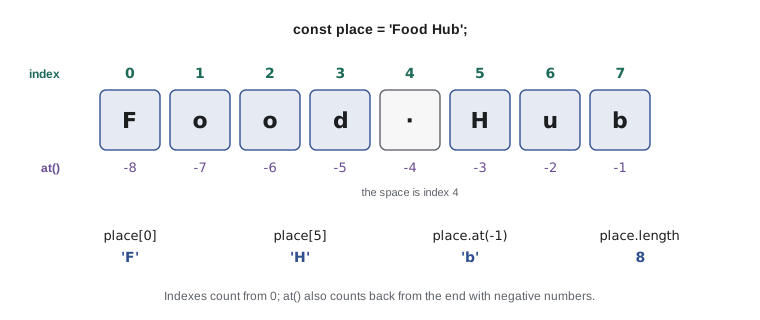
const place = 'Food Hub';
console.log(place.length);
console.log(place[0]);
console.log(place[5]);
console.log(place.at(-1));
console.log(place[20]);8 F H b undefined
What this code does
The string Food Hub has 8 characters, counting the space. Index 0 is the F and index 5 is the H, because counting starts from zero and the space is at index 4. at(-1) gives the last character, b, and asking for an index past the end gives undefined rather than an error.
Strings in JavaScript are immutable: once created, a string can never be changed. place[0] = 'G' does nothing at all. Every string method that seems to change a string, such as making it upper case, actually builds and gives back a new string and leaves the original alone. To keep the result, store it in a variable.
String methods
A method is a function that belongs to a value, called by writing a dot, the method name and parentheses after the value. Strings come with dozens of methods. The table lists the ones that cover most everyday jobs.
| Method | What it gives back | Example | Result |
|---|---|---|---|
| toUpperCase() | An upper-case copy | 'amara'.toUpperCase() | 'AMARA' |
| toLowerCase() | A lower-case copy | 'DEV'.toLowerCase() | 'dev' |
| trim() | A copy without spaces at either end | ' Lucy '.trim() | 'Lucy' |
| includes(text) | Whether the text appears anywhere | 'kitchen shift'.includes('kit') | true |
| startsWith(text) | Whether the string starts with the text | 'Saturday'.startsWith('Sat') | true |
| endsWith(text) | Whether the string ends with the text | 'menu.pdf'.endsWith('.pdf') | true |
| indexOf(text) | The index where the text first appears, or -1 | 'soup and bread'.indexOf('and') | 5 |
| slice(start, end) | The characters from start up to, not including, end | 'Saturday'.slice(0, 3) | 'Sat' |
| replaceAll(a, b) | A copy with every a replaced by b | 'a-b-c'.replaceAll('-', ' ') | 'a b c' |
| split(separator) | An array of the pieces between separators | 'Mon,Tue'.split(',') | [ 'Mon', 'Tue' ] |
| repeat(n) | The string repeated n times | '-'.repeat(5) | '-----' |
| padStart(n, ch) | A copy padded at the front to length n | '7'.padStart(3, '0') | '007' |
| padEnd(n, ch) | A copy padded at the end to length n | 'Soup'.padEnd(8, '.') | 'Soup....' |
const typed = '   aMARA osei  ';
const clean = typed.trim();
console.log('[' + clean + ']');
console.log(clean.toUpperCase());
console.log(clean.toLowerCase());
console.log(typed.length, clean.length);[aMARA osei] AMARA OSEI amara osei 15 10
What this code does
The typed name has stray spaces and mixed capitals. trim gives back a copy without the outside spaces, shown inside square brackets so that you can see where it starts and ends. The case methods give upper-case and lower-case copies, and the last line shows that the original still has 15 characters while the trimmed copy has 10.
Methods can be chained: because each one gives back a new string, you can call another method on the result straight away. typed.trim().toLowerCase() trims first and then lowers the case. Read a chain from left to right, one step at a time.
slice is the tool for taking part of a string. slice(start, end) copies from index start up to but not including end; leave out end to copy to the end of the string, and use negative numbers to count from the end. Combined with toUpperCase, it can give a name a capital first letter.
const raw = '  aMARA  ';
const lower = raw.trim().toLowerCase();
const tidy = lower[0].toUpperCase() + lower.slice(1);
console.log(tidy);
console.log('Saturday'.slice(0, 3), 'menu.pdf'.slice(-3));Amara Sat pdf
What this code does
The chain trims the spaces and lowers the case to give amara. Then the first character is made upper case and joined to the rest of the string from index 1 onward, giving Amara. The last line takes the first three letters of Saturday and the last three characters of a file name.
Searching is just as common. includes, startsWith and endsWith answer yes-or-no questions, and indexOf gives the position of a match or -1 if there is none. All of them are case-sensitive, so 'Kitchen'.includes('kitchen') is false. To search without caring about case, lower the case of both sides first.
const email = '  Amara.Osei@Example.com ';
const tidyEmail = email.trim().toLowerCase();
console.log(tidyEmail);
console.log('Has an @ sign: ' + tidyEmail.includes('@'));
console.log('At sign is at index', tidyEmail.indexOf('@'));
console.log('Domain:', tidyEmail.slice(tidyEmail.indexOf('@') + 1));amara.osei@example.com Has an @ sign: true At sign is at index 10 Domain: example.com
What this code does
An email address is trimmed and lowered, which is a common first step before storing it. includes confirms that it contains an at sign, and indexOf finds its position, 10. Slicing from just after that position gives the domain, example.com.
split breaks a string into pieces wherever a separator appears and gives back an array, a list of values that Lesson 9 covers in depth. Its partner, the array method join, glues pieces back together with a separator between them. Together they turn one kind of text into another, as below, where Lucy's comma-separated list of days is tidied up.
const days = 'mon, tue ,wed,  sat';
const parts = days.split(',');
console.log(parts);
console.log(parts.length, 'days');
const clean = days.replaceAll(' ', '').toUpperCase();
console.log(clean.split(',').join(' / '));[ "mon", " tue ", "wed", " sat" ] 4 days MON / TUE / WED / SAT
What this code does
split cuts the text at each comma and gives back an array of four pieces, some with stray spaces. Removing every space with replaceAll and making the text upper case cleans it. Splitting again and joining with a slash between pieces builds the tidy line MON / TUE / WED / SAT.
Template literals
Building messages with + works, but long ones quickly turn into a jumble of quotation marks, plus signs and spaces that are easy to get wrong. Template literals solve this. A template literal is written between backticks and can contain placeholders: a dollar sign followed by an expression in curly braces. JavaScript evaluates each placeholder and puts its value into the text. This is called string interpolation.
const name = 'Amara';
const shift = 'Saturday kitchen';
const hours = 3.5;
console.log('Thanks, ' + name + '. You are booked for ' + shift + ' (' + hours + ' hours).');
console.log(`Thanks, ${name}. You are booked for ${shift} (${hours} hours).`);Thanks, Amara. You are booked for Saturday kitchen (3.5 hours). Thanks, Amara. You are booked for Saturday kitchen (3.5 hours).
What this code does
Both lines print exactly the same sentence. The first builds it with + and has to open and close quotation marks around every piece. The second is a template literal: each placeholder is replaced by the value of the variable inside it, so the sentence reads almost as it will appear.
A placeholder can hold any expression, not just a variable name: arithmetic, a method call, a comparison, even a call to another function. The expression is evaluated when the template literal is evaluated.
const guests = 75;
const price = 12.5;
const volunteer = 'dev bhatt';
console.log(`Tables needed: ${Math.ceil(guests / 8)}`);
console.log(`Takings: ${(guests * price).toFixed(2)}`);
console.log(`Kitchen lead: ${volunteer.toUpperCase()}`);
console.log(`Enough helpers: ${guests / 10 <= 8}`);Tables needed: 10 Takings: 937.50 Kitchen lead: DEV BHATT Enough helpers: true
What this code does
Each placeholder contains a small expression that is worked out before the line is printed. The first rounds up the number of tables, the second calculates the takings and shows two decimal places, and the third makes a name upper case. The last holds a comparison, and its true or false answer is turned into text.
Template literals can also span several lines. Every line break inside the backticks becomes a new line in the string, which makes it easy to lay out a short message or a receipt.
const name = 'Amara';
const day = 'Saturday';
const message = `Hi ${name},

You are booked for the kitchen on ${day}.
Please arrive 10 minutes early.`;
console.log(message);Hi Amara, You are booked for the kitchen on Saturday. Please arrive 10 minutes early.
What this code does
One template literal holds a whole message across four lines, including a blank one. The placeholders insert the volunteer's name and the day. Printing the variable shows the message with its line breaks exactly as they were typed.
Template literals are the modern default for any string that includes values. Plain quotes remain fine for fixed text. A good rule is: if you are reaching for + to join text, reach for backticks instead.
Comparing strings
=== compares strings character by character, so it is exact and case-sensitive: 'amara' === 'Amara' is false. To compare what a person typed with a stored value, normalize both first, usually with trim() and toLowerCase(). The operators < and > compare strings by their character codes, which matches alphabetical order for plain lower-case English letters but puts all capital letters before small ones and handles accented letters poorly. For sorting real names, use localeCompare, which follows the rules of a language; Lesson 9 uses it to sort a volunteer list.
const stored = 'amara.osei@example.com';
const typed = ' Amara.Osei@example.com';
console.log('Exact match: ' + (typed === stored));
console.log('Normalized match: ' + (typed.trim().toLowerCase() === stored));
console.log('Apple before banana: ' + ('apple' < 'banana'));
console.log('Zoe before adam: ' + ('Zoe' < 'adam'));Exact match: false Normalized match: true Apple before banana: true Zoe before adam: true
What this code does
The typed address has a leading space and capital letters, so the exact comparison fails. After trimming and lowering the case, it matches the stored address. The last two lines show that comparing with less-than follows character codes, so a capital Z comes before a small a.
Numbers as text
Sooner or later every number in a program has to be shown to a person, which means turning it into text. A template literal or + does it automatically, String(value) does it on purpose, and the number method toFixed(n) does it with exactly n decimal places. For larger numbers, toLocaleString() adds the separators people expect, such as the commas in 1,234.5.
const total = 1234.5;
console.log(String(total));
console.log(total.toFixed(2));
console.log(total.toLocaleString('en-CA'));
console.log(total.toLocaleString('en-CA', { minimumFractionDigits: 2 }));
console.log(String(42).padStart(6, ' ') + ' meals');1234.5
1234.50
1,234.5
1,234.50
42 mealsWhat this code does
The total is shown five ways. String gives plain text, toFixed(2) adds a second decimal place, and toLocaleString with the en-CA locale adds a comma between thousands. Asking for at least two fraction digits shows 1,234.50, and padStart lines a number up in a column six characters wide.
toLocaleString and its big brother Intl.NumberFormat can also add a currency symbol and follow local conventions, such as French-Canadian formatting, which puts the symbol after the number. You will meet them again in the capstone. For now, toFixed(2) inside a template literal is all a receipt needs.
Try it yourself
A tidy name badge
The Input box holds a volunteer's name exactly as they typed it, with stray spaces and odd capitals. Read it with readline(), then print a badge line in the form VOLUNTEER: Amara Osei, where the first name and last name each start with a capital letter and the rest is in small letters.
Use trim, toLowerCase and split(' ') to separate the two names, and a template literal to build the line. You may assume the name has exactly two words separated by one space once it is trimmed.
const typed = readline();
const words = typed.trim().toLowerCase().split(' ');
// words is now an array of two words, such as [ "amara", "osei" ]
Try it yourself
A receipt line
The lunch counter's receipt prints each item on a line exactly 24 characters wide: the item name, then dots, then the price with two decimal places at the right edge. Using padEnd, padStart and toFixed, print the three lines for the items in the starter.
The first line must be Squash soup........ 5.50: the name padded with dots to 19 characters, followed by the price padded with spaces to 5 characters.
const item1 = 'Squash soup';
const price1 = 5.5;
const item2 = 'Egg sandwich';
const price2 = 6.25;
const item3 = 'Tea';
const price3 = 2;
console.log(item1.padEnd(19, '.') + price1.toFixed(2).padStart(5, ' '));
// Print the other two lines in the same way
Common mistakes
MistakeThe first character of a string is at index 1.
InsteadIndexes start at 0, so the first character is str[0] and the last is str[str.length - 1] or str.at(-1).
Mistakename.toUpperCase() changes name.
InsteadStrings are immutable. The method gives back a new string, which you must store: name = name.toUpperCase().
Mistake'Kitchen'.includes('kitchen') is true.
InsteadString searches are case-sensitive. Lower the case of both sides first.
MistakeA template literal works with single quotes.
InsteadPlaceholders only work between backticks. In single or double quotes the dollar sign and braces are printed as typed.
MistaketoFixed(2) gives back a number.
InsteadIt gives back a string, ready for display. Do any further arithmetic before calling it.
Summary and key terms
- A string is a sequence of characters written in single quotes, double quotes or backticks.
- Escape sequences such as \n and \' write special characters. length gives the number of characters; indexes start at 0, and at() also accepts negative indexes.
- Strings are immutable: methods such as toUpperCase, trim, slice, replaceAll and padStart give back new strings. includes, startsWith, endsWith and indexOf search, and are case-sensitive. split turns a string into an array and join turns it back.
- Template literals, in backticks, insert the values of expressions through placeholders and can span several lines.
- Normalize strings with trim and toLowerCase before comparing them. toFixed and toLocaleString format numbers as text for display.
- string
- A sequence of characters used as text.
- escape sequence
- A backslash and a code that stands for a special character, such as \n for a new line.
- index
- The numbered position of a character in a string, starting at 0.
- immutable
- Unable to be changed after creation; string methods give back new strings instead.
- method
- A function that belongs to a value, called with a dot, as in name.trim().
- chaining
- Calling one method directly on the result of another.
- template literal
- A string written in backticks that can contain placeholders and line breaks.
- placeholder
- The part of a template literal that inserts the value of an expression.
- string interpolation
- Inserting the values of expressions into a string.
- normalize
- To convert text to a standard form, for example trimmed and in small letters, before comparing it.
Practice problems
Work each problem on paper first, then reveal the answer to check.
What is 'Saturday'.slice(3)?
Show answer
'urday', the characters from index 3 to the end.
What does 'kitchen'.at(-2) give?
Show answer
'e', the second character from the end.
Rewrite 'Hi ' + name + '!' as a template literal.
Show answer
Put the text between backticks and replace + name + with a placeholder: a dollar sign, then name in curly braces.
Why should you trim and lower the case of an email address before comparing it?
Show answer
People type stray spaces and capitals, and === compares exactly, so the same address could otherwise fail to match.
What does 'a,b,,c'.split(',').length give?
Show answer
4, because the empty text between the two commas is also a piece.
Lesson quiz · 5 questions
Score 60% or more to complete this lesson.
Create a free account to save your progress, take quizzes and earn a certificate.