
JS-101 · Lesson 6 of 12 · 20 min
Making decisions
▶ Video coming soon A video version of this lesson is on the way.
Lucy's rules for the shift sign-up page fitted on one sticky note, which she stuck to Mira's monitor. If a shift is full, say so and suggest the waiting list. If it has three places or fewer left, warn that it is nearly full. Kitchen shifts need food-handling training. Nobody under 16 can work in the kitchen, and nobody under 14 can volunteer at all. "Every one of those starts with the word if," Gareth said. "So does the JavaScript."
So far every program in this course has run each statement once, from top to bottom. Real programs choose: they run some statements only when a condition holds and others when it does not. This lesson covers if, else and else if, the rules JavaScript uses to decide whether a value counts as true, the conditional operator for small choices, and the switch statement for choosing between many fixed values.
The if statement
An if statement runs a block of code only when a condition is true. The condition goes in parentheses after the word if, and the code to run goes in a block: statements between curly braces. If the condition is false, JavaScript skips the block and carries on with the next statement after it.
const openPlaces = 2;
if (openPlaces <= 3) {
  console.log('Nearly full: only ' + openPlaces + ' places left');
}
console.log('Check finished');Nearly full: only 2 places left Check finished
What this code does
The shift has 2 open places. The condition asks whether that is 3 or fewer, which is true, so the warning inside the braces is printed. The last line is outside the block and runs either way.
Indent the statements inside a block by two spaces. JavaScript does not need the indentation, but readers do: it shows at a glance which statements belong to the if. JavaScript allows the braces to be left out when the block is a single statement, but that habit causes bugs when someone later adds a second line that looks as though it belongs to the if but does not. Always write the braces.
else and else if
An if can have an else block that runs when the condition is false. Exactly one of the two blocks runs, never both and never neither. For more than two outcomes, chain conditions with else if. JavaScript tests the conditions in order, from the top, runs the block of the first one that is true and skips all the rest. The final else, if present, catches every case that no condition matched.
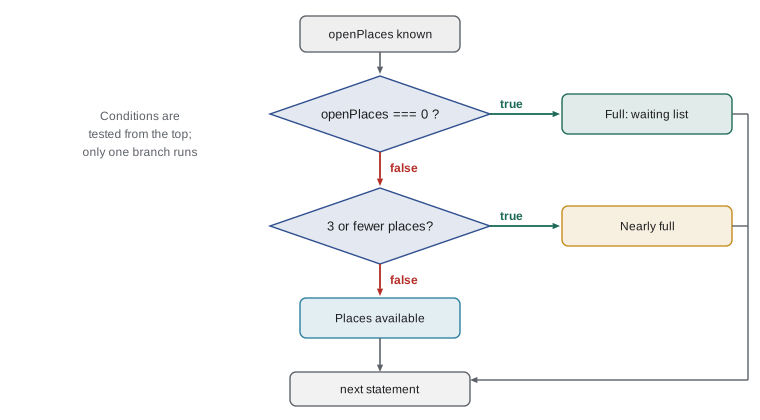
const openPlaces = 0;
if (openPlaces === 0) {
  console.log('Full: join the waiting list');
} else if (openPlaces <= 3) {
  console.log('Nearly full');
} else {
  console.log('Places available');
}Full: join the waiting list
What this code does
The shift has no open places, so the first condition is true and the waiting-list message is printed. The other two branches are skipped without being tested. Change openPlaces to 2 or to 8 and press Run to see the other two messages.
Order matters in a chain. Because JavaScript stops at the first true condition, put the most specific cases first. If the <= 3 test came before the === 0 test, a full shift would match <= 3 and be described as nearly full, because 0 is less than 3. When you write a chain, test each branch with a value that should reach it, and with the values on each boundary, such as 0, 3 and 4 here.
Building conditions
Any expression can be a condition. Most use the comparison operators from Lesson 4, combined with &&, || and ! when a rule has several parts. Lucy's kitchen rule, for example, has three parts: the volunteer must be 16 or over, must be trained, and the shift must have a place.
const age = 17;
const trained = true;
const openPlaces = 4;
if (age >= 16 && trained && openPlaces > 0) {
  console.log('Booked for the kitchen');
} else if (age < 14) {
  console.log('Volunteers must be 14 or older');
} else {
  console.log('Try a grocery shift instead');
}Booked for the kitchen
What this code does
A 17-year-old trained volunteer asks for a kitchen shift that has 4 places. All three parts of the first condition are true, so the booking message is printed. A younger or untrained volunteer would fall through to one of the other two messages.
When a condition becomes long, give its parts names. const oldEnough = age >= 16; and const hasPlace = openPlaces > 0; turn if (oldEnough && trained && hasPlace) into something that reads like Lucy's sticky note. Names also make it easy to print the parts while you are looking for a bug.
if statements can be nested, one inside another. Nesting is natural when the second question only makes sense after the first, such as asking which kind of shift a volunteer wants only after checking their age. Deep nesting is hard to follow, though. Two or three levels are a sensible limit; beyond that, combine conditions with && or move the inner part into a function, as Lesson 8 shows.
Truthy and falsy
The condition of an if does not have to be a boolean. JavaScript converts whatever value it finds to true or false. Values that convert to false are called falsy, and there are only a handful of them. Every other value is truthy, including the strings '0' and 'false', an empty array and any non-zero number.
| Falsy value | Type |
|---|---|
| false | boolean |
| 0 and -0 | number |
| 0n | bigint |
| '' (empty string) | string |
| null | null |
| undefined | undefined |
| NaN | number |
Truthiness makes some checks very short. if (name) is true when name holds any non-empty string, so it catches an empty form field. if (!phone) is true when phone is null, undefined or empty. The short form has a catch: if (openPlaces) is false when openPlaces is 0, which is a real, meaningful number. When zero is a valid answer, compare explicitly: if (openPlaces > 0) or if (openPlaces !== null).
const answers = ['Amara', '', '0', 0, null, 'false'];
for (const value of answers) {
  if (value) {
    console.log(JSON.stringify(value) + ' is truthy');
  } else {
    console.log(JSON.stringify(value) + ' is falsy');
  }
}"Amara" is truthy "" is falsy "0" is truthy 0 is falsy null is falsy "false" is truthy
What this code does
A short loop, explained in Lesson 7, tests six values one after another. JSON.stringify shows each value with quotation marks around strings, so that the empty string is visible. Only the empty string, the number 0 and null are falsy, while the strings '0' and 'false' are non-empty text and therefore truthy.
Checking input before using it
Decisions are the main tool for handling input safely. Input from people is unpredictable: an empty box, letters where a number belongs, a number far too large. A careful program checks before it calculates, a habit called validation. The usual order is: check that something was entered, convert it, check that the conversion worked, then check that the value is in range.
const typed = prompt('Age: ');
const age = Number(typed);
if (typed.trim() === '') {
  console.log('Please enter your age.');
} else if (Number.isNaN(age)) {
  console.log('Age must be a number.');
} else if (age < 14 || age > 120) {
  console.log('Volunteers must be 14 or older.');
} else {
  console.log(`Thanks. Age ${age} recorded.`);
}Age: twelve Age must be a number.
What this code does
The Input box gives the answer twelve, typed as a word. The text is not empty, but Number cannot convert it, so age is NaN and the second message is printed. Try 12, 35 and an empty line to reach each of the other branches.
The empty check comes first because Number('') is 0, a valid number, and an empty answer would otherwise slip through as age 0. Number.isNaN catches text that is not a number. The range check catches mistakes such as 350. Only when all three checks pass does the program use the value. In real pages, the same order of checks applies to form fields, and the HTML form attributes you met in Web Development Fundamentals, such as required and min, add a first line of defence in the browser.
The conditional operator
For a small choice between two values, the conditional operator, often called the ternary operator because it has three operands, is more compact than an if. It is written condition ? valueIfTrue : valueIfFalse and gives back one of the two values. Use it to choose a value, not to run statements.
const openPlaces = 1;
const label = openPlaces === 1 ? 'place' : 'places';
console.log(`${openPlaces} ${label} left`);
const shiftType = 'kitchen';
const minimumAge = shiftType === 'kitchen' ? 16 : 14;
console.log('Minimum age:', minimumAge);1 place left Minimum age: 16
What this code does
The first choice picks the word place or places so that the message is grammatical for 1 place. The second sets the minimum age to 16 for kitchen shifts and 14 for everything else. Each conditional operator gives back one value, which is stored in a constant.
Conditional operators can be nested, but a chain of them is much harder to read than an if with else if. Keep them for simple two-way choices.
The switch statement
When one value is compared with a list of fixed possibilities, a switch statement can be clearer than a long else if chain. JavaScript compares the value with each case using strict equality, ===, and runs the code from the first match. The break statement ends the switch; without it, JavaScript carries straight on into the next case, which is called fall-through. A default case runs when nothing matches.
const day = 'Wed';
let soup;
switch (day) {
  case 'Mon':
    soup = 'Squash and lentil';
    break;
  case 'Tue':
  case 'Thu':
    soup = 'Minestrone';
    break;
  case 'Wed':
    soup = 'Chicken noodle';
    break;
  case 'Fri':
    soup = 'Chef\'s choice';
    break;
  default:
    soup = 'No lunch service today';
}
console.log(`${day}: ${soup}`);Wed: Chicken noodle
What this code does
The day is compared with each case in turn until it matches Wed, which sets the soup to chicken noodle, and break leaves the switch. Tuesday and Thursday share one block by stacking their case lines with nothing between them. Any day that is not listed reaches the default case.
Stacking cases, as with Tuesday and Thursday above, is the one good use of fall-through. Forgetting a break is the classic switch bug: the program runs the code for the matching case and then the next one as well. Many code editors warn about missing breaks; Lesson 11 shows how to track down this kind of mistake. Use switch when you are matching one value against fixed values, and if for ranges and anything more complicated, such as age >= 16.
Putting the rules together
By Thursday afternoon, Mira had turned the sticky note into code. The program below is close to her version; it reads three answers, validates them and decides what the sign-up page should say. Read it slowly, following the path one set of answers would take, before you press Run.
const age = Number(prompt('Age: '));
const shift = prompt('Shift (kitchen or grocery): ').trim().toLowerCase();
const trained = prompt('Food-handling training (yes or no): ').trim().toLowerCase() === 'yes';
const openPlaces = 3;

if (Number.isNaN(age) || age < 14) {
  console.log('Sorry, volunteers must be 14 or older.');
} else if (shift !== 'kitchen' && shift !== 'grocery') {
  console.log('Please choose kitchen or grocery.');
} else if (openPlaces === 0) {
  console.log('That shift is full. Join the waiting list?');
} else if (shift === 'kitchen' && (age < 16 || !trained)) {
  console.log('Kitchen shifts need training and an age of 16 or over.');
} else {
  const warning = openPlaces <= 3 ? ' (nearly full)' : '';
  console.log(`Booked: ${shift} shift${warning}`);
}Age: 15 Shift (kitchen or grocery): Kitchen Food-handling training (yes or no): yes Kitchen shifts need training and an age of 16 or over.
What this code does
The Input box gives the answers 15, Kitchen and yes. The age passes the first check and kitchen is a valid shift with places left, but the volunteer is under 16, so the fourth branch explains why the booking is refused. Change the age to 17 and run it again to see the booking confirmed with a nearly-full warning.
Try it yourself
Waiting list message
Read the number of open places on a shift with Number(readline()). Print Full: join the waiting list if it is 0, Last place! if it is exactly 1, Nearly full if it is 2 or 3, and Places available otherwise.
The Input box holds 1, so the expected output is Last place!. Test your program with 0, 3 and 10 too, by changing the Input box.
const openPlaces = Number(readline());
// Write an if, else if, else chain
Try it yourself
Lunch special by day
Read a three-letter day name with readline(). Using a switch, print the lunch special: Mon and Wed give Soup and bread, Tue and Thu give Chili bowl, Fri gives Fish tacos, and any other day gives Closed.
Print it in the form Fri: Fish tacos. The Input box holds Fri.
const day = readline();
let special;
// Write the switch here
console.log(`${day}: ${special}`);
Common mistakes
Mistakeif (openPlaces) checks that the variable has a value.
Instead0 is falsy, so a shift with 0 places would fail the check. Compare explicitly, for example openPlaces > 0.
MistakeThe order of else if branches does not matter.
InsteadJavaScript runs only the first branch whose condition is true. Put the most specific conditions first.
Mistakeif (age = 16) checks whether age is 16.
InsteadA single = assigns 16 to age, and the condition is always truthy. Use === to compare.
MistakeA switch without break stops after the matching case.
InsteadWithout break, execution falls through into the following cases. End each case with break.
MistakeThe string 'false' is falsy.
InsteadAny non-empty string is truthy, including 'false' and '0'. Only the empty string is falsy.
Summary and key terms
- An if statement runs a block only when its condition is true. else runs when it is false, and else if chains several conditions; only the first true branch runs, so order matters.
- Always use braces and indent the block.
- Conditions are built from comparisons and the logical operators, and naming the parts of a long condition makes it readable.
- JavaScript converts any condition to true or false: false, 0, -0, 0n, the empty string, null, undefined and NaN are falsy, and everything else is truthy.
- Validate input in order: present, convertible, in range.
- The conditional operator, condition ? a : b, chooses between two values.
- A switch compares one value with fixed cases using ===; break ends each case, and default catches the rest.
- if statement
- A statement that runs a block of code only when its condition is true.
- condition
- The expression an if tests, converted to true or false.
- block
- A group of statements between curly braces.
- else if
- A further condition tested only when the previous ones were false.
- truthy
- A value that counts as true in a condition.
- falsy
- A value that counts as false in a condition: false, 0, -0, 0n, the empty string, null, undefined or NaN.
- validation
- Checking that input is present, of the right type and in range before using it.
- conditional operator
- The ? : operator, which gives back one of two values depending on a condition.
- switch statement
- A statement that compares one value with a list of cases.
- fall-through
- In a switch, carrying on into the next case because there is no break.
Practice problems
Work each problem on paper first, then reveal the answer to check.
Which branch runs when score is 70: if (score >= 50) ... else if (score >= 65) ...?
Show answer
The first, because 70 is at least 50 and JavaScript stops at the first true condition. Put the higher threshold first.
Is the empty array [] truthy or falsy?
Show answer
Truthy. Every object, including an empty array, is truthy.
Rewrite if (paid) { label = 'Paid'; } else { label = 'Due'; } with the conditional operator.
Show answer
const label = paid ? 'Paid' : 'Due';
Why check for an empty answer before calling Number()?
Show answer
Number('') gives 0, a valid number, so an empty answer would otherwise pass as zero.
When is switch a better choice than if?
Show answer
When one value is compared with several fixed values, such as day names. Ranges and complex rules are clearer with if.
Lesson quiz · 5 questions
Score 60% or more to complete this lesson.
Create a free account to save your progress, take quizzes and earn a certificate.