
JS-101 · Lesson 8 of 12 · 23 min
Functions
▶ Video coming soon A video version of this lesson is on the way.
By the second week of November, Mira's sign-up code had grown to more than a hundred lines, and the same few calculations appeared in four places: converting cents to a price with two decimals, deciding whether a shift was nearly full, building a confirmation message. When Lucy changed the nearly-full rule from three places to two, Mira had to find and fix every copy, and she missed one. Gareth was sympathetic. "Every programmer does that once," he said. "The cure is to write each rule once, give it a name, and use the name everywhere. That is what a function is for."
A function is a named, reusable block of code that can take inputs and give back a result. You have been calling built-in functions since Lesson 1: console.log, Number, Math.ceil, prompt. This lesson shows you how to write your own: declaring and calling functions, parameters and return values, default parameters, arrow functions, where variables can be seen, and how to test a function.
Declaring and calling a function
A function declaration starts with the word function, then the function's name, a pair of parentheses and a block in curly braces. Declaring a function does not run it. The code inside runs only when you call the function, by writing its name followed by parentheses. You can call a function as many times as you like.
function printShiftRules() {
  console.log('Arrive 10 minutes early');
  console.log('Wear closed-toe shoes');
  console.log('Sign in at the front desk');
}

console.log('Monday briefing:');
printShiftRules();
console.log('Saturday briefing:');
printShiftRules();Monday briefing: Arrive 10 minutes early Wear closed-toe shoes Sign in at the front desk Saturday briefing: Arrive 10 minutes early Wear closed-toe shoes Sign in at the front desk
What this code does
The function declaration defines three lines of rules but prints nothing by itself. Each call, written as the name with parentheses, runs the three statements inside the function. Because the function is called twice, the rules appear under both briefings.
Function names follow the same rules as variable names and the same camelCase convention. Because a function does something, its name usually starts with a verb: printShiftRules, calculateTip, formatPrice, isNearlyFull. Functions that answer a yes-or-no question often start with is, has or can.
Parameters and arguments
Most functions need information to work with. A parameter is a variable listed in the parentheses of a function declaration; it acts as a placeholder for a value that will be supplied later. An argument is the actual value passed in when the function is called. Each time the function runs, its parameters are set to the arguments of that call, in order.
function confirmBooking(name, shift) {
  console.log(`Thanks, ${name}. You are booked for ${shift}.`);
}

confirmBooking('Amara', 'Saturday kitchen');
confirmBooking('Dev', 'Tuesday grocery');Thanks, Amara. You are booked for Saturday kitchen. Thanks, Dev. You are booked for Tuesday grocery.
What this code does
The function has two parameters, name and shift. The first call passes the arguments Amara and Saturday kitchen, so those values fill the placeholders in the message. The second call passes different arguments and prints a different confirmation from the same code.
If you pass fewer arguments than there are parameters, the missing parameters are undefined. If you pass more, the extra ones are ignored. JavaScript does not complain either way, which is convenient but means a typo in a call can go unnoticed. Default parameters, below, are one way to handle missing arguments deliberately.
Returning a value
A function that only prints is useful, but a function that gives back a result is far more useful, because the caller can store the result, combine it with other values or pass it to another function. The return statement ends the function and gives back the value of the expression after it. The call itself then evaluates to that value, just as Math.ceil(9.4) evaluates to 10.
function centsToPrice(cents) {
  return (cents / 100).toFixed(2);
}

const soup = centsToPrice(550);
console.log(`Soup: ${soup}`);
console.log(`Sandwich: ${centsToPrice(625)}`);
console.log(`Order: ${centsToPrice(550 + 625 + 200)}`);Soup: 5.50 Sandwich: 6.25 Order: 13.75
What this code does
The function turns a whole number of cents into a price with two decimal places and returns it as text. The first call stores the result in a constant before printing it, the second puts the call straight inside a template literal, and the third passes an expression as the argument. All three use one rule written in one place.
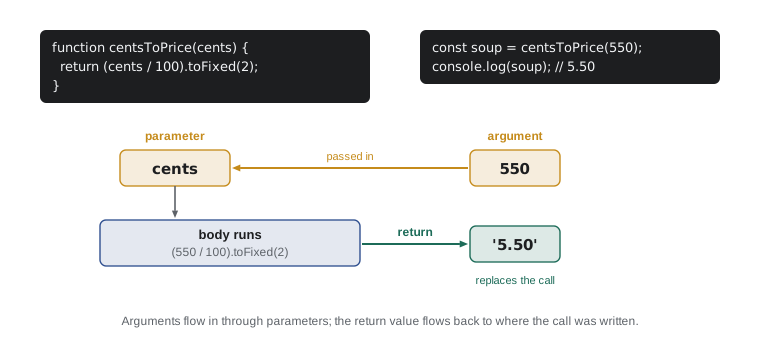
return ends the function immediately, even in the middle of a loop or an if. Any statements after it in the same path are never run. A function with no return, or with return; on its own, gives back undefined, which is why console.log itself, which only prints, evaluates to undefined in the console.
Returning early is a useful way to handle special cases at the top of a function, so that the main calculation below does not have to be wrapped in an if. Each early return is sometimes called a guard clause.
function shiftStatus(openPlaces) {
  if (openPlaces === 0) {
    return 'Full';
  }
  if (openPlaces <= 2) {
    return 'Nearly full';
  }
  return 'Places available';
}

console.log(shiftStatus(0));
console.log(shiftStatus(2));
console.log(shiftStatus(9));Full Nearly full Places available
What this code does
The function returns as soon as it knows the answer. With 0 places the first return gives Full and nothing after it runs. With 2 places the second return gives Nearly full, and any larger number reaches the last line, so Lucy's rule now lives in one place.
Default parameters
A parameter can have a default value, written with = in the parameter list. If the caller leaves that argument out, or passes undefined, the default is used. Defaults are ideal for settings that are usually the same, such as a standard tip rate.
function tipAmount(subtotal, rate = 0.15) {
  return Math.round(subtotal * rate * 100) / 100;
}

console.log(tipAmount(20));
console.log(tipAmount(20, 0.2));
console.log(tipAmount(13.75));3 4 2.06
What this code does
The function multiplies a subtotal by a tip rate and rounds the result to whole cents. When the rate is left out, the default of 0.15 is used, so a 20 subtotal gives a tip of 3. Passing 0.2 gives 4, and a 13.75 subtotal at the default rate rounds to 2.06.
Put parameters with defaults after the ones without, so that callers can leave them off the end. A default can be any expression, even a call to another function, and it is evaluated each time the function is called without that argument.
Function expressions and arrow functions
In JavaScript a function is a value, just like a number or a string. You can store one in a variable. A function expression creates a function without declaring it by name and assigns it, usually to a const. Modern code mostly writes these as arrow functions, a shorter syntax introduced in ES2015: the parameters, an arrow made of = and >, and the body.
const addTax = function (amount, rate) {
  return amount * (1 + rate);
};

const addTaxArrow = (amount, rate) => {
  return amount * (1 + rate);
};

const addTaxShort = (amount, rate) => amount * (1 + rate);

const double = n => n * 2;

console.log(addTax(10, 0.13).toFixed(2));
console.log(addTaxArrow(10, 0.13).toFixed(2));
console.log(addTaxShort(10, 0.13).toFixed(2));
console.log(double(21));11.30 11.30 11.30 42
What this code does
The same tax calculation is written three ways: a function expression, an arrow function with a block, and an arrow function with a short body that returns its expression automatically. All three give 11.30 for an amount of 10 at a rate of 0.13. The last arrow has a single parameter, so its parentheses can be left out.
When an arrow function's body is a single expression with no braces, the value of that expression is returned automatically; this is called an implicit return. With braces, you need an explicit return, just as in a declaration. Parentheses around the parameters are required for zero or several parameters and optional for exactly one; many teams write them always, for consistency.
Which form should you use? A common modern style is to use declarations for the main, named functions of a program, and arrow functions for short functions, especially ones passed to other functions, which Lesson 9 does constantly. Arrow functions also differ from other functions in how they treat the special word this, which matters for objects and is explained in Lesson 10.
There is one practical difference between declarations and expressions. Function declarations are hoisted: JavaScript processes them before running any code, so you can call a declared function on a line above its declaration. Functions stored in a const cannot be used before the line that creates them. Most programmers declare functions before using them anyway, which avoids the question.
Scope
Scope is the part of a program where a variable can be seen and used. A variable declared inside a function, including its parameters, is local to that function: it is created each time the function is called and disappears when the function returns, and code outside cannot see it. Variables declared with let or const inside any block, such as the block of an if or a loop, are local to that block. A variable declared outside every function and block is global and can be seen everywhere.
const taxRate = 0.13;

function priceWithTax(cents) {
  const taxCents = Math.round(cents * taxRate);
  return cents + taxCents;
}

console.log(priceWithTax(1000));
console.log(typeof taxCents);1130 undefined
What this code does
The global constant taxRate is visible inside the function, which uses it to work out the tax on 1000 cents. The function returns 1130 cents. The constant taxCents is local to the function, so outside it the name does not exist and typeof reports undefined.
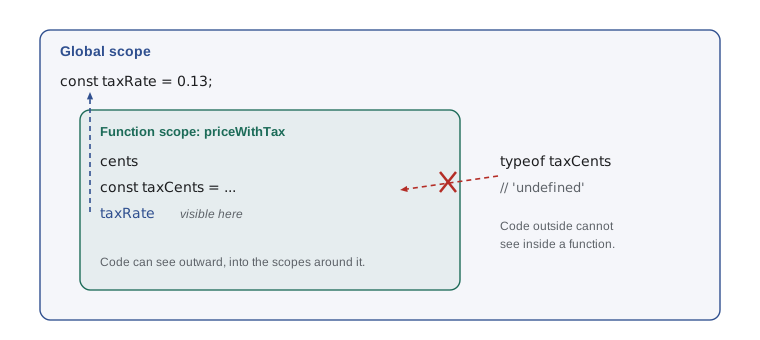
Code can always see outward, into the scopes that contain it, but never inward. Keeping variables as local as possible is one of the best habits in programming. A function that uses only its parameters and local variables can be understood, tested and reused on its own, without worrying about what the rest of the program has done to some global variable.
If a local variable has the same name as an outer one, the local one wins inside its scope; this is called shadowing. It is legal but confusing, so avoid it by choosing distinct names.
Pure functions and side effects
A pure function gives back a result that depends only on its arguments, and changes nothing outside itself. centsToPrice and tipAmount are pure: the same arguments always give the same answer, and calling them has no other effect. Anything else a function does, such as printing, changing a global variable or saving data, is a side effect. Programs need side effects, or they would be invisible, but they are easiest to manage when most functions are pure and a few clearly named ones do the printing and saving.
Pure functions are easy to test, because testing is just calling them with known inputs and comparing the result with what it should be. You do not need special tools to start. A small helper that prints whether each check passed is enough to catch mistakes, and it makes it safe to change a function later: run the checks again, and if they still pass, the change did not break anything.
function checkEqual(label, actual, expected) {
  const result = actual === expected ? 'ok' : `FAIL (got ${actual}, expected ${expected})`;
  console.log(`${label}: ${result}`);
}

function shiftStatus(openPlaces) {
  if (openPlaces === 0) return 'Full';
  if (openPlaces <= 2) return 'Nearly full';
  return 'Places available';
}

checkEqual('no places', shiftStatus(0), 'Full');
checkEqual('two places', shiftStatus(2), 'Nearly full');
checkEqual('three places', shiftStatus(3), 'Places available');
checkEqual('one place', shiftStatus(1), 'Full');no places: ok two places: ok three places: ok one place: FAIL (got Nearly full, expected Full)
What this code does
A helper function compares an actual result with the expected one and prints ok or a failure message. Four checks call shiftStatus with boundary values. The first three pass, while the last was written with a wrong expectation on purpose, so it shows what a failure looks like.
Look at how the checks concentrate on the boundaries: 0, 2 and 3 are exactly where the answer changes. Bugs gather at boundaries, so that is where tests do the most good. Professional projects use testing frameworks, and Node.js has one built in, node --test, but the idea is the same: known inputs, expected outputs and an automatic comparison.
Functions that use functions
Functions can call other functions, and larger programs are built this way: small functions that each do one job, combined by bigger ones. Because functions are values, a function can also be passed as an argument to another function. A function passed in this way is called a callback. You will use callbacks constantly with arrays in the next lesson; here is a first taste.
const centsToPrice = cents => (cents / 100).toFixed(2);
const withTax = cents => Math.round(cents * 1.13);

function receiptLine(item, cents, format) {
  return `${item.padEnd(14, '.')} ${format(cents)}`;
}

console.log(receiptLine('Squash soup', 550, centsToPrice));
console.log(receiptLine('Taxed soup', 550, c => centsToPrice(withTax(c))));Squash soup... 5.50 Taxed soup.... 6.21
What this code does
receiptLine builds one line of a receipt and receives, as its third argument, a function that decides how to show the amount. The first call passes centsToPrice, which gives 5.50. The second passes a small arrow function that adds tax before formatting, showing 6.21, without changing receiptLine at all.
A function can also accept any number of arguments with a rest parameter, written with three dots before the last parameter's name. The arguments are collected into an array. function total(...prices) can be called as total(5.5, 6.25, 2) or with any other number of prices, and a for...of loop inside can add them up.
Try it yourself
Tip calculator function
Complete the function tipCents(subtotalCents, rate) so that it returns the tip in whole cents, rounded to the nearest cent, with rate defaulting to 0.15. Then complete formatCents(cents) so that it returns the amount as a string with two decimal places.
The starter's three lines then print Tip: 3.00, Tip: 4.00 and Tip: 2.06. Do not change those lines.
// Complete both functions
function tipCents(subtotalCents, rate) {
  return 0;
}

function formatCents(cents) {
  return String(cents);
}

console.log(`Tip: ${formatCents(tipCents(2000))}`);
console.log(`Tip: ${formatCents(tipCents(2000, 0.2))}`);
console.log(`Tip: ${formatCents(tipCents(1375))}`);
Try it yourself
Who can book?
Complete the function canBook(age, shift, trained) so that it returns true or false. Volunteers must be 14 or older for any shift. For a 'kitchen' shift they must also be 16 or older and trained.
The starter prints the result of four calls by joining each one into a string. The expected output is true, false, false and true, one per line.
function canBook(age, shift, trained) {
  // Replace this line with the rules
  return false;
}

console.log('' + canBook(15, 'grocery', false));
console.log('' + canBook(13, 'grocery', true));
console.log('' + canBook(15, 'kitchen', true));
console.log('' + canBook(17, 'kitchen', true));
Common mistakes
MistakeDeclaring a function runs it.
InsteadA declaration only defines the function. Its code runs each time the function is called, with parentheses.
MistakeA function that prints a value also returns it.
InsteadPrinting is a side effect. Without a return statement, the function gives back undefined.
MistakeStatements after return still run.
Insteadreturn ends the function immediately; code after it on the same path is never reached.
MistakeA variable declared inside a function can be used after the function finishes.
InsteadLocal variables exist only inside their function or block. Return the value if the caller needs it.
Mistakex => { x * 2 } returns double x.
InsteadWith braces, an arrow function needs an explicit return. Write x => x * 2 or x => { return x * 2; }.
Summary and key terms
- A function is a named, reusable block of code.
- A declaration defines it, and a call, written with parentheses, runs it.
- Parameters are placeholders in the declaration; arguments are the values passed in a call. return ends the function and gives back a value; without it the result is undefined.
- Early returns, or guard clauses, handle special cases first.
- Default parameters supply values for missing arguments.
- Function expressions store a function in a variable; arrow functions are a shorter form, and an arrow function without braces returns its expression implicitly.
- Function declarations are hoisted.
- Scope decides where variables can be seen: locals live inside their function or block, code can see outward but not inward, and keeping variables local is good practice.
- Pure functions depend only on their arguments and have no side effects, which makes them easy to test with known inputs.
- Functions can be passed to other functions as callbacks, and rest parameters collect any number of arguments into an array.
- function
- A named, reusable block of code that can take inputs and return a result.
- call
- To run a function by writing its name followed by parentheses.
- parameter
- A variable in a function declaration that receives an argument.
- argument
- A value passed to a function when it is called.
- return value
- The value a function gives back to the place where it was called.
- default parameter
- A parameter with a value used when the argument is missing or undefined.
- arrow function
- A short function syntax with the parameters, an arrow made of = and >, and a body.
- scope
- The part of a program where a variable can be seen and used.
- pure function
- A function whose result depends only on its arguments and that has no side effects.
- callback
- A function passed as an argument to another function.
Practice problems
Work each problem on paper first, then reveal the answer to check.
What does function f(a, b) { return a - b; } give for f(10, 4)?
Show answer
6. The arguments 10 and 4 fill the parameters a and b in order.
What does a function with no return statement give back?
Show answer
undefined.
Rewrite function half(n) { return n / 2; } as an arrow function.
Show answer
const half = n => n / 2;
Why are pure functions easy to test?
Show answer
The same arguments always give the same result and nothing else changes, so a test only needs to call the function and compare the result.
Why choose boundary values such as 0, 2 and 3 for tests of shiftStatus?
Show answer
They are exactly where the answer changes, which is where mistakes are most likely.
Lesson quiz · 5 questions
Score 60% or more to complete this lesson.
Create a free account to save your progress, take quizzes and earn a certificate.