
JS-101 · Lesson 4 of 12 · 23 min
Operators and expressions
▶ Video coming soon A video version of this lesson is on the way.
The Food Hub's community kitchen was planning a harvest dinner for volunteers on the last Saturday of November, and Lucy had sent Mira a list of questions for the sign-up page to answer. How many tables of eight would 75 guests need? How many seats would be empty? If each guest paid a suggested 12.50 for the meal, what would the takings be? Could a volunteer who had worked 6 shifts and finished food-handling training help in the kitchen? "Every one of those is an expression," Gareth said when Mira showed him the list. "Values joined by operators. Once you can write expressions, the computer does the arithmetic and the checking for you."
This lesson covers the arithmetic operators, the order in which JavaScript applies them, the trouble with decimal numbers, the Math object, assignment shortcuts, turning text into numbers, comparison operators and the logical operators that combine yes-or-no answers.
Expressions and operators
An expression is any piece of code that produces a value. 75 is an expression; so is guests, if guests is a variable; so is guests / 8 + 1. An operator is a symbol that combines values to produce a new one, such as + or *. The values an operator works on are its operands. In guests / 8, the operator is / and the operands are guests and 8.
Expressions can be as long as you like, and they can appear anywhere a value is allowed: on the right of an assignment, inside the parentheses of console.log, as an operand of another operator. JavaScript works out, or evaluates, every expression to a single value before using it.
Arithmetic operators
| Operator | Meaning | Example | Result |
|---|---|---|---|
| + | Addition | 75 + 5 | 80 |
| - | Subtraction | 80 - 75 | 5 |
| * | Multiplication | 12.5 * 4 | 50 |
| / | Division | 75 / 8 | 9.375 |
| % | Remainder | 75 % 8 | 3 |
| ** | Exponentiation (power) | 2 ** 10 | 1024 |
Division with / always gives the exact answer, including any decimal part: 75 / 8 is 9.375. To count whole tables you need to round, which the Math functions later in this lesson do. The remainder operator % gives what is left over after dividing as many whole times as possible: 75 guests at tables of 8 fill 9 tables with 72 people, leaving 3. Remainders are useful whenever you split things into groups: guests into tables, minutes into hours, shifts into weeks.
const guests = 75;
const seatsPerTable = 8;
console.log('Exact division:', guests / seatsPerTable);
console.log('Full tables:', Math.floor(guests / seatsPerTable));
console.log('Guests left over:', guests % seatsPerTable);
console.log('Tables needed:', Math.ceil(guests / seatsPerTable));Exact division: 9.375 Full tables: 9 Guests left over: 3 Tables needed: 10
What this code does
The program divides 75 guests by 8 seats per table. Exact division gives 9.375 tables, Math.floor rounds down to 9 full tables, and the remainder operator shows 3 guests are left over. Math.ceil rounds up to 10, the number of tables the kitchen must actually set out.
The ** operator raises a number to a power: 2 ** 3 is 2 times 2 times 2, or 8. You will use it less often than the others, but it appears in interest and growth calculations, such as a donation that grows by a fixed share each year.
Order of operations
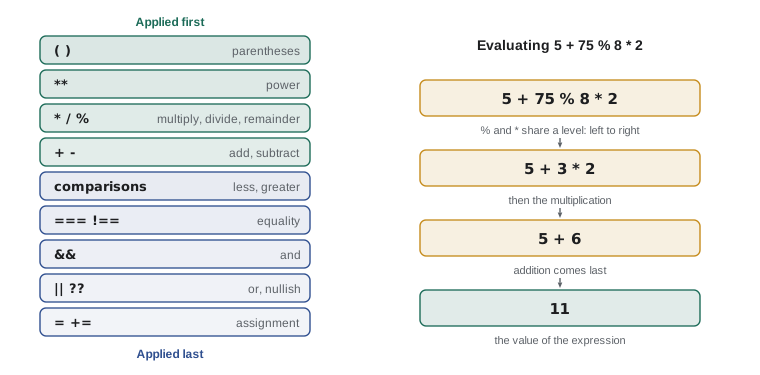
When an expression has several operators, JavaScript does not simply work from left to right. It follows rules of precedence, the same ones you learned in school arithmetic. Parentheses come first, then **, then *, / and %, then + and -. Operators with the same precedence are applied from left to right, except **, which works from right to left.
console.log(5 + 3 * 2);
console.log((5 + 3) * 2);
console.log(20 - 8 - 2);
console.log(2 ** 3 ** 2);11 16 10 512
What this code does
The first line multiplies before adding, so it prints 11. Parentheses in the second line force the addition first and give 16. The third works left to right, 20 minus 8 then minus 2, giving 10, and the last works right to left, 3 squared is 9 and 2 to the 9th power is 512.
When you are unsure of the order, add parentheses. They cost nothing, and they tell the next reader exactly what you meant. An average is the classic trap: a + b / 2 divides only b by 2, while (a + b) / 2 gives the average of the two.
Decimals are not exact
Try 0.1 + 0.2 in the console. The answer is not 0.3 but 0.30000000000000004. This is not a JavaScript bug; nearly every programming language does the same. Numbers are stored in binary, and just as one third cannot be written exactly in decimal (0.333 and so on, forever), most decimal fractions such as one tenth cannot be written exactly in binary. The stored value is extremely close, but not exact, and tiny errors can show up when you add or compare.
console.log(0.1 + 0.2);
console.log('Equal to 0.3? ' + (0.1 + 0.2 === 0.3));
console.log((0.1 + 0.2).toFixed(2));
const totalCents = 10 + 20;
console.log(totalCents / 100);0.30000000000000004 Equal to 0.3? false 0.30 0.3
What this code does
The first line shows the rounding drift that binary storage causes. Because of it, the comparison on the second line is false. Calling toFixed(2) rounds the result to two decimal places for display, and working in whole cents avoids the problem completely: 10 cents plus 20 cents is exactly 30, which is 0.3 of a dollar.
There are two practical rules for money. First, for display, use toFixed(2), which rounds a number to two decimal places and gives back a string, so (12.5 * 3).toFixed(2) is '37.50'. Second, for calculations that must be exact, such as an order total, work in whole cents and divide by 100 only when you show the result. Whole numbers are always stored exactly, so cents never drift. The capstone calculator in Lesson 12 uses both rules. ECMAScript 2026 also added Math.sumPrecise, which adds a list of decimals without drift, but it is so new that older browsers lack it, so this course does not rely on it.
The Math object
JavaScript gathers its mathematical tools in a built-in object called Math. You call them by writing Math., the name of the tool and its inputs in parentheses. The ones you will use most are listed below.
| Function | What it gives back | Example | Result |
|---|---|---|---|
| Math.round(x) | x rounded to the nearest whole number | Math.round(9.5) | 10 |
| Math.floor(x) | x rounded down | Math.floor(9.9) | 9 |
| Math.ceil(x) | x rounded up | Math.ceil(9.1) | 10 |
| Math.trunc(x) | x with the decimal part removed | Math.trunc(-9.7) | -9 |
| Math.abs(x) | x without its sign | Math.abs(-4) | 4 |
| Math.min(a, b, ...) | The smallest input | Math.min(4, 2, 7) | 2 |
| Math.max(a, b, ...) | The largest input | Math.max(4, 2, 7) | 7 |
| Math.sqrt(x) | The square root of x | Math.sqrt(81) | 9 |
| Math.random() | A random decimal from 0 up to (not including) 1 | Math.random() | for example 0.42 |
To round to two decimal places as a number rather than a string, multiply by 100, round, and divide by 100: Math.round(37.456 * 100) / 100 gives 37.46. Combining Math.min and Math.max is a neat way to keep a value inside limits, such as making sure a volunteer cannot sign up for fewer than 1 or more than 3 shifts in one go.
const price = 12.5;
const guests = 75;
const takings = price * guests;
console.log('Takings:', takings);
console.log('Average of two shifts:', (3.5 + 4) / 2);
console.log('Rounded to cents:', Math.round(37.456 * 100) / 100);
const requested = 5;
console.log('Shifts allowed:', Math.min(Math.max(requested, 1), 3));Takings: 937.5 Average of two shifts: 3.75 Rounded to cents: 37.46 Shifts allowed: 3
What this code does
Seventy-five guests paying 12.50 each give takings of 937.5, which JavaScript prints without a trailing zero. The average uses parentheses so the two shift lengths are added before dividing. The last two lines round a price to cents and clamp a request for 5 shifts to the allowed maximum of 3.
Assignment shortcuts
Programs often update a variable based on its own value: add an amount to a total, take one off a count. JavaScript has short forms for these updates. total += 12.5 means total = total + 12.5, and the same pattern works with every arithmetic operator: -=, *=, /=, %= and **=. To add or subtract exactly one, use the increment operator ++ or the decrement operator --.
let openPlaces = 6;
openPlaces -= 1;
openPlaces--;
console.log('Open places:', openPlaces);

let hours = 0;
hours += 3.5;
hours += 4;
hours *= 2;
console.log('Hours:', hours);Open places: 4 Hours: 15
What this code does
The first part starts with 6 open places and takes off one place twice, once with -= and once with --, leaving 4. The second part builds a total: it adds two shift lengths to get 7.5 and then doubles it with *= to get 15.
Write ++ and -- as statements on their own line, as above. They can also appear inside larger expressions, where count++ and ++count give back different values, but code that relies on that difference is hard to read. Keeping them on their own line avoids the question entirely.
Text and numbers: + and conversion
The + operator has two jobs. With two numbers it adds them. If either operand is a string, it concatenates: it joins the two into one longer string, turning the other operand into text first. This is convenient for building messages, and a trap when a number arrives as text.
console.log(3 + 4);
console.log('3' + 4);
console.log('Shifts: ' + 3 + 4);
console.log('Shifts: ' + (3 + 4));
console.log('10' - 4, '10' * 2);7 34 Shifts: 34 Shifts: 7 6 20
What this code does
Two numbers are added to give 7, but a string plus a number is joined into the text 34. The third line works left to right, joining the label and 3 and then 4, while parentheses in the fourth make the addition happen first. Subtraction and multiplication have no text meaning, so JavaScript turns '10' into a number for them.
Input from prompt, readline and forms is always text. To do arithmetic with it, convert it with Number(). Number('12.5') gives the number 12.5. If the text is not a valid number, the result is NaN, short for "not a number", a special number value that spreads through any arithmetic it touches. Two other functions read a number from the start of a string and stop at the first character that does not fit: parseInt('8 guests') gives 8 and parseFloat('12.5kg') gives 12.5. Number() is stricter, which is usually what you want for form input.
const typed = prompt('Guests: ');
console.log('As text:', typed + 5);
const guests = Number(typed);
console.log('As a number:', guests + 5);
console.log(Number('twelve'), parseInt('8 guests'), Number(''));Guests: 75 As text: 755 As a number: 80 NaN 8 0
What this code does
The Input box supplies 75, which prompt gives back as text, so adding 5 joins it into 755. After Number converts it, adding 5 gives 80. The last line shows that text that is not a number becomes NaN, that parseInt reads the 8 at the front of 8 guests, and that an empty string surprisingly becomes 0.
That last result, Number('') giving 0, matters for forms: an empty box quietly becomes zero. Lesson 6 shows how to check for an empty answer before converting it. To test whether a value is NaN, use Number.isNaN(value). You cannot use value === NaN, because NaN is the only value in JavaScript that is not equal to itself.
Comparison operators
A comparison asks a question about two values and gives back a boolean, true or false. These answers drive every decision a program makes, which Lesson 6 covers.
| Operator | Question | Example | Result |
|---|---|---|---|
| === | Equal (same type and value)? | 3 === 3 | true |
| !== | Not equal? | 3 !== '3' | true |
| < | Less than? | 6 < 4 | false |
| > | Greater than? | 6 > 4 | true |
| <= | Less than or equal? | 4 <= 4 | true |
| >= | Greater than or equal? | 3 >= 4 | false |
JavaScript has two equality operators. Strict equality, ===, is true only when both values have the same type and the same value, so 3 === '3' is false. Loose equality, ==, converts the values to a common type first, so 3 == '3' is true. Loose equality's conversion rules are full of surprises: 0 == '' is true, null == 0 is false but null >= 0 is true. Use === and !== always. If you need to compare a number with text from a form, convert the text with Number() first, so that the comparison says exactly what you mean.
const shifts = 6;
console.log('At least 5 shifts: ' + (shifts >= 5));
console.log('Exactly 6 shifts: ' + (shifts === 6));
console.log('Strict 3 and text 3: ' + (3 === '3'));
console.log('Loose 3 and text 3: ' + (3 == '3'));
console.log('Text order: ' + ('apple' < 'banana'));At least 5 shifts: true Exactly 6 shifts: true Strict 3 and text 3: false Loose 3 and text 3: true Text order: true
What this code does
Each line joins a label with the answer to one comparison, so the output reads as a list of checks. A volunteer with 6 shifts has at least 5 and exactly 6, so both answers are true. Strict equality says the number 3 and the text 3 differ, loose equality converts them and says they match, and strings compare in alphabetical order.
Look at the parentheses around each comparison. Without them, + would run first, because it has higher precedence than >=, and the label would be joined to shifts before the comparison happened.
Logical operators
Real questions often combine several conditions. Can a volunteer help in the kitchen? Only if they have worked at least 5 shifts and finished food-handling training. Is the lunch counter busy? Yes if it is Friday or there is a special event. JavaScript has three logical operators for combining booleans.
| Operator | Name | True when | Example |
|---|---|---|---|
| && | and | both sides are true | shifts >= 5 && trained |
| || | or | at least one side is true | isFriday || hasEvent |
| ! | not | the value is false | !trained |
const shifts = 6;
const trained = false;
const kitchenReady = shifts >= 5 && trained;
console.log('Can help in the kitchen: ' + kitchenReady);
console.log('Needs training: ' + !trained);
const isFriday = true;
const hasEvent = false;
console.log('Busy at lunch: ' + (isFriday || hasEvent));Can help in the kitchen: false Needs training: true Busy at lunch: true
What this code does
The volunteer has enough shifts but no training, so the and expression gives false: both conditions must hold. The not operator flips false to true, showing that training is still needed. The or expression is true because one of its two conditions, being Friday, is true.
&& and || stop as soon as they know the answer, which is called short-circuit evaluation. In a && b, if a is false the whole expression must be false, so b is never looked at; in a || b, if a is true, b is skipped. This lets you guard a risky step: guests > 0 && total / guests > 10 never divides by zero, because the division only runs when there are guests.
Strictly speaking, && and || give back one of their operands, not always a boolean. || gives back the first operand that counts as true, which programmers use to supply a default: name || 'Guest'. That catches empty strings, but also catches 0, which is a problem for numbers. The nullish coalescing operator ?? is more precise: a ?? b gives back b only when a is null or undefined. Use ?? for defaults, so that a real 0 is kept.
const typedName = '';
const tablesBooked = 0;
console.log('Name:', typedName || 'Guest');
console.log('Tables with ||:', tablesBooked || 10);
console.log('Tables with ??:', tablesBooked ?? 10);
let phone = null;
console.log('Phone:', phone ?? 'not given');Name: Guest Tables with ||: 10 Tables with ??: 0 Phone: not given
What this code does
An empty name counts as false, so the or operator replaces it with Guest. The or operator also wrongly replaces a real 0 tables with 10, while ?? keeps the 0 because 0 is neither null nor undefined. The last line uses ?? to show a friendly message when the phone is null.
Try it yourself
Tables for the harvest dinner
The Input box holds the number of guests who have signed up, as text. Read it with prompt('Guests: '), convert it to a number, and print two lines: Tables needed: N (tables seat 8, and a part-full table still counts) and Empty seats: M.
For 75 guests the output after the prompt line is Tables needed: 10 and Empty seats: 5. Your program must work for any number of guests.
const guests = Number(prompt('Guests: '));
const seatsPerTable = 8;
// Work out the tables and empty seats
Try it yourself
Who can help in the kitchen?
A volunteer can help in the kitchen if they have worked at least 5 shifts and are trained, or if they are a staff member. Using the variables in the starter, store the answer in canHelp with one expression and print Can help: followed by the answer.
With the starter values the output is Can help: true.
const shifts = 3;
const trained = true;
const isStaff = true;
const canHelp = false; // replace false with your expression
console.log('Can help: ' + canHelp);
Common mistakes
Mistake75 / 8 gives 9 in JavaScript.
InsteadDivision gives the exact answer, 9.375. Use Math.floor or Math.ceil to get a whole number.
Mistake0.1 + 0.2 === 0.3 is true.
InsteadBinary storage makes the sum 0.30000000000000004. Work in whole cents or round before comparing.
Mistake'5' + 3 gives 8.
InsteadWith a string operand, + joins text and gives '53'. Convert input with Number() first.
Mistake== and === are the same.
Instead== converts types before comparing and has many surprises. Use === and !==.
Mistakecount || 10 is a safe default for a number.
Instead|| replaces 0 as well as null. Use count ?? 10 to replace only null and undefined.
Summary and key terms
- An expression produces a value, and operators combine operands into new values.
- The arithmetic operators are +, -, *, /, % for the remainder and ** for powers.
- Precedence decides the order of operations; parentheses override it.
- Decimal fractions are stored in binary and can drift, so display money with toFixed(2) and calculate in whole cents.
- The Math object provides rounding, min, max, sqrt and random.
- Assignment shortcuts such as += and ++ update a variable in place. + joins strings, so convert text with Number(), which gives NaN for invalid text.
- Comparisons give booleans; use === and !== rather than == and !=.
- The logical operators &&, || and ! combine booleans and short-circuit.
- Use ?? to supply a default only when a value is null or undefined.
- expression
- Code that produces a value.
- operator
- A symbol that combines operands into a new value, such as + or ===.
- operand
- A value an operator works on.
- remainder operator
- The % operator, which gives what is left after whole division.
- precedence
- The rules that decide which operators in an expression are applied first.
- NaN
- Not a number: the number value produced by invalid arithmetic or conversion.
- concatenate
- To join strings end to end.
- strict equality
- The === operator, true only when type and value are both the same.
- short-circuit evaluation
- The rule that && and || stop as soon as the result is known.
- nullish coalescing
- The ?? operator, which supplies a default only for null or undefined.
Practice problems
Work each problem on paper first, then reveal the answer to check.
What is 29 % 4?
Show answer
1, because 4 goes into 29 seven times, making 28, with 1 left over.
What does 10 + 2 * 3 ** 2 give?
Show answer
28. The power comes first (9), then the multiplication (18), then the addition.
How would you show the number 7.5 as 7.50?
Show answer
(7.5).toFixed(2), which gives the string '7.50'.
What is the value of Number('4') + Number('5')?
Show answer
9, because both strings are converted to numbers before adding.
Why is guests > 0 && total / guests > 10 safe when guests is 0?
Show answer
&& stops at the first false operand, so the division is never evaluated.
Lesson quiz · 5 questions
Score 60% or more to complete this lesson.
Create a free account to save your progress, take quizzes and earn a certificate.