
DCT-110 · Lesson 6 of 12 · 20 min
Cooling at a glance
Hall A is loud. Jamal notices it on his first walk: a steady roar of fans from the cooling units along the walls and from thousands of small fans in the servers. In the cold aisle the air is cool and moves past his face; behind the racks, in the hot aisle, it is noticeably warm and he can feel it pushing against him. That movement of air is the visible half of the cooling system. This lesson explains how a data centre removes the heat its equipment makes, from the server fans to the roof, and what technicians do every day to keep it working.
Why cooling matters
Nearly every watt a server uses becomes heat. A rack drawing 6 kW gives off about the same heat as six small space heaters running flat out; an AI rack drawing 130 kW gives off as much as a large house's furnace in a cold snap, in a space the size of a refrigerator. If that heat is not removed, the air around the equipment warms, the components inside get hotter, and the servers first slow themselves down to protect their processors, then shut down. Cooling failures can take a hall from normal to dangerous in minutes.
The equipment does not need cold air; it needs air within a range. ASHRAE, the engineering society that publishes the guidelines used worldwide, recommends that the air entering IT equipment stay between 18 °C and 27 °C, with limits on humidity. Most equipment is rated to tolerate wider ranges for short periods. Running the cold aisle warmer, within the recommended range, saves a great deal of energy, which is why modern halls are not as cold as people expect.
How heat leaves the building
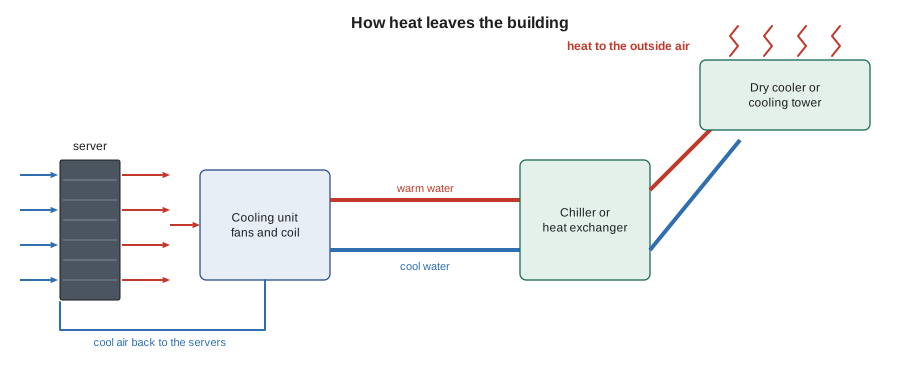
Heat moves out of a data centre in a chain, much like power moves in:
- Server fans draw cool air in the front of each server, across its hot components, and push warm air out the back.
- The warm air returns to cooling units, which pass it over coils filled with cold water or refrigerant. The coils absorb the heat and the cooled air goes back to the cold aisle.
- The water or refrigerant carries the heat out of the hall to a heat rejection plant: chillers, dry coolers or cooling towers.
- The heat rejection plant releases the heat to the outside air, sometimes with the help of evaporating water.
Each link in the chain must keep up with the load. If the cooling units lose their cold water, or the chillers trip, the hall begins to warm at once, and the speed at which it warms depends on how much heat the equipment makes and how much cold water and air are stored in the system.
Cooling units in the hall
The cooling units in an air-cooled hall come in two main types:
- CRAC units, computer room air conditioners, contain their own refrigeration compressor, like a large air conditioner. They are common in smaller and older rooms.
- CRAH units, computer room air handlers, contain only fans and a coil fed with chilled water from a central plant. They are common in large data centres because a central plant is more efficient.
Hall A has twelve CRAH units along its walls, pushing cold air into the space under the raised floor. Halls B and C use fan walls, large banks of fans and coils in galleries along the hall. Other halls use cooling units placed in the rows between racks, close to the heat. Each type has its own alarms, filters and maintenance, but the principle is the same: cold coil, fans, air.
Hot aisles and cold aisles
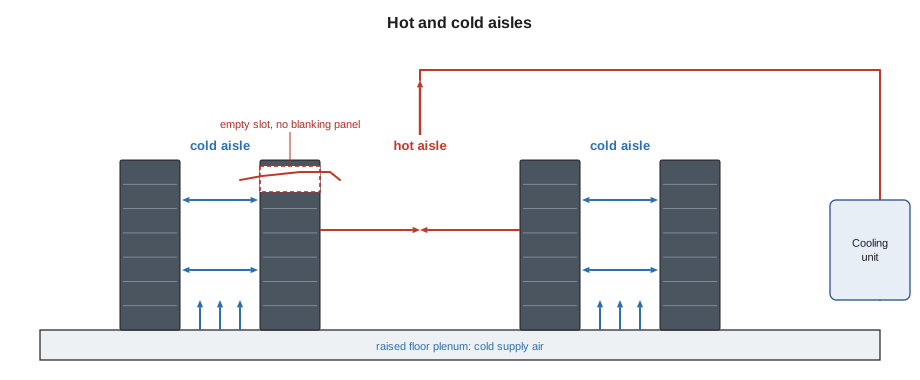
Air cooling works only if the cool air reaches the server inlets and the hot exhaust goes back to the cooling units without mixing. The standard layout puts racks in rows with their fronts facing each other across a cold aisle and their backs facing each other across a hot aisle. Containment improves on this by closing off one of the aisles. Cold-aisle containment puts doors at the ends of the cold aisle and a roof over it, so the cold air is trapped in front of the servers. Hot-aisle containment encloses the hot aisle instead and ducts the hot air back to the cooling units, leaving the rest of the room at the cold-aisle temperature.
Containment only works if it is complete. Every gap lets hot and cold air mix: an empty slot in a rack where a server has been removed, a missing blanking panel, a cable opening in a floor tile without a brush seal, a containment door propped open, a missing side panel between two cabinets. The cooling system then has to work harder, or some servers get warm air at their inlets even though the room is cool on average. Most of the cooling work a data centre technician does is keeping that containment tight.
- Fill every empty rack slot with a blanking panel.
- Keep containment doors closed; never prop them open, even for a short job.
- Use brush grommets or seals where cables pass through floors, roofs and cabinet tops.
- Report missing or broken containment panels, gaskets and door closers.
- Keep cables, boxes and tools out of the paths of airflow under raised floors and in front of server inlets.
Liquid cooling
Air can carry only so much heat. Above roughly 30 to 50 kW per rack, moving enough air becomes difficult and noisy, and the newest AI racks are far above that. Liquid carries heat much better than air: a litre of water absorbs about 3,500 times as much heat as a litre of air for the same temperature rise. Liquid cooling therefore brings the coolant close to the hottest components. The main approaches are:
- Rear-door heat exchangers: a coil fed with chilled water replaces the rear door of a rack and cools the exhaust air before it leaves the rack.
- Direct-to-chip cooling: small cold plates sit on the processors and other hot chips inside each server, with coolant flowing through them. Fans still cool the rest of the server.
- Immersion cooling: the servers are submerged in tanks of a non-conducting liquid that carries away all their heat.
Hall D uses direct-to-chip cooling. In each row, coolant distribution units, CDUs, in the technical gallery pump a treated coolant through manifolds at the back of each rack and through the cold plates in the servers. The CDUs pass the heat to the building's water loop, which carries it to dry coolers on the roof. Air handlers still cool about a fifth of the heat, from power supplies, memory and network gear, that the cold plates do not reach.
Liquid in the white space brings new rules. Every connection is a possible leak, so racks have leak detection cables under them and drip trays, quick-disconnect couplings are handled only as trained, and any sign of liquid is treated as an urgent alarm. Lessons in later courses cover liquid cooling work in detail; for now Jamal learns never to disconnect, bump or lean on a coolant hose, and to report any drip, stain or chemical smell at once.
Heat rejection and free cooling
On the roof and in the yard, the heat leaves the building. Chillers use a refrigeration cycle to make cold water and push the heat out at a higher temperature. Dry coolers are large radiators with fans that cool water with outside air alone. Cooling towers cool water by evaporating part of it, which works well in hot weather but uses water. In a cold climate such as Beauharnois, dry coolers can do all the cooling without chillers for much of the year, which is called free cooling or economization. YUL-2's chillers run only on the warmest summer days.
Units: kilowatts, BTUs and tons
Cooling is measured in the same units as heat. A kilowatt of IT load makes a kilowatt of heat, and the cooling must remove it. North American equipment is often rated in British thermal units per hour, BTU/h, or in tons of refrigeration, an old unit equal to the heat needed to melt a short ton of ice in a day: 12,000 BTU/h, or about 3.517 kW. Technicians meet all three units on nameplates and in monitoring screens.
# Heat from IT load in kW, BTU/h and tons, and the air needed to carry it
it_kw = [6, 12, 40, 132]    # rack loads in Halls A, B, D
delta_t = 12               # air temperature rise across the servers, kelvin
for kw in it_kw:
    btu_h = kw * 3412
    tons = kw / 3.517
    air = kw / (1.2 * 1.006 * delta_t) * 3600   # m3/h
print(f"{kw:4d} kW = {btu_h:9,.0f} BTU/h = {tons:5.1f} tons; air needed about {air:,.0f} m3/h")6 kW = 20,472 BTU/h = 1.7 tons; air needed about 1,491 m3/h 12 kW = 40,944 BTU/h = 3.4 tons; air needed about 2,982 m3/h 40 kW = 136,480 BTU/h = 11.4 tons; air needed about 9,940 m3/h 132 kW = 450,384 BTU/h = 37.5 tons; air needed about 32,803 m3/h
The last column shows why air cooling runs out of room. A 6 kW rack needs an airflow a few household fans could manage; a 132 kW rack would need more than twenty times as much air through the same footprint. That is why Hall D carries most of its heat away in liquid.
Monitoring temperature and humidity
Sensors on the fronts of racks, usually at the top, middle and bottom of the cold aisle, report inlet temperatures to the monitoring system. Others measure the return air, the supply air from each cooling unit, humidity and, in liquid-cooled halls, coolant temperatures, pressures and flows. The building management system and the data centre infrastructure management system, DCIM, display them and raise alarms. A rising inlet temperature on one rack often means a local airflow problem, such as a missing blanking panel or a blocked tile; a rising temperature across a whole row often means a cooling unit problem.
Humidity matters too. Air that is too dry encourages static electricity, which can damage components; air that is too damp risks condensation. Modern guidelines allow a wide range, and most halls control humidity only loosely, but technicians still follow electrostatic discharge rules when they handle components, as later courses explain.
Daily cooling tasks for a technician
On each walk through a hall, Jamal checks a short list and records what he finds:
- Containment doors closed, panels in place, no gaps.
- Blanking panels in every empty slot of every rack he passes.
- Floor tiles in place, perforated tiles only in cold aisles, no tiles lifted without a cone and a ticket.
- No boxes, carts or cables blocking cold aisles or server inlets.
- No unusual noise, vibration, water or smell at cooling units.
- Rack inlet temperatures on the monitoring screen within range.
Problems he cannot fix himself, such as a broken containment door closer or a cooling unit alarm, go to the facilities team through a ticket, and urgent ones by radio.
Worked problem
A warm rack in Hall A
The monitoring system shows that the top inlet sensor on cabinet A-14-07 reads 29 °C while its neighbours read 22 °C. Roz asks Jamal to investigate.
Show solution
- Walk to the cabinet and look at the front. The top four rack units are empty and have no blanking panel.
- Look behind it, in the hot aisle. Hot exhaust from the servers below is curling up and over through the open slots into the front of the cabinet.
- Check the customer's cabinet ticket history: a customer removed two old servers last week and did not install blanking panels.
- Under the site's standing rule for blanking panels, install two 2U panels from the hall's stock, record the work against the cabinet, and watch the sensor return to normal within ten minutes.
Answer: The fault was not the cooling system at all. A missing blanking panel let the rack heat itself. This is one of the most common cooling problems in any air-cooled hall, and one of the easiest to fix.
Common mistakes
MistakePropping a containment door open for a quick job.
InsteadKeep containment doors closed; open them only to pass through.
MistakeLeaving empty rack slots open.
InsteadInstall blanking panels in every empty slot.
MistakeMaking the cold aisle as cold as possible.
InsteadEquipment needs air within the recommended range, not cold air; colder costs energy.
MistakePutting a perforated tile in a hot aisle.
InsteadPerforated tiles belong in cold aisles; in a hot aisle they waste cold air.
MistakeTouching or disconnecting liquid cooling hoses.
InsteadOnly trained staff handle coolant connections; report any drip or stain at once.
Summary and key terms
- Almost all IT power becomes heat, which must be removed continuously.
- Heat travels from server fans to cooling units, then through water or refrigerant to chillers, dry coolers or towers, and out to the air.
- ASHRAE recommends inlet air of 18 to 27 °C; equipment needs air in range, not cold air.
- Hot and cold aisles and containment keep cold supply and hot exhaust apart; every gap wastes cooling.
- Liquid cooling, such as direct-to-chip cold plates, is needed for high-density AI racks.
- One ton of refrigeration is 12,000 BTU/h or about 3.5 kW.
- CRAH
- Computer room air handler: a cooling unit with fans and a chilled-water coil.
- CRAC
- Computer room air conditioner: a cooling unit with its own refrigeration compressor.
- Containment
- Barriers that enclose a hot or cold aisle so that supply and exhaust air do not mix.
- Blanking panel
- A plate that closes an empty slot in a rack.
- CDU
- Coolant distribution unit: equipment that pumps and controls coolant for liquid-cooled racks.
- Free cooling
- Cooling with outside air or water without running chillers.
Practice problems
Work each problem on paper first, then reveal the answer to check.
Why does a missing blanking panel make a rack run hot?
Show answer
Hot exhaust from the back recirculates through the open slot to the front inlets.
How many kilowatts is one ton of refrigeration?
Show answer
About 3.5 kW.
What is the difference between a CRAC and a CRAH?
Show answer
A CRAC has its own compressor; a CRAH uses chilled water from a central plant.
Why do AI racks need liquid cooling?
Show answer
Their heat is too great for air to carry through the rack's footprint; liquid carries far more heat per volume.
Lesson quiz · 5 questions
Score 60% or more to complete this lesson.
Create a free account to save your progress, take quizzes and earn a certificate.