
DCT-110 · Lesson 1 of 12 · 20 min
What a data centre is
Jamal Pierce badges in for his first shift at Stonebridge Data's YUL-2 campus in Beauharnois, on the south shore of Lake Saint-Louis, about forty minutes from downtown Montréal. From the road the campus looks like four long, windowless warehouses with rows of large fans on the roofs, a fenced yard of generators and a switching station next to the high-voltage lines that come from the Beauharnois generating station. Inside those plain walls sit tens of thousands of computers that run banking apps, streaming services, hospital records and, in the newest hall, the training runs of an artificial intelligence company. Jamal has been hired as a data centre technician. His mentor for the next year is Rosalind Kerr, a critical facilities technician who has worked on the campus since its first hall opened in 2014. Everyone calls her Roz.
Roz starts where she starts with every new technician: before anyone learns a single procedure, they should be able to explain in plain words what the building is for and why it is built the way it is. This course is that explanation. It is a technician's course. The design and engineering side of data centres, the sizing of transformers, chillers and fibre plant, is covered in the Data Centre Engineering school; here the aim is to understand the building well enough to work in it safely, follow its rules and know what every room, pipe and cable tray is doing.
A building for computers
A data centre is a building, or part of a building, designed to house computing equipment and keep it running without interruption. The computers in it are mostly servers: flat metal boxes, each with processors, memory and storage, mounted in tall steel cabinets called racks. Alongside them sit storage systems that hold data on spinning disks and flash drives, and network equipment that connects the servers to each other and to the outside world. All of it turns electricity into computation, and almost all of that electricity ends up as heat.
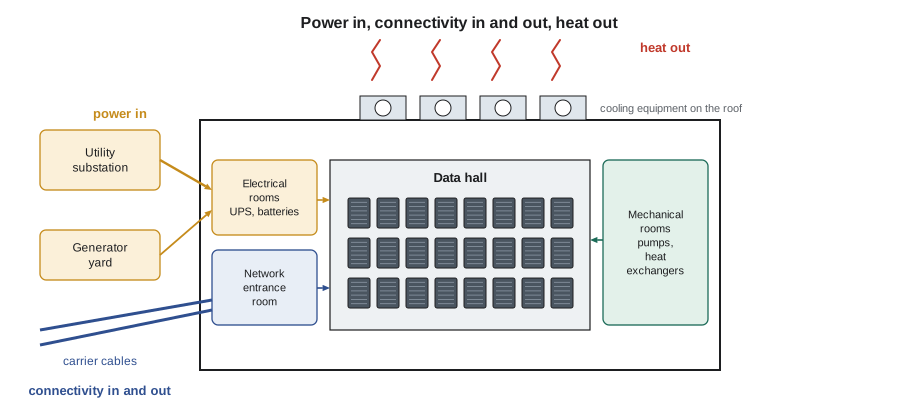
That one fact explains most of what a data centre looks like. A building full of computers needs three things that an ordinary office does not: a very large, very reliable supply of electricity; a way to remove the heat as fast as the computers make it; and many fibre connections to the outside world. Everything else, the security, the fire protection, the monitoring and the people on shift around the clock, exists to protect those three things and the equipment that depends on them.
What happens inside
It helps to follow one request through the building. When a customer opens a banking app in the morning, a message leaves the phone, crosses the mobile network and the internet, and arrives at the campus through one of the fibre cables that enter the building from the street. Network equipment in the meet-me room passes it to the bank's own cage, where a switch sends it to a server. The server looks up the account in a storage system, builds the answer and sends it back the same way. The whole trip takes a fraction of a second. Multiply that by millions of requests an hour, from thousands of customers, and the building never stops working.
While all of that happens, the facility itself is busy too. The utility feed arrives at medium voltage from Hydro-Québec's network, transformers step it down, switchgear distributes it, and uninterruptible power supplies, UPS units, condition it and stand ready to carry the load from batteries if the utility flickers. Generators wait in the yard to take over within seconds if the outage lasts. Cooling units push cold air or cold liquid to the racks and carry the heat to the roof, where dry coolers reject it to the outside air, which in a Quebec winter does most of the work for free. Sensors report thousands of readings to the monitoring system every minute, and people watch those readings around the clock.
Why reliability is the whole point
Most buildings can tolerate an hour without power. A data centre cannot tolerate a second. When a server loses power, the work it was doing stops, data that had not been saved can be lost, and the services that depend on it fail for every user at once. A bank's payment system that goes down for twenty minutes can strand thousands of card payments; a hospital's records system that goes down can delay care. Customers pay data centres a premium precisely so that this does not happen, and their contracts set out exactly how much downtime is allowed, usually none.
That is why every system in the building has a backup, and often a backup for the backup. Two utility feeds, two power paths to each rack, spare UPS modules, spare generators, spare cooling units, two or more fibre routes to different carriers: the language of the data centre is full of words like redundancy, N+1 and 2N, which Lesson 8 explains. It is also why technicians work under strict rules. Most outages in well-built data centres are not caused by equipment failing on its own. They are caused by people: a breaker opened on the wrong panel, a cable pulled from the wrong server, a procedure skipped. Roz puts it simply: the building is designed so that one failure does not take anything down, and the rules are designed so that we do not become the second failure.
# How much downtime does an availability figure allow?
hours_per_year = 365 * 24
for availability in (99.0, 99.9, 99.99, 99.999):
    down_h = hours_per_year * (1 - availability / 100)
    if down_h >= 1:
        text = f"{down_h:.2f} hours"
    else:
        text = f"{down_h * 60:.1f} minutes"
print(f"{availability:7.3f} % -> about {text} of downtime per year")99.000 % -> about 87.60 hours of downtime per year 99.900 % -> about 8.76 hours of downtime per year 99.990 % -> about 52.6 minutes of downtime per year 99.999 % -> about 5.3 minutes of downtime per year
The figures show why the industry talks about nines. Going from three nines to four nines cuts the allowed downtime from almost nine hours a year to under an hour; five nines leaves about five minutes. A single mistake during a maintenance window can use up years of that budget.
Who uses data centres
Almost every organization uses data centres, whether it knows it or not. A small business that keeps its accounts in a cloud application is renting a small slice of servers in someone else's data centre. A bank may own its own data centre, rent cages in a colocation facility and also use cloud services. The largest technology companies build campuses of their own. Lesson 3 sorts the types; for now it is enough to know the main groups of tenants Jamal will meet at Stonebridge:
- Enterprises: banks, insurers, retailers and governments that rent cages or suites and install their own equipment.
- Cloud and content providers: companies that rent whole halls or buildings and fill them with their own standard racks.
- Network carriers and internet exchanges: companies that bring fibre into the building and sell connections to everyone else.
- AI companies: newer tenants that need very high power density and liquid cooling for racks of graphics processors.
At YUL-2, Hall A holds about forty enterprise customers in cages, among them the Bayview Credit Union. Halls B and C are leased to a cloud provider. Hall D, the newest, was built for Corvid AI, which trains large models on racks that each draw more power than a whole row did in 2014. A small edge site in Saint-Hyacinthe, an hour east, runs equipment for a telecom company close to its customers.
| Hall | Opened | Use | Typical power per rack | Cooling |
|---|---|---|---|---|
| Hall A | 2014 | Enterprise colocation, about 200 racks | about 6 kW | Air, raised floor |
| Halls B and C | 2018, 2020 | Cloud provider, leased whole | about 12 kW | Air, contained aisles |
| Hall D | 2026 | AI training, 60 racks | about 132 kW | Liquid to the chip, plus air |
| Edge site | 2023 | Telecom equipment | about 8 kW | Packaged air units |
A short history
The first computer rooms in the 1960s held one large mainframe, with raised floors for its thick cables and cold air from dedicated air conditioners. Through the 1980s and 1990s companies filled rooms with smaller servers, and the internet boom of the late 1990s created the first buildings whose only purpose was to host other companies' servers and connect them to the internet: the colocation industry. The 2000s brought virtualization, which let one server run many virtual machines, and the 2010s brought cloud computing, which concentrated much of the world's computing in very large campuses run by a handful of companies. Since about 2023, demand for artificial intelligence has driven another wave, with racks that draw ten or twenty times the power of a typical enterprise rack and need liquid cooling.
Each wave left its mark on the buildings that are still running. Hall A at Stonebridge still has a raised floor because in 2014 that was how cold air reached the racks. Hall D has a plain concrete slab with overhead pipes and busway, because liquid cooling and very heavy racks made the raised floor unnecessary. A technician who understands why each generation was built the way it was can work in all of them.
The size of the industry
Data centres used about 415 terawatt-hours of electricity worldwide in 2024, roughly 1.5 % of all the electricity the world used, according to the International Energy Agency, which expects that figure to roughly double by 2030 as AI grows. In the United States, Lawrence Berkeley National Laboratory estimated that data centres used about 4.4 % of the country's electricity in 2023 and could reach between about 7 % and 12 % by 2028. Lesson 2 looks at that growth and what it means for jobs.
The numbers matter to a technician for two reasons. They explain why the industry is hiring, and they explain why energy efficiency is watched so closely. A hall that wastes a few percent of its power on inefficient cooling wastes as much electricity as a small town. Lesson 5 introduces the main efficiency measure, power usage effectiveness, and the code at the end of that lesson shows how to calculate it from meter readings.
The technician's place in the building
Jamal's job title is data centre technician. In some companies the same role is called a data centre operations technician, a remote hands technician or a deployment technician. The work divides roughly into two halves. On the IT side, technicians install and remove equipment, run and patch cables, replace failed parts, check lights and labels and carry out tasks that customers request remotely. On the facilities side, critical facilities technicians like Roz look after the power and cooling plant: they read gauges, run generator tests, change filters, respond to alarms and support contractors who maintain the big equipment. In a small site one person may do both; at Stonebridge they are separate teams that work side by side. Lesson 10 describes the roles in detail.
Whichever side they work on, technicians share one responsibility: they are the people physically in the building. Monitoring systems can raise an alarm, but someone has to walk to the unit, look, listen and decide what to do. Customers in other cities depend on that person's eyes and hands. Roz tells Jamal that the best technicians notice things: a fan that sounds different, a cable tie that has slipped, a door left propped open, a warm spot on a panel. Most of this course is about learning what normal looks and sounds like, so that the abnormal stands out.
Worked problem
Explaining the building to a visitor
On Jamal's second day a customer's new IT manager visits Hall A and asks Roz why the building needs so many generators when the utility has not failed in years. Roz asks Jamal to answer.
Show solution
- Start with what the building does: it keeps the customer's servers running every second of every day.
- Explain that servers stop instantly when power is lost, and services fail for every user at once.
- Explain that the utility is very reliable but not perfect: storms, equipment faults and grid events still happen, and even a short outage costs the customer far more than the generators.
- Explain that the UPS batteries carry the load for the few seconds or minutes until the generators start and take over, and that there are spare generators so that one failing to start does not matter.
Answer: The visitor hears the logic of the building in four sentences: continuous service, instant failure without power, an imperfect utility and layers of backup. Roz adds that the generators are tested every month, under load, so that the day they are needed is not the first time they run.
Common mistakes
MistakeThinking of a data centre as just a big server room.
InsteadA data centre is a complete system of power, cooling, connectivity, security and people built around the IT equipment.
MistakeAssuming backup systems mean mistakes do not matter.
InsteadRedundancy covers one failure; a human error during maintenance can be the second failure that causes an outage.
MistakeTreating customer equipment as the site's own.
InsteadCustomer equipment belongs to the customer; technicians touch it only under a ticket the customer has authorized.
MistakeIgnoring small changes in sound, smell or temperature.
InsteadReport anything abnormal; technicians are the building's eyes and ears.
MistakeExpecting every hall to work the same way.
InsteadHalls built in different years use different cooling, floors and power layouts; learn each one.
Summary and key terms
- A data centre houses computing equipment and keeps it running without interruption.
- Its three essential services are power in, connectivity in and out, and heat out.
- Reliability is the whole point; every major system has a backup, and strict rules prevent people from causing outages.
- Tenants include enterprises, cloud providers, carriers and AI companies, each with different needs.
- Data centres used about 1.5 % of the world's electricity in 2024 and that share is growing quickly.
- Technicians are the people physically in the building, on the IT side or the facilities side.
- Data centre
- A building or space designed to house computing equipment and keep it running continuously.
- Server
- A computer, usually mounted in a rack, that runs applications and services.
- Rack
- A standard steel frame or cabinet that holds servers, storage and network equipment.
- Availability
- The share of time a system is working, often expressed as a number of nines.
- UPS
- Uninterruptible power supply: equipment that conditions power and carries the load from batteries during an outage.
- Critical facilities technician
- A technician who operates and maintains the power and cooling plant.
Practice problems
Work each problem on paper first, then reveal the answer to check.
Name the three essential services a data centre provides to the equipment in it.
Show answer
Power in, connectivity in and out, and removal of heat.
Why do data centres have generators even where the utility is very reliable?
Show answer
Because even short outages are very costly and the UPS batteries can carry the load only until generators start.
About how much downtime per year does 99.99 % availability allow?
Show answer
About 53 minutes.
What is the most common cause of outages in well-built data centres?
Show answer
Human error, such as operating the wrong breaker or skipping a step in a procedure.
Lesson quiz · 5 questions
Score 60% or more to complete this lesson.
Create a free account to save your progress, take quizzes and earn a certificate.