
DCT-110 · Lesson 11 of 12 · 20 min
Working in a live critical facility: rules, tickets and the remote hands request
On the Monday of his fourth week, Jamal gets his first remote hands ticket of his own. A customer in Hall A wants a technician to check the status lights on a storage array, reseat a drive that the array reports as missing, and send back a photo of the front panel. It is a ten-minute job. Roz makes him spend twenty minutes reading the ticket, the customer's instructions and the site rules before he touches anything, and then watches him do it. This lesson explains why. In a data centre that never stops, the way work is requested, approved, carried out and recorded is what keeps one person's mistake from becoming everyone's outage.
Everything is live
The first rule of a critical facility is that everything is live. Every server is serving someone, every cable is carrying traffic, every breaker is feeding a load, every pipe is under pressure. There is no quiet hour to work in, and no part of the building that can be switched off for convenience. The rules that follow all come from that fact. Roz's short version, which every new technician at Stonebridge learns on day one, is: know what you are touching, know why you are touching it, and know who said you could.
House rules on the floor
Every site has its own written rules, which visitors and contractors sign before they enter. At Stonebridge the main ones for the white space are:
- No food or drink beyond the break room and office areas.
- No cardboard, wood, foam or packing material in the halls; unpack in the build room.
- No propping doors; containment and hall doors stay closed.
- Badge visible at all times; everyone badges through every door.
- No photos without a ticket that requires them.
- No lifting floor tiles, opening containment roofs or moving perforated tiles without permission.
- No ladders or lifts in the aisles without checking overhead obstructions and sprinkler heads, and never near busway tap-offs or coolant pipes without a spotter.
- Tools stay in a tool bag or cart, never left on top of equipment.
- Report anything abnormal: smell, sound, heat, water, an open cabinet, a stranger.
None of these rules is unusual in the industry. They exist because every one of them has caused an outage, an injury or a security breach somewhere.
Electrostatic discharge
Electronic components can be damaged by static electricity far too small to feel. A person walking across a floor can build up thousands of volts. Before handling server components, drives, memory or circuit boards, technicians ground themselves with an antistatic wrist strap clipped to the rack's grounding point or an antistatic mat, handle parts by their edges, keep them in antistatic bags until installation and never place them on top of equipment or on a cardboard box. Raised floors and halls are designed to bleed off static, but the wrist strap is still the rule.
Tickets: how work is requested
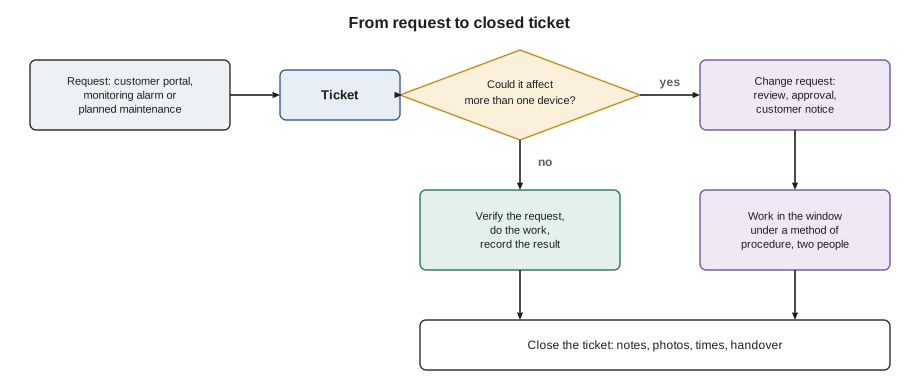
Almost all work in a data centre starts with a ticket, a record in the site's ticket system that says what is to be done, who asked, when and why. Tickets come from several sources:
- Customer requests through the customer portal: remote hands, installations, cross-connects, deliveries and access requests.
- Monitoring alarms, which open tickets automatically for the team that owns the system.
- Planned maintenance from the maintenance management system.
- Staff observations, such as a missing blanking panel found on a round.
Each ticket has a type, a priority, an owner, a target time and a history. The ticket is where instructions are given, questions are asked, results are reported and the work is closed. If it is not in the ticket, it did not happen. Customers can see their own tickets and often read every word, so notes are written clearly and professionally.
Remote hands and smart hands
Remote hands is the name for work technicians do on customer equipment at the customer's request, because the customer's own staff are elsewhere. Basic remote hands tasks are simple and quick: power cycling a server, pressing a button, reading lights, reseating a cable, swapping a labelled cable, photographing a panel, plugging in a console cable so the customer can reach a device. Some providers call more involved work smart hands: replacing a failed drive or power supply, racking and cabling new equipment, running a cable test or following a multi-step procedure the customer supplies.
A good remote hands request contains everything the technician needs to do the job without guessing:
- Who: the authorized customer contact making the request and a way to reach them during the work.
- Where: the hall, cage, cabinet and the position of the device in rack units, with its label or serial number.
- What: the exact steps, in order, including what to check before starting.
- How to confirm: what the technician should see when the job has worked, and what to report.
- Risk: whether the customer accepts a possible interruption, and whether the work must wait for a window.
When a request is unclear, the technician asks in the ticket before acting. A cable described as the blue one on the left may be one of six blue cables. A server described by its hostname may not have the hostname on its label. Asking takes a few minutes; guessing wrong can take a customer's service down.
# Format a remote hands request so that nothing is left out
request = {
    "ticket": "RH-48213",
    "customer": "Bayview Credit Union",
    "contact": "M. Leblanc, on call, +1 555 0147",
    "location": "Hall A, cage A-14, cabinet A-14-07, U22-U25",
    "device": "Storage array, label BCU-STOR-02, serial SN7H2Q91",
    "steps": ["Confirm the label and serial match the ticket",
              "Photograph the front panel status lights",
              "Reseat drive bay 11 (amber light) by pulling out 3 cm and reinserting",
              "Wait 2 minutes and photograph the front panel again"],
    "confirm": "Bay 11 light turns green; customer confirms the array sees the drive",
    "risk": "Customer accepts that the array may rebuild; no outage expected",
}
required = ["ticket", "customer", "contact", "location", "device", "steps", "confirm", "risk"]
missing = [k for k in required if not request.get(k)]
print("MISSING: " + ", ".join(missing) if missing else "Request complete")
for k in required:
    v = request[k]
    if isinstance(v, list):
        print(f"{k:9s}:")
        for i, step in enumerate(v, 1):
            print(f"           {i}. {step}")
    else:
print(f"{k:9s}: {v}")Request complete
ticket : RH-48213
customer : Bayview Credit Union
contact : M. Leblanc, on call, +1 555 0147
location : Hall A, cage A-14, cabinet A-14-07, U22-U25
device : Storage array, label BCU-STOR-02, serial SN7H2Q91
steps :
1. Confirm the label and serial match the ticket
2. Photograph the front panel status lights
3. Reseat drive bay 11 (amber light) by pulling out 3 cm and reinserting
4. Wait 2 minutes and photograph the front panel again
confirm : Bay 11 light turns green; customer confirms the array sees the drive
risk : Customer accepts that the array may rebuild; no outage expectedStonebridge's portal enforces most of these fields, but technicians still check every request against the list, because the most important details, such as which drive bay, are the ones customers most often leave vague.
Response times and service levels
Customer contracts set service level agreements, SLAs, for how quickly the site must respond to and complete each kind of request. A typical contract might require a remote hands request to be acknowledged within fifteen minutes and started within an hour, with faster times for urgent requests and slower times for scheduled work. Cross-connects and installations have their own targets in days. The ticket system tracks each request against its SLA and warns the shift lead before a target is missed. Speed matters, but never more than accuracy: an SLA missed by a few minutes is a minor issue; a wrong action taken in a hurry can be a major one.
# Check open tickets against their service levels at the end of a shift
from datetime import datetime, timedelta
now = datetime(2026, 11, 9, 6, 45)
targets = {"urgent": 30, "standard": 120, "scheduled": 24 * 60}  # minutes to complete, illustrative
tickets = [  # id, priority, opened
    ("RH-48213", "standard", datetime(2026, 11, 9, 5, 10)),
    ("RH-48219", "urgent", datetime(2026, 11, 9, 6, 22)),
    ("XC-41890", "scheduled", datetime(2026, 11, 8, 9, 0)),
    ("RH-48202", "standard", datetime(2026, 11, 9, 3, 55)),
]
for tid, pri, opened in tickets:
    due = opened + timedelta(minutes=targets[pri])
    left = (due - now).total_seconds() / 60
    state = "BREACHED" if left < 0 else ("due soon" if left < 30 else "on track")
print(f"{tid} {pri:9s} due {due:%d %b %H:%M} {left:7.0f} min left {state}")RH-48213 standard due 09 Nov 07:10 25 min left due soon RH-48219 urgent due 09 Nov 06:52 7 min left due soon XC-41890 scheduled due 09 Nov 09:00 135 min left on track RH-48202 standard due 09 Nov 05:55 -50 min left BREACHED
The shift lead uses a report like this at handover: anything due soon is finished or handed to the next crew by name, and anything breached is explained to the customer.
Change management
Any work that could affect a live system beyond a single customer device is a change, and changes go through change management. A change request describes what will be done, why, when, by whom, what could go wrong, how the risk is reduced and how the work will be undone if it fails. It is reviewed and approved, often by a change advisory board that meets weekly, and customers who could be affected are notified in advance. Work happens only in its approved window. Emergency changes, for an urgent repair, follow a faster approval but are still recorded and reviewed afterwards.
For the largest risks, such as switching power, transferring loads or working on cooling, the change is carried out under a method of procedure, a MOP: a written, step-by-step script, with checks at each step, a sign-off box for each action and a rollback plan. Two people work through it together, one reading and checking and one acting. Standard operating procedures, SOPs, cover routine tasks, and emergency operating procedures, EOPs, cover responses to failures. Technicians learn to follow these documents exactly, and to stop and call the shift lead when something does not match.
Permits to work
Contractors and staff who do hazardous work, such as electrical work, hot work like welding or grinding, work at height, confined space entry or work on fire suppression systems, need a permit to work issued by the site for that job on that day. The permit lists the hazards, the controls, the isolations and the people involved, and is signed off when the work ends. Fire suppression systems may be isolated during some work and must be restored afterwards. A technician who sees hazardous work without a visible permit stops and calls the shift lead.
Handovers
At the end of every shift the outgoing crew hands over to the incoming one. A good handover covers the redundancy status of every hall, any open incidents, alarms that are being watched, open tickets and their status, changes planned for the next shift, any visitors or contractors still on site, and anything unusual. Stonebridge uses a written handover log and a short face-to-face briefing. Jamal learns to write his notes as if the reader knows nothing about the job, because the reader may be someone who has just come back from two weeks off.
When something goes wrong
If a technician causes or sees an interruption, the rule is to stop, make it safe if that can be done without making it worse, and report immediately to the shift lead. Hiding or delaying a report turns a short incident into a long one. Stonebridge, like most of the industry, runs blameless reviews after incidents: the aim is to find out what happened and change the process so it cannot happen again, not to punish the person who reported it. Incident response is covered in detail in a later course.
Worked problem
Jamal's first remote hands ticket
Ticket RH-48213 asks Jamal to reseat drive bay 11 on the Bayview Credit Union's storage array BCU-STOR-02 in cabinet A-14-07.
Show solution
- Read the ticket and check it is from an authorized contact; it is.
- Collect a wrist strap and the hall's camera tablet, and badge into Hall A and the cage.
- Find cabinet A-14-07 and the array at U22 to U25. Check the label and serial against the ticket before touching anything: both match.
- Photograph the front panel. Bay 11 shows amber; the other bays show green.
- Clip on the wrist strap, release the drive latch, slide the drive out a few centimetres, wait five seconds, push it fully home and close the latch.
- After two minutes bay 11 shows green. Photograph the panel again, update the ticket with both photos and the times, and ask the customer to confirm.
Answer: The customer confirms within minutes that the array sees the drive and has started a rebuild. Jamal's notes let anyone who reads the ticket see exactly what was done, to what, and when.
Common mistakes
MistakeStarting a job from a verbal request.
InsteadWork starts from a ticket from an authorized contact.
MistakeGuessing when instructions are vague.
InsteadAsk in the ticket before acting.
MistakeWorking on live power or cooling without a MOP.
InsteadHigh-risk work follows an approved method of procedure with two people.
MistakeLeaving notes in your head at the end of a shift.
InsteadWrite the handover log so a stranger could pick up the job.
MistakeWaiting to report a mistake until you have fixed it.
InsteadStop, make safe and report immediately.
Summary and key terms
- Everything in a critical facility is live; know what you are touching, why and who authorized it.
- Site house rules keep food, packaging, open doors and unauthorized photos out of the white space.
- Antistatic precautions protect components.
- Tickets record every request, action and result; remote hands requests must say who, where, what, how to confirm and what risk is accepted.
- SLAs set response targets, but accuracy comes before speed.
- Changes are reviewed and approved; high-risk work follows a MOP; hazardous work needs a permit; handovers pass work safely between crews.
- Ticket
- A record of a work request, its instructions, actions and results.
- Remote hands
- Simple work on customer equipment done by site staff at the customer's request.
- SLA
- Service level agreement: contract targets for response and completion times.
- Change request
- A reviewed and approved plan for work that could affect live systems.
- MOP
- Method of procedure: a step-by-step script with checks for a high-risk task.
- Permit to work
- A site authorization for one hazardous job on one day, listing hazards and controls.
Practice problems
Work each problem on paper first, then reveal the answer to check.
Name the five things a good remote hands request contains.
Show answer
Who is asking, where the device is, what to do, how to confirm success and what risk is accepted.
What should you do if a customer's instruction says reseat the blue cable?
Show answer
Ask in the ticket for the exact port and label before acting.
What is a MOP?
Show answer
A method of procedure: a step-by-step script for high-risk work with checks and a rollback plan.
What do you do immediately after causing an interruption?
Show answer
Stop, make safe if possible without making it worse, and report to the shift lead.
Lesson quiz · 5 questions
Score 60% or more to complete this lesson.
Create a free account to save your progress, take quizzes and earn a certificate.