
MSBA-212 · Lesson 9 of 12 · 18 min
Feature updates, quality updates and driver updates
▶ Video coming soon A video version of this lesson is on the way.
Update rings decide when. They do not decide what. Left alone, a device in the "everyone else" ring would take whichever Windows version Windows Update offered once its 90-day feature deferral passed, and whichever drivers the manufacturer had published. In October 2026 that was not what Ama wanted. Microsoft had released Windows 11 version 26H2 at the end of September as an enablement package for devices on 24H2 and 25H2, and Corvallin's fleet was mostly on 25H2 after the spring project. She wanted to move to 26H2 on her schedule, not Windows Update's, and she wanted driver updates for the home-care laptops to stop arriving unannounced, after one touchpad driver had broken right-click on a whole model for a week. That is what feature, quality and driver update policies are for.
Three kinds of content
Windows Update delivers three kinds of content that matter here. Feature updates are new versions of Windows, released once a year in the second half of the year. Quality updates are the monthly cumulative updates, with security fixes released on the second Tuesday of each month, often called Patch Tuesday, and optional non-security previews later in the month. Driver updates come from hardware manufacturers through Windows Update, along with firmware for some devices.
Each kind has its own Intune policy under Devices, Windows updates. These policies are powered by Windows Autopatch, which decides what content is approved, and they need devices that are enrolled in Intune, joined to Microsoft Entra ID or hybrid joined, sending Windows diagnostic data at the required level, and licensed with a Windows edition that includes the Autopatch entitlement, such as through Microsoft 365 E3 or F3.
| Policy | What it decides | Example at Corvallin |
|---|---|---|
| Feature update policy | Which Windows version devices move to and stay on | Windows 11, version 26H2, rolled out gradually |
| Quality update policy | Expedited installation of a specific security update; hotpatch | Expedite an urgent fix; allow hotpatch |
| Driver update policy | Which drivers and firmware devices receive, and when | Manual approval for home-care laptop models |
Feature update policies
A feature update policy names a Windows version. Devices below that version are offered it; devices on it stay there, even when newer versions are released, until the policy changes. That last point is the important one: the policy is a ceiling as well as a target. Rings still apply their deadlines and restart behaviour.
The policy has rollout options. The update can be made available as soon as possible, on a start date, or through a gradual rollout, in which Autopatch offers it to a share of the assigned devices at a time, in groups spaced a set number of days apart. Microsoft also applies safeguard holds: if a known compatibility problem affects a device's hardware or software, Windows Update holds the feature update back from that device until the problem is fixed, and the Intune feature update report shows the hold.
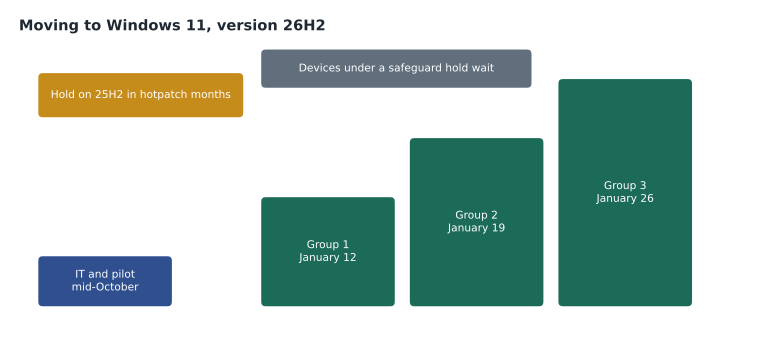
Corvallin's plan was simple. One feature update policy for Windows 11, version 26H2, assigned to the IT and pilot rings in mid-October. A second policy, with a gradual rollout, would take the remaining devices to 26H2 in three groups a week apart. Ama timed it with the hotpatch calendar in lesson 10 in mind: a device that changes Windows version in a hotpatch month leaves the hotpatch cycle until the next quarterly baseline, while one that upgrades in a baseline month stays on it. October and January are baseline months, so the pilot moved in October and the broad rollout was scheduled for January 2027. Until then, a policy for 25H2 held the rest of the fleet on its current version.
Because 26H2 arrived as an enablement package, devices already on 24H2 or 25H2 needed only a small download and one restart once they had the required monthly update. Ama scheduled the pilot's move for after the October Patch Tuesday update had installed, since the enablement package required it.
Worked problem
How long will the gradual rollout take?
The second feature update policy targets 490 devices in a gradual rollout of three equal groups, starting on Patch Tuesday, January 12, 2027, with 7 days between groups. On what date does the last group become eligible, will every group still be inside the January baseline month, and roughly how many devices are in each group?
Show solution
- Group 1: January 12.
- Group 2: January 12 + 7 = January 19.
- Group 3: January 19 + 7 = January 26.
- Devices per group: 490 / 3 is about 163.
Answer: The last group becomes eligible on January 26, still in January, with about 163 devices per group. With three-day deadlines, the last devices should upgrade before February, the next hotpatch month, so they stay on the hotpatch cycle.
Version support dates
Each Windows 11 version is supported for a fixed time from release: about 24 months for Home and Pro editions and about 36 months for Enterprise and Education. Corvallin's laptops stepped up to Enterprise through subscription activation, so 25H2 would have been supported into 2028. Moving to 26H2 was about keeping current, not about a deadline. The Windows release health pages list exact end-of-servicing dates, and Ama put the next one in the team calendar.
Windows 11 version 26H1 also exists, but only for certain new devices with a new generation of Arm processors; it is not offered to existing devices as an update. A feature update policy for 26H2 does not move such a device, and none of Corvallin's devices used it.
Quality update policies and expediting
Quality updates normally move through the rings. Sometimes a vulnerability is being exploited and waiting a week is not acceptable. A quality update policy can expedite a quality update: it tells devices whose build is older than a chosen update to install it immediately, overriding the ring's deferral, and to restart within a set number of days, from zero to two. Expediting works only for security updates that Microsoft makes available for it, and it does not change the ring for the following months.
The same policy type holds the hotpatch setting, covered in lesson 10, which lets eligible devices install security updates without restarting.
Driver update policies
A driver update policy puts drivers and firmware under the organization's control. Intune lists the drivers that Windows Update has for the assigned devices, grouped as recommended drivers, which are the ones Windows Update would install automatically, and other drivers, which are optional. The policy can approve drivers in two ways.
| Approval method | How it works | Suits |
|---|---|---|
| Automatic | Recommended drivers are approved automatically after a deferral of a chosen number of days | Broad rings once a pattern is trusted |
| Manual | An administrator reviews each driver and approves it, with a date to make it available | Pilot rings and sensitive models |
Corvallin used manual approval for the pilot ring, so Ama saw every new driver for the five laptop models first, and automatic approval with a 14-day deferral for everyone else, so drivers that had been out for two weeks without problems arrived without anyone clicking. When the touchpad driver problem happened again on a new version, she paused it in the driver policy for all rings, and the bad driver never reached the broad ring.
Driver policies work alongside the ring setting that allows or blocks drivers from Windows Update. If a ring blocks drivers, devices get none, whatever the driver policy approves, so Ama made sure the rings allowed them and left control to the driver policies.
# On a device: which build and edition is it running?
Get-ComputerInfo -Property OsName, OsVersion, OsBuildNumber, WindowsEditionId
# The display version, such as 25H2 or 26H2
(Get-ItemProperty "HKLM:\SOFTWARE\Microsoft\Windows NT\CurrentVersion").DisplayVersion
Reading the feature update report
The feature update report in Intune shows, for each policy, how many devices are on the target version, in progress, waiting, held by a safeguard or in error, with the reason for each hold or error. In the pilot's move to 26H2, 24 devices completed within a week. One was held by a safeguard related to an audio driver on one laptop model, and one failed because its disk was nearly full. The safeguard was released by Microsoft eleven days later, after the manufacturer published a new driver, and the laptop upgraded on its own. The full disk was fixed by the help desk.
| Report state | Meaning | Action |
|---|---|---|
| Up to date | The device is on the target version | None |
| In progress | Downloading or installing | Wait |
| Safeguard hold | Microsoft is holding the update for a known issue | Wait for Microsoft, or fix the cause if documented |
| Error | The update failed on the device | Read the error; common causes are disk space and drivers |
| Not offered | The device does not meet the policy's requirements | Check licence, diagnostic data and join type |
Drivers, firmware and the home-care laptops
Most of Corvallin's home-care laptops were one manufacturer's model, bought in two batches. That concentration made driver management both important and easy: one bad driver could affect two hundred laptops, but one test on the pilot covered most of the fleet. The driver policy showed each driver with its class, such as audio, display, firmware or networking, its release date and how many devices it applied to. Ama approved firmware updates only after they had been on the pilot for a week, and approved networking drivers for the LTE modems only after Felix had tested them in a car in the car park.
Updates outside Windows Update
A small number of updates never come through Windows Update at all: some manufacturer utilities, and vendor tools such as the pharmacy software. Those are handled as apps, covered in MSBA-213. The point for this lesson is that "fully patched" means Windows, drivers and firmware through these policies, and applications through app management. Defender Vulnerability Management, from lesson 3, is the tool that shows whether both halves are done.
Windows 10 and the end of the old fleet
By November 2026 Corvallin had no Windows 10 devices left in daily use; the spring and autumn projects had upgraded or replaced them. Organizations that still run Windows 10 after its end of support in October 2025 can buy Extended Security Updates (ESU) for up to three years, at a price that doubles each year. Feature update policies can still move eligible Windows 10 devices to Windows 11, and they include an option to install the latest Windows 10 feature update on devices that cannot run Windows 11, which matters only for organizations still planning that last move. For Corvallin, the lesson of the Windows 10 years was simply to keep versions current on a plan, so that no future end-of-support date arrived as a surprise.
Quality updates outside Patch Tuesday
Microsoft also releases optional non-security preview updates in the fourth week of each month, containing the fixes that will be in the next month's security update. They are useful for testing on the IT ring, because they show what is coming two weeks early. Corvallin let the IT ring take them and kept everyone else on the monthly security release only. Out-of-band updates, released outside the normal schedule for an urgent problem, are handled with the expedite option when they are security fixes and with the normal rings otherwise.
A feature update in practice
For users, the move to 26H2 was nearly invisible. Because it was an enablement package, the download was small, installation happened in the background, and the one restart could be scheduled like any monthly update, outside active hours. After the restart, Windows showed a short notice about new features. The pilot's feedback was mostly about two things: a change to the Start menu layout, which the help desk explained in a short note, and the fact that nothing else seemed different, which Ama counted as success.
She kept one habit from the Windows 11 project: a list of the five most important apps, the visit verification app, the VPN client, Microsoft 365 Apps, the scheduling app in the browser and the pharmacy software, which someone tested on each new Windows version in the IT ring before the pilot moved. The test took an afternoon and had caught a VPN client problem the previous year.
Common mistakes
MistakeRelying on feature deferral in rings to choose the Windows version.
InsteadUse a feature update policy to set the version; it also stops devices going further.
MistakeExpecting a feature update policy to move a device past a safeguard hold.
InsteadCheck the feature update report for holds and wait for Microsoft to release them.
MistakeBlocking drivers in the ring and approving them in a driver policy.
InsteadAllow drivers in rings and control them with driver update policies.
MistakeExpediting every monthly update.
InsteadExpedite only urgent security fixes; let rings handle normal months.
Summary and key terms
- Feature, quality and driver update policies decide what content devices receive; rings decide when and how.
- A feature update policy sets the Windows version devices move to and stay on, with immediate, dated or gradual rollout.
- Safeguard holds keep a feature update from devices with known compatibility problems.
- Quality update policies can expedite an urgent security update and enable hotpatch.
- Driver update policies approve recommended and other drivers automatically after a deferral or manually.
- Feature update
- A new version of Windows, released once a year.
- Quality update
- A monthly cumulative update with security and reliability fixes.
- Enablement package
- A small update that switches on a new Windows version already present in the code.
- Safeguard hold
- A block Microsoft places on a feature update for devices with a known problem.
- Expedited update
- A quality update installed immediately, overriding ring deferrals.
Practice problems
Work each problem on paper first, then reveal the answer to check.
A device is on 26H2 and its feature update policy names 25H2. What happens?
Show answer
Nothing; feature update policies do not downgrade. The device stays on 26H2.
What is the longest restart delay an expedited quality update allows?
Show answer
Two days.
Why did Corvallin use manual driver approval for the pilot ring?
Show answer
So that Ama saw and tested every new driver before broader rings received it.
Lesson quiz · 5 questions
Score 60% or more to complete this lesson.
Create a free account to save your progress, take quizzes and earn a certificate.