
MSBA-212 · Lesson 10 of 12 · 18 min
Windows Autopatch
▶ Video coming soon A video version of this lesson is on the way.
By the end of October, Ama had four update rings, two feature update policies, a driver policy for each ring and a calendar reminder for every Patch Tuesday. It worked, but it was a lot of moving parts for a team of four, and Teodor pointed out that half of it would need rebuilding every time someone joined or left a ring. He had read that Windows Autopatch could create and run most of it as a service. Ines asked the obvious question: "What does it cost, and what do we lose?" The answer to the first was nothing extra, because Corvallin's Microsoft 365 E3 and F3 licences already included it. The answer to the second took a week of testing.
What Windows Autopatch is
Windows Autopatch is a cloud service that automates update management for Windows devices managed by Intune. It creates and maintains the update rings and content policies described in lessons 8 and 9, moves updates through them in stages, watches the results and pauses rollouts when something goes wrong. It can also manage updates for Microsoft 365 Apps for enterprise, Microsoft Edge and Microsoft Teams. Everything it creates is visible in Intune as ordinary policies, so administrators can see exactly what it is doing.
Autopatch has also become the engine behind Intune's own feature, quality and driver update policies. Microsoft's current documentation describes Intune sending policy to Autopatch, which decides which Windows Update content is approved for each device. Organizations can use those policies on their own, as Corvallin had so far, or let Autopatch build and run the whole structure through Autopatch groups.
| Requirement | Detail |
|---|---|
| Licence | A Windows edition with the Autopatch entitlement, for example through Windows Enterprise E3 or E5, Microsoft 365 E3, E5 or F3, Education A3 or A5, Microsoft 365 Business Premium, or Windows 365 Enterprise |
| Management | Devices enrolled in Intune, or co-managed with the update workloads moved to Intune |
| Identity | Devices joined to Microsoft Entra ID or hybrid joined |
| Diagnostic data | Windows diagnostic data at the required level |
| Network | Access to the Windows Update and Autopatch service endpoints |
Autopatch groups and rings
An Autopatch group is a set of devices divided into deployment rings. Autopatch provides a default group with a test ring and several deployment rings, and administrators can create their own groups with their own rings, each tied to a Microsoft Entra group or to a share of devices assigned dynamically. For each ring, the administrator sets deferrals, deadlines and grace periods for quality updates and a target version and rollout for feature updates; Autopatch then creates the matching Intune policies.
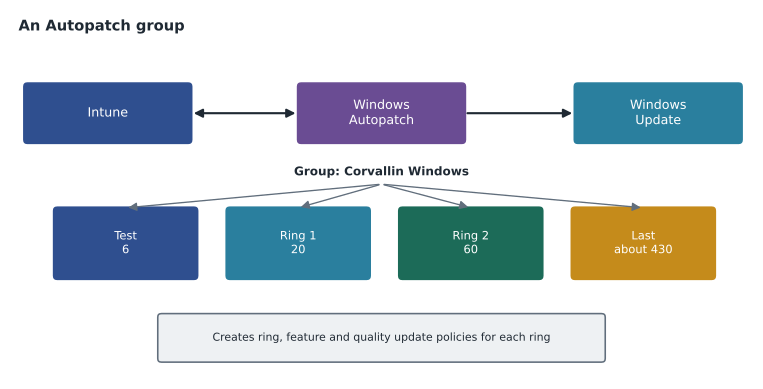
Ama rebuilt Corvallin's four rings as one custom Autopatch group called "Corvallin Windows". The test ring held the six IT devices. The first deployment ring held the 20 pilot devices, the second held the 60 early adopters, and the last held everyone else, assigned dynamically so that new devices landed there automatically. The deferrals and deadlines were the ones from lesson 8. Once the group was created, she unassigned her hand-built rings and policies from those devices, so that nothing conflicted with what Autopatch had made.
Release management and reports
Autopatch's release management view shows, for each month, which quality update is moving through which ring and when each ring's deadline falls. Administrators can pause a release for a ring or for a whole group, and Autopatch itself can pause a release if it detects that an update is causing problems. The reports show, for quality and feature updates, how many devices are up to date, which are not and why, with alerts that name the likely cause, such as a device that has not checked in or has too little disk space. Ama found the alerts more useful than the error codes in the plain Intune reports, because they said what to do.
Hotpatch
The biggest change Autopatch brought was hotpatch. A hotpatch update installs a monthly security update into running processes in memory, so that it takes effect without a restart. Windows achieves this on a quarterly cycle. In the first month of each quarter, devices install a baseline update, a normal cumulative update that needs a restart. In the next two months, they install hotpatches with no restart.
| Quarter | Baseline (restart) | Hotpatch (no restart) |
|---|---|---|
| 1 | January | February and March |
| 2 | April | May and June |
| 3 | July | August and September |
| 4 | October | November and December |
A device must meet several requirements to receive hotpatches: Windows 11, version 24H2 or later, on an eligible licence; managed through a Windows quality update policy with hotpatch allowed; on the latest baseline; and with virtualization-based security (VBS) running, which the hotpatch installer requires. On Arm64 devices, a compatibility feature called CHPE must be turned off, which can break some 32-bit add-ins. Devices that are not eligible simply receive the normal cumulative update and restart as usual.
In Intune, hotpatch is set in a Windows quality update policy, with the setting that applies updates without restarting the device when available set to Allow. Microsoft made hotpatch the default for eligible devices managed by Autopatch starting with the May 2026 security update, for devices not already assigned a quality update policy, with an opt-out for the tenant or for groups. Corvallin's devices already had policies from Ama's rings, so she turned hotpatch on explicitly in the Autopatch group's quality update policy.
Worked problem
How many restarts in a year?
A nurse's laptop is eligible for hotpatch for the whole of 2027 and stays on the hotpatch cycle. How many monthly security updates require a restart, and how many restarts does hotpatch save compared with normal updates?
Show solution
- Normal updates: 12 monthly security updates, each with a restart, so 12 restarts.
- With hotpatch: only the baselines restart, one per quarter, so 4 restarts.
- Saved: 12 - 4 = 8 restarts.
Answer: Four security-update restarts a year instead of twelve, saving eight, as long as no extra baseline is released and the device is not upgraded in a hotpatch month. A feature update still needs its own restart.
Checking VBS was the slow part. On most laptops it was already running, because Windows 11 turns on memory integrity on supported hardware. On 37 older desktops it was not, and Ama added the VBS setting to a settings catalog profile for them. Two older laptop models could not run VBS at all; they stayed on normal monthly updates until they were replaced.
Dr. Ostrander-Bey's reaction to the plan was the warmest Ama had heard from the clinical team all year. Fewer restarts meant fewer laptops rebooting at the wrong moment, and Corvallin could patch faster without making nurses wait.
Microsoft 365 Apps, Edge and Teams
Autopatch can also manage updates for Microsoft 365 Apps, Microsoft Edge and Microsoft Teams, using the same rings. For Microsoft 365 Apps it sets the update channel, normally Monthly Enterprise Channel, and staggers deadlines by ring. Corvallin let Autopatch manage all three, which retired two older app update profiles from the Windows 11 project. MSBA-213, Managing Applications for Endpoints, covers app updates in more detail.
What Autopatch does not do
Autopatch does not manage macOS, iOS, iPadOS or Android updates; those are covered in the next lesson. It does not manage updates for third-party applications, which come from the app's own updater or from Intune app deployment. And it does not replace judgement. Ines kept one rule from the old process: a person reviewed the release management view every Patch Tuesday week, even though Autopatch would have managed without them.
Moving to Autopatch safely
Switching from hand-built rings to an Autopatch group is a change to how every device updates, so Ama treated it like any other change. She created the Autopatch group with the same values as the existing rings, so that devices would see no difference, and moved the IT ring first. Once the IT devices showed the new policies applied and the old ones removed, she moved the pilot, then the early adopters, then everyone, over two weeks. The only surprise was a dynamic group rule that included the two pharmacy devices in the last ring, which she fixed by excluding them from the group and keeping their special ring.
| Step | Check before the next step |
|---|---|
| Create the Autopatch group with existing values | Policies created in Intune match the old rings |
| Move the IT ring | New policies apply; old ring unassigned; no conflicts |
| Move pilot and early adopters | Next Patch Tuesday goes through as expected |
| Move everyone else | Reports show every device in exactly one ring |
| Turn on hotpatch in the quality update policy | Eligible devices show hotpatch status after the next baseline |
Expedite and hotpatch together
Expedited updates and hotpatch work together. When an expedited quality update policy targets devices on the hotpatch cycle during a hotpatch month, eligible devices install the expedited update as a hotpatch and do not need to restart. Devices not on the cycle install the cumulative update and restart within the expedite policy's deadline. That combination is the centre of the case study in lesson 12.
What changes for the help desk
With hotpatch, the help desk's most common update question changed from "why did my laptop restart?" to "why does my laptop say it needs a restart when hotpatch is on?". The answer was usually that it was a baseline month, or that the device had missed a baseline while switched off and needed to catch up. Ama added the hotpatch calendar to the help desk wiki, with the baseline months highlighted, and the calls stopped.
Hotpatch and the help desk calendar
The quarterly cycle gave the help desk a rhythm. In baseline months, January, April, July and October, the usual restart reminders appeared, and the help desk expected a few more calls in the week after Patch Tuesday. In hotpatch months, almost nothing happened from the user's point of view: the update installed, Windows recorded it, and the device carried on. Ama scheduled the 26H2 broad rollout, any large driver approvals and the Microsoft 365 Apps channel changes for baseline months too, so that the restarts users did see came together in four weeks of the year rather than spread across all twelve.
| Month type | What users see | What Corvallin schedules then |
|---|---|---|
| Baseline month | A normal restart for the security update | Feature updates, firmware, major app changes |
| Hotpatch month | No restart for the security update on eligible devices | Nothing that needs a restart, if it can wait |
Devices that are not eligible for hotpatch keep restarting monthly. Ama tracked the non-eligible devices as a list in the Autopatch reports and aimed to shrink it each quarter, either by turning on VBS where hardware allowed or by replacing the oldest models.
Autopatch for Microsoft 365 Apps in practice
Moving Microsoft 365 Apps updates to Autopatch changed little for users but simplified things for IT. The apps stayed on Monthly Enterprise Channel, which receives one feature and security update a month on a predictable date. Autopatch gave each ring its own deadline, so the IT ring saw the new version first and the broad ring a little later. Teams and Edge updated themselves frequently as before, with Autopatch making sure that updates were not blocked and that devices that fell behind were noticed. The two old app update profiles from the Windows 11 project were deleted once the Autopatch group was in place.
One question came from the finance team: would their workbook's macro survive each monthly Office update? The answer was the same as for Windows: the IT and pilot rings saw each update first, and the finance workbook was on the list of things tested in the pilot each month.
Common mistakes
MistakeLeaving hand-built update rings assigned to devices after adding them to an Autopatch group.
InsteadUnassign the old policies so that only Autopatch's policies apply.
MistakeAssuming every device will receive hotpatches once the policy allows them.
InsteadCheck the prerequisites, especially VBS, the baseline and Arm64 CHPE.
MistakeExpecting hotpatch to remove every restart.
InsteadPlan for quarterly baseline restarts, feature updates and occasional extra baselines.
MistakeTreating Autopatch as a reason to stop watching updates.
InsteadReview the release management view and reports every month.
Summary and key terms
- Windows Autopatch automates Windows, Microsoft 365 Apps, Edge and Teams updates for Intune-managed devices and is included in many Microsoft 365 and Windows Enterprise licences.
- Autopatch groups divide devices into deployment rings and create the matching Intune policies.
- Release management and reports show each month's progress, with pauses and alerts.
- Hotpatch installs security updates without restarts in two of every three months, after a quarterly baseline.
- Hotpatch needs Windows 11 24H2 or later, an eligible licence, VBS running and a quality update policy allowing it; it became the default for eligible unassigned devices from May 2026.
- Windows Autopatch
- A cloud service that creates and runs update policies and rollouts for Intune-managed devices.
- Autopatch group
- A set of devices divided into deployment rings with their own update settings.
- Hotpatch
- A security update applied to running code in memory so that no restart is needed.
- Baseline update
- The quarterly cumulative update that needs a restart and starts a hotpatch cycle.
- Virtualization-based security
- Windows use of hardware virtualization to isolate security functions; required for hotpatch.
Practice problems
Work each problem on paper first, then reveal the answer to check.
Which months of the year are planned hotpatch baselines?
Show answer
January, April, July and October.
Name three hotpatch prerequisites.
Show answer
Windows 11 24H2 or later, an eligible licence, a quality update policy allowing hotpatch, the latest baseline, and VBS running.
Why did Ama unassign her own rings after creating the Autopatch group?
Show answer
So the old and new policies did not both apply and conflict.
Lesson quiz · 5 questions
Score 60% or more to complete this lesson.
Create a free account to save your progress, take quizzes and earn a certificate.