
MSBA-212 · Lesson 3 of 12 · 18 min
Onboarding Defender for Endpoint
▶ Video coming soon A video version of this lesson is on the way.
Antivirus blocks what it recognizes. The phishing incident in September had shown Ines what it misses: an attacker who signs in with stolen credentials and uses ordinary tools does not look like malware at all. What Corvallin needed was a record of what each device was doing and someone, or something, watching it. That is endpoint detection and response (EDR), and at Corvallin it would come from Microsoft Defender for Endpoint. In October 2026 the board approved licences that included Defender for Endpoint Plan 2 for every member of staff, starting December 1. Ama arranged trial licences so that she could pilot onboarding on the IT and pilot rings in November.
Plans and what they include
Defender for Endpoint is sold in two plans, and a third product serves small businesses. Plan 1 gives next-generation protection (the Defender Antivirus features of lesson 2 managed centrally), attack surface reduction, device control, the endpoint firewall, network protection and application control. Plan 2 adds EDR, automated investigation and remediation, vulnerability management, threat intelligence and deep analysis in a sandbox. Microsoft Defender for Business, included in Microsoft 365 Business Premium, offers much of Plan 2 in a simpler form for organizations of up to 300 people.
| Licence | Defender for Endpoint coverage |
|---|---|
| Microsoft 365 E3 | Plan 1 |
| Microsoft 365 E5, or Windows Enterprise E5 | Plan 2 |
| Microsoft Defender Suite, including its frontline version | Plan 2 |
| Microsoft 365 Business Premium | Defender for Business |
| Standalone | Plan 1 or Plan 2 |
Corvallin's office staff had Microsoft 365 E3, so their devices were already entitled to Plan 1, which was enough for antivirus, ASR and firewall policy. The board's approval added the Microsoft Defender Suite for office staff and its frontline version for the home-care staff on Microsoft 365 F3, bringing every device to Plan 2. Defender for Endpoint is licensed per user, and each licensed user covers several devices, so the shared training tablets and the lobby kiosk were covered by the users who signed in to them and by the IT staff who managed them.
Connecting Intune and Defender for Endpoint
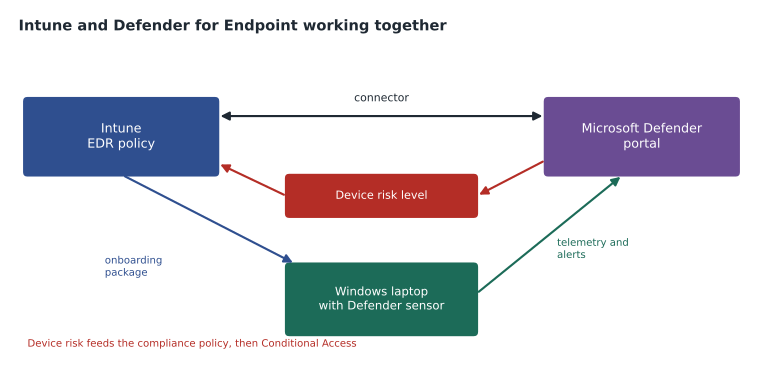
The two services must first trust each other. In the Microsoft Defender portal, under the endpoint settings for advanced features, an administrator turns on the Microsoft Intune connection. In the Intune admin center, under Endpoint security, the Microsoft Defender for Endpoint page then shows the connector as available, and the administrator turns on the options to connect Windows devices, and optionally macOS, iOS and Android devices, to Defender for Endpoint. The connection lets Intune pass onboarding packages to devices and lets Defender pass each device's risk level back to Intune.
Onboarding Windows devices with an EDR policy
Windows already contains the Defender for Endpoint sensor; it only needs to be told which tenant to report to. In Intune, an endpoint detection and response policy under Endpoint security does that. With the connector in place, the policy's onboarding setting can be set to take its configuration package automatically from the connector, so nobody has to download and paste a package file. The same policy sets sample sharing, which allows Defender to collect suspicious files for analysis; Corvallin allowed it, as recommended.
Ama assigned the EDR policy to the IT ring first. Within an hour the six devices appeared in the Defender portal's device inventory. She then ran Microsoft's documented detection test on one of them, a harmless command that Defender is designed to flag, and watched an alert appear in the portal a few minutes later. The test proved the whole path: sensor, cloud, alert, portal. Only then did the pilot ring follow.
| Onboarding method | Typical use |
|---|---|
| Intune EDR policy | Enrolled Windows devices; the default for Corvallin |
| Configuration Manager | Devices already managed by Configuration Manager, as at the partner network |
| Group Policy | Domain-joined devices without modern management |
| Local script | Testing on a few devices; not for production |
| Defender app on macOS, iOS and Android | Non-Windows platforms, deployed and configured through Intune |
| Azure Arc or Defender for Cloud | Servers |
Felix's two call-recording servers were onboarded with the local script during a maintenance window, since they were not enrolled in Intune. Their antivirus and firewall policies then came through security settings management, described in lesson 1.
Other platforms
On macOS, onboarding uses the Defender for Endpoint app, which Intune deploys along with a configuration profile containing the onboarding information and the system extension, network filter and full disk access approvals the app needs. On iOS and Android, Defender for Endpoint is an app that provides web protection, phishing detection and device risk; Intune deploys it, and on supervised iPhones can configure it so that users do not need to set anything up. Corvallin deployed Defender to its nine Macs and 74 corporate iPhones in the pilot, which mattered because phishing links arrived on phones as often as on laptops.
Device risk and compliance
Once devices report to Defender for Endpoint, each one has a risk level: clear, low, medium or high, based on active alerts. The connector sends the level to Intune. A Windows compliance policy can then require that the device be at or under a chosen risk level. If the device is above it, it becomes non-compliant, and the Conditional Access policy Corvallin built in phase 1, which already required a compliant device for client data, blocks it automatically until the risk is cleared.
Choosing the level is a judgement. Requiring "clear" means any low-severity alert, even a blocked adware download, cuts the user off. Requiring "medium" allows low-risk alerts but blocks a device with anything serious. Corvallin chose medium for office staff and home-care staff alike, with a note to revisit it once the team knew how many alerts a normal week produced.
Worked problem
How many devices would be blocked?
During the pilot, the 26 onboarded devices show these risk levels at one moment: 19 clear, 4 low, 2 medium and 1 high. How many would be non-compliant if the policy required "at or under low", and how many if it required "at or under medium"?
Show solution
- At or under low: clear and low pass, so 19 + 4 = 23 pass and 2 + 1 = 3 are non-compliant.
- At or under medium: clear, low and medium pass, so 19 + 4 + 2 = 25 pass and 1 is non-compliant.
Answer: Three devices with a low threshold, one with a medium threshold. Corvallin's choice of medium blocks only the high-risk device.
Investigating and triaging
Defender groups related alerts into incidents. An incident might combine an alert for a suspicious PowerShell command on a laptop with an alert for a malicious email the user received and a sign-in from an unusual location, because Microsoft Defender XDR correlates signals across email, identity and endpoints. MSBA-203 covers the wider Defender XDR portal; here the focus is the device side.
For each device, the portal shows a timeline of processes, network connections, file changes and sign-ins, an alerts list, the software inventory and its vulnerabilities. A triage routine helps a small team. Ama's was short: check the incident's severity and the devices and users involved; read the alert story to see what actually happened; decide whether it is a true positive, a false positive or a test; and act.
| Response action | What it does | When Corvallin uses it |
|---|---|---|
| Isolate device | Cuts the device off from the network except the Defender service | Suspected active attacker or ransomware |
| Restrict app execution | Allows only Microsoft-signed software to run | Suspected malicious tool still present |
| Run antivirus scan | Starts a quick or full scan remotely | After any malware alert |
| Collect investigation package | Gathers logs and forensic data from the device | Before reimaging a device involved in an incident |
| Live response | Opens a remote shell for investigation | Senior analyst or the monitoring partner only |
| Automated investigation | Lets Defender examine and remediate on its own | Set to remediate automatically for most device groups |
Corvallin's monitoring partner, which already handled high-severity identity incidents after hours, was given access to the Defender portal through Defender's own role-based access, limited to the response actions in the table. Defender device groups let Ama set automated remediation to full for most devices but to "require approval" for the two pharmacy devices, whose vendor wanted to be told before anything changed.
Checking the rollout
The Intune Defender for Endpoint page and the device inventory in the Defender portal both show onboarding status. Ama compared the two lists every Monday during the rollout: every Intune-managed Windows device should appear in Defender, and any device missing from one list was investigated. Most gaps had simple causes, such as a laptop that had been switched off since before the policy arrived.
Planning the rollout
Onboarding changes nothing a user can see, which makes it easy to roll out quickly. Ama still used the rings, for two reasons. First, the Defender sensor adds a small amount of work to each device, and she wanted to confirm that the oldest laptops in the pilot were not slowed down. Second, the first weeks of EDR produce alerts that nobody has seen before, and a small team needs time to learn what normal looks like. The pilot produced 41 alerts in two weeks: 29 were low-severity detections already blocked by antivirus, 9 were the detection tests and a penetration test the monitoring partner ran with permission, and 3 were a user's browser extension that Defender flagged as suspicious. None was a real attack, but each one taught the team something about the portal.
| Week | Devices onboarded | Focus |
|---|---|---|
| Pilot week 1 | 6 IT devices | Connector, policy, detection test, portal access for the monitoring partner |
| Pilot week 2 | 20 pilot devices | Performance on older laptops, first alerts, risk levels |
| December 1 onward | Early adopters, then everyone | Licences active; compliance risk requirement turned on |
Vulnerability management
Plan 2 includes core Defender Vulnerability Management. Once devices report their software inventory, the portal lists known vulnerabilities on each device, the software affected and security recommendations, ranked by how much each would reduce exposure. The exposure score summarizes the whole organization. In the pilot, the top recommendation was to update an old PDF reader still installed on 11 devices; the second was to remove a retired version of a Java runtime that one vendor tool had installed years earlier. Ama turned both into tasks for the Intune app work in MSBA-213.
Defender can send a recommendation to Intune as a security task, which appears in the Intune admin center for an administrator to accept and act on, for example by deploying an app update to the affected devices. The task closes when the devices report the fix. It is a small feature, but it joins the people who find problems to the people who fix them, which in a team of four were sometimes the same person on different days.
What the help desk sees
The help desk does not need to become a security operations team. Ama gave the help desk read access to device pages and alerts in the Defender portal, so that when a user called about a blocked file the analyst could see what had happened, and kept response actions for herself, Teodor and the monitoring partner. The runbook told help desk staff what to say to a user whose device was isolated: that IT had cut the laptop off from the network to protect client data, that this was normal during an investigation, and that someone would call within the hour.
Common mistakes
MistakeDownloading the onboarding package and pasting it into a policy when the connector is available.
InsteadTurn on the connector and let the EDR policy take its package automatically.
MistakeAssuming onboarding worked because the policy shows as succeeded.
InsteadCheck the device in the Defender portal and run the documented detection test.
MistakeRequiring a "clear" risk level on day one without knowing normal alert volumes.
InsteadStart with a level that blocks serious risk and adjust once alert patterns are known.
MistakeForgetting phones and Macs.
InsteadDeploy Defender for Endpoint to every platform that reaches company data.
Summary and key terms
- Defender for Endpoint Plan 1 provides protection and ASR; Plan 2 adds EDR, automated investigation and vulnerability management.
- The Intune connection lets Intune onboard devices and lets Defender send device risk back to Intune.
- An Intune EDR policy onboards Windows devices automatically from the connector; other platforms use the Defender app.
- A compliance policy can require a maximum device risk level, which Conditional Access then enforces.
- Incidents group related alerts; device response actions include isolation, scans, investigation packages and live response.
- EDR
- Endpoint detection and response: recording device activity, detecting attacks and responding to them.
- Onboarding
- Connecting a device's Defender sensor to an organization's Defender for Endpoint tenant.
- Device risk level
- Defender for Endpoint's rating of a device, from clear to high, based on active alerts.
- Incident
- A group of related alerts treated as one attack story.
- Device isolation
- Cutting a device off from the network except for the Defender service.
Practice problems
Work each problem on paper first, then reveal the answer to check.
Where must the connection between Intune and Defender for Endpoint be turned on first?
Show answer
In the Microsoft Defender portal's advanced features, then on the Defender for Endpoint page in Intune.
How does a high device risk level stop a user reaching client data?
Show answer
The compliance policy marks the device non-compliant, and Conditional Access requires a compliant device.
Name two device response actions and when you would use them.
Show answer
Isolation for a suspected active attacker; an investigation package before reimaging; a remote scan after a malware alert.
Lesson quiz · 5 questions
Score 60% or more to complete this lesson.
Create a free account to save your progress, take quizzes and earn a certificate.