
MSBA-212 · Lesson 2 of 12 · 20 min
Microsoft Defender Antivirus
▶ Video coming soon A video version of this lesson is on the way.
The unassigned antivirus profile from 2021 had one setting in it: an exclusion for an entire folder on the C: drive, added because an old scheduling app had been slow to start. The scheduling app had been retired two years earlier. The folder still existed, and nothing in it was ever scanned. Ama deleted the profile on her first afternoon and started again. Every Corvallin device already ran Microsoft Defender Antivirus, the antivirus built into Windows, because no other product had been installed. Her job was to make sure it ran with the right settings everywhere, could not be switched off by a user or by malware, and reported its state where the team could see it.
What Defender Antivirus does
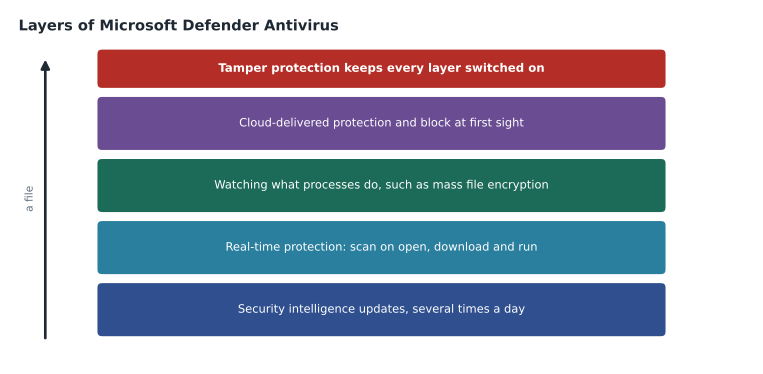
Defender Antivirus protects in several layers. Real-time protection scans files when they are opened, downloaded or run. Behaviour monitoring watches what processes do, not just what they contain, so it can stop software that encrypts files in bulk even if the file itself looks harmless. Cloud-delivered protection sends metadata about suspicious files to Microsoft's cloud, where machine learning models can return a verdict in seconds, long before a new signature reaches the device. Block at first sight uses that cloud check to hold a new executable briefly while the verdict comes back. And security intelligence updates, which most people still call signatures, arrive several times a day.
Defender Antivirus is not a separate product to buy; it is part of Windows. What licensing adds is management and the wider Defender for Endpoint platform: EDR, investigation, vulnerability management and the security portal. Those come in the next lesson. Antivirus policy from Intune works on any supported Windows device that is enrolled, whatever its licence.
The antivirus profile
In Intune, Ama created a Windows Microsoft Defender Antivirus profile under Endpoint security, Antivirus. It exposes the Defender CSP settings with Microsoft's descriptions. She set the important ones explicitly rather than relying on defaults, so that the policy documented the design.
| Setting | Corvallin value | Why |
|---|---|---|
| Real-time monitoring | Allowed | The core protection; never off |
| Behaviour monitoring | Allowed | Catches ransomware-like activity |
| Cloud protection | Allowed, with the cloud block level set to High | Faster verdicts for new files |
| Cloud extended timeout | 50 seconds | Gives the cloud check time on slow branch links |
| Submit samples consent | Send safe samples automatically | Lets the cloud analyse suspicious files without prompting users |
| Potentially unwanted apps (PUA) protection | Block | Stops bundled toolbars, coin miners and similar software |
| Network protection | Enabled (block mode) | Blocks connections to known malicious sites from any app |
| Scan of removable drives during full scan | Allowed | USB drives are common in branch offices |
| Quick scan time and day | Daily at noon | Laptops are usually on and connected at midday |
| Signature update interval | 4 hours | In addition to the automatic updates |
Some settings in the profile are enforced only if tamper protection is on, and some depend on the device's Defender platform version. Ama kept a short note in the profile description listing the design decisions, because six months later nobody would remember why the cloud timeout was 50 seconds and not 10.
Tamper protection
Attackers who gain administrator rights on a device often try to switch off antivirus before doing anything else. Tamper protection locks the important Defender settings so that they cannot be changed locally, not by a user, not by a local administrator and not by a script, even one run with administrator rights. Only the management service can change them. With Defender for Endpoint, tamper protection can be turned on for the whole tenant in the Microsoft Defender portal or through an Intune Windows Security experience profile; Corvallin used Intune so that the setting sat with the rest of the antivirus design.
Tamper protection changes how troubleshooting works. If the help desk needs to switch off a protection briefly to diagnose a problem, it must be done from the portal, for example by putting a single device into troubleshooting mode for a few hours. Ama added that to the help desk runbook, with a rule that troubleshooting mode needed a ticket and that the device was checked afterwards.
Exclusions
Exclusions are the most common way antivirus protection is weakened. An exclusion tells Defender not to scan a file, folder, file type or process. They are sometimes necessary, for example for database files that a vendor says must not be scanned while in use, but each one is a place malware can hide. Ama set three rules for Corvallin. Exclusions needed a written reason from a vendor or from testing. They were as narrow as possible: a specific file path rather than a folder, a folder rather than a drive, never a whole file type such as every .exe. And they were reviewed every six months.
She also turned on the setting that hides exclusions from local administrators, so that anyone who gained administrator rights could not simply read the list to learn where to put malware. Only two exclusions survived review: the pharmacy software's database folder on the two LTSC devices, which the vendor documented, and a single process for the call recording software on Felix's servers.
Worked problem
How many exclusions to review?
An audit finds 17 exclusions across three old profiles. Ama removes 9 that relate to retired software, narrows 4 folder exclusions to single files and keeps 2 vendor-documented exclusions unchanged. Two more are duplicates of ones already kept. How many exclusions remain after the clean-up?
Show solution
- Start with 17.
- Remove 9 for retired software: 17 - 9 = 8 remain.
- Remove 2 duplicates: 8 - 2 = 6 remain.
- Narrowing 4 exclusions changes them but does not remove them, and the 2 vendor exclusions stay.
Answer: Six exclusions remain: the 4 narrowed ones and the 2 vendor-documented ones. After further testing, Ama found the 4 narrowed ones were no longer needed at all, leaving the 2 described above.
The user experience
The Windows Security experience profile controls what users see in the Windows Security app. Corvallin hid the areas users had no reason to change, such as virus and threat protection settings, and left the notifications that told users when a threat was blocked. It also added Corvallin's help desk phone number and email address to the app's contact card, so that a nurse who saw a threat warning on a laptop at a client's home knew whom to call.
Dr. Marguerite Ostrander-Bey, the clinical director, had one request: no full scans during visit hours, because a busy laptop was a slow laptop in front of a client. Ama scheduled quick scans at noon, which take a few minutes, and left full scans to run only when a threat was found or when the help desk triggered one remotely.
Remote actions and updates
Intune has remote actions for Defender on each device page: Quick scan, Full scan and Update Windows Defender security intelligence. The last appears in the MD-102 outline; it tells the device to fetch the newest intelligence now rather than waiting. The help desk uses it on laptops that have been offline for a while, such as one returned from a staff member's leave, before reconnecting them to the network fully.
Defender itself has three kinds of updates. Security intelligence updates arrive several times a day. Engine updates and platform updates arrive monthly, and platform updates in particular can be staged so that pilot devices get them first. Ama used the Defender update controls to put the IT and pilot rings on the current channel a little earlier than the rest of the fleet, the same idea as the Windows update rings in lesson 8.
Get-MpComputerStatus |
    Select-Object AMRunningMode, RealTimeProtectionEnabled, IsTamperProtected,
                  AntivirusSignatureLastUpdated, AMProductVersion
Update-MpSignature
Reporting
Intune's antivirus reports show, for each device, whether real-time protection is on, how old its security intelligence is and whether it has any active threats. The Antivirus agent status report and the Detected malware report are the two the help desk checks each morning. Ama also added an antivirus requirement to the Windows compliance policy that MSBA-211 covers: a device whose real-time protection was off or whose intelligence was out of date became non-compliant, and Conditional Access then blocked it from client data until it was fixed.
Defender Antivirus can also run in passive mode, where it scans but does not block, if another antivirus product is the primary one. Corvallin had no other product, so every device should report active mode. Ama's first report found three laptops in passive mode, left over from a trial of a third-party product at one branch years earlier. Removing the old product's leftover registry entries returned them to active mode.
Cloud protection levels
The cloud block level decides how aggressively the cloud blocks files it is unsure about. At the default level, Defender blocks files the cloud is confident are malicious. At High, it blocks more aggressively, while still trying to avoid blocking legitimate software. At High plus it adds further protection measures, and Zero tolerance blocks every unknown executable, which suits only locked-down devices. Ama chose High for everyone, ran it on the pilot for two weeks and found no false positives that mattered; one user's unofficial photo-editing tool was blocked, which the help desk was happy to explain.
The cloud check needs the device to reach Microsoft's cloud protection service. Felix confirmed that the branch firewalls and the LTE routers allowed the required endpoints, and the antivirus agent status report showed the cloud protection connection as working on every device.
| Cloud block level | Behaviour | Typical use |
|---|---|---|
| Default | Blocks files the cloud is confident are malicious | Starting point |
| High | Blocks unknown files more aggressively, with low false positives | Most organizations, including Corvallin |
| High plus | Adds further protective measures | Higher-risk devices |
| Zero tolerance | Blocks all unknown executables | Kiosks and fixed-function devices |
Controlled folder access
Controlled folder access protects chosen folders, such as Documents and Desktop, so that only trusted applications can change files in them. It is an anti-ransomware feature: an unknown program that tries to encrypt a user's documents is blocked. It can be set to audit or block, and organizations can add apps that are allowed. Because Corvallin's documents lived mostly in OneDrive with Known Folder Move, and because OneDrive keeps previous versions, Ama started controlled folder access in audit mode only and planned to review it after the ASR rollout in lesson 4.
When a threat is found
When Defender finds a threat, it takes the remediation action set in policy, normally quarantining the file, and records a detection. The user sees a notification. In the Intune device page the help desk can see the detection, its severity and whether it was remediated. Ama wrote a simple routine: a detection that was remediated automatically gets a quick scan and a note; a detection that was not remediated, or one on a device with repeated detections, becomes a ticket, a full scan and a conversation with the user about where the file came from. After the Defender for Endpoint rollout in the next lesson, those cases would also arrive as alerts in the Defender portal with much more context.
Worked problem
Is the intelligence fresh enough?
Security intelligence updates arrive several times a day. The compliance policy treats a device as out of date if its intelligence is more than 3 days old. A nurse's laptop last updated on Friday at 18:00 and has been in a drawer since. At what point does it become non-compliant, and what happens when she opens it on Tuesday morning?
Show solution
- Friday 18:00 plus 3 days is Monday 18:00.
- From Monday 18:00 the device is out of date.
- On Tuesday morning it checks in, is marked non-compliant, and Conditional Access blocks client data.
- Within minutes Defender downloads new intelligence, the next compliance check passes, and access returns.
Answer: It becomes out of date on Monday at 18:00. On Tuesday morning it is briefly blocked until it updates, which normally takes a few minutes on a working connection.
Common mistakes
MistakeExcluding a whole folder or file type because an app is slow.
InsteadUse the narrowest exclusion with a documented reason, and review exclusions regularly.
MistakeLeaving tamper protection off so that the help desk can change settings locally.
InsteadTurn tamper protection on and use troubleshooting mode from the portal when needed.
MistakeScheduling full scans during working hours on clinical laptops.
InsteadUse short quick scans at a quiet time and trigger full scans when needed.
MistakeAssuming every device is in active mode.
InsteadCheck the antivirus agent status report for devices in passive mode.
Summary and key terms
- Defender Antivirus combines real-time protection, behaviour monitoring, cloud-delivered protection and frequent security intelligence updates.
- An Intune antivirus profile sets these explicitly; a Windows Security experience profile controls what users see.
- Tamper protection stops local changes to Defender settings, even by administrators; troubleshooting mode allows temporary changes from the portal.
- Exclusions should be rare, narrow, documented and hidden from local administrators.
- Remote actions include scans and updating security intelligence; reports and compliance policy show which devices are protected.
- Cloud-delivered protection
- Defender's use of Microsoft's cloud to return verdicts on new files within seconds.
- Tamper protection
- A lock that prevents local changes to important Defender settings.
- Exclusion
- A file, folder, type or process that Defender does not scan.
- PUA protection
- Blocking of potentially unwanted applications such as bundled adware.
- Passive mode
- Defender scanning without blocking when another antivirus is primary.
Practice problems
Work each problem on paper first, then reveal the answer to check.
Which Defender feature stops a local administrator from switching off real-time protection?
Show answer
Tamper protection.
Give Ama's three rules for exclusions.
Show answer
A written reason, as narrow as possible, and a review every six months.
Which remote action would you run on a laptop that has been switched off for a month?
Show answer
Update Windows Defender security intelligence, followed by a quick scan.
Lesson quiz · 5 questions
Score 60% or more to complete this lesson.
Create a free account to save your progress, take quizzes and earn a certificate.