
MSBA-212 · Lesson 1 of 12 · 18 min
Endpoint security policies in Intune
▶ Video coming soon A video version of this lesson is on the way.
In the second week of October 2026, Ines put a single slide in front of the IT team. It showed the Zero Trust roadmap the board had approved in September: phase 1, identity, was finished; phase 2, devices and data, was due to start in the winter. Under phase 2 she had written one sentence: "Every Corvallin device can prove it is healthy before it reaches client data." Ama Owusu-Pratt, who ran the help desk and looked after the 520 Windows devices, would lead the device work. Teodor would help with policy design, and Felix would handle anything that touched the network. The first thing Ama did was open the Endpoint security node in the Microsoft Intune admin center and write down what was already there. It was almost nothing: a default antivirus profile that someone had created during the pandemic and never assigned.
This course follows Ama's device protection project from that first inventory to a fleet that is encrypted, monitored, patched on a schedule and able to respond quickly when something goes wrong. It covers the protect-devices and update skills of the MD-102 exam, whose skills outline was updated on October 27, 2026 and is now titled "Managing and Securing Microsoft 365 Endpoints by using Intune". Lesson 1 sets out the tools.
What the Endpoint security node is
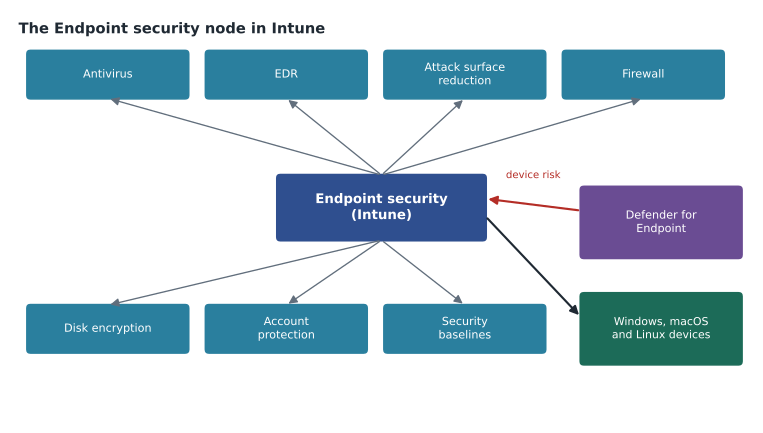
Intune can configure almost any Windows setting through configuration profiles, including the large settings catalog. Security settings, though, have their own home. The Endpoint security node groups policies by security job, so that a security administrator can manage antivirus, encryption or firewall settings without searching through general device configuration, and so that Intune can show security-focused reports for each job. The settings are delivered the same way as any other profile, through configuration service providers (CSPs) on the device, but they are organized for the people who own them.
| Policy type | What it controls | Lesson |
|---|---|---|
| Antivirus | Microsoft Defender Antivirus settings, exclusions and the Windows Security app experience | 2 |
| Endpoint detection and response (EDR) | Onboarding devices to Microsoft Defender for Endpoint and sample sharing | 3 |
| Attack surface reduction | ASR rules, exploit protection, device control and App Control for Business | 4 |
| Firewall | Windows Firewall profiles and firewall rules; macOS firewall | 5 |
| Disk encryption | BitLocker on Windows and FileVault on macOS | 6 |
| Account protection | Windows Hello for Business, local group membership and Windows LAPS | 7 |
| Security baselines | Microsoft's recommended groups of security settings, applied as a starting point | 1 |
Each policy type contains one or more profiles for each platform. Antivirus, for example, has profiles for Windows, macOS and Linux, and a separate profile for the Windows Security experience, which controls what users see in the Windows Security app. Profiles are assigned to groups of users or devices, like every other Intune policy, and they can be narrowed with assignment filters, such as "Windows 11 Enterprise only" or "corporate-owned only".
Who manages endpoint security
Intune has a built-in Endpoint Security Manager role that can manage security and compliance policies and view device information, but not general configuration. Ama gave herself that role, eligible through Privileged Identity Management for eight hours at a time, matching the PIM pattern Corvallin had set up in phase 1. Teodor kept his Intune Administrator eligibility for the rest of the configuration work. Separating the roles meant that a change to a firewall rule showed up in the audit log under the person responsible for security, and it limited what a compromised help desk account could alter.
Endpoint security policies also use scope tags, which let an organization show administrators only the objects for their region or business unit. Corvallin was small enough not to need them, but the partner network Ama had advised in the spring, with 6,000 devices across several regions, used scope tags so that each regional team saw only its own policies.
Security baselines
A security baseline is a group of settings that Microsoft recommends, prepared by the teams that build each product. Intune offers several, each with versions that are updated as products change. The main ones are the security baseline for Windows, the baseline for Microsoft Defender for Endpoint, the baseline for Microsoft Edge, the baseline for Windows 365 and the baseline for Microsoft 365 Apps for enterprise. A baseline is created as a profile, with Microsoft's values already filled in, and the administrator can change any value before assigning it.
Baselines are a starting point, not a finished design. Ama read through the Windows baseline before using it and found three settings that would have caused trouble at Corvallin. One blocked the older remote-assistance method that the help desk still used for some branch laptops. One set a screen lock time shorter than the clinical team could accept on the shared nursing station computers. And one disabled a print feature the pharmacy devices needed. She changed those three values, wrote down why, and kept the rest.
Two rules make baselines manageable. First, use one baseline profile per product per group of devices, rather than several overlapping ones. Second, when Microsoft releases a new baseline version, do not edit the old profile; create a new profile from the new version, compare the settings, and move devices across in stages. Intune can compare versions and shows which settings changed.
Conflicts between policies
A device can receive the same setting from several places: a security baseline, an endpoint security profile, a settings catalog profile, or even a Group Policy object on the partner network's hybrid devices. If two Intune policies set the same setting to different values, Intune reports a conflict, and the device keeps whichever value it applied first; the conflict is not resolved for you. The answer is design: decide which policy owns each area and keep that setting out of the others.
Corvallin's design was simple. The Windows security baseline owned general hardening. The endpoint security profiles owned antivirus, firewall, encryption, ASR and account protection, and the matching sections of the baseline were left at "Not configured" so that the two never collided. The settings catalog was used only for things neither covered.
Worked problem
Counting conflicts before rollout
In the pilot, Intune shows that 26 devices each report the same 3 conflicting settings between the security baseline and the new antivirus profile, and 4 of those devices also report 2 conflicts from an old settings catalog profile. How many setting conflicts does Ama need to clear, counted per device?
Show solution
- Baseline against antivirus profile: 26 devices x 3 settings = 78.
- Old settings catalog profile: 4 devices x 2 settings = 8.
- Total: 78 + 8 = 86 device-setting conflicts.
Answer: 86 conflicts, but only two causes. Setting the three antivirus settings to Not configured in the baseline and deleting the old profile clears all of them.
Defender for Endpoint security settings management
Intune can deliver endpoint security policies to devices that are not enrolled in Intune at all. With Defender for Endpoint security settings management, a device that is onboarded to Microsoft Defender for Endpoint receives antivirus, firewall, EDR and ASR policies from Intune through the Defender agent. This suits servers and devices managed by another tool. Corvallin enrolled every Windows device in Intune, so it did not need the feature, but Felix planned to use it for two Windows servers that ran the phone system's call recording and were not enrolled.
Reading what is there
Ama's first job was an inventory, and she did part of it from PowerShell so that she could keep the results. The Microsoft Graph PowerShell SDK can list settings catalog and endpoint security policies, which are stored as configuration policies.
Connect-MgGraph -Scopes "DeviceManagementConfiguration.Read.All"
Get-MgBetaDeviceManagementConfigurationPolicy -All |
    Select-Object Name, Platforms, Technologies, LastModifiedDateTime |
    Sort-Object LastModifiedDateTime |
    Export-Csv .\corvallin-policies.csv -NoTypeInformation
The list confirmed what the admin center had suggested. There was one antivirus profile, unassigned, from 2021; two settings catalog profiles from the Windows 11 project; and no encryption, firewall, ASR or account protection policy at all. BitLocker was on for many laptops only because Windows had turned on device encryption by itself on modern hardware, and nobody knew where all the recovery keys were.
The plan
Ama wrote the project plan in the order the lessons of this course follow: antivirus first, because it protects every device immediately; then onboarding to Defender for Endpoint; then attack surface reduction, firewall and encryption; then Windows Hello for Business and LAPS; and finally updates, from rings and feature versions to Autopatch and the iPhones and Macs. Every policy would go to the same rings the Windows 11 project had used: IT with 6 devices, a pilot of 20, early adopters of 60, then everyone.
Assignment groups and filters
Endpoint security policies are only as good as their assignments. Ama followed three rules. Security policies were assigned to device groups rather than user groups wherever the setting was about the device, such as encryption or the firewall, so that a shared tablet got the same protection whoever signed in. Exclusions were handled with a small number of named exclusion groups, each with an owner and a reason, rather than by removing devices from the main groups. And assignment filters narrowed policies by device properties: a filter for "Windows 11 Enterprise" kept a hotpatch-related setting off the two LTSC pharmacy devices, and a filter for corporate ownership kept device policies off the handful of personal Windows laptops that were registered but not managed.
Filters are evaluated on the device when it checks in, so they react quickly when a device changes, for example after an edition upgrade. Groups are evaluated by Microsoft Entra ID and can take longer to update. For a security policy, a short delay matters, so Ama preferred filters for anything that depended on a device's operating system or ownership.
| Assignment tool | Best for | Corvallin example |
|---|---|---|
| Dynamic device group | Rings and broad populations | The four rollout rings, by extension attribute |
| Static exclusion group | Named exceptions with an owner | Pharmacy devices excluded from ASR block mode |
| Assignment filter | Device properties such as edition, model or ownership | Windows 11 Enterprise only; corporate-owned only |
Monitoring the policies themselves
Each endpoint security policy has a status page showing how many devices succeeded, failed, are in conflict or have not yet checked in, with a per-setting view underneath. Ama added a five-minute task to the help desk's Monday routine: open each security policy, check for new errors or conflicts, and open a ticket for anything new. Errors usually meant a device had an old Windows build that did not understand a setting, or an earlier setting from a removed policy had been left behind. Most fixed themselves after the next sync; the rest became tickets.
Intune also keeps an audit log of every change to a policy, showing who changed what and when. Ines reviewed it once a month for security policies, alongside the PIM activation history, so that every change to protection could be matched to a ticket.
The device health picture
By the end of the project, Corvallin wanted one view of each device that answered Ines's question: is it healthy enough to reach client data? That view came from combining the pieces of this course. The compliance policy in MSBA-211 checked encryption, antivirus status, the minimum OS version and Defender device risk; the endpoint security policies made those checks pass; and Conditional Access, configured in phase 1, required a compliant device. Ama drew it on the whiteboard as a chain, and wrote under it: "If any link is missing, the chain does not hold."
Common mistakes
MistakeAssigning a security baseline and an endpoint security profile that both set the same antivirus settings.
InsteadDecide which policy owns each area and leave that area Not configured everywhere else.
MistakeEditing an old baseline profile when a new baseline version is released.
InsteadCreate a profile from the new version, compare, and move devices across in stages.
MistakeApplying a baseline without reading it.
InsteadReview every setting against how the organization works, change what must change and record why.
MistakeGiving everyone who touches security the Intune Administrator role.
InsteadUse the Endpoint Security Manager role, eligible through PIM, for people who own security policy.
Summary and key terms
- The Endpoint security node groups security policies by job: antivirus, EDR, attack surface reduction, firewall, disk encryption and account protection.
- Security baselines are Microsoft-recommended groups of settings, used as starting points and updated by creating profiles from new versions.
- Conflicting values for the same setting are reported but not resolved; give each area one owning policy.
- The Endpoint Security Manager role and scope tags limit who can change security policy.
- Defender for Endpoint security settings management delivers Intune security policies to devices that are not enrolled.
- Endpoint security node
- The area of the Intune admin center that holds security policies grouped by job.
- Security baseline
- A Microsoft-recommended set of security settings for a product, delivered as an Intune profile.
- Policy conflict
- Two policies setting the same setting to different values on one device.
- Endpoint Security Manager
- A built-in Intune role for managing security and compliance policies.
- Security settings management
- Delivery of Intune security policies to devices through the Defender for Endpoint agent, without Intune enrollment.
Practice problems
Work each problem on paper first, then reveal the answer to check.
Name four endpoint security policy types in Intune.
Show answer
Any four of antivirus, EDR, attack surface reduction, firewall, disk encryption, account protection and security baselines.
What should you do when Microsoft releases a new version of a baseline you use?
Show answer
Create a new profile from the new version, compare it with the old one, and move devices across in stages.
Why did Ama set the antivirus sections of the Windows baseline to Not configured?
Show answer
So that the antivirus profile alone owned those settings and the two policies never conflicted.
Lesson quiz · 5 questions
Score 60% or more to complete this lesson.
Create a free account to save your progress, take quizzes and earn a certificate.