
MSBA-212 · Lesson 8 of 12 · 20 min
Windows Update for Business and update rings
▶ Video coming soon A video version of this lesson is on the way.
Before the project, Corvallin's update policy was "whatever Windows does by default". Most laptops installed updates eventually, but some had not restarted in seven weeks, one branch's desktops had paused updates after a printer problem in 2025 and never resumed, and on the morning of an important accreditation visit a scheduler's laptop had restarted itself in the middle of a call. Dr. Ostrander-Bey put the clinical team's view plainly: "Patch everything, quickly, but never restart a laptop in front of a client." Ama's answer was a set of update rings.
Windows Update client policies
Windows can be told how and when to take updates from Windows Update through a set of device settings that Microsoft long called Windows Update for Business. Microsoft now calls these device-level settings Windows Update client policies, and uses Windows Autopatch for the cloud service that decides which updates are approved, covered in lesson 10. The exam and many documents still use the older name, so it helps to know both. Either way, the device downloads updates directly from Windows Update; Intune sends only the policy.
In Intune, these settings are set mainly through update ring policies under Devices, Windows updates. A ring controls how long a group of devices waits before taking updates, how long users have before installation is forced, and what users see. Feature, quality and driver update policies, covered in the next lesson, sit alongside rings and control which update content is offered.
| Ring setting | What it does | Range |
|---|---|---|
| Servicing channel | General Availability Channel or Windows Insider builds | Choice |
| Quality update deferral | Days to wait after Microsoft releases a monthly quality update | 0 to 30 days |
| Feature update deferral | Days to wait after a new Windows version is released | 0 to 365 days |
| Pause quality or feature updates | Stops updates for the ring for a period | Up to 35 days |
| Deadline for quality updates | Days after an update is offered before installation is forced | 0 to 30 days |
| Deadline for feature updates | Days after a feature update is offered before installation is forced | 0 to 30 days |
| Grace period | Extra days before a forced restart for a device that was offline past its deadline | 0 to 7 days |
| Active hours | Hours when Windows will not restart automatically | Up to 18 hours |
Designing the rings
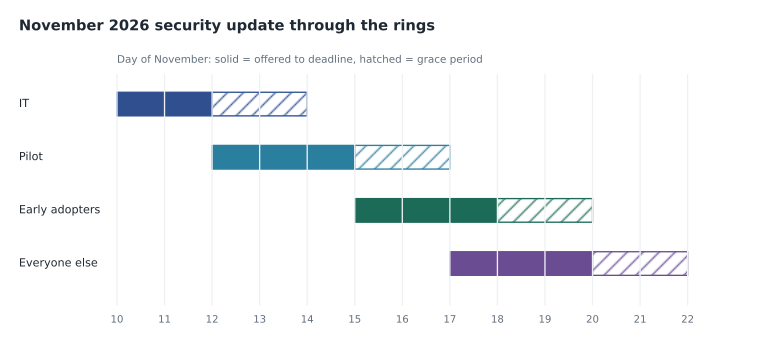
Ama reused the four rings from the Windows 11 project, because the people in them already knew they were first to see change. Each ring waited a little longer than the one before, so that a bad update would show up on a few IT laptops before it reached a nurse's.
| Ring | Devices | Quality deferral | Quality deadline | Feature deferral |
|---|---|---|---|---|
| IT | 6 | 0 days | 2 days | 0 days |
| Pilot | 20 | 2 days | 3 days | 30 days |
| Early adopters | 60 | 5 days | 3 days | 60 days |
| Everyone else | About 430 | 7 days | 3 days | 90 days |
Rings are assigned to device groups. Corvallin used dynamic groups based on a device extension attribute that Ama set during the Windows 11 project, so moving a device between rings meant changing one attribute. Devices that belonged to no ring group were caught by a fifth ring assigned to all devices with the same values as "everyone else", so no device was ever left on defaults.
Deadlines, restarts and the user
A deferral decides when an update is offered. A deadline decides when it must be installed. Before the deadline, Windows downloads and installs the update in the background and asks the user to restart at a convenient time, outside active hours. Once the deadline passes, Windows schedules the restart itself outside active hours, and if the device is never idle outside them it restarts with a warning. The grace period protects devices that were switched off: a laptop returned after a week away is given that many extra days before a forced restart, so that the user is not ambushed the moment they open it.
Corvallin's settings followed the clinical rule. Active hours were set from 7:00 to 19:00, which covered every visit schedule. Quality deadlines were 3 days, short enough to keep the fleet patched within ten days of Patch Tuesday, and the grace period was 2 days. Users received restart notifications with Corvallin's wording through the user experience settings, and the setting that lets Windows restart a device in the middle of the night when it is plugged in was enabled, which is how most laptops ended up restarting without anyone noticing.
Worked problem
When must a laptop restart?
Microsoft releases the monthly security update on Patch Tuesday, November 10, 2026. A home-care laptop is in the everyone-else ring: 7-day deferral and 3-day deadline. On which date is the update offered, and on which date does the deadline fall?
Show solution
- Offered: November 10 + 7 days = November 17.
- Deadline: November 17 + 3 days = November 20.
- If the nurse leaves the laptop on overnight and plugged in, it usually restarts on the night of November 17 or 18 without her noticing.
Answer: Offered on November 17, with a deadline of November 20. After November 20, Windows restarts it outside active hours, from 19:00, even if nobody has chosen to restart.
Pausing and uninstalling
If a quality update causes a problem, a ring can be paused for up to 35 days, which stops further installs in that ring while Microsoft or the vendor fixes it. Pausing does not remove the update from devices that already have it; Intune's uninstall option on a ring does, for the latest quality or feature update, as long as Windows still allows rollback. Ama wrote a rule into the runbook: pause the next ring first, investigate, and uninstall only if the problem is serious and confirmed, because removing a security update reopens the hole it closed.
The branch that had paused updates in 2025 had done so through a local setting on each desktop. Once the rings applied, the managed settings took over, and the help desk confirmed with the Windows Update reports that those desktops had caught up.
Delivery Optimization
Updates are large, and a branch office of 60 laptops downloading the same monthly update over one internet link is slow and expensive. Delivery Optimization lets Windows devices share update content with each other. A device can download pieces of an update from other devices on the same network instead of from the internet. Intune configures it with a Delivery Optimization profile.
| Download mode | Peers used |
|---|---|
| HTTP only | None; download from the internet or a cache server only |
| LAN | Devices behind the same public IP address |
| Group | Devices in the same group, defined by an ID or by site, even across addresses |
| Internet | Any peers on the internet as well |
| Simple and bypass | Special modes for restricted environments |
Felix chose LAN mode for the offices, so laptops at each branch shared with each other, and set a limit on how much upload bandwidth peers could use during working hours. For home-care laptops on clients' Wi-Fi or LTE, LAN mode simply found no peers, which was correct: nobody wanted a Corvallin laptop uploading to a client's television. The partner network, with much larger offices, also used Microsoft Connected Cache, a cache server on the local network that serves update content to devices.
Monitoring
Windows update reports in Intune show, for each ring and policy, how many devices are up to date, in progress or in error, and the error codes. They depend on Windows diagnostic data being enabled at the required level, which Corvallin had set in the Windows 11 project. Ama checked the report on the Monday after each Patch Tuesday, and again a week later; the target was every active device patched within 14 days.
Rings for different kinds of devices
Not every device fits the four rings. The lobby kiosk had no user and could restart at any time outside office hours, so it went in the IT ring's timing with a deadline of zero days. The two pharmacy devices on LTSC needed the vendor's approval for each monthly update, so they had their own ring with updates paused until the vendor confirmed, usually within three days, after which Ama unpaused it. The training tablets followed the broad ring but with active hours set to the training room's schedule. Each special case had its own small ring, so the four main rings stayed simple.
| Special ring | Devices | Difference from the main rings |
|---|---|---|
| Kiosk | 1 | No deferral, no deadline grace, restart overnight |
| Pharmacy LTSC | 2 | Paused each month until vendor approval |
| Training room | 12 | Active hours matching training sessions |
What the user sees
Ring settings also decide how Windows talks to users about updates. Corvallin allowed users to schedule a restart before the deadline, showed notifications as usual and kept the option for users to check for updates themselves, because some nurses liked to install updates at home on a Sunday. It blocked the option to pause updates, which had caused the branch problem in 2025. And it set a short message in the restart notification explaining that Corvallin would not restart the laptop during visit hours.
Measuring patch speed
Ines asked for one number to report to the board: how quickly Corvallin patched. Ama chose the share of active Windows devices with the latest security update 14 days after Patch Tuesday. Before the project it was about 61 percent. After two months of rings it was 96 percent, and the remaining devices were almost all switched off. That number became part of the monthly security report alongside Secure Score.
Rings and the other update tools
Rings are the foundation for everything in the next two lessons. Feature update policies, quality update policies and driver update policies all assume that a device already has a ring telling it how to behave: when to install, when to restart, how to talk to the user. Without a ring, a device follows Windows' default behaviour for those things even if a feature update policy names its version. That is why Ama built the rings first and kept a catch-all ring for any device that slipped through the dynamic groups.
Rings are also where Microsoft product updates are allowed or blocked, through the setting that lets Windows Update deliver updates for other Microsoft products. Corvallin allowed them, so that components such as the .NET runtime were patched through the same rings as Windows itself.
Worked problem
How long until the whole fleet has the update?
Using Corvallin's main rings, how many days after Patch Tuesday is the last deadline, and how many days of exposure does the slowest ring accept?
Show solution
- The slowest main ring is everyone else: 7-day deferral plus 3-day deadline.
- 7 + 3 = 10 days after Patch Tuesday.
- Devices that were offline get up to 2 more days of grace once they reconnect.
Answer: Ten days for connected devices, which met Ines's target of 14 days with room to spare. Lesson 12 shows how to go faster when a vulnerability is already being exploited.
Diagnostic data and why reports need it
Update reports in Intune depend on Windows diagnostic data reaching Microsoft. If a device sends no diagnostic data, the reports cannot show its update state accurately, and Autopatch-backed policies in the next lessons do not work at all. Corvallin had set diagnostic data to the required level during the Windows 11 project and had enabled the tenant setting that lets Intune use Windows diagnostic data for these features. Ama checked both again before relying on the reports, because a report showing every device as up to date is only reassuring if every device is actually reporting.
Privacy-minded staff sometimes asked what diagnostic data contained. The required level sends basic information about the device, its configuration and whether updates succeeded; it does not include documents or client records. The help desk had a short answer ready that said so and pointed to Microsoft's description of the required data.
Common mistakes
MistakeSetting long deadlines so that users are never bothered.
InsteadUse short deadlines with active hours and overnight restarts, so updates land quickly without restarts in front of clients.
MistakeLeaving devices outside every ring on Windows defaults.
InsteadAdd a catch-all ring for devices in no other group.
MistakeUninstalling a security update at the first report of a problem.
InsteadPause the next ring, investigate, and uninstall only for confirmed serious problems.
MistakeUsing Internet mode for Delivery Optimization on laptops that work on clients' networks.
InsteadUse LAN or group mode so peers are only other company devices on the same network.
Summary and key terms
- Windows Update client policies, formerly Windows Update for Business, control how devices take updates; Intune sets them mainly through update rings.
- Rings set deferrals, deadlines, grace periods, active hours and the user experience, and are assigned to device groups.
- Deferral decides when an update is offered; the deadline decides when installation and restart are forced.
- Rings can be paused for up to 35 days, and the latest update can be uninstalled where Windows allows.
- Delivery Optimization shares update content between devices; Connected Cache adds a local cache server.
- Update ring
- An Intune policy setting update deferrals, deadlines and restart behaviour for a group of devices.
- Deferral
- The number of days a device waits after release before an update is offered.
- Deadline
- The number of days after an update is offered before installation and restart are enforced.
- Active hours
- Hours during which Windows will not restart automatically.
- Delivery Optimization
- Peer-to-peer sharing of Windows and app update content.
Practice problems
Work each problem on paper first, then reveal the answer to check.
An update is released on the 10th. A ring has a 5-day deferral and a 3-day deadline. When is the deadline?
Show answer
The 18th: offered on the 15th, deadline 3 days later.
What does the grace period protect against?
Show answer
A forced restart the moment a device that was offline past its deadline is switched back on.
Why did Felix choose LAN mode for Delivery Optimization?
Show answer
Branch laptops share content with each other, while laptops on clients' networks find no company peers and use no client bandwidth.
Lesson quiz · 5 questions
Score 60% or more to complete this lesson.
Create a free account to save your progress, take quizzes and earn a certificate.