
MSBA-212 · Lesson 12 of 12 · 18 min
Case study: responding to a vulnerable device fleet
▶ Video coming soon A video version of this lesson is on the way.
This lesson brings the course together in one week of work. The scenario is a hypothetical built on Corvallin's real setup at the end of the project: the vulnerability, its timing and the numbers are invented for teaching, but every tool and setting is one covered in lessons 1 to 11. Work through each step before reading Ama's choice.
The situation on Tuesday, November 10, 2026
November's Patch Tuesday arrives with a security update that fixes, among other things, a Windows vulnerability that Microsoft marks as exploited: attackers are already using it to run code on unpatched devices after a user opens a crafted file. By 9:00 the monitoring partner has emailed Ines. By 9:30 the Defender portal shows the vulnerability against Corvallin's devices in Defender Vulnerability Management, part of Defender for Endpoint Plan 2, which was in pilot on 26 devices and licensed for everyone from December 1.
This is where the fleet stands that morning.
| Group | Devices | State |
|---|---|---|
| Windows on the hotpatch cycle | 431 | Windows 11 26H2 or 25H2 Enterprise, VBS running, on the October baseline |
| Windows not eligible for hotpatch | 57 | Older hardware without VBS, plus devices that missed the October baseline |
| Windows offline for more than 7 days | 20 | Staff on leave, spare laptops, two in repair |
| LTSC pharmacy devices | 2 | Vendor approval needed before changes |
| Lobby kiosk and training tablets | 13 | Shared devices in the catch-all ring |
| Not yet onboarded to Defender for Endpoint | Most of the fleet | Onboarding planned for December |
Step 1: Assess
The first question is how exposed Corvallin is, and Ama answers it with data rather than guesses. In Defender Vulnerability Management, the vulnerability page lists the exposed devices among those onboarded, and the weaknesses and software inventory pages show which builds are affected. For devices not yet onboarded, the Intune Windows update reports and the device list filtered by OS build give the same answer from the management side.
Ama's assessment fits on one slide. Every Windows device below the November build is exposed. The vulnerability needs a user to open a crafted file, so the attack surface reduction rules from lesson 4 that block Office applications from creating child processes and block executable content from email reduce the risk, but they do not remove it. No device in the pilot has an alert related to it.
Step 2: Decide how fast
Corvallin's rings would deliver the update to everyone else on November 17, with a deadline of November 20. For an exploited vulnerability, Ines and Ama agree that ten days is too long for the most exposed devices and acceptable for none. The tools from lessons 9 and 10 offer three speeds.
| Option | Effect | Cost |
|---|---|---|
| Let the rings run | Broad devices patched by November 20 | Ten days of exposure |
| Hotpatch | Eligible devices install November's security fixes with no restart; November is a hotpatch month | None for users; only works on the 431 eligible devices |
| Expedite | Devices below the November build install it now and restart within the chosen days | A restart for the 57 non-hotpatch devices |
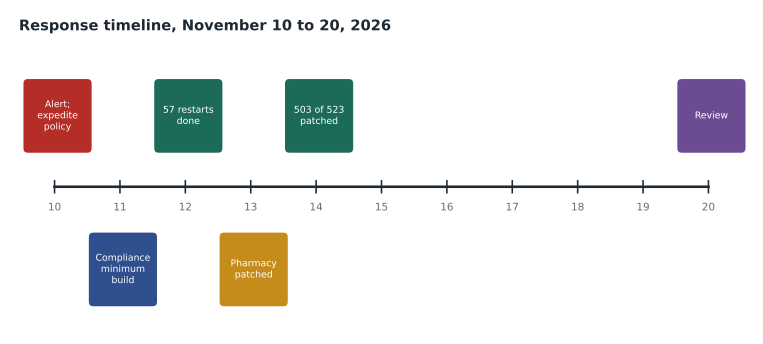
November falls in the fourth quarter's hotpatch months, after the October baseline. That means the 431 eligible devices can take the fix without a restart, which removes the clinical team's main objection to speed. Ama pauses nothing and changes the rollout for this one update: she creates a quality update policy that expedites the November security update for all Windows devices, with a restart deadline of one day. On hotpatch-eligible devices, the expedited update installs as a hotpatch; on the others, it installs the normal cumulative update and restarts within a day, outside active hours where possible.
Worked problem
How many restarts will the expedite cause?
Of the 523 Windows devices, 431 are on the hotpatch cycle, 57 are not eligible, 20 are offline, 2 are the pharmacy devices (excluded from the expedite until the vendor approves) and 13 are shared devices that are eligible for hotpatch. How many devices will restart for the expedited update this week, assuming the offline ones stay offline?
Show solution
- The 431 hotpatch devices and the 13 shared devices, which are also eligible, install the fix with no restart.
- The 57 non-eligible devices install the cumulative update and restart.
- The 20 offline devices do nothing until they reconnect.
- The 2 pharmacy devices are excluded for now.
Answer: 57 restarts this week, instead of 503 if every connected device had needed one. Ama tells branch managers which 57 laptops will restart overnight on Wednesday.
Step 3: Enforce
Speed is not enough on its own; devices that miss the update must not reach client data while they are exposed. Ama raises the minimum OS build in the Windows compliance policy to the November build, with a grace period of two days before a device is marked non-compliant. From Friday, any Windows device still below the build becomes non-compliant, and Conditional Access blocks it from Microsoft 365 and the visit verification app until it is patched. The 20 offline devices are the ones this catches: when a nurse returns from leave and opens her laptop, it cannot reach client data until it has installed the update, and the compliance message tells her what to do.
The pharmacy devices are the exception. Their vendor approves the update on Thursday after testing, and Ama assigns them the expedite policy then. Until that point, she relies on compensating controls: the devices already run App Control in audit mode from lesson 4, and Felix confirms that the firewall from lesson 5 blocks all inbound traffic to them.
Step 4: Watch for exploitation
For the 26 pilot devices onboarded to Defender for Endpoint, any attempt to exploit the vulnerability would raise an alert and raise the device's risk level, which the compliance policy from lesson 3 would turn into a block. For the rest, Defender Antivirus and the ASR rules are the protection. Ama asks the monitoring partner to watch for alerts mentioning the vulnerability across the tenant and, if one appears, to isolate the device first and ask questions second. None appears.
The episode also makes the case for finishing onboarding. Ines moves the remaining Defender for Endpoint onboarding forward from December to the following week, using the licences' start date of December 1 for billing but the trial for coverage, so that the whole fleet has EDR before the next exploited vulnerability.
Step 5: Track and report
Ama tracks progress in three places: the Autopatch release management view for the expedited update, the Windows update reports for errors, and the compliance report for devices below the minimum build. She sends Ines a short daily note.
| Day | Patched | Not yet | Main reason for gaps |
|---|---|---|---|
| Tuesday evening | 312 | 211 | Devices had not checked in yet |
| Wednesday evening | 470 | 53 | Non-hotpatch devices waiting for the overnight restart |
| Thursday evening | 496 | 27 | 20 offline, 2 pharmacy, 5 with errors |
| Friday evening | 503 | 20 | All 20 offline; blocked by compliance until they return |
The five devices with errors all had less than the free disk space the update needed. The help desk cleared old temporary files remotely with a remediation script, and they patched on Friday. The pharmacy devices patched on Thursday night after vendor approval.
Step 6: The other platforms
The vulnerability is in Windows, but Ines asks the right question: what if it had been on iPhones? Teodor walks through the answer from lesson 11. He would update the three DDM policies to the fixed iOS version with target dates one, two and three days out instead of the usual pattern, raise the minimum OS version in the iOS compliance policy, and tighten the app protection conditional launch setting for personal phones to block at one version behind. The tools differ by platform; the pattern of assess, speed up, enforce, watch and report is the same.
Step 7: Review
On Friday, November 20, the team holds a 30-minute review. Ama's notes record what worked: hotpatch removed almost all restarts, the expedite policy took ten minutes to create, and compliance-based Conditional Access caught every device that missed the update. They also record what to improve. Onboarding to Defender for Endpoint had lagged the rest of the project. Twenty devices had been offline for more than a week, and the help desk would now chase any device offline for 14 days. Disk space had caused every update error, so a remediation script to clean temporary files would run monthly. And the pharmacy vendor's approval process would be written into the runbook with a named contact.
Ines's summary for the board was one sentence long, which was the sign of a good week: "An exploited Windows vulnerability was fixed on 503 of 523 devices within three days, with 57 overnight restarts, and the remaining 20 cannot reach client data until they are fixed."
Applying the pattern
The case study follows a pattern that works for any urgent fix, whatever the platform or product. It is worth stating on its own so that it can be reused.
| Phase | Question | Main tools |
|---|---|---|
| Assess | Which devices are exposed? | Defender Vulnerability Management; Intune reports by build or version |
| Speed up | How quickly can the fix reach them? | Expedited quality update; hotpatch; DDM target dates |
| Enforce | What happens to devices that miss it? | Compliance minimum version; Conditional Access |
| Protect meanwhile | What reduces risk until then? | ASR rules; firewall; App Control; compensating controls |
| Watch | Is anyone exploiting it? | Defender alerts; device risk; isolation |
| Report and review | Did it work, and what should change? | Daily progress notes; review meeting |
What the course built
Looking back over the project, Ama listed what had changed between the first inventory in October and the response in November. Every Windows device had antivirus with tamper protection, a firewall that ignored local rules, ASR rules, BitLocker with a stored and rotating key, Windows Hello for Business and a unique LAPS password. Updates moved through an Autopatch group with hotpatch, drivers were approved deliberately and the fleet was moving to Windows 11, version 26H2 on a plan. iPhones and Macs used declarative updates, Android devices had maintenance windows, and personal phones were protected by app protection. Defender for Endpoint was about to cover everything. And a compliance policy tied all of it to Conditional Access, so that a device that fell out of line lost access to client data until it was fixed.
Ines took the list to the board with one comment: phase 2 of the Zero Trust roadmap had started early, and the board's condition for the spring 2027 Copilot pilot, that devices and data be under control first, was half met. The data half belonged to the Purview work in MSBA-204.
Questions to discuss
Before moving on, consider how the response would change in three variations. If the vulnerability had been in a third-party PDF reader rather than Windows, the expedite policy would not help; the fix would come through the app deployment work in MSBA-213, with Defender Vulnerability Management showing the exposed devices and compliance unable to check app versions directly. If it had been announced in a baseline month, every device would have needed a restart, and the conversation with the clinical team would have been about overnight scheduling rather than hotpatch. And if Defender for Endpoint had already covered every device, the team would have had direct evidence of whether anyone tried to exploit the vulnerability, rather than relying on the absence of alerts from a partial pilot.
Your turn
Take an organization you know, or invent one with a fleet of about 500 devices, and answer the case study's questions for it. How many devices would be eligible for hotpatch, and why? Which devices could not be patched quickly, and what compensating controls would protect them? What would the compliance minimum build be, and how long a grace period would users get? Who would watch for exploitation outside business hours? And what single sentence would you send to the board at the end of the week? Writing the answers down is the best preparation for the scenario questions in the MD-102 exam, which describe a fleet and ask which combination of tools solves the problem.
Common mistakes
MistakeWaiting for the normal ring schedule when a vulnerability is being exploited.
InsteadExpedite the update and use hotpatch where available to remove restart objections.
MistakeRelying only on update policy, so offline devices return unpatched with full access.
InsteadRaise the compliance minimum build so Conditional Access blocks unpatched devices.
MistakeForcing an update onto vendor-controlled devices without approval.
InsteadUse compensating controls until the vendor approves, then patch.
MistakeEnding the response when the numbers look good.
InsteadReview what worked and fix the gaps the incident revealed.
Summary and key terms
- Assess exposure with Defender Vulnerability Management for onboarded devices and Intune reports for the rest.
- Speed up with an expedited quality update; in hotpatch months, eligible devices take it without restarting.
- Enforce with a compliance minimum OS build and Conditional Access, so devices that miss the update lose access to data.
- Watch for exploitation with Defender alerts and device risk, and isolate devices if needed.
- Track progress daily, handle exceptions with compensating controls, and review afterwards to fix gaps.
- Exploited vulnerability
- A vulnerability that attackers are already using in real attacks.
- Defender Vulnerability Management
- Defender for Endpoint capability that lists vulnerable devices and software and recommends fixes.
- Exposed device
- A device running software affected by a known vulnerability.
- Compensating control
- A temporary protection used when the main fix cannot yet be applied.
- Minimum OS build
- A compliance setting that marks devices below a given build non-compliant.
Practice problems
Work each problem on paper first, then reveal the answer to check.
Why did hotpatch matter so much in this case?
Show answer
November was a hotpatch month, so 431 eligible devices installed the fix with no restart, leaving only 57 restarts.
What stopped the 20 offline laptops reaching client data while unpatched?
Show answer
The raised compliance minimum build and the Conditional Access policy requiring a compliant device.
Name two improvements from the review.
Show answer
Finish Defender onboarding sooner; chase devices offline for 14 days; run a monthly disk clean-up script; document the vendor approval process.
Lesson quiz · 5 questions
Score 60% or more to complete this lesson.
Create a free account to save your progress, take quizzes and earn a certificate.