
MSBA-112 · Lesson 9 of 12 · 18 min
Reviewing AI output for accuracy
▶ Video coming soon A video version of this lesson is on the way.
Lorne Macpherson-Ibe, Quillfield's chief financial officer, had a habit that everyone in the firm knew about. Whenever someone handed him a report, he picked one number at random and asked where it came from. If the answer was quick and right, he read the rest of the report with confidence. If it was slow or wrong, he handed the report back. In early November, Hamish asked Lorne to join a desk session and explain the habit, because it was the best single description he had heard of how to review AI-generated work. "I'm not checking the number," Lorne said. "I'm checking whether the person knows where their numbers come from."
The first eight lessons each ended with a review step: comparing a rewrite with its original, checking a summary against the thread, testing an Excel figure by another method, reading a generated slide against the source guide. This lesson pulls those steps together into a method that works across Word, Excel, PowerPoint, Outlook and Teams. MSBA-111 introduced the principle of checking in proportion to the consequences; here the focus is on the specific errors that appear in drafted and analyzed business content, and on the techniques that catch them.
Why review is not optional
A large language model produces text by predicting what is likely to come next, given everything in its context. When that context includes the right sources and a clear request, the result is usually accurate. But the model does not check its output against the world, and its fluency is the same whether it is right or wrong. Microsoft's own support pages for Copilot in Word, Excel, PowerPoint and Outlook all remind users to review and verify AI-generated content. That is not a legal disclaimer to skip past; it is a description of how the technology works.
Six kinds of error
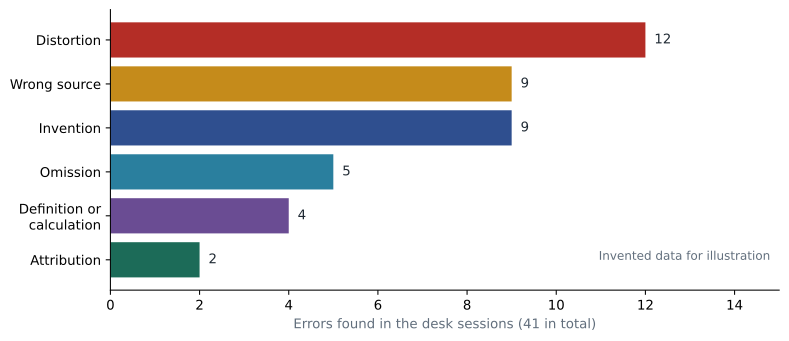
Over the desk sessions, Hamish kept a list of every error people found in Copilot's work. By November it had grown to forty-one entries, and almost all of them fitted into six kinds.
| Kind of error | What it looks like | Example from the sessions |
|---|---|---|
| Invention | A specific fact, figure, name or reference that is not in the sources | A deductible amount that appeared in no document |
| Distortion | A real fact changed in meaning: a qualifier dropped, two conditions merged, a maybe turned into a must | "May require" became "require" (lesson 2); sewer backup appeared covered (lesson 4) |
| Omission | Something important left out of a summary or analysis | An encrypted message missing from a thread summary |
| Wrong source | An answer drawn from an outdated or unintended file | Last year's wording used instead of this year's |
| Definition or calculation | A number computed correctly for a different question than the one intended | Average wait including abandoned calls (lesson 3) |
| Attribution | A statement or task assigned to the wrong person | An action item for "Toby" (lesson 6) |
The list was useful because it changed what people looked for. Most new users read AI output for invention, the error everyone has heard about. In Quillfield's list, invention accounted for fewer than a quarter of the errors. Distortion and wrong source were more common, and they are harder to spot, because the text looks grounded: it mentions the right client and the right topic, and the error is in a single word or an outdated figure.
Techniques that catch errors
Each kind of error has a technique that catches it efficiently. None of them requires rechecking every word.
Trace the specifics. For invention, the fastest check is to pick out every specific item in the output, such as numbers, dates, names, clause numbers and amounts, and confirm each one appears in a source. Copilot's numbered references, which appear in many responses grounded in work content, make this quick: open the reference and find the figure. If a specific has no reference, treat it as unverified until you find it yourself.
Compare side by side. For distortion, put the output next to its source and read them together, sentence by sentence, for anything with legal, financial or coverage meaning. Word's ability to show a rewrite next to the original makes this easy; for a generated slide, keep the source document open beside the deck.
Ask what is missing. For omission, ask Copilot directly: "What did you leave out of this summary?" or "Which messages in the thread did you not include?" Copilot's answer is not proof, but it often surfaces gaps. Then use your own knowledge of what should be there: if a renewal summary has no mention of claims, ask why.
Check the source's date and version. For wrong source, look at which files Copilot used and whether they are current. A prompt that names the exact file prevents most of these errors; when Copilot chooses its own sources, read the reference list before reading the answer.
Restate the definition. For definition errors, ask how the figure was calculated, and then restate your own definition explicitly, as Tomasz did with average wait. Recording definitions in the report stops the same question recurring.
Read the names. For attribution, check every name attached to a statement or task, especially in meeting recaps, where similar names and nicknames cause confusion.
Lorne's random check, applied
Lorne's habit translates directly into a technique for long AI-assisted documents: spot-check by sampling. You cannot verify every sentence of a twenty-page report in reasonable time, but you can choose several specifics at random, trace each to its source, and decide based on the result. If all of them check out, you can read the rest with reasonable confidence. If even one is wrong, check everything of the same kind. Sampling works because errors tend to cluster: a model that used the wrong source for one figure probably used it for others.
Worked problem
Sampling a renewal report
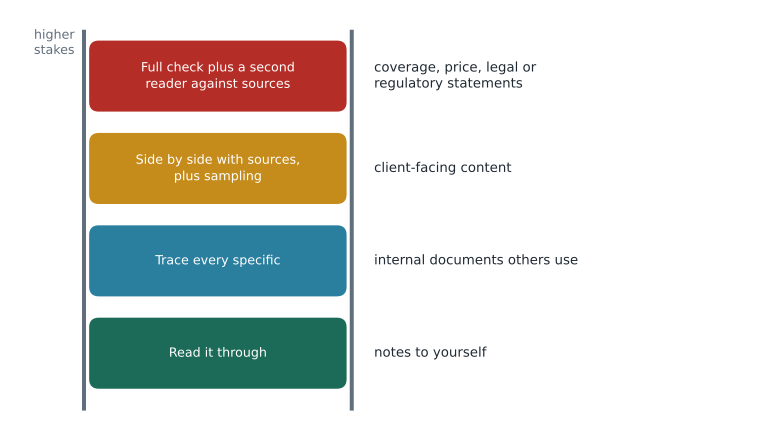
Tobias Okafor-Rains has a Copilot-drafted renewal report for a manufacturing client: 14 pages, with 37 figures (premiums, limits, deductibles, claims). He has 30 minutes. How should he review it?
Show solution
- Check every figure on the first page, the executive summary, because that is what the client will read and remember.
- Sample five more figures at random from the body and trace each to its source document.
- Four of the five match. The fifth, a deductible, comes from last year's policy.
- Because one figure used an outdated source, check every deductible and limit in the report against the current policy, and ask Copilot to regenerate the affected section with the current policy named as the source.
Answer: Sampling found a wrong-source error; Tobias then checked all figures of that kind. The summary page was checked in full because its consequences were highest.
Can Copilot check its own work?
People often ask whether they can simply ask Copilot to review its own output. It helps, within limits. Asking "Check this summary against the attached wording and list any statement that the wording does not support" can catch distortions and inventions, because the second request focuses the model on comparison rather than writing. But the same model can make the same mistake twice, especially if the error came from the wrong source. Use self-checking as an extra filter, not as a replacement for your own check of the items that matter most.
The same is true of a colleague's review. A second reader is valuable, but only if they check against sources. A colleague who reads a fluent Copilot draft and says "looks good" has reviewed its style, not its accuracy.
Making review easier before it starts
The best review is the one you barely need, and most of the work happens in the prompt. Name the sources, so you know where to check. Ask Copilot to say "not found" rather than fill gaps. Ask for references or clause numbers in summaries. Ask for one kind of change at a time, so you can see what changed. Keep sources open while you review. And keep a record of the errors you find, as Hamish did, because the list teaches you where to look next time.
What review is not
Review is not a guarantee. Careful people miss errors, with or without AI. The goal is not perfection but a process proportionate to the stakes, applied every time. Review is also not a reason to avoid Copilot. In Quillfield's November measurement, staff who used Copilot and reviewed its output carefully still saved substantial time on the measured tasks. The time saved on drafting was partly spent on checking, and that trade was worth making.
How AB-730 tests this
Responsible AI is woven through every skill area of AB-730, and questions about drafted and analyzed content often include a review step. Expect scenarios where the right answer is to verify specific facts against sources, to check that a summary includes what it should, or to notice that an output used the wrong file. Answers that rely only on Copilot checking itself, or on a fluent appearance, are usually wrong.
Checking in each app
The six techniques apply everywhere, but each app has its own quick checks, which Hamish summarized on a single page for the desk sessions.
In Word, keep the source documents open in a second window, check every figure and clause number in client-facing text, and read rewrites side by side with the original. For long documents, sample. In Excel, test one value in every output by a method you control: a filter and the status bar, a formula you write yourself, or a manual count. Ask how each figure was calculated and record the definition. In PowerPoint, compare every factual slide and its speaker note with the source document, and look closely at charts generated from data, including the axis ranges. In Outlook, use summaries to orient, then open messages with commitments, figures and deadlines; check names, dates and amounts in drafts before sending; and check that every message in a thread was included. In Teams, read the transcript passage behind any decision or task you will act on, and check names and dates in action items.
Checking content you did not create
More and more of the content you receive will have been drafted with AI by someone else: a colleague's report, an insurer's summary, a client's letter. The same techniques apply, and they are worth applying with the same proportion as to your own work. Dolores noticed in November that an insurer's summary of a policy change contained a description of an exclusion that did not match the wording attached to the same email. She did not know whether the summary had been written with AI, and it did not matter: she checked it against the wording, as she would have checked any summary, and asked the underwriter to confirm. The underwriter corrected the summary the same day.
The lesson is that good review habits are not about distrusting Copilot specifically. They are about knowing where facts come from, whatever produced the text. In a world where fluent text is cheap, the ability to trace a statement to its source becomes more valuable, not less.
Recording what you checked
For client-facing and high-stakes documents, Quillfield asked staff to record briefly what they had checked, in the file's comments or in the approval note: "Figures checked against the 2026 policy schedule; coverage statements checked against wording sections 3 and 7." The record takes a minute, helps a second reviewer focus on what was not checked, and shows, if a question arises later, that review was done. It also builds the habit: people who know they will write down what they checked tend to check it.
Common mistakes
MistakeLooking only for invented facts.
InsteadLook for distortion, omission, wrong source, definition and attribution errors too.
MistakeTrusting a figure because the surrounding text mentions the right client.
InsteadTrace the figure to its reference and check the source is current.
MistakeAsking Copilot to review its own work and stopping there.
InsteadUse self-checking as an extra filter, then check the highest-stakes items yourself.
MistakeChecking a sample, finding an error, and fixing only that one.
InsteadWhen a sample fails, check everything of the same kind.
Summary and key terms
- Copilot's fluency is the same whether it is right or wrong, so review is part of every task.
- Six kinds of error recur: invention, distortion, omission, wrong source, definition or calculation, and attribution.
- Each kind has an efficient check: trace specifics, compare side by side, ask what is missing, check source versions, restate definitions, read names.
- For long documents, sample specifics at random and check everything of a kind when a sample fails.
- Good prompts make review easier: named sources, "not found" instructions and references.
- Invention
- A specific fact or reference in AI output that does not appear in any source; often called a hallucination.
- Distortion
- A real fact changed in meaning, such as a lost qualifier or merged conditions.
- Omission
- Important information left out of a summary or analysis.
- Wrong source
- Output based on an outdated or unintended file.
- Spot-check by sampling
- Checking randomly chosen specifics to estimate the reliability of a whole document.
- Reference
- A numbered link in a Copilot response to the source it drew on.
Practice problems
Work each problem on paper first, then reveal the answer to check.
Which kind of error was most common in Hamish's list?
Show answer
Distortion, followed by wrong source and invention.
What should Tobias do after one sampled deductible came from last year's policy?
Show answer
Check every deductible and limit against the current policy and regenerate the section with the right source.
Why is a colleague saying "looks good" not a full review?
Show answer
It checks style and fluency, not accuracy against sources.
Lesson quiz · 5 questions
Score 60% or more to complete this lesson.
Create a free account to save your progress, take quizzes and earn a certificate.