
MSBA-112 · Lesson 10 of 12 · 18 min
Keeping a human in the loop
▶ Video coming soon A video version of this lesson is on the way.
Lesson 9 was about checking whether Copilot's output is right. This lesson is about a wider question: who is responsible for what happens next. At Quillfield the question became urgent in early November, when a claims advocate in a branch office sent a client a Copilot-drafted email that explained, confidently and incorrectly, why a water damage claim would be declined. The email was well written, polite and wrong about the policy's wording. The claim was in fact covered, the client complained, and the advocate said, honestly, "Copilot wrote it and it sounded right." Nobody had been harmed beyond a bad afternoon, but Celestine asked Wendell and Hamish to write down, plainly, where people had to stay in charge.
What "human in the loop" means
Human in the loop means that a person reviews, approves or controls an AI system's output before it has an effect. The phrase covers a range. At one end, a person reads a draft before sending it. At the other, a person makes a decision with AI only as one input, or decides that AI should not be used for a task at all. Between them sit approval steps, second reviewers and limits on what AI may do without permission.
Microsoft builds this idea into its own products and its Responsible AI Standard, which sets out six principles: fairness, reliability and safety, privacy and security, inclusiveness, transparency, and accountability. MSBA-110 introduced them; this lesson applies the last one, accountability, to everyday work. Accountability means that people, not systems, answer for the outcomes of AI-assisted work. Copilot can draft the email; the person who sends it owns it.
How the products keep you in control
Each app in this course has controls that keep a human between Copilot's work and its effect. Knowing them is part of using Copilot well.
| App | Built-in control | What it protects |
|---|---|---|
| Word | Keep, regenerate or refine a draft; Replace or Insert below for rewrites; reviewable and reversible edits | Nothing changes until you accept it, and changes can be undone |
| Excel | Plan mode for approval before changes; chat only mode; the Stop button | You approve the method, explore without changes, or halt work in progress |
| PowerPoint | Copilot works in the file you are editing; brand kits and templates | You review each slide; layouts and assets stay approved |
| Outlook | Drafts and coaching never send by themselves; proposed rules can be reviewed before saving | Nothing leaves your mailbox without you |
| Teams | Organizer controls the Copilot setting; editable Facilitator notes | The record can be corrected before it is shared |
These controls only work if people use them. A draft that is sent without reading has passed through the control without being controlled. The rest of this lesson is about the habits and rules that make the controls meaningful.
Matching oversight to the task
Wendell and Hamish's note to Celestine sorted Quillfield's Copilot uses into four levels of oversight, based on what could go wrong.
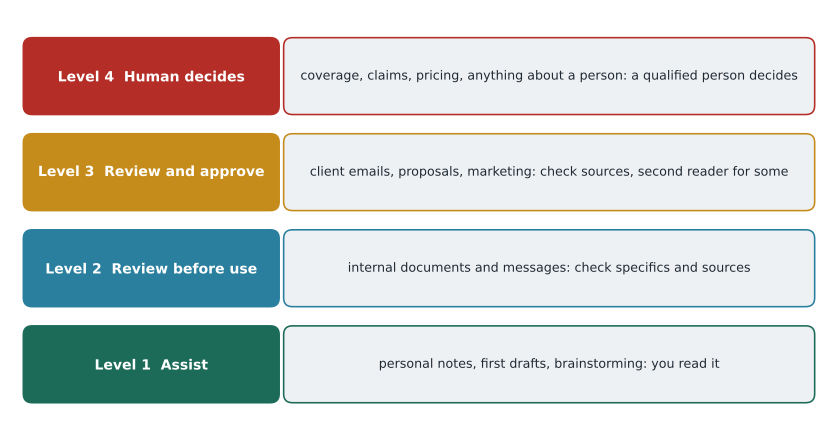
Level 1, assist. Personal notes, outlines, brainstorming and first drafts that only you will see. You read the output and use your judgement; no formal checks are needed. Level 2, review before use. Internal documents and messages that colleagues will rely on. You check the specifics and the sources before sharing. Level 3, review and approve. Anything going to a client, an insurer or the public: emails, proposals, marketing and seminar material. You check against sources, and some categories, such as marketing and anything stating coverage, also need a second reader. Level 4, human decides. Coverage positions, claim outcomes, pricing, and anything that affects a person's job or access to a service. Copilot can help gather information and draft explanations, but a qualified person makes the decision and writes or approves the final words.
The branch office email was a level 4 task treated as level 2. The advocate had used Copilot to explain a coverage decision, which is acceptable, but had let Copilot's reading of the policy stand in for his own. Under the new note, the explanation of any declined or partly declined claim had to be checked against the wording by the advocate and approved by a senior claims colleague before it was sent.
Automation bias and how to resist it
Automation bias is the tendency to trust a system's output more than you should, especially when the system is usually right. It is well documented in fields from aviation to medicine, and AI writing tools invite it, because their output is fluent and confident. The advocate in the branch office was not careless by nature; he was busy, the email sounded right, and Copilot had been right about the last twenty emails.
Three habits help resist it. Form your own view first on anything that matters: before asking Copilot what a clause means, read it yourself, then compare. Slow down on the unusual: when an output says something surprising, such as a claim being declined, an exclusion applying or a deadline being missed, treat the surprise as a reason to check, not to accept. And keep your skills: people who stop writing first drafts entirely can lose the ability to judge whether a draft is good. Several of Quillfield's senior staff made a point of writing important client letters themselves from time to time.
Worked problem
Rewriting a claim explanation the right way
Gus has to tell a client that part of a restaurant equipment claim is not covered because the equipment was more than ten years old and the policy pays actual cash value for such items. How should he use Copilot while keeping the decision his?
Show solution
- Read the relevant clause and the adjuster's report himself and confirm the coverage position.
- Prompt Copilot with the facts he has confirmed: the covered and uncovered amounts, the reason, the clause number and the appeal option.
- Ask Copilot to draft a clear, considerate explanation and use coaching to check the tone.
- Send the draft to a senior claims colleague for approval, as the oversight note requires, before it goes to the client.
Answer: Gus decides the position and supplies the facts; Copilot drafts the explanation; a senior colleague approves it. The client receives an accurate, readable explanation with a clear next step.
Agents and editing modes
As Copilot gains the ability to act, for example editing a workbook in Excel, rewriting a whole document in Word, or running tasks through agents, the question of oversight moves earlier. Instead of only reviewing the result, you decide what Copilot may do. Excel's plan mode is an example: you approve the method before any change. In agent-based work, Microsoft and organizations add approvals for actions with consequences, such as sending messages or updating records. Yusra's HR leave agent, for example, could create a leave case for an employee, but an HR adviser approved every case. The principle is the same at every scale: the more an AI system can do on its own, the more carefully a person should define the boundaries and check the outcomes.
Telling people when AI was used
Transparency is another of Microsoft's principles, and it raises a practical question: should you tell a client that Copilot helped write an email? Quillfield's answer was nuanced. Staff did not need to label routine emails drafted with Copilot, any more than they labelled emails drafted with a template, because the sender reviewed and owned every word. But they were expected to answer honestly if a client asked, and the client questions and answers that Wendell prepared in lesson 7 explained how the firm used AI. Meetings were different: attendees were always told when transcription or Facilitator was on. And anything that could be mistaken for a human judgement it was not, such as an AI-generated assessment presented as an expert's opinion, was not allowed.
When not to use Copilot
Keeping a human in the loop sometimes means keeping AI out of the loop. Quillfield's note listed a few situations where staff should not use Copilot at all: drafting messages that involve a person's health information beyond what a claim strictly requires, evaluating colleagues' performance from meeting transcripts, and any task where the client had asked that their information not be processed with AI. It also reminded staff of the September AI-use policy: client and company data go only into work-account Copilot, never into consumer AI tools.
Escalation
Finally, people need to know what to do when something goes wrong. Quillfield set a simple path: if Copilot produces something harmful, biased or seriously wrong, stop, do not send it, keep a copy of the prompt and output, and tell a manager or the AI council. Microsoft's products include feedback buttons for reporting problematic responses, and Quillfield's IT team asked staff to use them as well, because reports help both the firm and Microsoft improve. The branch office incident became a training example, with the advocate's permission, in every new desk session.
How AB-730 tests this
Expect questions that ask which tasks need human review or approval, what accountability means for AI-assisted work, how Microsoft's responsible AI principles apply in practice, and which product controls keep users in charge. The answers that score keep a person accountable for decisions and client-facing content, scale oversight to consequences, and avoid using AI where it is inappropriate.
Writing the rules down
Quillfield's oversight note was two pages long, and its brevity was deliberate. A long policy that nobody reads keeps no one in the loop. The note had five sections: the four oversight levels with examples from each team, the list of tasks where Copilot should not be used, the rule about telling meeting attendees, the escalation path, and a short paragraph on who owns what. That last paragraph said simply that the person who sends, presents or decides is accountable for the content, regardless of how it was produced, and that managers are accountable for making sure their teams know the rules.
Writing rules is only half the work. Hamish built the note into every desk session after the branch office incident, using real examples from each team. Claims advocates practised the claim explanation workflow; account executives practised the level 3 review of a proposal; marketing practised the image checks. People remember rules they have used far better than rules they have read.
Fairness and inclusiveness in everyday content
Two of Microsoft's principles, fairness and inclusiveness, can seem remote from drafting an email, but they show up in ordinary work. A Copilot summary of customer complaints may underweight complaints written in less fluent English. A generated job description may use language that discourages some applicants. A draft letter may assume a reader's family situation or ability. Copilot reflects patterns in its training data and in your sources, and some of those patterns are unfair.
The human in the loop is the person best placed to notice. Hamish's suggestion was to add one question to the review of anything that affects how people are treated: would this read the same way to every reader it reaches? When the contact centre asked Copilot to summarize a month of complaints, Tomasz also asked it to count complaints by language of correspondence, and then read a sample of the non-English complaints himself to make sure their concerns appeared in the summary. They had been underrepresented, and the final summary corrected that.
Oversight as a skill
Keeping a human in the loop is sometimes presented as a brake on productivity. Quillfield's experience was different. The desk sessions showed that people who understood the oversight levels used Copilot more, not less, because they knew which tasks they could hand to it with light review and which needed care. Clear rules removed the anxiety that had kept some staff from using Copilot at all.
Common mistakes
MistakeLetting Copilot's interpretation of a policy stand in for your own on a coverage decision.
InsteadForm your own view from the source, then use Copilot to help explain it.
MistakeApplying the same light review to every task.
InsteadScale oversight to the consequences, up to human decision for coverage, pricing and people.
MistakeTrusting output because it has been right many times before.
InsteadRecognize automation bias and slow down on surprising or high-stakes results.
MistakeUsing Copilot on tasks where the client or policy excludes AI.
InsteadKnow when not to use AI at all.
Summary and key terms
- Human in the loop means a person reviews, approves or controls AI output before it has an effect.
- Accountability, one of Microsoft's six responsible AI principles, means people answer for AI-assisted outcomes.
- Each app has controls, such as keep or discard, plan mode, Stop and editable notes, that only work if used.
- Oversight should scale with consequences, from assisting to human decision.
- Automation bias is resisted by forming your own view first, slowing down on surprises and keeping skills.
- Human in the loop
- A design and working practice in which a person reviews, approves or controls AI output before it takes effect.
- Accountability
- The principle that people, not systems, answer for the outcomes of AI-assisted work.
- Automation bias
- The tendency to over-trust output from an automated system.
- Responsible AI Standard
- Microsoft's framework of principles and requirements for building and using AI responsibly.
- Oversight level
- The degree of human review required for a task, set by its consequences.
- Escalation
- Reporting a problem to the right person so it can be handled and learned from.
Practice problems
Work each problem on paper first, then reveal the answer to check.
What went wrong in the branch office email?
Show answer
A coverage decision, a level 4 task, was treated as a quick review task, and Copilot's reading of the policy replaced the advocate's own.
Name Microsoft's six responsible AI principles.
Show answer
Fairness, reliability and safety, privacy and security, inclusiveness, transparency, and accountability.
Give one habit that resists automation bias.
Show answer
Form your own view first, slow down on surprising results, or keep writing important drafts yourself.
Lesson quiz · 5 questions
Score 60% or more to complete this lesson.
Create a free account to save your progress, take quizzes and earn a certificate.