
MSBA-112 · Lesson 2 of 12 · 19 min
Rewriting, summarizing and checking tone
▶ Video coming soon A video version of this lesson is on the way.
The second desk session was with Dolores Ventimiglia, a senior account executive with twenty-five years at Quillfield and about a hundred and forty commercial clients: restaurants, food producers and small manufacturers. Dolores had been a sceptic when Copilot arrived and had become one of the firm's eight AI champions, but she rarely used Copilot to write from scratch. "I know what I want to say," she told Hamish. "What I need is help saying it to the right person, and getting through everything I'm sent." That is a fair description of most professional work, and it is what this lesson covers: rewriting text you already have, summarizing long material, and checking that the tone fits the reader.
Rewriting a selection
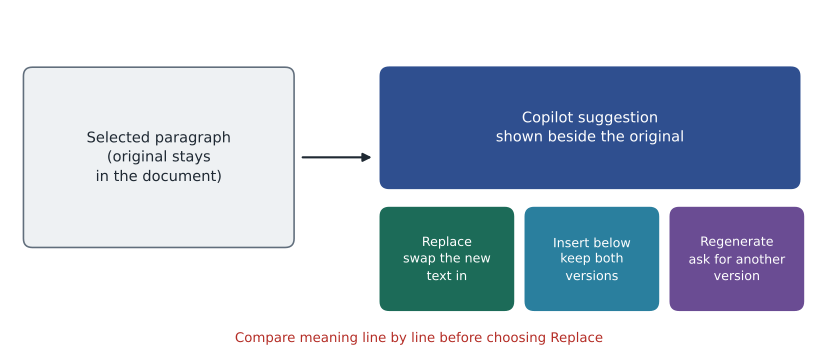
In Word, selecting a passage and choosing Copilot on the mini toolbar opens options for working on just that text. Microsoft's support article for editing and rewriting describes an Auto Rewrite option that proposes alternative versions, and a prompt box where you can describe the change you want: shorter, more formal, more direct, bullet points, a table. Copilot shows the result next to the original, and you choose Replace to swap it in, Insert below to keep both, or Regenerate for another version. Nothing changes in the document until you choose.
Dolores's first example was a paragraph from a renewal letter to Birchgrove Smokehouse, a client expanding from a single restaurant into wholesale sales. The paragraph explained, in one sentence of ninety words, why the client now needed product recall coverage. She selected it and asked Copilot to "rewrite in three short sentences for a business owner, keeping every fact". The result was clearer, but Hamish asked her to compare it with the original line by line before replacing it. One fact had changed: "distributors may require proof of coverage" had become "distributors require proof of coverage". A small word, *may*, had disappeared, and with it an important qualification. She fixed it by hand and kept the rest.
That comparison is the core skill of rewriting. A rewrite is supposed to change the words and keep the meaning. Language models are good at the first part and usually good at the second, but they can drop qualifiers, merge two conditions into one, turn a recommendation into an instruction, or add a reason that was not there. For anything with legal, financial or coverage meaning, read the rewrite against the original before you replace it.
Common rewriting requests
Most rewriting requests fall into a few families, and naming the family in the prompt gets better results than a vague "make this better". Hamish wrote them on the whiteboard during the session.
| Family | Example instruction | What to check afterward |
|---|---|---|
| Shorten | Cut this to under 80 words without losing any of the conditions | Qualifiers and exceptions are still there |
| Simplify | Rewrite for a reader with no insurance background, at about a grade 8 reading level | Technical terms were explained, not replaced with wrong ones |
| Change tone | Make this firmer but still courteous | Nothing became rude or a promise |
| Restructure | Turn this paragraph into a numbered list of steps | Steps are in the right order and none is missing |
| Reformat | Convert this list of deductibles into a table with columns for coverage and amount | Every number moved to the right cell |
| Adapt for a channel | Rewrite this as a short Teams message | The message still makes sense without the surrounding document |
Notice that each instruction includes a constraint that protects meaning: "without losing any of the conditions", "keeping every fact". That small addition costs nothing and reduces the number of corrections. Dolores added it to every rewriting prompt she saved.
Summarizing a long document
Summarizing is where Copilot saves the most time for people like Dolores, who receive long documents they must understand quickly: an insurer's new policy wording, a forty-page risk report, a contract a client wants reviewed for insurance requirements. In Word, you can open the Copilot pane and ask for a summary of the open document, or reference a document from Copilot Chat and ask for a summary there. Word also shows an automatic summary option at the top of some documents for licensed users. Whichever route you use, a summary prompt works better with the same four parts as any other prompt: what kind of summary, for whom, from which part of the document, and in what shape.
"Summarize this" produces a general overview. "List every change from last year's wording that reduces coverage, with the clause number for each" produces something Dolores can act on. The second prompt is also far easier to check, because each item points to a clause she can open. Microsoft's guidance and the AB-730 skill area both emphasize management summaries, short summaries that lead with decisions, risks and actions rather than retelling the document in order. A management summary for Celestine about a new insurer agreement would lead with what Quillfield has to do differently, by when, and what it costs, not with the history of the relationship.
Worked problem
From a forty-page wording to an actionable summary
An insurer has sent Dolores a revised restaurant package wording, 41 pages, effective January 1. She needs to brief her team in a Monday meeting. Write a prompt that gives her something useful.
Show solution
- Goal: identify changes, not summarize everything.
- Context: the audience is account executives who renew restaurant clients.
- Source: the new wording, compared with last year's wording if both are referenced.
- Expectations: a table of changes with clause numbers, a column saying whether coverage got broader or narrower, and a short list of clients likely to be affected by type of business.
Answer: Using the attached 2027 restaurant package wording and the 2026 wording, list every change in a table with the clause number, a one-line description, and whether coverage is broader, narrower or unchanged. Then list the types of restaurant client most affected. Say "not found" if a clause has no equivalent in the older wording.
Dolores ran the prompt and got a table of fourteen changes. She checked all the narrower ones against the wording, because those were the ones that could hurt a client, and spot-checked three of the others. Two items needed correcting: one clause number was wrong, and one change described as narrower was really a reorganized sentence with the same meaning. Her verdict was that the table saved her about two hours and that she would never send it to clients without checking. Both halves of that verdict are the right lesson.
How long can a document be?
Copilot has limits on how much content it can consider at once, and Microsoft adjusts them as models improve. Very long documents may be summarized from part of their content, and Copilot may say so. Two practical habits avoid surprises. First, if a document is long, ask about a specific part: "summarize section 4, Exclusions" is more reliable than "summarize the whole wording". Second, if the summary seems to ignore later sections, ask directly: "Did you consider the endorsements at the end of the document?" A good answer either covers them or says it could not.
Summarizing across documents and messages
Summaries do not have to come from one file. In Copilot Chat you can reference several documents, an email thread and a meeting, and ask for a combined summary. This is how Dolores prepared for client meetings: she referenced the client folder, the last few months of email and the previous meeting's recap, and asked for "what has happened since we last met, what is still open, and what the client is likely to raise". Lesson 5 covers the Outlook side of this and lesson 6 the Teams side. The skill is the same: say which sources, and ask for a structure that leads with what you need.
Checking tone
Tone is how a message feels to its reader: warm or cold, confident or hesitant, respectful or impatient. It matters most when the news is unwelcome, such as a premium increase, a declined claim or a coverage gap, and those are exactly the messages people write in a hurry. Copilot can help with tone in two ways. You can ask it to rewrite text in a particular tone, as above. And in Outlook, Coaching by Copilot reviews a draft email and suggests improvements to tone, sentiment and clarity, which you can apply with one selection. Microsoft's Outlook FAQ lists coaching among Copilot's features in new Outlook for Windows, Outlook for Mac and Outlook on the web.
At the session, Dolores tried coaching on an email to a client whose restaurant claim had been partly declined because the kitchen's fire suppression system had not been serviced. Her draft was accurate and blunt. Coaching suggested acknowledging the client's frustration first, explaining the reason for the partial decline more clearly, and making the next step, an appeal she could help with, more prominent. She accepted two of the three suggestions and rewrote the third in her own words. "It didn't know that this client hates being told how he feels," she said. Tone suggestions are suggestions; you know the reader.
Plain language and inclusive writing
Plain language is writing that the intended reader can understand the first time. Canadian and US governments both promote it, and so do many insurance regulators, because misunderstood coverage leads to complaints. Copilot is a useful plain-language assistant: it can replace jargon with everyday words, split long sentences and suggest headings. Ask it to keep technical terms that the reader must know, such as *deductible* or *exclusion*, and to explain them the first time, rather than removing them. Inclusive writing follows the same pattern: Copilot can suggest gender-neutral phrasing or flag terms some readers find exclusionary, but it does not know your organization's style guide unless you reference it.
Translation and other languages
Many Quillfield clients prefer to read in a language other than English, and Copilot can draft and rewrite in many languages. Microsoft's Outlook FAQ notes language-related differences across platforms, and some Copilot features support only a set of major languages. The practical rule at Quillfield, written by Wendell, was that a machine translation of anything with legal or coverage meaning had to be checked by a fluent colleague before it was sent, and that the English version remained the official one unless the insurer said otherwise. Translation is a form of rewriting, and the same risk applies: the words change, and sometimes the meaning does too.
How AB-730 tests this
Questions in this area typically describe a document or message and a goal, then ask which Copilot capability fits: rewriting a selection, summarizing a document, coaching a draft email, or generating a management summary. Look for answers that keep the original until the user chooses to replace it, that make summaries specific and actionable, and that leave the final judgement about tone and accuracy with the person sending the message.
Summarizing for different readers
The same document often needs different summaries for different people, and Copilot makes producing several cheap. After her table of changes, Dolores asked for two more versions of the same information. For her team: "Rewrite the changes as five bullet points an account executive needs before a renewal call, in plain words." For Celestine: "Write a three-sentence management summary of what this wording change means for Quillfield: the effect on clients, the effect on our workload, and whether any client needs to hear from us before January." Each version answered a different reader's question. The team wanted to know what to say on the phone; the chief operating officer wanted to know whether there was a business risk.
The habit to take from this is to name the reader in every summary prompt. "Summarize for the leadership team", "summarize for a client who is not an insurance expert" and "summarize for the claims team" produce different selections of facts, not just different vocabulary. A summary that tries to serve everyone usually serves no one well.
Checking a summary for balance
Summaries can also be unbalanced in ways that are hard to see. A model asked to summarize a long email exchange may give more weight to whoever wrote the most, or to the most recent messages, simply because there is more of their text. When Dolores summarized a disagreement between a client and an underwriter about a fire inspection, the first summary read almost entirely from the underwriter's point of view, because the underwriter's emails were long and the client's were short. She asked: "Summarize each party's position separately, in equal length, and then list the points they agree on." The second version was fairer and, as it happened, showed that the two sides disagreed about only one item.
For any summary that will inform a decision about people, money or a dispute, it is worth asking for positions to be presented separately and checking that each side's strongest point appears.
Common mistakes
MistakeReplacing a rewritten paragraph without comparing it with the original.
InsteadRead the rewrite against the original and look for lost qualifiers or changed conditions.
MistakeAsking for "a summary" of a long document when you need specific information.
InsteadAsk for the changes, risks or actions you need, with references to where each appears.
MistakeAccepting every coaching suggestion automatically.
InsteadTreat tone suggestions as advice; you know the reader.
MistakeSending a machine translation of coverage terms without review.
InsteadHave a fluent colleague check anything with legal or coverage meaning.
Summary and key terms
- Rewriting a selection in Word offers Replace, Insert below and Regenerate; the original stays until you choose.
- A rewrite should change wording, not meaning; check qualifiers, conditions and promises line by line.
- Specific summary prompts, such as a table of changes with clause numbers, are more useful and easier to check.
- Management summaries lead with decisions, risks and actions rather than retelling a document.
- Coaching by Copilot in Outlook suggests improvements to tone, sentiment and clarity; you decide what to accept.
- Auto Rewrite
- A Word option in which Copilot proposes alternative versions of selected text.
- Management summary
- A short summary that leads with decisions, risks and actions for a decision maker.
- Coaching by Copilot
- An Outlook feature that reviews a draft email and suggests changes to tone, sentiment and clarity.
- Tone
- How a message feels to its reader, such as warm, firm, formal or casual.
- Plain language
- Writing the intended reader can understand the first time they read it.
- Qualifier
- A word or phrase, such as "may" or "unless", that limits or conditions a statement.
Practice problems
Work each problem on paper first, then reveal the answer to check.
What changed in Dolores's rewritten Birchgrove paragraph, and why did it matter?
Show answer
"May require" became "require", removing a qualification and overstating what distributors demand.
How can you make a summary of a long wording easier to check?
Show answer
Ask for specific items, such as changes, with the clause number for each so you can open the source.
What does Coaching by Copilot review?
Show answer
The tone, sentiment and clarity of a draft email.
Lesson quiz · 5 questions
Score 60% or more to complete this lesson.
Create a free account to save your progress, take quizzes and earn a certificate.