
MSBA-112 · Lesson 6 of 12 · 18 min
Meeting recaps and follow-ups in Teams
▶ Video coming soon A video version of this lesson is on the way.
Every Monday at 9:30, Dolores ran a forty-five-minute meeting in Teams for the account executives who handle Quillfield's restaurant and food-producer clients. The meeting covered renewals due in the next sixty days, problems with insurers, and anything a client had raised. It was useful and it always ran long, and the notes were whatever Dolores remembered to type into the meeting chat afterward. Two weeks before her desk session, an action item had been lost: someone had agreed to ask an insurer about a food-truck endorsement, nobody wrote it down, and the client called a week later to ask why nothing had happened. Dolores wanted to know whether Copilot could stop that from happening again.
Copilot in a Teams meeting
Microsoft's support article on catching up on meetings with Copilot in Teams describes two ways people use it. During a meeting, you open Copilot from the meeting controls and ask questions in a private pane: summarize what has been discussed, who said what, where people disagree, which action items have come up. If you join more than five minutes late, Copilot can offer a catch-up summary. After a meeting, you open Copilot from the meeting chat or the Recap tab and ask the same kinds of questions about the whole meeting. Copilot's answers can be opened in Word for longer responses or in Excel for tables, unless a sensitivity label or a restriction on copying blocks that.
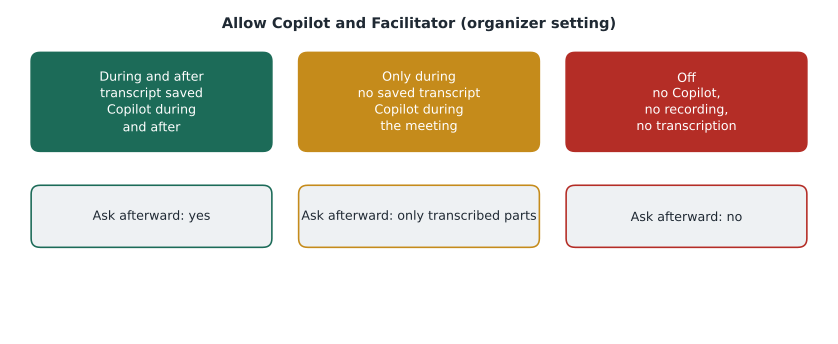
The key requirement is transcription. Copilot answers questions about what was said from the meeting's speech, and the organizer controls how that works with a meeting option called *Allow Copilot and Facilitator*, under the meeting's options for Copilot and other AI:
| Setting | What happens | After the meeting |
|---|---|---|
| During and after the meeting | Transcription is required; Copilot starts when transcription begins and stops when it stops | Copilot can answer questions about transcribed parts of the meeting |
| Only during the meeting | Copilot works from speech-to-text without saving a transcript | Copilot is available afterward only for any parts that were transcribed |
| Off | Copilot is off, and so are recording and transcription | Nothing is available from Copilot |
Microsoft's article notes several other conditions. Copilot does not work in meetings hosted outside your organization, so if a client invites Dolores to their Teams meeting, her Copilot cannot help in it. Organizers control Copilot for the meetings they organize even if they do not have a licence themselves. If transcription starts, Copilot in the meeting chat also uses chat messages from up to twenty-four hours before the meeting. In a recurring series, earlier Copilot history is lost when a later meeting in the series is transcribed, and if a transcript is deleted, Copilot is no longer available for that meeting.
Intelligent recap
After a transcribed meeting, the Recap tab brings together the recording if there was one, the transcript, and an AI-generated intelligent recap with notes and suggested follow-up tasks. Microsoft's support article states that intelligent recap is included with Teams Premium, an add-on licence, or with a Microsoft Copilot licence. It is the after-meeting view most attendees use, because it does not require them to know what to ask: the notes and tasks are already there, organized by topic.
The Facilitator agent
Dolores's problem was not only what was said but what was agreed. For that, Microsoft offers Facilitator, an agent that works inside Teams meetings. Microsoft's support article, updated in November 2026, describes what it does:
| Facilitator capability | What it does |
|---|---|
| Notes | Writes real-time AI notes that participants can edit together, and summarizes decisions and open questions |
| Agenda | Finds an agenda in the meeting invitation or notes, or accepts one in chat, and posts it in the meeting chat; asks participants to set goals if there is none |
| Timekeeping | Shows an agenda timer with time for each topic, marks topics as discussion starts, and alerts the meeting when it runs past its end time |
| Action items | Captures follow-up tasks, which can be synced to Planner (Microsoft lists this as a preview capability) |
| Questions | Answers questions in the meeting chat and can mention absent people who were discussed |
Facilitator needs a Microsoft Copilot licence for the person who adds it or turns it on, and only organizers or presenters on Teams for the web or desktop can turn it on during a meeting; it can also be enabled when the meeting is scheduled, under the same Copilot and other AI options. Any participant except external participants can see its updates in the meeting chat and notes. It works only in scheduled meetings, not in channel meetings, instant meetings or Teams calls, and transcription must be on for it to answer questions about the meeting after it ends. Microsoft also notes some practical quirks: it cannot read the agenda until at least one person other than the organizer has joined, it cannot read agendas in content protected by sensitivity labels or encryption, and live notes take a few minutes to start appearing.
Dolores's new Monday meeting
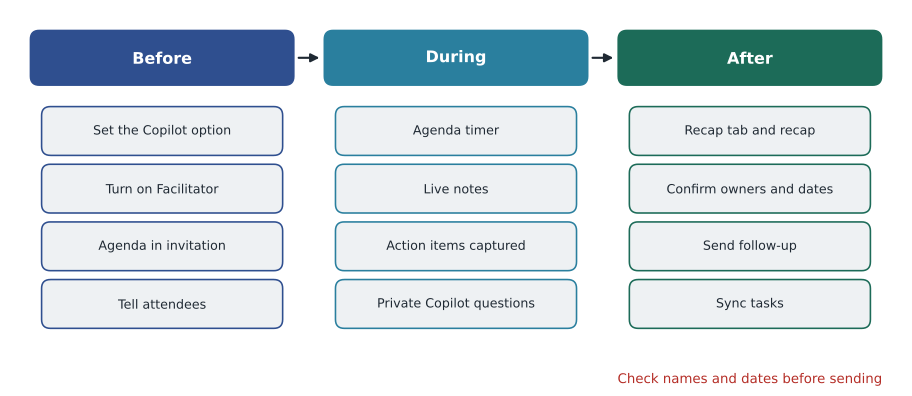
Hamish helped Dolores set up her next Monday meeting differently. In the meeting options she set *Allow Copilot and Facilitator* to *During and after the meeting* and turned on Facilitator. She put a simple agenda in the invitation: renewals due in sixty days (twenty minutes), insurer issues (ten minutes), client concerns (ten minutes), wrap-up (five minutes). At the start of the meeting she said what was happening: "We're transcribing today and Facilitator is taking notes; say so if anything should be off the record." At Quillfield, as in many organizations, telling people about transcription is both a courtesy and part of the firm's privacy expectations; Teams also shows participants a notice when transcription or recording starts.
During the meeting, the agenda timer kept the renewals discussion to its twenty minutes for the first time anyone could remember. When the food-truck endorsement came up again, Dolores said, "Tobias, can you ask the insurer by Wednesday?" and Facilitator added a task: *Tobias Okafor-Rains to ask the insurer about the food-truck endorsement by Wednesday.* At the wrap-up, Dolores read the action items aloud from the notes and corrected one: Facilitator had recorded a task for "Toby", which could have meant two people. She edited the name. The notes now had five tasks, each with an owner and a date.
Turning a recap into follow-up
A meeting has not done its job until the follow-up is sent. After the meeting, Dolores opened Copilot from the meeting chat and asked: "Draft a follow-up message to the attendees with the decisions made and the action items, each with owner and due date. Keep it short." She checked the draft against the Facilitator notes, which she had already corrected, and posted it in the meeting chat. She also asked Copilot, "What questions were raised that we did not answer?" It found two, which became items on the next week's agenda.
This is the AB-730 thread about using Copilot in meetings to generate summaries, manage agendas and create follow-up tasks, and it shows the right division of labour. Copilot and Facilitator do the capturing and drafting. The meeting leader confirms that the record is accurate, that every task has a real owner and date, and that the follow-up goes out.
Worked problem
Checking an action item
Facilitator recorded: "Follow up with the insurer about the patio heater exclusion." What is missing, and what should Dolores do before sending the follow-up?
Show solution
- Check the owner: the item has none.
- Check the date: the item has none.
- Check the transcript or notes for who agreed to it: Solveig said she would ask her underwriter contact.
- Edit the item to "Solveig Etxeberria to ask the underwriter about the patio heater exclusion by Friday" and confirm with Solveig.
Answer: An action item needs an owner and a due date. Dolores adds both from the record and confirms them before the follow-up is sent.
Asking good questions about a meeting
Copilot in a meeting responds to the same kind of prompting as Copilot anywhere else. Good questions are specific: "What did we decide about the Ridgeline renewal?" "List the risks people raised about the new restaurant wording." "Where did people disagree, and what were the two positions?" "Create a table of action items with owner and date." Microsoft's article mentions suggested prompts such as comparing viewpoints or building tables of pros and cons. Avoid questions that ask Copilot to judge people, such as who contributed most or whether someone seemed unhappy. Those are not good uses of a transcript, and many organizations' policies discourage them.
Privacy, records and judgement
Transcripts and recaps are records. They can be searched, shared and retained, and they may contain personal information about clients or employees. Wendell set three rules for Quillfield's meetings. Use transcription for working meetings where a record helps, and not for sensitive conversations such as performance discussions or a client's health information. Tell attendees at the start when transcription or Facilitator is on. And treat a recap as a draft record: if a recap says someone agreed to something they did not, correct it in the notes, because a wrong record is worse than none.
How AB-730 tests this
Expect questions about what transcription makes possible, which organizer settings control Copilot, what intelligent recap includes and which licences provide it, what Facilitator does and where it works, and how to turn meeting content into follow-up. The best answers keep humans responsible for confirming owners, dates and decisions.
Catching up on a meeting you missed
Copilot is especially useful for people who could not attend. When Gus missed a Monday meeting because of a site visit, he opened the meeting's Recap tab that afternoon and asked Copilot in the meeting chat three questions: "What was decided?", "Were any action items assigned to me?" and "Was anything said about the Birchgrove claim?" The answers took a minute to read, and the third pointed him to the part of the transcript where Dolores had mentioned a new document from the adjuster. He read that part of the transcript himself before acting on it.
That last step is the meeting equivalent of opening the messages behind an email summary. A recap tells you what happened in general; the transcript tells you exactly what was said. For anything you will act on, especially anything involving a client, a commitment or a disagreement, check the relevant passage. Transcription is good but not perfect: names, figures and technical terms are where it most often goes wrong, and a misheard number in a transcript becomes a wrong number in a recap.
Preparing for a meeting with Copilot
Copilot helps before meetings as well as after. Lesson 5 described Outlook's Prepare for meeting feature. In Teams, an organizer can ask Copilot Chat to draft an agenda from the email thread that led to the meeting, or to summarize what was decided at the previous meeting in a series, as long as that meeting's transcript is still available. Dolores began asking, each Friday, "What actions from last Monday's meeting are still open, based on the meeting notes and follow-up messages?" and put the answer at the top of the next agenda. Meetings that start by reviewing last week's actions tend to finish more of them.
Meetings with clients and other organizations
Many of Quillfield's most important meetings included people from outside the firm: clients, insurers, adjusters. The rules here deserve care. Copilot does not work in meetings hosted by another organization, so if an insurer sends the invitation, Copilot is not available to Quillfield attendees in that meeting. In meetings Quillfield hosts, external participants can attend while Copilot is in use, but Facilitator's notes and chat updates are not shown to external participants. Most importantly, transcribing a client conversation creates a record of what the client said, and clients should know that before it begins. Quillfield's practice was to mention transcription in the invitation for client meetings, repeat it at the start, and turn it off if the client preferred.
Common mistakes
MistakeExpecting to ask Copilot about a meeting afterward when transcription was never on.
InsteadUse the During and after setting and start transcription if you need Copilot after the meeting.
MistakeExpecting Copilot to work in a client's Teams meeting.
InsteadCopilot does not work in meetings hosted outside your organization.
MistakeSending Facilitator's action items without checking them.
InsteadConfirm each task has the right owner and a due date first.
MistakeTranscribing sensitive conversations by default.
InsteadDecide meeting by meeting, and tell attendees when transcription is on.
Summary and key terms
- Copilot in Teams meetings summarizes discussion, answers questions and suggests action items, during and after the meeting.
- The organizer's Allow Copilot and Facilitator setting and transcription determine what is available afterward.
- Intelligent recap is included with Teams Premium or a Microsoft Copilot licence.
- Facilitator keeps an agenda timer, takes live notes and captures action items in scheduled meetings.
- The meeting leader confirms the record and sends the follow-up; Copilot drafts it.
- Transcription
- A written record of what was said in a meeting, generated from speech.
- Intelligent recap
- AI-generated notes and follow-up tasks shown on a meeting's Recap tab.
- Facilitator
- An agent in Teams meetings that manages the agenda, takes notes and captures action items.
- Action item
- A task agreed in a meeting, with an owner and a due date.
- Teams Premium
- An add-on licence for Microsoft Teams that includes intelligent recap and other advanced meeting features.
- Recap tab
- The place in a Teams meeting where the recording, transcript and recap are gathered after the meeting.
Practice problems
Work each problem on paper first, then reveal the answer to check.
What does the "Only during the meeting" setting mean for questions afterward?
Show answer
Copilot is available afterward only for parts of the meeting that were transcribed.
In which kinds of meeting does Facilitator not work?
Show answer
Channel meetings, instant meetings and Teams calls; it works only in scheduled meetings.
What two things should every action item have before follow-up is sent?
Show answer
A named owner and a due date.
Lesson quiz · 5 questions
Score 60% or more to complete this lesson.
Create a free account to save your progress, take quizzes and earn a certificate.