
MSAZ-319 · Lesson 4 of 12 · 21 min
Review: maintaining a data analytics solution
▶ Video coming soon A video version of this lesson is on the way.
The first review lesson covers the area Keiko scored 13 of 20 on, maintaining a data analytics solution. On the current outline it is about a quarter of the exam, much larger than the planning group on the older outline, and its questions are about running an analytics solution safely once it exists: who can see and change what, how changes are versioned and deployed, how dependencies are found before something breaks, and how reusable assets keep twenty analysts from building twenty copies of the same model. Marisol ran the review on Thursday, November 19, the evening of the DiscountAmt rename, which gave them a live example to start with.
The review is organized around the skills the study guide lists for this area, grouped into security and governance, the development lifecycle, and managing the environment. Each section names the facts most likely to be asked, ties them to what Keiko did at Harrow & Finch in the fall, and ends with the kind of decision an exam item would ask her to make.
Workspace roles and item permissions
A Fabric workspace has four roles. Admins can do everything, including adding other admins and deleting the workspace. Members can do almost everything except remove admins, and can share items and add Contributors and Viewers. Contributors can create, edit and delete content but cannot manage access to the workspace. Viewers can open content and, for a warehouse or lakehouse, connect to the SQL analytics endpoint and read data subject to its security. Workspace roles apply to every item in the workspace, so they are the right tool for a team that works together and the wrong tool for giving one person access to one report.
For that, Fabric has item permissions, granted by sharing a single item. For a semantic model, the key permissions are Read, which lets a user see reports built on it, Build, which lets a user create new reports and queries on it, Write, and Reshare. For a lakehouse or warehouse, sharing can grant Read, which allows connecting to the SQL analytics endpoint, ReadData, which allows reading tables through SQL, and ReadAll, which allows reading the files and tables directly through OneLake, for example from Spark. Exam items often hinge on the least permission that meets a need: an analyst who must build a new report on a certified model needs Build on the model, not Contributor on its workspace.
| Need | Least access that meets it | Too much |
|---|---|---|
| See reports in one workspace | Viewer on the workspace, or an app | Contributor |
| Build new reports on a shared semantic model | Build permission on the model | Member on the model's workspace |
| Query a warehouse with SQL | Read and ReadData on the warehouse | Admin on the workspace |
| Read lakehouse files from a notebook in another workspace | ReadAll on the lakehouse | Contributor on both workspaces |
| Publish and edit items, but not manage access | Contributor on the workspace | Member |
Security inside the data
Workspace roles and item permissions decide who reaches an item. Security inside the item decides what they see. In a warehouse or the SQL analytics endpoint, row-level security uses a security policy with a predicate function to filter rows by user; column-level security uses GRANT and DENY on columns; object-level security hides tables and views; and dynamic data masking shows a masked value, such as the first letter of an email address, to users who lack the UNMASK permission. In a semantic model, row-level security uses roles with DAX filter expressions, often comparing a column to USERPRINCIPALNAME(), and object-level security hides tables or columns from a role. OneLake security adds data access roles on lakehouse folders and tables, so that Spark and other engines see only what the role allows.
Keiko's StoreManagers role from the fall is a good example to rehearse. It filters the store table through a security table loaded nightly from HR, using USERPRINCIPALNAME(), and it hides the cost columns with object-level security. The exam asks the same kind of decision in reverse: given a requirement such as 'regional managers see only their region and must not see supplier costs', choose the combination of row and object security. Two facts are worth remembering. Row-level security in a semantic model does not apply to users who have edit rights on the workspace, so testing must use a Viewer account or the 'view as' feature. And when a Direct Lake model reads from a warehouse that has its own row-level security through the SQL analytics endpoint, the queries may fall back to DirectQuery, which is why Keiko's model used a fixed identity and kept security in the model.
Sensitivity labels and endorsement
Sensitivity labels come from Microsoft Purview Information Protection and mark how confidential an item is. In Fabric they can be applied to semantic models, reports, lakehouses and other items, and they can flow downstream: a report built on a model labelled Confidential inherits the label, and the label travels with data exported to Excel or PDF. Admins can require a label before content is published and can set a default label. Endorsement is different: it says how much an item can be trusted, not how secret it is. An item can be promoted by its owners, certified by people an admin has authorized, or, for data items such as a warehouse, designated as master data. At Harrow & Finch, Finance Margin carries the Confidential label and is certified; wh_sales is master data; Finance History is promoted but not certified.
Version control with Git
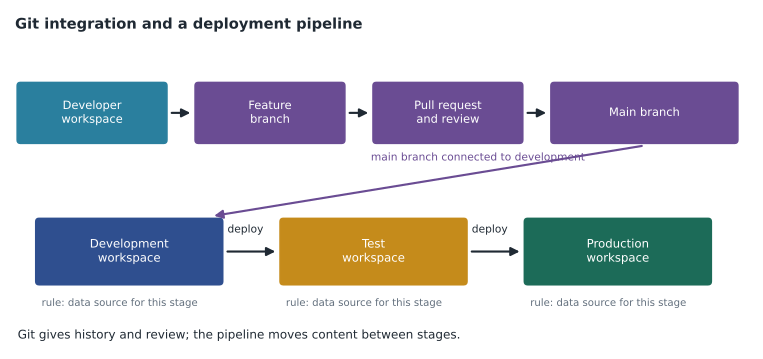
A Fabric workspace can be connected to a branch in an Azure DevOps or GitHub repository. Once connected, supported items such as semantic models, reports, notebooks, pipelines and lakehouse definitions are stored as text files, and the workspace shows which items have changes to commit or updates to pull. Each developer usually works in a personal workspace connected to a feature branch, and changes reach the shared development branch through a pull request with review. Items the integration does not support are simply ignored. Exam items tend to test the order of steps and the division of labour between Git and deployment pipelines: Git provides history, branching and review; deployment pipelines move content between development, test and production workspaces.
Power BI Desktop has its own way into the same workflow, the Power BI project format. Saving a report as a .pbip file creates a folder instead of a single binary file: a short .pbip file that points to the parts, a report folder with the report definition, and a semantic model folder with the model definition, which can be stored in TMDL, the Tabular Model Definition Language, as one readable text file per table, role and perspective. Because the files are text, Git can show exactly which measure changed. Keiko had not used project files before the diagnostic and missed both questions on them, which is why they are in her not-met list.
Deployment pipelines
A deployment pipeline has between two and ten stages, three by default, each assigned to a workspace. Deploying copies items from one stage to the next, comparing the two and showing which items are new, different or unchanged. Deployment rules change settings per stage, such as the data source or a parameter, so that the test model points at test data and production at production data. For semantic models, data is not copied on deployment; after the first deployment the target model keeps its own data and needs a refresh, and later deployments keep the data that is already there unless the structure change requires a reload. Items that exist only in the target stage are left alone. Keiko's FDH-Finance-Dev, FDH-Finance-Test and FDH-Finance workspaces form a three-stage pipeline with a rule that switches the warehouse connection.
Impact analysis
Before changing an item, impact analysis shows what depends on it. Opened from a lakehouse, warehouse or semantic model, it lists the child items and every item further downstream, including reports and dashboards in other workspaces, with the number of views each has had. Items in workspaces the user cannot open appear as limited access. The 'notify contacts' option sends a message to the contact lists of the affected workspaces. Running impact analysis needs write permission on the item. For the DiscountAmt rename, it found 3 models, 22 reports, 2 dashboards and the Store Sales app across 4 workspaces, one of them limited access. That is the level of detail the exam expects: what impact analysis shows, who can run it, and what it cannot see.
The XMLA endpoint and reusable assets
Semantic models on a Fabric or Premium capacity expose an XMLA endpoint. It is read-only by default; an admin can enable read-write for the capacity. Read access lets tools such as DAX Studio and SQL Server Management Studio query the model and inspect its metadata. Read-write access lets tools such as Tabular Editor and the ALM Toolkit deploy changes, process individual partitions and script the model. A model changed through the XMLA endpoint can no longer be downloaded from the service as a .pbix file, which is one reason Keiko's team limits XMLA writes to the BI team.
Reusable assets reduce duplication. A shared semantic model, published once and certified, lets many reports use one set of measures. A Power BI template, a .pbit file, contains a report and model definition without data, so an analyst can start from a standard layout and queries. A Power BI data source file, a .pbids file, opens Power BI Desktop already connected to a source; it can describe only one data source. In the fall, Keiko retired seventeen private copies of Finance Margin by giving the analysts Build permission on the certified model and handing out a template and a data source file.
Managing the environment
The rest of the area covers the environment around the solution: Fabric capacities, the settings that workspace admins control, and how data reaches Fabric from outside. A capacity has a size, an F SKU such as F16 or F64, measured in capacity units; workspaces are assigned to a capacity, and an admin can pause, resize or reassign. Workspace settings include the license mode, the default storage format for semantic models, Spark settings and Git integration. On-premises sources need a gateway: an on-premises data gateway installed on a machine that can reach the source, or a virtual network data gateway for sources inside an Azure virtual network, which needs no machine to maintain. Exam items here usually ask which gateway type or which capacity action fits a short scenario.
Worked problem
Choosing least access
Rosa, a finance analyst, must build her own reports on the certified Finance Margin model. She must not be able to change the model or any other item in the FDH-Finance workspace. What access should she get, and why not a workspace role?
Show solution
- The need is to create reports on one existing model.
- Build permission on the semantic model allows creating reports and queries on it.
- Viewer on the workspace would let her open reports but not build on the model unless Build is also granted.
- Contributor would let her edit and delete items, which breaks the second requirement.
- So the least access is Build on Finance Margin, granted by sharing the model or through a group, with her reports kept in her own workspace.
Answer: Build permission on the Finance Margin model; any workspace role gives either too little or too much.
Common mistakes
MistakeGive a user Contributor on a workspace so they can build reports on one model.
InsteadGrant Build on the semantic model; Contributor lets them change everything in the workspace.
MistakeObject-level security filters rows.
InsteadObject-level security hides tables and columns; row-level security filters rows.
MistakeTest row-level security with the model owner's account.
InsteadUsers with edit rights bypass model roles; test with a Viewer account or 'view as'.
MistakeDeployment pipelines copy the data of a semantic model to the next stage.
InsteadThey copy the definition; the target model keeps or loads its own data.
MistakeA .pbids file can connect to several sources.
InsteadA data source file describes one data source.
MistakeThe XMLA endpoint is read-write by default.
InsteadIt is read-only by default; an admin enables read-write per capacity.
Summary and key terms
- Workspace roles (Admin, Member, Contributor, Viewer) apply to every item; item permissions such as Build, Read, ReadData and ReadAll give access to one item.
- Row, column and object security and dynamic data masking work inside warehouses; roles with DAX filters and object-level security work inside semantic models; OneLake security protects lakehouse data for every engine.
- Sensitivity labels mark confidentiality and flow downstream; endorsement (promoted, certified, master data) marks trust.
- Git integration stores supported items as text in a branch; Power BI project files and TMDL bring Desktop into the same workflow.
- Deployment pipelines have 2 to 10 stages and use rules to change sources per stage; impact analysis lists downstream items and needs write permission.
- The XMLA endpoint is read-only by default; templates, data source files and shared models reduce duplication.
- Item permission
- Access to one item granted by sharing it, such as Build on a semantic model or ReadAll on a lakehouse.
- Build permission
- The right to create new reports and queries on a semantic model.
- Power BI project (.pbip)
- A Desktop save format that stores a report and model as a folder of text files suited to Git.
- TMDL
- Tabular Model Definition Language, a readable text format for semantic model definitions.
- Deployment rule
- A per-stage setting in a deployment pipeline that changes a data source or parameter.
- Impact analysis
- A view that lists every item that depends on a chosen item.
- XMLA endpoint
- The connection point that lets external tools query or change a semantic model on a capacity.
Practice problems
Work each problem on paper first, then reveal the answer to check.
Which workspace role can edit content but not manage access?
Show answer
Contributor.
What permission lets a user read lakehouse files directly from Spark?
Show answer
ReadAll.
How many stages can a deployment pipeline have?
Show answer
Between two and ten, three by default.
What happens to a model changed through the XMLA endpoint?
Show answer
It can no longer be downloaded from the service as a .pbix file.
What does a .pbit file contain?
Show answer
A report and model definition without data.
Lesson quiz · 5 questions
Score 60% or more to complete this lesson.
Create a free account to save your progress, take quizzes and earn a certificate.