
MSAZ-319 · Lesson 12 of 12 · 20 min
Exam day and renewal
▶ Video coming soon A video version of this lesson is on the way.
The last lesson covers the two ends of the certification: the day of the exam, which Keiko has planned for Thursday, October 14, 2027, and renewal, which keeps the certification current every year after. Both are mostly about procedure, and procedure is where avoidable failures happen. A candidate who knows the material can still lose an attempt to a webcam that does not work, a name that does not match the ID, or a renewal window that closed while they were busy. Marisol spent the last session of the plan, on Thursday, December 10, 2026, writing the exam-day checklist with Keiko, ten months early, so that it would exist long before the nerves did.
Keiko chose to take the exam online from home rather than at a test centre. Both are allowed for DP-600, and both use Pearson VUE. Online saves the drive and lets her use a room she knows; a test centre removes the risk of home internet or a neighbour's renovation. The rest of this lesson follows her choice, with notes where a test centre differs.
Before booking
Three things need to be right before the booking, and they are easy to get wrong. The first is the account: the certification page recommends using a personal Microsoft account, as lesson 1 noted, because a work account may be closed if the candidate changes jobs. The second is the name: Microsoft's online exam page says the name on the certification profile must match the name on the government-issued ID exactly, and that name-change forms are not accepted at check-in. Keiko's passport and her profile both read Keiko Tanabe, but she checked the middle initial too. The third is the outline: as lesson 1 explained, the certification page and the study guide disagreed in November 2026, and she will check both again in early September 2027, a month before the exam, as the course has advised throughout.
The system test comes next. Microsoft's online exam page says to run it on the same computer, in the same place and on the same internet connection that will be used on exam day, both before registering and again on the day. Keiko will use her personal laptop, not her work laptop, because work laptops often have security software or settings that block the exam's secure browser. She plans to run the test on the evening she books, in the room she will use, and again on Wednesday, October 13.
| When | Task | Why |
|---|---|---|
| Early September 2027 | Recheck the certification page and the study guide | The outline may have changed |
| When booking | Confirm the profile name matches the ID exactly; run the system test | A mismatch or failed test can cost the attempt |
| The week before | Clear and set up the room; tell the household | No one may enter during the exam |
| The day before | Run the system test again; restart the laptop; charge the phone | Updates and background processes cause failures |
| Exam day, 30 minutes before | Start check-in | Check-in opens 30 minutes before the appointment |
| After the exam | Read the score report; note weak areas whatever the result | It guides the retake or the renewal |
The room and the check-in
Microsoft's online exam page sets out the room rules. The room must have walls and a door that closes, and no one else may enter during the exam. The desk must be clear of books, notes, papers and pens. Extra monitors must be unplugged and turned away, and other computers in the room turned off. Phones, watches and bags are not allowed at the desk; the phone is used during check-in to photograph the ID and the room, and then placed out of arm's reach. Eating and gum are not allowed without an approved accommodation, and a drink is allowed only in a clear, spill-proof container. The candidate may not receive help from anyone or from any AI tool, and the proctor cannot answer questions about the content.
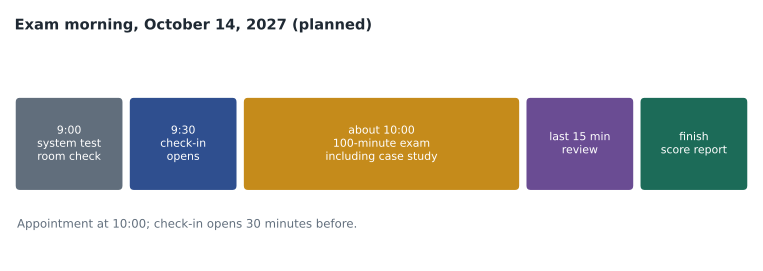
Check-in opens 30 minutes before the appointment and stays open until 15 minutes after it, and the page says the launch and check-in usually take about 15 minutes. Keiko has booked a 10:00 appointment, so she will be at her desk at 9:25 with the laptop restarted, the phone charged and her passport on the desk. If no proctor has made contact within 30 minutes of checking in, the page suggests using the OnVUE support chat, because the connection may have dropped.
During the exam
The habits from earlier lessons come together here. Read each stem for the existing item, the requirement and the deciding phrase. Answer every item, because there is no penalty for a wrong answer. Use mark for review on items that take more than three minutes, and come back to them in the 15 minutes held at the end. Remember that some sections, such as a case study, cannot be revisited once left, so finish and review within them before moving on; the exam says on screen when a section is closing. Keep an eye on the clock at three points: after about a third of the items, at the start of the case study, and with 20 minutes left.
Anxiety is normal and usually fades after the first few items. Keiko's plan for a bad start is to mark the hard item, answer the next easy one, and take three slow breaths before going on. The timed practice sets in September will have shown her what her pace feels like, and the score she needs is 700 on a scale of 1 to 1,000, not perfection.
After the exam
The result appears on screen at the end of the exam, with a score report that shows performance by skill area as bars rather than exact scores. If Keiko passes, the certification appears on her Microsoft Learn profile, usually within a day, along with a digital badge she can share. If she does not, the retake policy from lesson 1 applies: 24 hours after a first failure, 14 days after later ones, and at most five attempts in 12 months. The score report is the most useful document in either case. A pass with a low bar in one area tells her what to watch before renewal; a fail tells her where the next three or four weeks should go, and the plan in lesson 11 can be rerun with the new scores.
Renewal
An associate certification such as the Fabric Analytics Engineer Associate must be renewed every year. Microsoft's renewal page says the renewal assessment is free, online, unproctored and open book, shorter than the original exam, and focused on recent changes to the technology. It can be taken during a six-month eligibility window before the certification expires, as many times as needed, as long as it is passed before the expiry date. Passing extends the certification by one year from its expiration date, so renewing early does not lose any time. Fundamentals certifications, such as the DP-900 that Keiko plans for March 2027, do not expire.
If Keiko passes on October 14, 2027, her certification will expire about a year later, in October 2028, and the renewal window will open about six months earlier, in the spring of 2028. She has put two reminders in her personal calendar: one for the month the window opens, and one for six weeks before the expiry date, in case the first is ignored. Microsoft also sends reminders to the email address on the profile, which is another reason to use a personal account that will not be closed.
| Date (planned) | Event |
|---|---|
| Thursday, October 14, 2027 | Exam |
| Spring 2028 | Renewal window opens, six months before expiry |
| Early September 2028 | Second reminder, about six weeks before expiry |
| October 2028 | Certification expires unless renewed |
Preparing for renewal is lighter than preparing for the exam. The assessment focuses on what has changed, so the best preparation is to keep reading the Fabric release notes and the monthly feature summaries during the year, and to look at the renewal assessment's own list of skills, shown on the certification's renewal page once the window opens. Keiko plans to spend one evening a month on what is new in Fabric, which she will do anyway for her job, and two evenings before the renewal assessment.
If something goes wrong
Most online exams run without trouble, but it is worth deciding in advance what to do if one does not. If the internet drops during the exam, the secure browser usually tries to reconnect, and the proctor may contact the candidate by phone or chat; the candidate should not open other programs or leave the room while waiting. If the exam cannot be resumed, the candidate should contact Pearson VUE support the same day and keep a note of the time, what was on screen and any case number, because those details are what support needs to arrange a new appointment. If a proctor ends the exam for a rule the candidate believes was not broken, the same applies: write down what happened straight away, while it is fresh.
Keiko's backup plan is simple. Her phone stays charged and in the room, out of reach, so the proctor can call. She has written the Pearson VUE support link and her appointment number on a sticky note that will sit outside the room, not on the desk. And she has told her household, a week ahead and again the evening before, that the room is off limits from 9:15 until noon.
| Problem | First step | Afterwards |
|---|---|---|
| System test fails on exam morning | Restart, close other programs, retry on a wired connection | Contact support before the appointment time if it still fails |
| Connection drops during the exam | Wait for the secure browser to reconnect; answer the proctor | Note the time and contact support the same day |
| Someone enters the room | Ask them to leave; stay in view of the camera | Mention it if the proctor asks |
| Exam ends unexpectedly | Write down the time and the message on screen; do not photograph exam content | Contact support with the details the same day |
After the certification
A certification is a milestone, not an end. Keiko's manager has already said that a pass would make her the data team's first certified Fabric analytics engineer, and that she would take over the lunchtime model tune sessions from January 2028. Keiko has also started to think about the next step. The Fabric Data Engineer exam, DP-700, covers the engineering side she worked on in the fall; Marisol suggested waiting a year, renewing DP-600 once, and deciding then, when she knows whether her job is moving towards modelling or engineering.
Whatever comes next, the habits built in this plan carry over: read the study guide and check it a month before booking, rate each skill honestly, put the most hours where weight and weakness meet, practise reading code without running it, label wrong answers by pattern, rehearse in the real room, and plan exam day as carefully as the study. Those are the habits Marisol wanted her to keep, and they are the ones this course has tried to teach.
Worked problem
Working out the renewal window
Keiko passes on October 14, 2027, and her profile shows an expiry date of October 14, 2028. The eligibility window is six months before expiry. When does the window open, and what is the new expiry date if she renews on May 3, 2028?
Show solution
- Six months before October 14, 2028 is about April 14, 2028.
- May 3, 2028 is inside the window.
- Passing extends the certification one year from its expiration date, not from the renewal date.
- The new expiry date is October 14, 2029.
Answer: The window opens around April 14, 2028; renewing on May 3 moves the expiry to October 14, 2029.
Common mistakes
MistakeUse a work account for the exam.
InsteadUse a personal Microsoft account so the record survives a job change.
MistakeAssume a nickname on the profile is fine.
InsteadThe profile name must match the ID exactly.
MistakeRun the system test once, weeks before.
InsteadRun it when booking and again the day before, on the same computer and connection.
MistakeTake the exam on a work laptop.
InsteadWork laptops often block the secure browser; use a personal one.
MistakeWait until the last week to renew.
InsteadRenew early in the window; passing extends from the expiry date, so nothing is lost.
MistakeRenewal needs a proctored exam.
InsteadIt is a free, unproctored, open-book online assessment.
Summary and key terms
- Use a personal account, make the profile name match the ID exactly, and recheck the outline a month before.
- Run the system test when booking and the day before, on the exam computer, room and connection.
- The room must be closed and clear; check-in opens 30 minutes before and takes about 15 minutes.
- During the exam, answer every item, mark long ones for review, and finish sections that cannot be revisited.
- The score report shows performance by area; retakes follow the 24-hour and 14-day rules.
- Renew every year with a free, unproctored assessment in a six-month window; passing extends one year from the expiry date.
- System test
- A check that the computer, camera and connection meet the online exam requirements.
- Check-in
- The steps before an online exam starts: ID and room photos and a proctor review.
- Proctor
- The person who supervises an exam, at a testing site or online.
- Score report
- The result shown after an exam, with performance by skill area.
- Renewal assessment
- A free, unproctored online assessment that renews an associate certification for a year.
- Eligibility window
- The six months before expiry during which renewal can be done.
Practice problems
Work each problem on paper first, then reveal the answer to check.
How early does check-in open for an online exam?
Show answer
30 minutes before the appointment.
Why use a personal laptop?
Show answer
Work laptops often have settings that block the exam's secure browser.
Is the renewal assessment proctored?
Show answer
No; it is unproctored and open book.
If Keiko renews in May 2028, when does the certification expire?
Show answer
October 14, 2029.
Do fundamentals certifications expire?
Show answer
No.
Lesson quiz · 5 questions
Score 60% or more to complete this lesson.
Create a free account to save your progress, take quizzes and earn a certificate.