
MSAZ-319 · Lesson 2 of 12 · 20 min
Question types and case studies
▶ Video coming soon A video version of this lesson is on the way.
Keiko had taken DP-900 practice questions and found them straightforward: read the question, pick the answer. DP-600 questions look different, and Marisol wanted her to see every format before she studied any content. 'Half the points people lose on associate exams are lost to the format, not the content,' she said. 'They read a yes-or-no series too fast, or they spend twenty minutes on a case study they could have done in fifteen, or they miss the word that says choose two.' On Monday, November 16, they opened the exam sandbox together and went through each format.
Microsoft does not publish the number of questions on DP-600, and different candidates report different totals, usually somewhere between 40 and 60 items including a case study. This course plans for about 50 items in 100 minutes, which gives roughly two minutes per item on average. The real number can differ, and the pacing method in lesson 11 is built so that it still works if the count is higher or lower.
The formats
Most items are one of six formats, all of which appear in the sandbox. A single-answer multiple-choice item has four or more options and one correct answer. A multiple-answer item says how many to choose, such as 'choose two', and usually gives no credit for a partly correct set. A drag-and-drop item asks the candidate to move options into slots, for example placing the steps of a deployment in order or matching each requirement to a storage mode. A build-a-list item is a drag-and-drop where the order matters. A hot area item shows a picture of a screen or a block of code with drop-down menus, and the candidate completes it, for example choosing the right DAX function and the right filter argument in a measure. A yes-or-no series gives one scenario and several statements, and each statement asks whether a proposed solution meets the goal.
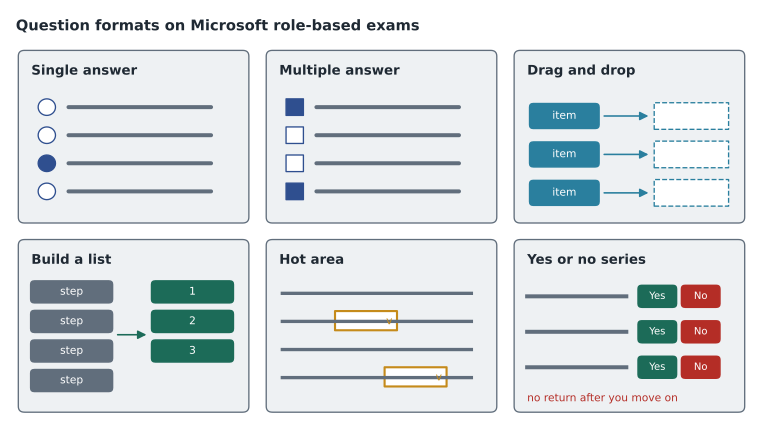
| Format | What it asks | Reading tip |
|---|---|---|
| Single answer | Choose the one best option | Find the requirement that rules out the near misses |
| Multiple answer | Choose the stated number of options | Count the options you pick before moving on |
| Drag and drop | Place options into the right slots | Some options may be used once, more than once, or not at all |
| Build a list | Put steps in the right order | Decide the first and last steps, then fill the middle |
| Hot area | Complete a screen or code block with drop-downs | Read the whole block before choosing any drop-down |
| Yes or no series | Judge several proposed solutions for one goal | Each statement is independent; you cannot go back to change earlier ones |
Yes-or-no series
The yes-or-no series is the format that catches most people. The scenario is the same for every statement, but each statement proposes a different solution, and the question is whether that solution meets the goal. Several of them may meet it, or none. Once the candidate answers a statement and moves on, the exam does not allow a return to it, so the series is answered strictly in order. The common mistake is to treat the statements as alternatives and look for the single best one, which wastes time and leads to wrong answers. The right method is to read the goal carefully, then test each proposal against every requirement in the goal, one at a time.
Marisol showed Keiko an example from her own preparation. The goal: report users in the store manager role must see only their own store's rows, and the solution must not need a separate model per store. Proposal one: create a role with a DAX filter on the store table that compares a column to USERPRINCIPALNAME(). Yes. Proposal two: create one workspace per store and share the report. No; that is many copies, and workspace sharing does not filter rows. Proposal three: create one semantic model per store. No; the goal rules it out. Proposal four: use object-level security to hide the other stores. No; object-level security hides tables and columns, not rows. Two minutes, four answers, no going back.
Case studies
DP-600 includes at least one case study. It is a separate section that opens with a description of a fictional company, usually split into tabs: an overview, the existing environment, the requirements, and sometimes technical details such as data volumes. After the description come several questions, often between five and ten, all about the same company. While the case study is open, the candidate can move between its questions and return to its description as often as needed. Once the case study section is finished, its questions cannot be reopened. Time spent on the case study comes out of the same 100 minutes as everything else.
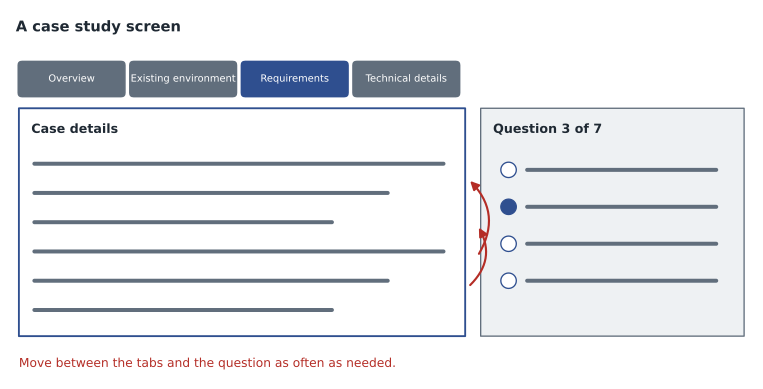
Keiko's first instinct was to read the whole case study carefully before looking at any questions. Marisol suggested the opposite. Skim the overview for the company, the size and the main goal. Then read the first question, and go to the tab that answers it. Most case studies contain more detail than the questions use, and a candidate who reads every word first may spend ten minutes on details that never matter. The requirements tab deserves the closest reading, because almost every question turns on one requirement, often a phrase such as 'minimize administrative effort', 'data must not leave the region' or 'users must see data within five minutes'. Lesson 9 works through a full case study this way.
Labs and interactive components
Some Microsoft exams have included performance-based labs, where the candidate works in a live environment. The DP-600 certification page says candidates may have interactive components to complete. Keiko and Marisol agreed to prepare for the possibility without depending on it: if a lab or interactive task appears, it will ask for something the outline covers, such as creating a measure, setting a refresh policy or configuring a workspace setting, and the best preparation is the hands-on practice in lesson 10. The sandbox shows what any interactive item looks like.
Marking and review
Within a section, the candidate can mark items for review and return to them before ending the section. A review screen lists every item and shows which are marked and which are unanswered. An unanswered item scores zero, and there is no extra penalty for a wrong answer, so a guess is always better than a blank. Marisol's rule for Keiko: never leave an item blank, mark any item where you are less than sure, and keep about ten minutes at the end of each section for the marked items. Some sections, including the yes-or-no series and case studies, warn that review will not be possible; the warning appears on screen before the section starts, and it is worth reading.
Reading the question stem
Every item has a stem, the part before the options, and most stems follow the same pattern: a short scenario, a requirement, and an instruction. 'You have a Fabric workspace that contains a semantic model in import mode. Report users must see data no more than five minutes old. You need to minimize the refresh load on the source. What should you do?' The scenario sets the context, the requirement says what must be true, and the instruction says how many answers to give. Marisol's habit is to underline three things in the stem before looking at the options: the item that already exists, the requirement that must be met, and any phrase that says how to choose between solutions that would all work, such as 'minimize cost', 'least administrative effort' or 'without changing the report'.
That last phrase is what turns a question with several workable options into a question with one answer. In the example, scheduling a refresh every five minutes, changing the model to DirectQuery, and using Direct Lake on the lakehouse tables could all show recent data. Only one of them also keeps the load on the source low, and only one fits the platform the scenario describes. Lesson 8 returns to this, because the most common wrong answer on DP-600 is an option that works but ignores the deciding phrase.
| Part of the stem | Example words | What to underline |
|---|---|---|
| Existing item | "You have a semantic model in import mode" | What already exists and cannot be replaced freely |
| Requirement | "must see data no more than five minutes old" | The condition every correct option must meet |
| Deciding phrase | "minimize the refresh load", "least effort" | The rule that picks one option from several that work |
| Instruction | "What should you do?", "Choose two" | How many answers, and whether order matters |
Drag and drop and hot area in practice
Drag-and-drop items on DP-600 often ask for a sequence, such as the steps to set up incremental refresh, or a matching, such as which storage mode fits each requirement. Two details trip people up. First, the number of slots may be smaller than the number of options, and some options are there only to distract. Second, an option may be usable more than once, and the item says so if it is. Hot area items most often show a short DAX measure, a SQL statement or a settings screen with two or three drop-downs. The trap is to choose the first drop-down before reading the rest of the block; the later lines often decide what the first must be. Keiko practised by covering the options and predicting what each drop-down should hold before she looked.
Worked problem
Planning time for a case study
Keiko plans for about 50 items in 100 minutes, including a case study of 8 questions. She wants a 10-minute reserve at the end and plans 20 minutes for the case study. How many minutes does that leave for each of the other items, and how much time is that per case study question?
Show solution
- Items outside the case study: 50 − 8 = 42.
- Time for them: 100 − 10 − 20 = 70 minutes.
- Per item: 70 ÷ 42 ≈ 1.67 minutes, or about 1 minute 40 seconds.
- Per case study question: 20 ÷ 8 = 2.5 minutes, including reading the description.
Answer: About 1 minute 40 seconds for each of the 42 other items and 2.5 minutes per case study question, with 10 minutes in reserve.
How Keiko will practise each format
Content knowledge and format skill are practised differently. Content comes from the reviews in lessons 4 to 6. Format skill comes from doing many items under realistic conditions. Marisol set Keiko three habits. First, every practice item she gets wrong goes into an error log with one of four causes: did not know the fact, misread the question, fell for a distractor, or ran out of time. Second, every yes-or-no series and case study is done in order, without going back, even in practice. Third, once a week she does a 15-minute drill of hot area items, because those reward reading code carefully, which is the subject of lesson 7.
| Cause of a miss | Example | What fixes it |
|---|---|---|
| Did not know the fact | Did not know Direct Lake on OneLake has no fallback to DirectQuery | Review the topic; add a flash card |
| Misread the question | Missed "choose two" | Underline the instruction before reading options |
| Fell for a distractor | Chose object-level security for a row filter | Lesson 8: name the trap |
| Ran out of time | Rushed the last six items | Lesson 11: pacing checkpoints |
Common mistakes
MistakeIn a yes-or-no series, look for the single best proposal.
InsteadEach statement is judged on its own; several may meet the goal, or none.
MistakeRead every word of a case study before looking at the questions.
InsteadSkim the overview, then let each question send you to the tab that answers it, reading the requirements most closely.
MistakeLeave hard items blank to avoid losing marks.
InsteadThere is no penalty for a wrong answer; an unanswered item always scores zero.
MistakeCase study time is extra.
InsteadCase study time comes out of the same 100 minutes.
MistakeMultiple-answer items give partial credit.
InsteadAssume no credit unless every chosen option is right, and pick exactly the number asked for.
Summary and key terms
- DP-600 uses single answer, multiple answer, drag and drop, build a list, hot area and yes-or-no series formats, plus at least one case study.
- Microsoft does not publish the number of items; planning for about 50 in 100 minutes gives about two minutes per item.
- Yes-or-no series are answered in order without returning; each statement is judged on its own against every requirement.
- Case studies present a company in tabs; answer question by question, reading the requirements tab most closely.
- Mark uncertain items and keep a reserve for review; never leave an item blank.
- An error log with four causes shows whether a miss came from knowledge, reading, a distractor or time.
- Yes-or-no series
- A set of statements about one scenario, each asking whether a proposed solution meets the goal, answered without returning.
- Case study
- A section built around a fictional company, with a description in tabs and several questions about it.
- Hot area
- An item where the candidate completes a screen or code block by choosing from drop-down menus.
- Build a list
- A drag-and-drop item in which the order of the chosen steps matters.
- Review screen
- The list of items in a section showing which are marked or unanswered.
- Error log
- A record of each missed practice item and its cause.
Practice problems
Work each problem on paper first, then reveal the answer to check.
Can you return to an earlier statement in a yes-or-no series?
Show answer
No. Each statement is final once you move on.
Where should you read most carefully in a case study?
Show answer
The requirements tab, because most questions turn on one requirement.
Is there a penalty for a wrong answer?
Show answer
No. A wrong answer and a blank both score zero, so always answer.
Keiko plans 20 minutes for an 8-question case study. How much time is that per question?
Show answer
2.5 minutes.
Which cause would you record if you chose three options when the item said choose two?
Show answer
Misread the question.
Lesson quiz · 5 questions
Score 60% or more to complete this lesson.
Create a free account to save your progress, take quizzes and earn a certificate.