
JS-260 · Lesson 8 of 12 · 27 min
Secrets management
▶ Video coming soon A video version of this lesson is on the way.
On Thursday, October 26, Theo brings a printed list to the session: every secret the Food Hub's software uses, where each one is stored, who can read it and when it was last changed. It is longer than a page. The database passwords for his application and for the partner service; the agencies' API keys and the board's signing secret; the HMAC key for the new donation webhook; the SSH key the pipeline will use to reach his server; the static host's and the CDN's API tokens; the mail provider's key. Several have not changed in years, and two exist in places they should not. Today's lesson is about secrets management: keeping credentials out of code, out of logs and out of the wrong hands, and being able to change them quickly.
What counts as a secret
A secret is any value that grants access or proves identity: passwords, API keys, tokens, private keys, signing keys and the client secrets used in sign-in flows. Anyone who holds it can act as its owner. Secrets are configuration, so lesson 3's rules apply, with two more: a secret must be readable by as few people and programs as possible, and it must be possible to replace it, which is called rotation, without a scramble.
| Secret | Used by | Stored in | Rotated |
|---|---|---|---|
| Partner service database password | Partner service | /etc/partner-orders/env on the server, readable by root and the service user | Yearly and when anyone with access leaves |
| Board token signing secret | Partner service | The same file | Yearly, with an overlap (below) |
| Donation webhook secret | The serverless function | The platform's secret settings | When GiveRight allows; yearly |
| Deploy SSH key | The pipeline | GitHub environment secrets for staging and production | Every six months |
| CDN and static host access | The pipeline | None: short-lived tokens from OIDC (below) | Every run |
| Agency API keys and client secrets | The agencies' systems | Hashed in the partner database (JS-230, JS-240) | On request, or at once if leaked |
Where secrets must never be
The studio has two stories of its own about secrets in the wrong place. In JS-230, Mira hard-coded HUB_API_KEY in the reminders script while testing, and Theo revoked it the same day. In JS-240, Westview's own staff page carried its agency API key in its JavaScript, where anyone could read it, and Theo revoked that too. Both show the same rule from different sides: a secret written into code, or into anything sent to a browser, should be treated as public from that moment.
- Not in source code or the repository. Repositories are copied to every laptop, every CI run and sometimes to the public.
- Not in front-end code. Anything in a front-end build or page is readable by every visitor (lesson 2).
- Not in container images. Layers are kept and shared (lesson 6).
- Not in logs, error reports or URLs. These are stored for months and read by many people and tools (lesson 10).
- Not in chat or email. Messages are copied to many devices and kept indefinitely; the team shares secrets through its password manager instead.
Removing a secret from the repository in a later commit does not remove it from the repository's history. Every earlier commit is still there, cloned onto every machine. Mira demonstrates with a throwaway repository: she commits an environment file by mistake, deletes it in the next commit, and then reads it back from history.
$ git init -q demo && cd demo && git checkout -q -b main
$ cd demo && printf "HUB_API_KEY=hk_live_51c0ffee\n" > .env && git add .env && git commit -qm "Add reminders config" && git rm -q .env && git commit -qm "Remove .env" && git log --oneline
d4c0003 Remove .env
1c13a77 Add reminders config
$ cd demo && ls -a
.
..
.git
$ cd demo && git show HEAD~1:.env
HUB_API_KEY=hk_live_51c0ffee
What this code does
A new repository gets one commit that adds a .env file and a second that removes it. The working folder no longer contains the file, but git show reads it back from the earlier commit in one command. Anyone with a copy of the repository has the key, so the only real fix is to revoke it and issue a new one.
Tools exist to rewrite history and purge a file, and GitHub can remove cached views, but once a repository has been cloned or a commit has been pushed, the safe assumption is that the secret has been copied. The correct response to a leaked secret is always the same and always in this order: revoke it so it stops working, replace it with a new one, then look at the logs for any use of the old one, and only then tidy the history.
Catching secrets before they leak
Prevention is cheaper than revocation. A .gitignore that lists .env files stops most accidents. Beyond that, secret scanning looks for strings that look like credentials. GitHub scans repositories for known credential formats from many providers and notifies the provider so the key can be disabled; push protection goes further and refuses a push that contains one, unless the person explicitly bypasses it with a reason. Push protection has been on by default for public repositories since 2024 and can be enabled for private ones, and in October 2026 GitHub extended it beyond the predefined patterns. Scanners can also run on a laptop before each commit.
// A tiny secret scanner: known formats plus high-entropy values next to suspicious names.
function entropy(s) {
  const counts = {};
  for (const ch of s) counts[ch] = (counts[ch] ?? 0) + 1;
  return Object.values(counts).reduce((h, n) => h - (n / s.length) * Math.log2(n / s.length), 0);
}
const patterns = [
  ['private key', /-----BEGIN [A-Z ]*PRIVATE KEY-----/],
  ['GitHub token', /\bgh[pousr]_[A-Za-z0-9]{36,}\b/],
  ['assignment', /(secret|token|password|api_?key)\s*[:=]\s*['"]?([A-Za-z0-9_\-]{16,})/i],
];

function scan(lines) {
  const found = [];
  lines.forEach((line, i) => {
    for (const [name, re] of patterns) {
      const m = line.match(re);
      if (!m) continue;
      if (name === 'assignment' && entropy(m[2]) < 3.5) continue;   // skip placeholders like xxxxxxxxxxxxxxxx
      found.push(`line ${i + 1}: ${name}`);
    }
  });
  return found;
}

const diff = [
  "const BOARD_TOKEN_SECRET = 'q8Zr2LwN5vYt7KcP3mXa9Ue4';",
  "const password = 'xxxxxxxxxxxxxxxxxxxx'; // placeholder in docs",
  'const port = 3100;',
  '-----BEGIN OPENSSH PRIVATE KEY-----',
];
console.log(scan(diff).join('\n'));
console.log('entropy of the real-looking value:', entropy('q8Zr2LwN5vYt7KcP3mXa9Ue4').toFixed(2), 'bits per character');line 1: assignment line 4: private key entropy of the real-looking value: 4.58 bits per character
What this code does
Some secrets have a recognizable format, such as private key headers or GitHub's token prefixes, and are matched directly. A generic value assigned to a suspicious name is reported only if it has high entropy, a measure of how random its characters are, so placeholders made of one repeated letter are skipped. Real scanners use many more patterns, but they work on the same two ideas.
Secrets in the pipeline
The pipeline needs secrets to deploy: at least the SSH key for Theo's server. GitHub Actions stores secrets encrypted and gives them to a job only as environment variables or inputs, and masks them, replacing any appearance of the exact value in the job's log with asterisks. Secrets can be set for the whole repository or for one environment; the studio uses environment secrets, so the production deploy key is available only to jobs in the production environment, which means only after a reviewer has approved the deployment. Workflows started by pull requests from forks receive no secrets at all.
Masking is a last line of defence, not a design. It only recognizes the exact value, so a secret that is base64-encoded, split or printed one character at a time slips through. Steps should never print secrets, and third-party actions given access to a secret are trusted with it completely, which is one more reason to pin them by SHA (lesson 7).
No stored keys at all: OIDC
The best secret is one that does not exist. For cloud services, GitHub Actions can prove a job's identity with OpenID Connect (OIDC) instead of a stored key. A job with the permission id-token: write can ask GitHub for a short-lived, signed token that says which repository, branch and environment the job is running in. The cloud provider is configured in advance to trust tokens from GitHub that match certain conditions, and exchanges a valid token for temporary credentials that expire within the hour.
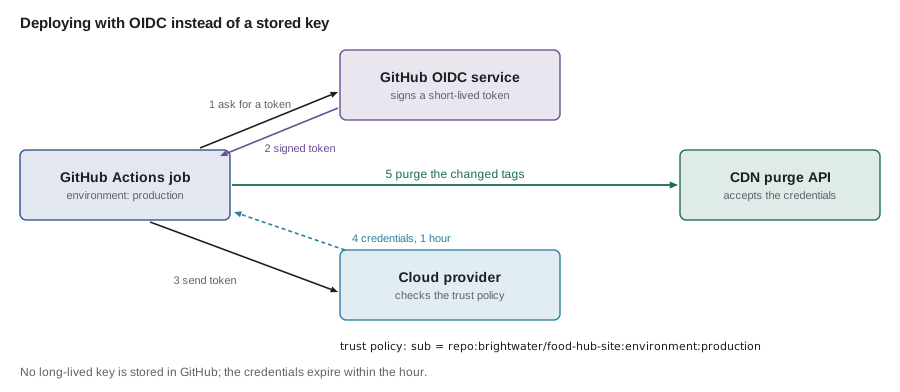
The important part is the trust policy. A token's subject claim names the job's source, for example repo:brightwater/food-hub-site:environment:production. The CDN's role trusts only that subject, so a job in another repository, on another branch or outside the production environment cannot get credentials, even though it can get a token from GitHub.
// Does an OIDC token's claims match the cloud role's trust policy?
const policy = {
  iss: 'https://token.actions.githubusercontent.com',
  aud: 'cdn.example',
  sub: 'repo:brightwater/food-hub-site:environment:production',
};
const tokens = [
  { iss: policy.iss, aud: 'cdn.example', sub: 'repo:brightwater/food-hub-site:environment:production', exp: 1855003600 },
  { iss: policy.iss, aud: 'cdn.example', sub: 'repo:brightwater/food-hub-site:pull_request', exp: 1855003600 },
  { iss: policy.iss, aud: 'cdn.example', sub: 'repo:someone-else/food-hub-site:environment:production', exp: 1855003600 },
  { iss: policy.iss, aud: 'cdn.example', sub: 'repo:brightwater/food-hub-site:environment:production', exp: 1854990000 },
];

function trust(claims, now) {
  if (claims.iss !== policy.iss) return 'deny: wrong issuer';
  if (claims.aud !== policy.aud) return 'deny: wrong audience';
  if (claims.exp <= now) return 'deny: expired';
  if (claims.sub !== policy.sub) return `deny: subject ${claims.sub}`;
  return 'allow: issue credentials valid for 1 hour';
}
for (const t of tokens) console.log(trust(t, 1855000000));allow: issue credentials valid for 1 hour deny: subject repo:brightwater/food-hub-site:pull_request deny: subject repo:someone-else/food-hub-site:environment:production deny: expired
What this code does
The provider checks that the token was issued by GitHub's OIDC service, was meant for this audience, has not expired, and comes from the one repository and environment the role trusts. In real use it also verifies the token's signature with GitHub's published keys, which this model leaves out. Only the first token passes; a pull request, another account's copy of the repository and an expired token are all refused.
The studio uses OIDC for everything that supports it: the CDN purge, the static host for previews and the serverless platform. Only the SSH key for Theo's server remains a stored secret, because a plain server has no OIDC trust to configure. That key is limited on the server side: it belongs to a deploy user that can run only the shipping commands.
Secrets on the server
On Theo's server, the partner service's secrets are in /etc/partner-orders/env, the EnvironmentFile from JS-230. The file's permissions matter as much as its contents: it should be owned by root, readable by the service's group and nobody else, and never inside the release folders the pipeline replaces.
$ printf 'DATABASE_URL=postgres://partner_app@db.internal:5432/foodhub\nBOARD_TOKEN_SECRET=(set on the server)\n' > env
$ chmod 640 env
$ stat -c '%A %a %n' env
-rw-r----- 640 env
What this code does
The file is written and its permissions set to 640, which means the owner may read and write it, the group may only read it, and everyone else gets nothing. stat shows the result in both symbolic and numeric form. On the server the group is the partner service's, so the service can read its settings and other users cannot.
Environment variables have one weakness: they are inherited by every child process and can appear in crash dumps and process listings for the same user. systemd offers a stricter alternative, credentials: with LoadCredential=, the service reads a secret from a file in a private directory that only it can see, named by the CREDENTIALS_DIRECTORY variable. The studio plans to move the board signing secret there when the service moves to Node 28 in January; for now, the environment file with tight permissions is a reasonable choice for a single-server setup.
For people rather than programs, the team uses a shared password manager, with a separate vault for the Food Hub's production secrets that only Theo, Gareth and Rhea can open, and Mira from December 1 to January 5. Larger organizations use a dedicated secret manager, such as the ones the major clouds provide or HashiCorp Vault, which add audit logs, automatic rotation and short-lived database credentials.
Rotation without an outage
Rotating a secret that only one program uses is easy: put the new value in place and restart. Rotating one that two sides share, such as the board's signing secret, needs an overlap, because tokens signed with the old key are still in use when the new key arrives. The usual approach gives each key an id. For a while the service signs with the new key but accepts both; once every old token has expired, the old key is removed.
// Rotating a signing key with an overlap: sign with the newest, verify with any key still accepted.
const keys = [
  { kid: '2027-11', secret: 'old-board-secret', acceptUntil: 1855005000 },
  { kid: '2028-10', secret: 'new-board-secret', acceptUntil: Infinity },
];
const signingKey = keys.at(-1);

function sign(payload) { return { kid: signingKey.kid, payload, mac: `${signingKey.secret}:${payload}` }; }
function verify(token, now) {
  const key = keys.find((k) => k.kid === token.kid);
  if (!key) return 'reject: unknown key';
  if (now > key.acceptUntil) return `reject: key ${key.kid} retired`;
  return token.mac === `${key.secret}:${token.payload}` ? `accept (${key.kid})` : 'reject: bad signature';
}

const oldToken = { kid: '2027-11', payload: 'board-device', mac: 'old-board-secret:board-device' };
const newToken = sign('board-device');
console.log('old token, during overlap:', verify(oldToken, 1855000000));
console.log('new token, during overlap:', verify(newToken, 1855000000));
console.log('old token, after overlap: ', verify(oldToken, 1855009999));
console.log('new token, after overlap: ', verify(newToken, 1855009999));old token, during overlap: accept (2027-11) new token, during overlap: accept (2028-10) old token, after overlap: reject: key 2027-11 retired new token, after overlap: accept (2028-10)
What this code does
Each token records the id of the key that signed it, so the verifier can choose the right key without trying them all. New tokens are always signed with the newest key, while old tokens keep working until their key's acceptance window ends. The mac here is a stand-in for the real HMAC from JS-240, so the rotation logic is visible on its own.
Trusting what you deploy
The last part of the lesson turns from secrets to a related question: how do you know that what you are deploying is what you think it is? Attacks on the software supply chain, such as a stolen maintainer token used to publish a malicious version of a popular npm package, target the steps between source and running code. Two kinds of record help.
- A software bill of materials (SBOM) lists every component in an artifact, with versions, in a standard format such as CycloneDX or SPDX. When a vulnerability is announced in a library, an SBOM answers which of the studio's artifacts contain it in seconds. npm can produce one with npm sbom, and container tools can generate one for an image.
- Provenance is a signed statement of how an artifact was built: from which repository and commit, by which build system and workflow. The SLSA framework defines levels for it: at Build L1 provenance exists, at L2 it is generated and signed by a hosted build platform, and at L3 the platform is hardened so builds cannot affect each other or reach the signing keys. GitHub Actions can produce signed provenance for artifacts, and npm packages published with trusted publishing carry it automatically.
npm itself tightened publishing after a series of compromises in 2025. Classic access tokens were revoked in November 2025 and can no longer be created; granular tokens with write access default to seven days and expire within 90; and trusted publishing, which uses the same OIDC exchange as the CDN purge, removes long-lived publishing tokens altogether. The studio does not publish packages, but it checks the packages it installs: npm audit signatures verifies the registry signatures and provenance attestations of installed packages, and the pipeline runs it after npm ci.
Worked problem
How long is a leaked key useful?
Suppose a deploy key were accidentally printed in a public log at 14:00 on a Tuesday. With a stored SSH key rotated every six months, it stays valid until someone notices and revokes it. GitHub's secret scanning alerts the team within about 5 minutes, and revoking and replacing the key takes Theo about 15 minutes. With OIDC, the leaked thing would instead be a cloud token that expires one hour after it was issued, and the job had issued it at 13:55. How long does each leaked value remain usable?
Show solution
- Stored key: alert at about 14:05, plus about 15 minutes to revoke.
- Stored key usable for about 5 + 15 = 20 minutes, if someone is watching; otherwise up to six months.
- OIDC token: issued 13:55, expires 13:55 + 60 min = 14:55.
- OIDC token usable for at most 55 minutes after the leak, with nobody needing to act.
Answer: About 20 minutes for the stored key if the alert is acted on at once, and at most 55 minutes for the OIDC token whatever anyone does. The short-lived token's limit does not depend on someone noticing, which is its real advantage.
Common mistakes
MistakeDeleting a committed secret and carrying on.
InsteadRevoke and replace it at once; it remains in the history and in every clone.
MistakeRelying on log masking to protect secrets.
InsteadNever print secrets; masking only catches the exact value.
MistakeStoring long-lived cloud keys in the pipeline.
InsteadUse OIDC with a trust policy limited to one repository and environment.
MistakeLeaving the server's environment file readable by everyone.
InsteadOwner root, readable only by the service's group, outside the release folders.
MistakeRotating a shared signing key all at once.
InsteadSign with the new key while accepting both, then retire the old key after its tokens expire.
Summary and key terms
- A secret is any value that grants access, and it must be kept out of code, front-end files, images, logs, URLs and chat.
- A secret that reaches a repository stays in its history, so it must be revoked and replaced at once.
- Secret scanning and push protection catch many leaks before or just after they happen.
- In GitHub Actions, secrets are stored encrypted per environment, masked in logs and withheld from forks, but should never be printed.
- OIDC replaces stored cloud keys with short-lived credentials granted by a trust policy that names the repository and environment.
- On the server, secrets sit in a tightly permissioned file or systemd credentials.
- Shared keys are rotated with an overlap and key ids.
- SBOMs and signed provenance, with npm's trusted publishing and audit signatures, help confirm that what is deployed is what was built.
- Secret
- A value that grants access or proves identity, such as a password, key or token.
- Rotation
- Replacing a secret with a new one on a schedule or after a possible leak.
- Revocation
- Making a secret stop working, the first step after a leak.
- Push protection
- A repository feature that refuses pushes containing recognized credentials.
- OpenID Connect (OIDC)
- An identity protocol used here to exchange a job's signed token for short-lived cloud credentials.
- Trust policy
- The conditions under which a cloud provider accepts an OIDC token, such as its repository and environment.
- Software bill of materials (SBOM)
- A list of every component and version in an artifact.
- Provenance
- A signed record of how, where and from what source an artifact was built.
Practice problems
Work each problem on paper first, then reveal the answer to check.
Why is deleting a committed .env file not enough?
Show answer
The file is still in earlier commits, which every clone of the repository contains.
Why are the production deploy secrets environment secrets rather than repository secrets?
Show answer
So they are available only to jobs in the production environment, after approval.
What stops a pull request's workflow from using the CDN role through OIDC?
Show answer
The role's trust policy accepts only the production environment's subject.
Why does rotating the board's signing secret need an overlap?
Show answer
Tokens signed with the old key are still in use and must keep working until they expire.
Try it yourself
Mask a secret for display
Complete mask(value) so that secrets can be identified in a settings summary without being shown. For values of 12 characters or more, return the first 4 characters, then ..., then the length in brackets, such as whse...(24). For shorter values, return only (set). For an empty or missing value, return (missing).
This is the kind of helper lesson 3's start-up summary uses.
function mask(value) {
  return value;
}

for (const v of ['whsec_example_only_7f3c1e9a', 'short-secret', 'abc', '', undefined]) console.log(mask(v));
Try it yourself
Match a trust subject
Trust policies may use * as a wildcard in the subject, for example repo:brightwater/food-hub-site:*. Complete matches(pattern, subject) so that * matches any run of characters, including none, and every other character must match exactly.
The program checks four subjects against two patterns.
function matches(pattern, subject) {
  return pattern === subject;
}

const subjects = ['repo:brightwater/food-hub-site:environment:production', 'repo:brightwater/food-hub-site:pull_request',
  'repo:brightwater/portal:environment:production', 'repo:someone/food-hub-site:environment:production'];
for (const p of ['repo:brightwater/food-hub-site:*', 'repo:brightwater/*:environment:production']) {
  console.log(p, subjects.map((s) => (matches(p, s) ? 'Y' : 'n')).join(''));
}
Lesson quiz · 5 questions
Score 60% or more to complete this lesson.
Create a free account to save your progress, take quizzes and earn a certificate.