
JS-260 · Lesson 2 of 12 · 28 min
Production builds
▶ Video coming soon A video version of this lesson is on the way.
On Thursday, October 5, Mira opens the folder she has been uploading to Theo's server by hand: the volunteer portal's dist folder. It holds an index.html, a service worker, eleven JavaScript files with names like shifts-B3kQ9xZa.js, two stylesheets, the fonts and the icons, and none of the source files she actually wrote. "That folder is the thing we deploy," Gareth says, "and today is about how it gets made and how to make sure it is made the same way every time." A production build turns source code written for people into files written for browsers and servers: smaller, combined, named so they can be cached, and checked.
What a build does
Source code is organized for the people who work on it: many small modules, readable names, comments, TypeScript types and JSX. Browsers would rather have a few compact files. A build tool sits between the two and performs a series of steps, most of which Mira has met in earlier courses without needing to know how they fit together.
| Step | What it does | Why it matters in production |
|---|---|---|
| Resolve and bundle | Follows import statements from an entry file and combines the modules into a few output files | Fewer requests; packages from node_modules included |
| Transform | Turns TypeScript and JSX into plain JavaScript and lowers newer syntax for the target browsers | Browsers run only JavaScript; old browsers need older syntax |
| Tree shake | Leaves out exports that nothing imports | Unused code costs bytes and parse time |
| Minify | Removes whitespace and comments and shortens local names | Often halves the size before compression |
| Split | Puts dynamically imported code in separate chunks (JS-250 lesson 5) | Pages load only what they need |
| Hash names | Puts a short hash of each file's content in its name | Lets files be cached for a year (JS-250 lesson 6) |
| Source maps | Writes a map from output positions back to the original source | Error reports can point at the real line (lesson 9) |
| Copy assets | Copies images, fonts and the public folder, often hashing them too | Everything the site needs ends up in one folder |
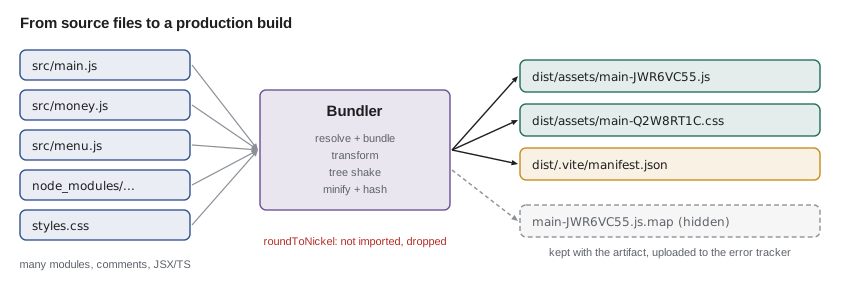
Different projects need different tools. The portal is built with Vite, which the studio adopted in JS-220. Since Vite 8 was released in March 2026, its production builds use Rolldown, a bundler written in Rust by the same group, with the Oxc compiler for transforms; earlier versions used esbuild during development and Rollup for builds, and a compatibility layer translates most old settings. The counter page and other small scripts can use esbuild directly, a fast bundler with a simple command-line interface. The Node services are not bundled at all: they run from their source files with their dependencies installed, which is covered below.
A small build, run for real
To see the steps without the portal's size getting in the way, Gareth has Mira build the counter page from JS-210 with esbuild. It has three modules: the menu, the money functions with Mira's lineCents fix, and the main file that totals an order. One export, roundToNickel, is left over from an experiment and imported by nothing.
export function lineCents(priceDollars, qty) {
  return Math.round(priceDollars * 100) * qty;
}

export function formatCents(cents) {
  return (cents / 100).toFixed(2);
}

// Kept from an old experiment; nothing imports it.
export function roundToNickel(cents) {
  return Math.round(cents / 5) * 5;
}
What this code does
This is the counter page's money module with three exports. lineCents and formatCents are used by main.js, while roundToNickel is imported nowhere. A tree-shaking bundler should leave it out of the output.
$ npm run build
> counter-page@1.8.0 build
> esbuild src/main.js --bundle --minify --format=esm --target=es2022 --sourcemap=external --entry-names=[name]-[hash] --outdir=dist --metafile=dist/meta.json --log-level=warning
$ ls dist
main-JWR6VC55.js
main-JWR6VC55.js.map
meta.json
$ cat dist/main-*.js; echo
function e(o,t){return Math.round(o*100)*t}function n(o){return(o/100).toFixed(2)}var r=[{id:"soup",name:"Soup of the day",price:3.5},{id:"sandwich",name:"Sandwich",price:4.25},{id:"cookie",name:"Oat cookie",price:1}];var a=[["soup",2],["sandwich",1]],i=0;for(let[o,t]of a){let c=r.find(d=>d.id===o);i+=e(c.price,t)}console.log("Order total:",n(i));
$ npm run build
> counter-page@1.8.0 build
> esbuild src/main.js --bundle --minify --format=esm --target=es2022 --sourcemap=external --entry-names=[name]-[hash] --outdir=dist --metafile=dist/meta.json --log-level=warning
$ sha256sum first.js dist/main-*.js | cut -c1-16
389b283a902f64ce
389b283a902f64ce
What this code does
The build script in package.json runs esbuild with bundling, minifying, an external source map, hashed entry names and a metafile describing what went into each output. The output is one small file whose name contains a hash of its content, plus its map and the metafile. Running the build a second time and comparing checksums shows that the same input produced byte-for-byte the same output.
The minified file is worth reading once. The three modules have become one line, local names are a single letter, the comment is gone, and roundToNickel is nowhere to be seen: esbuild saw that nothing imported it. The menu item that no order uses is still there, because tree shaking removes unused exports, not unused data inside a used export. And because the build is deterministic, building twice gives files with the same checksum, so the hash in the file name is stable for the same content.
Tree shaking works because ES modules are static: the bundler can see every import and export without running the code. It has limits. A module that does something when imported, such as registering a global or adding to a prototype, has side effects, and the bundler must keep it even if none of its exports are used. Packages declare in the sideEffects field of their package.json whether their modules are safe to drop, and code that is safe to drop helps by not doing work at the top level of a module.
// Which exports does a bundler keep? A tiny model of tree shaking.
const modules = {
  'money.js': { exports: { lineCents: 120, formatCents: 60, roundToNickel: 70 }, sideEffects: false },
  'menu.js': { exports: { MENU: 180, SPECIALS: 240 }, sideEffects: false },
  'analytics.js': { exports: { track: 300 }, sideEffects: true },
};
const imports = [['money.js', 'lineCents'], ['money.js', 'formatCents'], ['menu.js', 'MENU']];

let kept = 0, dropped = 0;
for (const [file, mod] of Object.entries(modules)) {
  for (const [name, bytes] of Object.entries(mod.exports)) {
    const used = imports.some(([f, n]) => f === file && n === name);
    if (used || mod.sideEffects) { kept += bytes; console.log('keep', `${file}:${name}`, used ? '(imported)' : '(module has side effects)'); }
    else { dropped += bytes; console.log('drop', `${file}:${name}`); }
  }
}
console.log(`kept ${kept} bytes, dropped ${dropped} bytes`);keep money.js:lineCents (imported) keep money.js:formatCents (imported) drop money.js:roundToNickel keep menu.js:MENU (imported) drop menu.js:SPECIALS keep analytics.js:track (module has side effects) kept 660 bytes, dropped 310 bytes
What this code does
Each export has a size and each module says whether importing it has side effects. An export is kept if something imports it, or if its module has side effects and therefore cannot be skipped; everything else is dropped. Here the analytics module is kept even though nothing uses track, which is why a stray import with side effects can undo the savings.
Manifests: finding hashed files
Hashed names solve caching but create a small problem: the HTML must refer to main-ZDU7IKHH.js, and that name changes whenever the code does. Build tools solve it in two ways. Vite writes the HTML itself, inserting the right script and link tags. For pages the build tool does not write, such as the PHP templates in Theo's application that load the portal's widget, the build produces a manifest: a JSON file that maps each source entry to its output file name. Vite writes one when build.manifest is turned on, and esbuild's metafile contains the same information.
// Use a build manifest to rewrite references in a template.
const manifest = {
  'src/main.js': { file: 'assets/main-ZDU7IKHH.js', css: ['assets/main-Q2W8RT1C.css'] },
  'src/widget.js': { file: 'assets/widget-4MN3PLQX.js' },
};

function scriptTags(entry) {
  const e = manifest[entry];
  if (!e) throw new Error(`no manifest entry for ${entry}`);
  const css = (e.css ?? []).map((href) => `<link rel="stylesheet" href="/${href}">`);
  return [...css, `<script type="module" src="/${e.file}"></script>`].join('\n');
}

console.log(scriptTags('src/main.js'));
console.log(scriptTags('src/widget.js'));
try { scriptTags('src/old.js'); } catch (err) { console.log('error:', err.message); }<link rel="stylesheet" href="/assets/main-Q2W8RT1C.css"> <script type="module" src="/assets/main-ZDU7IKHH.js"></script> <script type="module" src="/assets/widget-4MN3PLQX.js"></script> error: no manifest entry for src/old.js
What this code does
The manifest is keyed by source entry and gives the hashed output file and any CSS it pulled in. The function builds the tags from that entry, putting stylesheets first so they start loading early. An entry that is not in the manifest throws, because a template pointing at a file that no longer exists would fail silently in production.
Source maps in production
Minified code is unreadable in an error report: a stack trace pointing at line 1, column 18,402 of shifts-B3kQ9xZa.js does not tell anyone which line of Mira's source failed. A source map is a JSON file that maps positions in the output back to the original files and lines. Browsers' developer tools use maps automatically if the output file says where its map is, and error tracking services use them to show readable stack traces (lesson 9).
Whether to serve maps publicly is a choice. They are not secret in the sense of a password, since anyone can read the minified code anyway, but they include the original source with its comments and file layout. Many teams build hidden maps: generated alongside the output but with no reference to them in the files, kept as part of the build artifact, uploaded to the error tracker and not served to browsers. That is the studio's choice for the portal: in Vite, build.sourcemap set to 'hidden'.
// vite.config.js for the volunteer portal
import { defineConfig } from 'vite';
import react from '@vitejs/plugin-react';

export default defineConfig({
  base: '/volunteer/',
  plugins: [react()],
  build: {
    target: 'es2022',
    sourcemap: 'hidden',   // write maps, but do not point to them from the files
    manifest: true,        // dist/.vite/manifest.json for templates that load portal code
    outDir: 'dist',
    emptyOutDir: true,
  },
  define: {
    __APP_VERSION__: JSON.stringify(process.env.APP_VERSION ?? 'dev'),
  },
});
What this code does
The portal is served from /volunteer/ on Theo's server, so base makes every generated URL start there. Hidden source maps and a manifest are written into the build, and emptyOutDir removes old files so the folder holds only this build. The define option replaces __APP_VERSION__ in the source with the version given to the build, so the running portal can report which release it is.
Build-time constants and environment modes
Build tools can replace expressions with constants while they build. Vite replaces import.meta.env.MODE with the name of the mode, import.meta.env.PROD with true or false, and any variable whose name starts with VITE_ with its value at build time. After the replacement, the minifier removes code that can never run, such as an if (import.meta.env.DEV) block in a production build. This is useful for leaving debugging aids out of production.
It also has a sharp edge that lesson 3 returns to: anything substituted into front-end code at build time is public. A value placed in a VITE_ variable ends up as plain text in a file every visitor downloads. Front-end builds may contain addresses and feature switches, never secrets. And because the values are fixed when the build runs, a front-end artifact built with staging's API address cannot be promoted to production unchanged. The studio's answer, in lesson 3, is for the portal to read its few environment-specific settings from a small config.json served next to it, so that one build works everywhere.
Dependencies: lockfiles and npm ci
A build depends on more than Mira's code. The portal has about 40 direct dependencies and several hundred indirect ones, and package.json gives most of them as ranges, such as ^19.3.0, meaning any version from 19.3.0 up to but not including 20.0.0. If the build installed the newest version in each range, two builds a week apart could include different code. The lockfile, package-lock.json, records the exact version and a checksum of every package that was installed, so that the next install can reproduce it.
In CI and on servers, the install command should be npm ci, not npm install. npm ci deletes any existing node_modules, installs exactly what the lockfile says, verifies each package's checksum and fails if package.json and the lockfile disagree. npm install, by contrast, may update the lockfile to satisfy package.json, which is right on a developer's laptop when adding a dependency and wrong in a pipeline. For a Node service, npm ci --omit=dev installs only the packages needed at run time, leaving out test and build tools.
// Why ranges need a lockfile: which version would a fresh install choose?
function parse(v) { return v.split('.').map(Number); }
function cmp(a, b) {
  const x = parse(a), y = parse(b);
  for (let i = 0; i < 3; i++) if (x[i] !== y[i]) return x[i] - y[i];
  return 0;
}
// ^1.2.3 allows >=1.2.3 and <2.0.0 (for versions 1.0.0 and above)
function caretAllows(range, version) {
  const base = range.slice(1);
  return cmp(version, base) >= 0 && parse(version)[0] === parse(base)[0];
}

const published = ['19.2.8', '19.3.0', '19.3.2', '19.4.0', '20.0.0'];
const range = '^19.3.0';
const allowed = published.filter((v) => caretAllows(range, v));
console.log('range', range, 'allows', allowed.join(', '));
console.log('newest allowed today:', allowed.at(-1));
console.log('locked in package-lock.json: 19.3.2');range ^19.3.0 allows 19.3.0, 19.3.2, 19.4.0 newest allowed today: 19.4.0 locked in package-lock.json: 19.3.2
What this code does
The caret range accepts any version at or above its base with the same major number. Of the published versions, three qualify, and without a lockfile a fresh install would take the newest, 19.4.0. The lockfile pins the version that was actually tested, 19.3.2, until someone deliberately updates it.
Packing the Node services
The partner service and the reminders script are not bundled. Their artifact is the source files plus the exact production dependencies, built once in CI and copied to the server, instead of git pull and npm install on the server as in September. One way to make that artifact is to run npm ci --omit=dev in CI and archive the folder; another is npm pack, which creates a tarball of the files the package would publish, controlled by the files field in package.json. The studio archives the folder with its node_modules, because the server should never need to reach the npm registry during a deployment.
Packages with native code, such as some database drivers, are compiled for a particular operating system and processor. A folder installed on Mira's laptop would not work on the server, but one installed in a CI job running the same Linux distribution as the server will. This is one of the reasons lesson 6 uses containers: the build happens in the same environment the service runs in.
npm ci --omit=dev
tar --create --gzip --file partner-orders-1.12.0.tar.gz \
    package.json package-lock.json src/ node_modules/
sha256sum partner-orders-1.12.0.tar.gz > partner-orders-1.12.0.tar.gz.sha256
What this code does
In CI, npm ci installs exactly the locked production dependencies, and tar packs the service's files and dependencies into one archive named with its version. A checksum file is written next to it so the server can confirm it received the archive intact. This archive is the partner service's artifact, deployed unchanged to staging and production.
Checking a build before it ships
A build that finishes is not necessarily a good build. The studio's pipeline will check each one before deploying it: the tests from JS-210 run against the built files, not the source; the performance budgets from JS-250 check the sizes; and a simple script confirms that every file the HTML refers to exists and that no source map is referenced from the public files. Each check runs on every build, in CI, so a problem is caught before anyone has to notice it in production.
// Compare the file lists of two builds of the same commit.
const buildA = { 'index.html': 'a91f', 'assets/main-ZDU7IKHH.js': '77c2', 'assets/main-Q2W8RT1C.css': '0b3e', 'build-info.json': 'e510' };
const buildB = { 'index.html': 'a91f', 'assets/main-ZDU7IKHH.js': '77c2', 'assets/main-Q2W8RT1C.css': '0b3e', 'build-info.json': '3d04' };

const names = [...new Set([...Object.keys(buildA), ...Object.keys(buildB)])].sort();
const differ = names.filter((n) => buildA[n] !== buildB[n]);
console.log(differ.length === 0 ? 'reproducible' : `not reproducible: ${differ.join(', ')}`);
// build-info.json held the time of the build; using the commit time instead fixes itnot reproducible: build-info.json
What this code does
Each build is described by its file names and a checksum of each file, so two builds of the same commit can be compared name by name. Only build-info.json differs, because it recorded the clock time of the build. Using the commit's time, which is the same for every build of that commit, makes the builds identical.
Worked problem
How much does the build save?
Before the studio's first build step, the counter page was served as its three source modules: 1,180 bytes of money.js, 260 bytes of menu.js and 330 bytes of main.js, in three requests. The minified bundle is one file. Suppose minifying and tree shaking leave 30 in 100 of the source size. How many bytes and requests are saved, before compression?
Show solution
- Source size: 1,180 + 260 + 330 = 1,770 bytes in 3 requests.
- Bundle size: 1,770 × 30/100 = 531 bytes.
- Bytes saved: 1,770 − 531 = 1,239 bytes.
- Requests: 3 become 1, saving 2 requests (each a round trip on the phone profile from JS-250).
Answer: About 1,240 bytes and two requests. On a page this small the requests matter more than the bytes; on the portal, with hundreds of modules, both matter.
Common mistakes
MistakeRunning npm install in CI or on the server.
InsteadUse npm ci, which installs exactly what the lockfile says and fails if it disagrees with package.json.
MistakePutting a secret in a VITE_ variable or any front-end build setting.
InsteadAssume everything in a front-end build is public; keep secrets on the server.
MistakeBuilding separately for each environment.
InsteadBuild once and read environment-specific settings at run time.
MistakeServing source maps from the public site by accident.
InsteadUse hidden maps, keep them with the artifact and upload them to the error tracker.
MistakeWriting the build time into the output.
InsteadUse the commit and its time, so two builds of one commit are identical.
Summary and key terms
- A production build bundles modules, transforms TypeScript and JSX, removes unused exports, minifies, splits code, puts content hashes in file names, writes source maps and copies assets.
- The portal uses Vite, whose builds use Rolldown since Vite 8; small pages can use esbuild; Node services are not bundled but packed with their exact production dependencies.
- A manifest maps source entries to hashed output names for templates.
- Hidden source maps are kept with the artifact for error tracking rather than served.
- Build-time constants are public and fixed at build time, so front-end builds must not contain secrets or environment-specific addresses.
- Lockfiles and npm ci make installs exact, and reproducible builds give identical files for the same commit.
- Bundler
- A tool that follows imports from an entry file and combines modules into a few output files.
- Tree shaking
- Leaving out exports that nothing imports, possible because ES module imports are static.
- Minification
- Shrinking code by removing whitespace and comments and shortening local names.
- Source map
- A file mapping positions in built code back to the original source files and lines.
- Manifest
- A file produced by a build that maps each source entry to its hashed output files.
- Lockfile
- package-lock.json: the exact version and checksum of every installed package.
- npm ci
- The install command for CI and servers: installs exactly the lockfile, from a clean folder.
- Reproducible build
- A build that produces byte-for-byte identical output from the same source.
Practice problems
Work each problem on paper first, then reveal the answer to check.
Why did roundToNickel disappear from the counter page's bundle?
Show answer
Nothing imported it, and its module has no side effects, so the bundler left it out.
Why can't a VITE_ variable hold an API key?
Show answer
Its value is written into a JavaScript file that every visitor downloads.
What does npm ci do that npm install does not?
Show answer
It removes node_modules, installs exactly the lockfile's versions with checksums, and fails if package.json and the lockfile disagree.
Why is the partner service's artifact built in CI rather than on the server?
Show answer
So the server never installs from the registry during a deployment, and the tested files are the deployed ones.
Try it yourself
Rewrite asset references
A PHP template refers to source entries with placeholders such as {{asset:src/widget.js}}. Complete render(template, manifest) so that each placeholder is replaced by / followed by that entry's file from the manifest.
If an entry is missing from the manifest, replace it with /missing so the problem is easy to spot.
function render(template, manifest) {
  return template;
}

const manifest = { 'src/widget.js': { file: 'assets/widget-4MN3PLQX.js' }, 'src/main.css': { file: 'assets/main-Q2W8RT1C.css' } };
console.log(render('<link href="{{asset:src/main.css}}"><script src="{{asset:src/widget.js}}"></script>', manifest));
console.log(render('<script src="{{asset:src/old.js}}"></script>', manifest));
Try it yourself
Does the range allow it?
Complete caretAllows(range, version) for caret ranges such as ^5.2.0. A version is allowed if it has the same major number as the range's base and is not lower than the base.
Compare versions number by number, not as strings, so that 5.10.0 counts as higher than 5.9.0.
function caretAllows(range, version) {
  return false;
}

for (const v of ['5.2.0', '5.2.1', '5.10.0', '5.1.9', '6.0.0', '4.9.9']) {
  console.log(v, caretAllows('^5.2.0', v));
}
Lesson quiz · 5 questions
Score 60% or more to complete this lesson.
Create a free account to save your progress, take quizzes and earn a certificate.