
JS-260 · Lesson 11 of 12 · 25 min
Releases, rollbacks and versioning
▶ Video coming soon A video version of this lesson is on the way.
On Tuesday, November 7, Gareth starts by asking a question Theo could never answer quickly: what is running in production right now, and what changed since last week? With the pipeline, the first half has an answer, because every release folder and image is named after a version and a commit. The second half needs a habit. Today's lesson is about releases: giving each one a meaningful version, describing what changed, and being able to go back, or forward, safely when a release turns out to be wrong.
Versions that mean something
Most of the studio's code uses semantic versioning, MAJOR.MINOR.PATCH, which Mira met in lesson 2's version ranges. The rules come from semver.org: increase PATCH for fixes that change nothing else, MINOR for new features that do not break anything, and MAJOR for any change that could break something that depends on it. Before 1.0.0, anything may change. A pre-release such as 1.13.0-rc.1 comes before 1.13.0 and is used for trying a release out before calling it final.
For a library, whose users are other programs, the rules are essential, because ranges like ^5.2.0 depend on them. For a service, the version describes the deployable, and what counts as breaking is its API. The partner service's version is 1.12.0 and its API is v1, two separate things: JS-240 set the rule that v1 of the API stays compatible, so a breaking API change would mean adding v2 beside it, while the service's own version keeps counting minor releases. For the portal, which only people use, the version simply names each release.
// Compare and sort semantic versions, including pre-releases.
function parse(v) {
  const [core, pre] = v.split('-');
  return { nums: core.split('.').map(Number), pre: pre ? pre.split('.') : [] };
}
function compare(a, b) {
  const x = parse(a), y = parse(b);
  for (let i = 0; i < 3; i++) if (x.nums[i] !== y.nums[i]) return x.nums[i] - y.nums[i];
  if (!x.pre.length || !y.pre.length) return y.pre.length - x.pre.length;   // a release outranks its pre-releases
  for (let i = 0; i < Math.max(x.pre.length, y.pre.length); i++) {
    const p = x.pre[i], q = y.pre[i];
    if (p === undefined) return -1;
    if (q === undefined) return 1;
    if (p === q) continue;
    const pn = /^\d+$/.test(p), qn = /^\d+$/.test(q);
    if (pn && qn) return Number(p) - Number(q);
    if (pn !== qn) return pn ? -1 : 1;
    return p < q ? -1 : 1;
  }
  return 0;
}

const versions = ['1.13.0', '1.12.0', '1.13.0-rc.2', '1.10.4', '1.13.0-rc.10', '2.0.0', '1.13.0-beta.1', '1.9.12'];
console.log(versions.sort(compare).join(' '));1.9.12 1.10.4 1.12.0 1.13.0-beta.1 1.13.0-rc.2 1.13.0-rc.10 1.13.0 2.0.0
What this code does
The three numbers are compared one by one as numbers, so 1.10.4 comes after 1.9.12. When they are equal, a version without a pre-release part outranks one with it, which puts 1.13.0 after all its release candidates. Pre-release identifiers made of digits are compared numerically, so rc.10 comes after rc.2, and alphabetic ones in dictionary order, so beta comes before rc.
Commit messages that write the changelog
Deciding the next version by hand is easy to get wrong, and writing the changelog by hand is easy to skip. The studio adopts Conventional Commits, a convention for commit messages that makes both automatic. Each message starts with a type, an optional scope and a short description: feat(board): show the van loading order. The types used most are feat for a feature, fix for a bug fix, perf, docs, test, refactor and chore. An exclamation mark after the type, or a BREAKING CHANGE: line in the body, marks a breaking change.
| Commits since the last release include | Next version from 1.12.0 |
|---|---|
| Only docs, test, refactor or chore | No release needed (or 1.12.1 if one is wanted) |
| At least one fix or perf | 1.12.1 |
| At least one feat | 1.13.0 |
| Any breaking change | 2.0.0 |
Mira writes a small script that reads the commits since the last tag, decides the bump and drafts the changelog. Tools such as release-please and semantic-release do the same at larger scale, opening a release pull request or publishing automatically. In a throwaway repository with the partner service's last four commits, the script and npm version do the whole release.
// scripts/next-version.mjs: suggest the next version from Conventional Commits since the last tag
import { execFileSync } from 'node:child_process';
import { readFileSync } from 'node:fs';

const git = (...args) => execFileSync('git', args, { encoding: 'utf8' }).trim();
const last = git('describe', '--tags', '--abbrev=0');
const log = git('log', `${last}..HEAD`, '--format=%s%x1f%b%x1e');
const commits = log.split('\x1e').map((c) => c.trim()).filter(Boolean).map((c) => {
  const [subject, body = ''] = c.split('\x1f');
  const m = /^(\w+)(\(([^)]+)\))?(!)?: (.+)$/.exec(subject);
  return m ? { type: m[1], scope: m[3], breaking: !!m[4] || /BREAKING CHANGE:/.test(body), text: m[5] } : null;
}).filter(Boolean);

const bump = commits.some((c) => c.breaking) ? 'major' : commits.some((c) => c.type === 'feat') ? 'minor'
  : commits.some((c) => c.type === 'fix' || c.type === 'perf') ? 'patch' : null;
const current = JSON.parse(readFileSync('package.json', 'utf8')).version;
const [maj, min, pat] = current.split('.').map(Number);
const next = bump === 'major' ? `${maj + 1}.0.0` : bump === 'minor' ? `${maj}.${min + 1}.0` : bump === 'patch' ? `${maj}.${min}.${pat + 1}` : current;

console.log(`last tag ${last}, ${commits.length} commits, bump: ${bump ?? 'none'}, next: ${next}`);
for (const [title, types] of [['Features', ['feat']], ['Fixes', ['fix', 'perf']]]) {
  const items = commits.filter((c) => types.includes(c.type));
  if (items.length) console.log(`\n## ${title}\n` + items.map((c) => `- ${c.scope ? `**${c.scope}:** ` : ''}${c.text}`).join('\n'));
}
What this code does
The script asks git for the latest tag and the subject and body of every commit since, separated by control characters that cannot appear in messages. Each subject is matched against the Conventional Commits pattern to find its type, scope and breaking marker. The highest bump wins, and features and fixes are listed under headings as the draft changelog.
$ git init -q && git checkout -q -b main
$ git log --oneline v1.12.0..HEAD
4285f82 perf(kitchen): load the day sheet with one query
5be0d45 docs: explain the fair-share rule in the README
850d89e fix(orders): reject notes longer than 500 characters with a clear error
8e2308a feat(board): show the van loading order on the day view
$ node scripts/next-version.mjs
last tag v1.12.0, 4 commits, bump: minor, next: 1.13.0

## Features
- **board:** show the van loading order on the day view

## Fixes
- **kitchen:** load the day sheet with one query
- **orders:** reject notes longer than 500 characters with a clear error
$ npm version minor -m "chore(release): %s"
v1.13.0
$ git tag
v1.12.0
v1.13.0
What this code does
Four commits follow the v1.12.0 tag: a feature, a fix, a documentation change and a performance improvement. The script finds the feature and suggests 1.13.0, with a changelog of the user-visible changes and the docs commit left out. npm version minor then updates package.json, commits the change and creates the v1.13.0 tag in one step.
The pushed tag starts the release workflow, which builds the artifact once, attaches it and its SBOM to a GitHub Release with the changelog as release notes, and runs the deployment from lesson 7. GitHub's immutable releases, enabled on the studio's repositories, prevent a published release's tag and files from being changed afterwards, so 1.13.0 always means the same code.
Developers' changelogs are not what Rosa and Lucy need. For them, Mira writes a few plain sentences when a release changes something they will see, posted in the Food Hub's staff channel: "From Wednesday the board shows the van loading order on each day. Nothing else changes." The changelog is generated; the note to people is written.
Rolling back
Lesson 7 made rollback of code a single step: point current at the previous release folder and restart. It takes seconds and should be the first thing tried when a release goes wrong, before anyone starts debugging, because restoring service matters more than understanding the problem. The understanding can come afterwards, with the old version running.
Not everything can be rolled back that way. Code can be swapped, but side effects cannot be unsent: emails that went out, notifications pushed to the board, orders created by agencies, calls made to GiveRight or Theo's API. And database changes are the hardest of all. If release 1.13.0 renamed a column, putting 1.12.0 back means old code running against the new schema, which fails. This is why the shipping script in lesson 7 runs migrations that must work with both the old and the new code.
Database changes: expand and contract
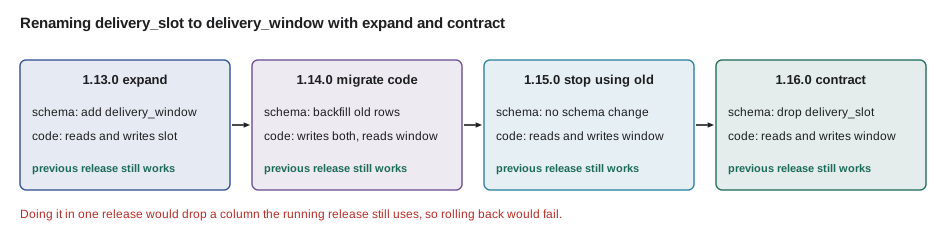
WEB-201 introduced the expand and contract pattern for changing a database without downtime, and it is what makes rollback safe. Instead of one release that changes the schema and the code together, a change is split so that every release works with the schema before and after it.
// Check that each release's code works with the schema before and after its migration.
const releases = [
  { name: '1.13.0', migration: { add: ['delivery_window'] }, reads: ['delivery_slot'], writes: ['delivery_slot'] },
  { name: '1.14.0', migration: {}, reads: ['delivery_window'], writes: ['delivery_slot', 'delivery_window'] },
  { name: '1.15.0', migration: {}, reads: ['delivery_window'], writes: ['delivery_window'] },
  { name: '1.16.0', migration: { drop: ['delivery_slot'] }, reads: ['delivery_window'], writes: ['delivery_window'] },
];
const risky = [{ name: '1.13.0-direct', migration: { add: ['delivery_window'], drop: ['delivery_slot'] }, reads: ['delivery_window'], writes: ['delivery_window'] }];

function check(list, columns) {
  let schema = new Set(columns);
  let previous = { name: 'running release', reads: ['delivery_slot'], writes: ['delivery_slot'] };
  for (const r of list) {
    for (const c of r.migration.add ?? []) schema.add(c);
    for (const c of r.migration.drop ?? []) schema.delete(c);
    const broken = [...previous.reads, ...previous.writes].filter((c) => !schema.has(c));
    console.log(r.name.padEnd(14), broken.length ? `rollback to ${previous.name} breaks: needs ${[...new Set(broken)].join(', ')}` : 'previous release still works');
    previous = r;
  }
}
check(releases, ['delivery_slot']);
check(risky, ['delivery_slot']);1.13.0 previous release still works 1.14.0 previous release still works 1.15.0 previous release still works 1.16.0 previous release still works 1.13.0-direct rollback to running release breaks: needs delivery_slot
What this code does
After each release's migration, the check asks whether the release before it would still find every column it reads and writes. In the four-step plan the answer is always yes, so any one release can be rolled back without touching the database. Doing the rename in one release drops a column the running release still needs, so rolling back after it would fail.
Roll back or roll forward? If a release is broken and its migration only added things, rolling back is quick and safe. If a fix is small and obvious, shipping it as the next release through the normal pipeline, rolling forward, may be quicker than rolling back and then forward again. The studio's rule for December is to roll back first, always, and only roll forward with a reviewed change once the service is stable.
Deploying is not releasing
Lesson 3's feature flags make it possible to deploy code, putting it on the servers, without releasing it, turning it on for users. A new feature can go to production switched off, be turned on for the studio's test agency, then for Northside, then for everyone, and be switched off again in seconds if it misbehaves, without a deployment or a rollback. A flag used this way is a kill switch. The board's new layout ships like that in December: deployed in release 1.14.0, switched on for Rosa's tablet only, and for the other kitchen screens a week later.
Blue-green and canary releases
Two common patterns reduce the risk of switching versions all at once. In a blue-green deployment, two complete copies run side by side: blue serves traffic while green is deployed and checked, then the router switches all traffic to green. If green misbehaves, switching back to blue is instant, and blue is already warm. On Theo's server, this would mean running the new release on port 3101 beside the old one on 3100 and changing the web server's upstream, which also removes the brief gap of a restart; the studio plans to try it for the partner service in January.
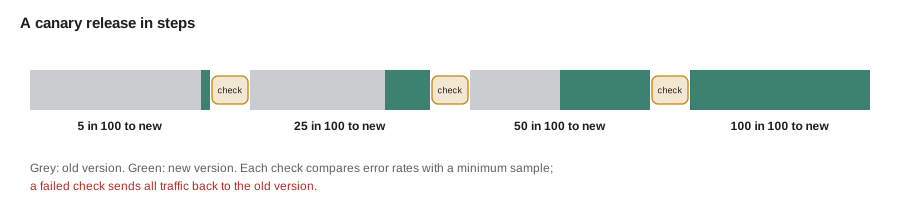
In a canary release, the new version first receives a small share of real traffic, such as 5 in 100 requests, while its error rate and latency are compared with the old version's. If it does as well, its share grows step by step; if not, it is withdrawn automatically. Canaries need enough traffic to compare, which is the Food Hub's limit: with a few hundred partner requests a day, 5 in 100 is too few to see a difference within hours. For services that small, a flag that turns a feature on for one agency at a time does the same job better.
// Canary analysis: compare the canary's error rate with the baseline's, with a minimum sample.
function decide(canary, baseline, { minRequests = 400, maxRatio = 1.5, minExtraErrors = 5 } = {}) {
  if (canary.total < minRequests) return `wait: only ${canary.total} canary requests`;
  const rate = (s) => s.errors / s.total;
  const expected = rate(baseline) * canary.total;
  const extra = canary.errors - expected;
  if (rate(canary) > rate(baseline) * maxRatio && extra >= minExtraErrors) {
    return `roll back: ${(rate(canary) * 100).toFixed(1)} in 100 vs ${(rate(baseline) * 100).toFixed(1)} in 100`;
  }
  return `promote: ${(rate(canary) * 100).toFixed(1)} in 100 vs ${(rate(baseline) * 100).toFixed(1)} in 100`;
}

const baseline = { errors: 38, total: 19000 };
console.log(decide({ errors: 1, total: 120 }, baseline));
console.log(decide({ errors: 3, total: 1000 }, baseline));
console.log(decide({ errors: 14, total: 1000 }, baseline));wait: only 120 canary requests promote: 0.3 in 100 vs 0.2 in 100 roll back: 1.4 in 100 vs 0.2 in 100
What this code does
No decision is made until the canary has served a minimum number of requests, because a handful of requests says nothing reliable. After that, the canary is rolled back only if its error rate is clearly higher than the baseline's and the difference amounts to several actual errors, so one unlucky request cannot cause a rollback. The second canary is within normal variation and is promoted; the third has seven times the baseline's rate and is withdrawn.
Worked problem
How long does a rollback take now?
Recovering on September 15 took Theo 34 minutes after Rosa's call (from lesson 1's table). With the new process, an alert reaches Gareth about 2 minutes after a failure starts; he decides to roll back within 3 minutes of the alert; the rollback command switches current and restarts in about 5 seconds; and the smoke test confirms the old release in about 10 seconds. How long from the start of a failure to the old release serving again, and how much of the error budget from lesson 9 would a failure of that length use, at 8 board requests a minute?
Show solution
- Alert: 2 minutes after the failure starts.
- Decision: 3 more minutes, so 5 minutes.
- Rollback and smoke test: 5 + 10 = 15 seconds, so about 5.25 minutes in all.
- Failed board requests: 8 × 5.25 = 42.
- Budget used: 42 of 1,344, about 3 in 100 of the 28-day budget.
Answer: About five and a quarter minutes, using about 42 of the 1,344 failed requests the month allows, compared with 40 minutes and more than 300 failed requests on September 15.
Common mistakes
MistakeChanging the schema and the code that depends on it in one release.
InsteadExpand first, migrate the code, then contract in a later release, so each release can be rolled back.
MistakeDebugging a broken release while it keeps failing.
InsteadRoll back first to restore service, then investigate with the old version running.
MistakeDeciding version numbers by feel.
InsteadFollow semantic versioning, and let Conventional Commits decide the bump.
MistakeRunning a canary on too little traffic.
InsteadWait for a minimum sample, or use flags per customer when traffic is small.
MistakeSending developers' changelogs to staff.
InsteadWrite a short plain note for the people a release affects.
Summary and key terms
- Semantic versioning gives each release a meaningful version: patch for fixes, minor for compatible features, major for breaking changes, with pre-releases sorting before their release.
- A service's version is separate from its API's version.
- Conventional Commits mark each commit's type, so a script or tool can choose the next version and draft the changelog, and a tag starts the release workflow, with immutable releases keeping it fixed.
- Code rollback is a quick switch and should come first, but side effects and database changes cannot be undone that way, so schema changes use expand and contract so every release works with the schema on either side.
- Feature flags separate deploying from releasing and act as kill switches.
- Blue-green deployments switch between two running copies, and canaries compare a new version on a share of traffic, which needs enough traffic to be meaningful.
- Semantic versioning
- MAJOR.MINOR.PATCH versions whose changes signal breaking changes, features and fixes.
- Pre-release
- A version such as 1.13.0-rc.1 that comes before its release in order.
- Conventional Commits
- A format for commit messages, such as feat(board): ..., that tools can read.
- Rollback
- Returning production to a previous release.
- Roll forward
- Fixing a broken release by deploying a new one rather than going back.
- Expand and contract
- Changing a schema in steps so each release works with the schema before and after it.
- Blue-green deployment
- Running two copies and switching all traffic from one to the other at once.
- Canary release
- Giving a new version a small share of traffic and comparing it before widening its share.
Practice problems
Work each problem on paper first, then reveal the answer to check.
Why does 1.13.0 sort after 1.13.0-rc.10?
Show answer
A version without a pre-release outranks the same numbers with one.
What version follows 1.12.0 if the commits include a fix and a feat?
Show answer
1.13.0, because the feature calls for a minor bump, which outranks the fix.
Why can't release 1.13.0 both add delivery_window and drop delivery_slot?
Show answer
The running release still uses delivery_slot, so rolling back to it would fail.
Why does the Food Hub use per-agency flags rather than canaries?
Show answer
With so little traffic, a small share of requests is too few to compare reliably.
Try it yourself
Bump a version
Complete bump(version, kind) for semantic versions without pre-release parts. major increases the first number and resets the others to 0, minor increases the second and resets the third, and patch increases the third.
For any other kind, throw an Error with the message unknown bump KIND.
function bump(version, kind) {
  return version;
}

for (const [v, k] of [['1.12.0', 'patch'], ['1.12.3', 'minor'], ['1.12.3', 'major'], ['0.9.9', 'minor']]) console.log(v, k, '->', bump(v, k));
try { bump('1.0.0', 'huge'); } catch (err) { console.log('error:', err.message); }
Try it yourself
Choose the bump from commits
Complete bumpFor(messages) so that it returns major, minor, patch or none for a list of Conventional Commit subjects. A ! before the colon means major; any feat means at least minor; any fix or perf means at least patch.
Subjects may have a scope in brackets, such as fix(orders): ....
function bumpFor(messages) {
  return 'none';
}

console.log(bumpFor(['docs: update README', 'test: add capacity tests']));
console.log(bumpFor(['fix(orders): round tray counts', 'docs: typo']));
console.log(bumpFor(['perf(kitchen): one query', 'feat(board): van order', 'fix: typo in message']));
console.log(bumpFor(['feat(api)!: remove the day sheet endpoint', 'fix: tidy']));
Lesson quiz · 5 questions
Score 60% or more to complete this lesson.
Create a free account to save your progress, take quizzes and earn a certificate.