
JS-260 · Lesson 12 of 12 · 27 min
Capstone: a deployment pipeline for a full-stack app
▶ Video coming soon A video version of this lesson is on the way.
On Thursday, November 9, Mira brings the block's work together for the capstone: one deployment process for every piece of the Food Hub's software that the studio owns, good enough that Theo can leave on December 4 without being called. The session is a dry run on staging in the morning and a written plan in the afternoon. The review is on Monday, November 13, with Theo, Gareth and Rhea, and if it goes well the first production deployments through the pipelines are planned for Tuesday, November 14 and Wednesday, November 15, three weeks before the hamper drive's busiest days.
The system as a whole
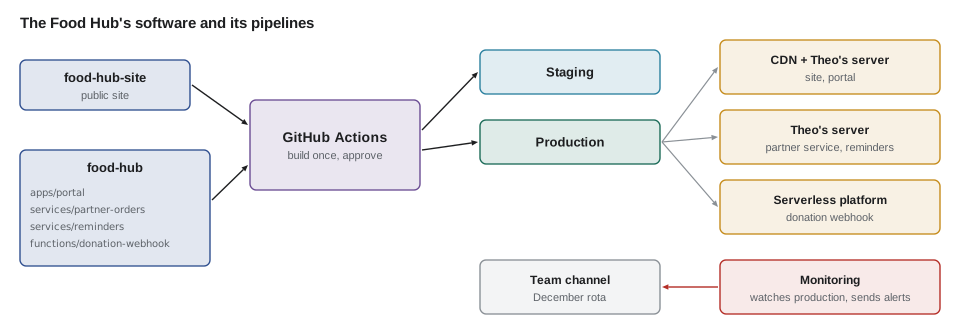
Mira's first diagram shows everything at once: two repositories, five deployable pieces, three environments and the services that watch them. The public site has its own repository, food-hub-site, because Dev's team edits its content. Everything else lives in the food-hub repository, with one folder and one workflow per piece, so that a change to the portal does not redeploy the partner service.
| Piece | Artifact | Staging | Production | Rollback |
|---|---|---|---|---|
| Public site | dist folder, hashed assets | Every push to main | Same artifact, after approval; CDN purge by tag | Switch web root link; purge |
| Volunteer portal | dist folder with hidden maps, config.json per environment | Every merge | After approval; maps uploaded to the error tracker | Switch link; old assets kept a week |
| Partner service | Archive with node_modules, built in the Node 27 image | Every merge, migrations first | After approval; smoke test with release check | Automatic on failed smoke test, or one command |
| Reminders script | Archive with node_modules | Every merge | After approval; next 18:00 run checked | Switch link before 18:00 |
| Donation webhook | Bundled function with adapter | Staging function with GiveRight's test mode | After approval; platform keeps previous version | Platform's previous version |
Two of the pieces were not covered in detail earlier. The reminders script is a scheduled job, so it has no service to restart: a systemd timer starts it at 18:00 each evening from whichever release current points at, and its smoke test is a dry run that writes the batch to a temporary file and checks it. The webhook function is deployed with the platform's own tool from the pipeline, using OIDC, and the platform keeps the previous version for one-click rollback.
# /etc/systemd/system/reminders.timer
[Unit]
Description=Nightly volunteer reminder batch

[Timer]
OnCalendar=*-*-* 18:00:00
Persistent=true

[Install]
WantedBy=timers.target

# /etc/systemd/system/reminders.service
[Unit]
Description=Write the reminder batch for the mail queue

[Service]
Type=oneshot
User=partner-orders
EnvironmentFile=/etc/partner-orders/reminders.env
WorkingDirectory=/srv/reminders/current
ExecStart=/usr/bin/node src/remind.mjs
What this code does
The timer starts the reminders service every day at 18:00, and Persistent=true runs a missed batch at the next boot if the server was off at that time. The service runs once and exits, as the unprivileged service user, with its own environment file. Its working directory is the current link, so switching releases changes which code the next run uses without touching the timer.
Which pipelines run
Because the food-hub repository holds several pieces, each workflow has a path filter: it runs only when files under its folder, or shared files it depends on, change. A change to the shared riverside-data library from JS-102 must trigger every piece that imports it.
// Which workflows does a change trigger? Path filters with simple glob matching.
const filters = {
  portal: ['apps/portal/**', 'packages/riverside-data/**', '.nvmrc'],
  'partner-orders': ['services/partner-orders/**', 'packages/riverside-data/**', '.nvmrc'],
  reminders: ['services/reminders/**', 'packages/riverside-data/**', '.nvmrc'],
  'donation-webhook': ['functions/donation-webhook/**'],
};
const toRegex = (glob) => new RegExp('^' + glob.replace(/[.+^${}()|[\]\\]/g, '\\$&').replace(/\*\*/g, '§').replace(/\*/g, '[^/]*').replace(/§/g, '.*') + '$');

function triggered(changed) {
  return Object.entries(filters)
    .filter(([, globs]) => changed.some((file) => globs.some((g) => toRegex(g).test(file))))
    .map(([name]) => name);
}

console.log(triggered(['apps/portal/src/Shifts.jsx']));
console.log(triggered(['packages/riverside-data/src/dates.js', 'README.md']));
console.log(triggered(['.nvmrc']));
console.log(triggered(['docs/runbook.md']));[ "portal" ] [ "portal", "partner-orders", "reminders" ] [ "portal", "partner-orders", "reminders" ] []
What this code does
Each glob is turned into a regular expression in which ** matches across folders and a single * matches within one folder name. A workflow runs if any changed file matches any of its globs. A change to the shared library triggers the three pieces that use it, a Node version change triggers every Node piece, and a documentation change triggers nothing.
The public site's workflow
The public site's workflow shows the pieces from lessons 7 and 8 together: build once with the performance budgets from JS-250 as a check, deploy the same artifact, then purge only the CDN tags that changed, using an OIDC token instead of a stored CDN key.
# food-hub-site/.github/workflows/deploy.yml: the public site
name: deploy-site
on:
  push:
    branches: [main]

permissions:
  contents: read

concurrency:
  group: site-deploy
  cancel-in-progress: false

jobs:
  build:
    runs-on: ubuntu-24.04
    steps:
      - uses: actions/checkout@08eba0b27e820071cde6df949e0beb9ba4906955 # v4.3.0
      - uses: actions/setup-node@49933ea5288caeca8642d1e84afbd3f7d6820020 # v4.4.0
        with:
          node-version-file: .nvmrc
      - run: npm ci
      - run: npm run build
      - run: npm run check:budgets
      - uses: actions/upload-artifact@ea165f8d65b6e75b540449e92b4886f43607fa02 # v4.6.2
        with:
          name: site-${{ github.sha }}
          path: dist

  deploy-production:
    needs: build
    runs-on: ubuntu-24.04
    environment: production
    permissions:
      contents: read
      id-token: write          # lets this job ask GitHub for an OIDC token
    steps:
      - uses: actions/checkout@08eba0b27e820071cde6df949e0beb9ba4906955 # v4.3.0
      - uses: actions/download-artifact@d3f86a106a0bac45b974a628896c90dbdf5c8093 # v4.3.0
        with:
          name: site-${{ github.sha }}
          path: dist
      - run: ./deploy/ship-static.sh production dist "site-${GITHUB_SHA::7}"
        env:
          DEPLOY_SSH_KEY: ${{ secrets.DEPLOY_SSH_KEY }}
          DEPLOY_HOST: ${{ vars.DEPLOY_HOST }}
      - run: ./deploy/purge-cdn.sh --tags-from dist/.changed-tags
What this code does
The build job installs exactly, builds, checks the budgets and uploads the dist folder once. The production job downloads that artifact, ships it into a new release folder and switches the web root, then purges the CDN for the tags the build recorded as changed. Only that job has id-token: write, so it is the only one that can obtain the short-lived token the CDN's trust policy accepts.
Gates: what every pipeline must have
Gareth and Mira agree on a list of things every piece's pipeline must have before it can be used in December, and Mira writes the list as code so that the review can check it rather than argue about it.
// Check each pipeline against the studio's release gates.
const gates = ['tests', 'singleArtifact', 'staging', 'approval', 'smokeTest', 'rollback', 'monitoring', 'alertOwner', 'runbook'];
const pipelines = {
  'public site':      { tests: true, singleArtifact: true, staging: true, approval: true, smokeTest: true, rollback: true, monitoring: true, alertOwner: true, runbook: true },
  'volunteer portal': { tests: true, singleArtifact: true, staging: true, approval: true, smokeTest: true, rollback: true, monitoring: true, alertOwner: true, runbook: true },
  'partner service':  { tests: true, singleArtifact: true, staging: true, approval: true, smokeTest: true, rollback: true, monitoring: true, alertOwner: true, runbook: true },
  'reminders script': { tests: true, singleArtifact: true, staging: true, approval: true, smokeTest: true, rollback: true, monitoring: false, alertOwner: true, runbook: false },
  'donation webhook': { tests: true, singleArtifact: true, staging: true, approval: true, smokeTest: false, rollback: true, monitoring: true, alertOwner: true, runbook: true },
};

for (const [name, p] of Object.entries(pipelines)) {
  const missing = gates.filter((g) => !p[g]);
  console.log(name.padEnd(17), missing.length ? `missing: ${missing.join(', ')}` : 'ready');
}public site ready volunteer portal ready partner service ready reminders script missing: monitoring, runbook donation webhook missing: smokeTest
What this code does
The gates are a list of names, and each pipeline records which it meets, so missing items fall out of a filter. Three pipelines are ready. The reminders script has no monitoring or runbook yet, and the webhook has no smoke test, so those three items go on the list for the review.
The gaps are real ones the dry run found. The reminders script runs once a day, so nothing noticed when it failed on staging in the morning; Mira adds a check that the day's batch file exists by 18:05 and alerts if not, and writes its runbook page. The webhook's smoke test sends a signed test event using GiveRight's test mode after each deployment and checks that the record appears in staging.
The morning's dry run
The dry run is a game day: deliberately causing failures on staging to see whether the pipeline, the monitoring and the people respond as planned. Mira and Gareth run five scenarios, each one a real failure from the last two months or a likely one in December.
// Game day: run each scenario through the deployment and monitoring rules and record what happens.
const scenarios = [
  { name: 'missing BOARD_TOKEN_SECRET', starts: false, ready: false, smoke: false },
  { name: 'database unreachable after deploy', starts: true, ready: false, smoke: false },
  { name: 'old release still running (restart failed)', starts: true, ready: true, smoke: false },
  { name: 'board 401s from a bad key rotation', starts: true, ready: true, smoke: true, boardErrors: true },
  { name: 'certificate expires in 18 days', starts: true, ready: true, smoke: true, certDays: 18 },
];

for (const s of scenarios) {
  const steps = [];
  if (!s.starts) steps.push('start-up validation exits 1', 'smoke test fails', 'automatic rollback');
  else if (!s.smoke) steps.push(s.ready ? 'release check fails' : 'readiness 503', 'automatic rollback');
  else steps.push('deploy succeeds');
  if (s.boardErrors) steps.push('board synthetic check alerts in about 2 min', 'rota rolls back by command');
  if (s.certDays !== undefined && s.certDays <= 21) steps.push(`certificate alert (${s.certDays} days left)`);
  console.log(`${s.name}:\n  ${steps.join(' -> ')}`);
}missing BOARD_TOKEN_SECRET: start-up validation exits 1 -> smoke test fails -> automatic rollback database unreachable after deploy: readiness 503 -> automatic rollback old release still running (restart failed): release check fails -> automatic rollback board 401s from a bad key rotation: deploy succeeds -> board synthetic check alerts in about 2 min -> rota rolls back by command certificate expires in 18 days: deploy succeeds -> certificate alert (18 days left)
What this code does
Each scenario describes how the release behaves, and the rules from lessons 3, 7 and 9 decide what happens next. Failures that stop the service from starting, becoming ready or passing the smoke test are rolled back automatically within the deployment. A failure that only users see, such as the board's rejected tokens, is caught by the synthetic check and handled by a person, and the certificate warning arrives three weeks ahead.
Every scenario behaved as planned except one: in the key rotation scenario, the alert went to Theo's phone because the rota had not been updated. That is exactly the kind of finding a game day is for, and the rota now lists Gareth and Mira from December 1.
When not to deploy
The last part of the plan is about timing. Small, frequent deployments are safer than large rare ones, but some moments are worse than others for any change. The studio writes its change freeze rules as code too, so the pipeline can refuse an approval at the wrong time rather than relying on everyone remembering.
// Is a production deployment allowed at this local time? Times are wall-clock strings in the kitchen's time zone.
const freezeDays = { '2028-12-16': 'hamper drive packing day', '2028-12-25': 'Christmas Day' };

function allowed(local) {
  const [date, time] = local.split(' ');
  const [y, m, d] = date.split('-').map(Number);
  const weekday = new Date(Date.UTC(y, m - 1, d)).getUTCDay();   // 0 is Sunday
  const hour = Number(time.split(':')[0]);
  if (freezeDays[date]) return `no: ${freezeDays[date]}`;
  if (weekday === 0 || weekday === 6) return 'no: weekend (emergency fixes only)';
  if (weekday === 5 && hour >= 15) return 'no: Friday after 15:00';
  if (hour < 9 || hour >= 17) return 'no: outside 09:00 to 17:00';
  return 'yes';
}

for (const t of ['2028-11-14 10:30', '2028-11-17 15:20', '2028-12-16 11:00', '2028-12-12 08:15', '2028-12-13 14:00', '2028-12-25 10:00']) {
  console.log(t, allowed(t));
}2028-11-14 10:30 yes 2028-11-17 15:20 no: Friday after 15:00 2028-12-16 11:00 no: hamper drive packing day 2028-12-12 08:15 no: outside 09:00 to 17:00 2028-12-13 14:00 yes 2028-12-25 10:00 no: Christmas Day
What this code does
The date is turned into a weekday with Date.UTC, which avoids any time zone conversion because only the calendar date matters, and the hour comes straight from the wall-clock time. Named freeze days are checked first, then weekends, then the Friday afternoon rule and the working hours. Emergency fixes bypass these rules through a separate, recorded path that needs two approvals.
The runbook
The plan's last page is a short runbook: the steps someone follows under pressure, written so that a person who has never done it can. It lives in the repository next to the workflows, and each alert from lesson 9 links to its section.
# Runbook: Food Hub production (December 2028)

## Deploying
1. Merge to main. Watch the workflow reach staging (about 5 minutes).
2. Check the staging smoke test and the summary of commits.
3. Approve production in GitHub, inside the deployment window.
4. Watch the production smoke test and the board for 10 minutes.

## Something is wrong after a deployment
1. Roll back first: run the workflow "rollback" for the piece, or on the server:
   sudo -u deploy /srv/<piece>/bin/rollback
2. Confirm the smoke test passes on the previous release.
3. Post in the team channel: what broke, when, what was rolled back.
4. Investigate with the old release running. Fix forward through the pipeline.

## Alerts
- Board heartbeat missing: check readiness, then the error tracker issue list.
- Readiness 503 from outside: check the database status page, then the logs
  for the request id in the alert.
- Reminder batch missing at 18:05: run the reminders workflow's dry run, then
  start the service by hand: sudo systemctl start reminders.service
- Certificate expiring: check that renewal ran on the server and the CDN.

## Who to call
Rota (Dec 1 to Jan 5): Gareth, then Mira. Theo only if the server is lost.
What this code does
The runbook is grouped by situation rather than by system, because that is how people arrive at it: deploying, something broke, or an alert fired. Every emergency path starts with rolling back, the step that restores service fastest and needs no diagnosis. It names the exact commands and the people to call, so nothing depends on memory at night.
What the review will decide
Mira's last table compares September with what the plan should achieve. The new figures are estimates from the dry run, to be checked against real ones after a month, using the same DORA measures from lesson 1.
| Measure | September 2028 | Plan for December 2028 |
|---|---|---|
| Deployments | 9 in the month, all by Theo | As often as needed, by any of three people |
| Lead time, merge to production | Median about 3 days | About 12 minutes plus approval |
| Change failure rate | 2 of 9 | Lower, with failures caught by smoke tests before users see them |
| Recovery time | 40 and 25 minutes | Under 6 minutes, most of it noticing |
| Theo's time per deployment | About 35 minutes | None |
The review on Monday, November 13 is planned as a walk through the gates, the game day results and the runbook, followed by a decision. If Theo approves, the portal's first pipeline release, 2.4.1, goes to production on Tuesday, November 14, and partner service 1.13.0 on Wednesday, November 15, giving three weeks of real deployments before he leaves. The move of the partner service to Node 28 and to running its container image in production are planned for January, when Theo is back, and Rosa's request to show waiting orders as a badge on the kitchen tablet goes on the list for after the hamper drive.
Worked problem
Is the plan worth the work?
Building the pipelines took about 60 hours of Mira's and Gareth's time over the block. In September, deployments took about 380 minutes of Theo's time (lesson 1). Suppose the Food Hub keeps deploying about 9 times a month, each deployment now takes about 5 minutes of a person's attention (approval and watching), and failures drop to one a month costing 10 minutes. How many hours a month does the new process save, and after how many months have the 60 hours been repaid in time alone?
Show solution
- Old monthly time: 380 minutes.
- New monthly time: 9 × 5 + 10 = 55 minutes.
- Saved: 380 − 55 = 325 minutes, about 5.4 hours a month.
- Months to repay 60 hours: 60 ÷ 5.4 ≈ 11 months.
Answer: About 5.4 hours a month, repaying the work in about 11 months on time alone. The larger benefits are not in that number: outages measured in minutes rather than tens of minutes, and a December in which deployments do not depend on one person.
Common mistakes
MistakeTreating the capstone as finished once the pipelines work.
InsteadRehearse failures on staging, fix what the game day finds, and check results against the plan after a month.
MistakeOne workflow that redeploys everything on any change.
InsteadUse path filters so each piece deploys only when it or something it depends on changes.
MistakeKeeping freeze rules in people's heads.
InsteadWrite them as code the pipeline enforces, with a recorded emergency path.
MistakeWriting a runbook organized by system.
InsteadOrganize it by situation, start every emergency with rollback, and link alerts to their sections.
MistakeLeaving scheduled jobs unmonitored.
InsteadCheck that each run produced its result, such as the reminders batch by 18:05.
Summary and key terms
- The capstone brings the block together into one deployment process for the Food Hub's five studio-owned pieces: the public site, the portal, the partner service, the reminders script and the donation webhook.
- Each has one artifact built once, an automatic staging deployment, an approved production deployment with a smoke test, a quick rollback, monitoring, an alert owner and a runbook entry.
- Path filters run only the workflows a change affects, OIDC replaces stored keys where possible, and the reminders script runs from a systemd timer pointing at the current release.
- Release gates written as code make the review concrete, a game day on staging tests that failures are caught and rolled back, freeze rules keep risky moments free of changes, and a runbook organized by situation lets anyone on the rota act.
- DORA measures will show whether the plan delivered.
- Path filter
- A rule that runs a workflow only when files matching given patterns change.
- Release gate
- A condition a pipeline must meet before it may be used to release.
- Game day
- A rehearsal in which failures are caused deliberately to test systems and people.
- Change freeze
- A period during which production changes are not made except in emergencies.
- Runbook
- Step-by-step instructions for operating a system and responding to alerts.
- On-call rota
- The schedule of who responds to alerts at a given time.
- systemd timer
- A systemd unit that starts a service on a schedule, like a cron job.
- Dry run
- Running a process in a safe environment or mode to check it before doing it for real.
Practice problems
Work each problem on paper first, then reveal the answer to check.
Why does a change to packages/riverside-data trigger three workflows?
Show answer
The portal, the partner service and the reminders script all import it, so each must be rebuilt and tested.
Why does every emergency path in the runbook start with rolling back?
Show answer
It restores service fastest and needs no diagnosis; investigation can follow with the old release running.
What did the game day find that no test would have?
Show answer
That alerts still went to Theo's phone because the rota had not been updated.
Why is the reminders script's smoke test a dry run?
Show answer
It has no running service to check, so the test writes the batch to a temporary file and checks that.
Try it yourself
Which pipelines run?
Complete pipelinesFor(changed, filters) so that it returns the sorted names of the pipelines with at least one prefix that some changed file starts with.
Here the filters are folder prefixes rather than globs, to keep it simple.
function pipelinesFor(changed, filters) {
  return [];
}

const filters = {
  portal: ['apps/portal/', 'packages/riverside-data/'],
  'partner-orders': ['services/partner-orders/', 'packages/riverside-data/'],
  'donation-webhook': ['functions/donation-webhook/'],
};
console.log(pipelinesFor(['apps/portal/src/App.jsx'], filters).join(', ') || '(none)');
console.log(pipelinesFor(['packages/riverside-data/src/money.js'], filters).join(', ') || '(none)');
console.log(pipelinesFor(['functions/donation-webhook/handler.mjs', 'services/partner-orders/src/board.mjs'], filters).join(', ') || '(none)');
console.log(pipelinesFor(['docs/runbook.md'], filters).join(', ') || '(none)');
Try it yourself
Inside the deployment window?
Complete canDeploy(day, hour) where day is a weekday name such as Mon and hour is 0 to 23. Return true only on Monday to Friday between 9 and 16 inclusive, except that on Friday the last allowed hour is 14.
The program checks a few times.
function canDeploy(day, hour) {
  return true;
}

for (const [d, h] of [['Tue', 10], ['Fri', 14], ['Fri', 15], ['Sat', 11], ['Mon', 8], ['Thu', 16], ['Wed', 17]]) console.log(d, h, canDeploy(d, h));
Lesson quiz · 5 questions
Score 60% or more to complete this lesson.
Create a free account to save your progress, take quizzes and earn a certificate.