
JS-260 · Lesson 3 of 12 · 25 min
Environments and configuration
▶ Video coming soon A video version of this lesson is on the way.
On Tuesday, October 10, the day after Thanksgiving, Mira and Gareth go back to the September 15 incident. The partner service needed a new setting, the secret that signs the order board's tokens, and production did not have it. The service read process.env.BOARD_TOKEN_SECRET, got undefined, and carried on: it started, it answered its health check, and it signed every board token with a key of undefined, which the board then rejected. "The service knew something was wrong the moment it started," Gareth says. "It just didn't say so." Today's lesson is about configuration: what it is, where it should live, and how a program should check it.
Code, configuration and data
A deployed program is made of three different things that change at different speeds and are managed in different ways. Code is the same in every environment and changes only through a new release. Configuration is everything that differs between environments: the database address, the port, credentials, log level, limits such as the fair-share rule from JS-240, and switches that turn features on or off. Data is what the program stores and serves: orders, volunteers, shifts. Mixing them causes most deployment surprises.
| Belongs in | Examples from the partner service | Changes by |
|---|---|---|
| Code | Routes, validation rules, the 40-tray capacity rule, the order statuses | A new release |
| Configuration | PORT, DATABASE_URL, BOARD_TOKEN_SECRET, LOG_LEVEL, FAIR_SHARE_TRAYS | Editing the environment and restarting |
| Data | Orders, delivery days, Rosa's lowered capacity for a day | Using the application |
A useful test for whether something is configuration is to ask whether the code could be made public right now without exposing anything or tying it to one environment. If the answer is no because the code contains a password, an internal address or a staging-only switch, those values are configuration that has leaked into the code.
The twelve-factor rule: configuration in the environment
The twelve-factor app, a set of principles for software that runs as a service, puts it simply: store configuration in the environment. Every operating system gives a running process a set of environment variables, named strings inherited from whatever started it, and every language can read them; in Node.js they are in process.env. Code reads its settings from there and contains no list of environments at all, so the same artifact runs anywhere and only its environment changes.
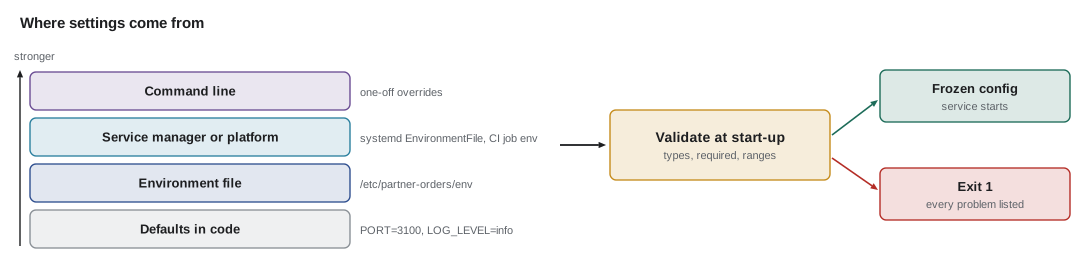
On Theo's server, the systemd unit that JS-230 wrote for the partner service already does this: its EnvironmentFile line points at /etc/partner-orders/env, a file of NAME=value lines readable only by root and the service's user, and systemd sets those variables when it starts the process. In CI, the pipeline sets variables for each job. On a laptop, a developer keeps them in a .env file that is listed in .gitignore and never committed, and Node.js can load it directly with node --env-file=.env, without any package.
// Every environment variable is a string. Converting them is the program's job.
const env = { PORT: '3100', DB_POOL: '10', ENABLE_BOARD: 'false', AGENCIES: 'northside,elm-seniors,westview' };

console.log('PORT', typeof env.PORT, env.PORT + 1);        // string: '31001'
console.log('PORT as number', Number(env.PORT) + 1);
console.log('ENABLE_BOARD is truthy?', Boolean(env.ENABLE_BOARD));  // 'false' is a non-empty string
console.log('ENABLE_BOARD parsed', env.ENABLE_BOARD === 'true');
console.log('AGENCIES', env.AGENCIES.split(',').length, 'agencies');
console.log('MISSING', env.MISSING, Number(env.MISSING));PORT string 31001 PORT as number 3101 ENABLE_BOARD is truthy? true ENABLE_BOARD parsed false AGENCIES 3 agencies MISSING undefined NaN
What this code does
Environment variables are always strings, so adding 1 to PORT joins the text instead of adding. The string 'false' is truthy because it is not empty, which is a classic configuration bug. A missing variable is undefined, and Number(undefined) is NaN, so careless conversion turns a missing setting into a quiet wrong value.
Check everything when the program starts
The fix for September 15 is a rule: validate configuration at start-up and fail fast. When the service starts, it reads every setting it needs, converts each to the right type, applies defaults where a default is safe, and checks the result. If anything is missing or invalid, it prints every problem at once and exits with a non-zero status, before it opens a port. A service that refuses to start is noticed within seconds by the deployment's checks (lesson 7); a service that starts with a bad setting can fail quietly for an hour.
The partner service already uses zod to validate request bodies (JS-230), so Mira uses it for the environment too. The schema says what each setting must look like; z.coerce converts strings to numbers; .default supplies safe defaults; and safeParse returns every issue rather than stopping at the first.
import { z } from 'zod';

const Env = z.object({
  PORT: z.coerce.number().int().min(1).max(65535).default(3100),
  DATABASE_URL: z.url(),
  BOARD_TOKEN_SECRET: z.string().min(32),
  LOG_LEVEL: z.enum(['debug', 'info', 'warn', 'error']).default('info'),
  FAIR_SHARE_TRAYS: z.coerce.number().int().positive().default(16),
});

const result = Env.safeParse(process.env);
if (!result.success) {
  console.error('Invalid configuration:');
  for (const issue of result.error.issues) {
    console.error(`  ${issue.path.join('.')}: ${issue.message}`);
  }
  process.exit(1);
}

export const config = Object.freeze(result.data);
const shown = { ...config, DATABASE_URL: '(set)', BOARD_TOKEN_SECRET: '(set)' };
console.log('configuration ok', JSON.stringify(shown));
What this code does
The schema describes each setting: PORT is coerced from text to an integer in the valid range, DATABASE_URL must be a URL, the board secret must be at least 32 characters, and two settings have defaults. If validation fails, every issue is printed with the setting's name and the process exits with status 1 before doing anything else. On success the configuration is frozen so no other code can change it, and the summary printed for the log hides the two sensitive values.
$ node --env-file=.env.staging config.mjs; echo "exit status $?"
Invalid configuration:
  PORT: Invalid input: expected number, received NaN
  BOARD_TOKEN_SECRET: Invalid input: expected string, received undefined
  LOG_LEVEL: Invalid option: expected one of "debug"|"info"|"warn"|"error"
exit status 1
$ node --env-file=.env.fixed config.mjs
configuration ok {"PORT":3100,"DATABASE_URL":"(set)","BOARD_TOKEN_SECRET":"(set)","LOG_LEVEL":"debug","FAIR_SHARE_TRAYS":16}
The first run uses the staging file as it was in September. Three problems are reported together: a port typed with two capital letter O's instead of zeros, the missing board secret, and a log level that does not exist. Fixing one and restarting three times would have taken three deployments; seeing all of them at once takes one. The second run, with the corrected file, prints a summary that is safe to keep in the logs.
// A small validator that collects every problem before giving up.
function readConfig(env) {
  const problems = [];
  const out = {};
  function need(name, convert, fallback) {
    const raw = env[name];
    if (raw === undefined || raw === '') {
      if (fallback === undefined) { problems.push(`${name} is missing`); return; }
      out[name] = fallback; return;
    }
    const value = convert(raw);
    if (value === undefined || Number.isNaN(value)) problems.push(`${name} is invalid: ${JSON.stringify(raw)}`);
    else out[name] = value;
  }
  const int = (s) => (/^\d+$/.test(s) ? Number(s) : NaN);
  const level = (s) => (['debug', 'info', 'warn', 'error'].includes(s) ? s : undefined);
  need('PORT', int, 3100);
  need('DATABASE_URL', String);
  need('BOARD_TOKEN_SECRET', String);
  need('LOG_LEVEL', level, 'info');
  if (problems.length) return { ok: false, problems };
  return { ok: true, config: Object.freeze(out) };
}

console.log(readConfig({ PORT: '31OO', DATABASE_URL: 'postgres://db/foodhub', LOG_LEVEL: 'verbose' }));
console.log(readConfig({ DATABASE_URL: 'postgres://db/foodhub', BOARD_TOKEN_SECRET: 'x'.repeat(32) }));{ ok: false, problems: [ "PORT is invalid: \"31OO\"", "BOARD_TOKEN_SECRET is missing", "LOG_LEVEL is invalid: \"verbose\"" ] }
{ ok: true, config: { PORT: 3100, DATABASE_URL: "postgres://db/foodhub", BOARD_TOKEN_SECRET: "xxxxxxxxxxxxxxxxxxxxxxxxxxxxxxxx", LOG_LEVEL: "info" } }What this code does
Each setting is read with a converter and an optional default, and any problem is added to a list rather than thrown. Only when every setting has been checked does the function decide, so the caller sees all the problems at once. The second call relies on the defaults for PORT and LOG_LEVEL and succeeds.
Defaults, and when not to have one
Defaults make configuration shorter, but a default is a decision made in advance for every environment. A default port or log level is harmless. A default for a database address, a secret or an external service's URL is dangerous: if staging's file is missing DATABASE_URL and the code defaults to the production database, staging tests will write to real data. The studio's rule is that anything that identifies another system or grants access has no default and must be set.
Settings usually come from several places, and the order in which they override each other should be fixed and documented. A common order, from weakest to strongest, is: defaults in code, then a configuration file, then environment variables, then command-line options for one-off runs. The order matters less than everyone knowing it.
// Settings from several sources: later sources override earlier ones.
const defaults = { PORT: '3100', LOG_LEVEL: 'info', FAIR_SHARE_TRAYS: '16' };
const fromFile = { LOG_LEVEL: 'warn', DATABASE_URL: 'postgres://db/foodhub' };
const fromEnv = { LOG_LEVEL: 'debug' };
const fromCommandLine = { PORT: '3199' };

const layers = [['default', defaults], ['file', fromFile], ['environment', fromEnv], ['command line', fromCommandLine]];
const merged = {};
const source = {};
for (const [name, layer] of layers) {
  for (const [key, value] of Object.entries(layer)) { merged[key] = value; source[key] = name; }
}
for (const key of Object.keys(merged).sort()) console.log(key.padEnd(17), merged[key].padEnd(22), 'from', source[key]);DATABASE_URL postgres://db/foodhub from file FAIR_SHARE_TRAYS 16 from default LOG_LEVEL debug from environment PORT 3199 from command line
What this code does
The layers are applied in order, so a key set by a later layer replaces the value from an earlier one. Recording which layer each final value came from makes the merged result easy to explain when something is surprising. LOG_LEVEL is set by three layers, and the environment variable wins.
Do not test the environment's name
It is tempting to write if (process.env.NODE_ENV === 'production') around behaviour that should differ. The trouble is that staging should behave like production, so every such test either makes staging different from production, which defeats its purpose, or has to be written as production-or-staging, and the list grows. The better pattern is a specific setting for each behaviour: LOG_LEVEL=debug rather than not production, SEND_EMAIL=false on a laptop rather than development. The code then reads what to do, not where it is.
NODE_ENV itself is still worth setting to production on servers, because many libraries, including Express, use it to turn off development-only checks and verbose errors. It should be treated as a hint to libraries, not as a switch for the application's own logic.
Configuration for the front end
The portal is a set of static files, so it has no process.env when it runs. Lesson 2 showed that build-time variables are public and fixed when the build runs, which means a portal built with staging's settings cannot be promoted to production unchanged. Mira's solution is a small runtime configuration file: config.json, served by each environment's web server next to the portal's files and fetched once when the app starts. The build is identical everywhere; only config.json differs, and it contains nothing secret.
{
  "environment": "staging",
  "apiBase": "https://staging.riverside-food-hub.example/api/v1",
  "partnerApiBase": "https://staging.riverside-food-hub.example/api/partners/v1",
  "errorReportingUrl": "https://errors.brightwater.example/ingest/portal",
  "release": "portal@2.4.0"
}
What this code does
The file holds the few values that differ between staging and production, all of which a visitor could see anyway. The portal fetches it before rendering and fails with a clear message if it cannot. It is served with Cache-Control: no-cache, from JS-250's rules, so a changed value is picked up on the next visit.
Feature flags
A feature flag is a setting that turns a piece of functionality on or off without a new release. The simplest flags are configuration like any other: ENABLE_BOARD_NOTIFICATIONS=true. More useful ones are evaluated per request, so a feature can be turned on for a few people first. To make that stable, so the same volunteer sees the same choice every time, the flag hashes something that does not change, such as the volunteer's id, into a number from 0 to 99 and compares it with the rollout percentage.
// A stable percentage rollout: hash the id into a bucket from 0 to 99.
function fnv1a(text) {
  let h = 0x811c9dc5;
  for (const ch of text) { h ^= ch.codePointAt(0); h = Math.imul(h, 0x01000193) >>> 0; }
  return h;
}
const bucket = (flag, id) => fnv1a(`${flag}:${id}`) % 100;
const enabled = (flag, id, share) => bucket(flag, id) < share;

for (const id of ['v-1042', 'v-1043', 'v-2210']) {
  console.log(id, 'bucket', bucket('new-checkin', id), enabled('new-checkin', id, 10) ? 'on' : 'off');
}
let on = 0;
for (let n = 1; n <= 1000; n++) if (enabled('new-checkin', `v-${n}`, 10)) on++;
console.log(`${on} of 1000 volunteers get the new check-in at a 10 in 100 rollout`);v-1042 bucket 13 off v-1043 bucket 94 off v-2210 bucket 99 off 102 of 1000 volunteers get the new check-in at a 10 in 100 rollout
What this code does
FNV-1a is a small, fast hash, used here only to spread ids evenly, not for security. Hashing the flag name together with the id means each flag gets its own independent selection of people. Because the bucket depends only on the id, raising the share from 10 to 50 keeps everyone who already had the feature and adds more.
Flags have a cost. Each one doubles the number of ways the code can behave, and an old flag left in place after a feature is fully released is a branch nobody tests. The studio writes an end date next to every flag when it is created, and lesson 11 uses flags to separate deploying code from releasing a feature.
Worked problem
How long does a bad setting take to find?
On September 15, the board was broken for 40 minutes before anyone noticed. With start-up validation, the service exits within about 1 second of starting, and the deployment script from lesson 7 checks the service 10 seconds after starting it, retrying 3 times at 5-second intervals before declaring failure and keeping the old version. What is the longest a bad setting can now go unnoticed, and what do users see?
Show solution
- The service refuses to start, about 1 second after the restart.
- The first check runs at 10 seconds and fails.
- Three more checks at 5-second intervals: 3 × 5 = 15 seconds.
- Failure is declared at about 10 + 15 = 25 seconds, and the old version is kept or restored.
Answer: About 25 seconds, and if the deployment keeps the old version running until the new one passes its checks (lesson 7), users see no interruption at all.
Common mistakes
MistakeTreating 'false' as false.
InsteadCompare explicitly, for example value === 'true', or use a parser that rejects anything else.
MistakeGiving a database address or secret a default.
InsteadSettings that point at another system or grant access must be set explicitly in every environment.
MistakeChecking each setting only when it is first used.
InsteadValidate all configuration at start-up and exit with a list of every problem.
MistakeBranching on NODE_ENV for application behaviour.
InsteadUse a specific setting for each behaviour so staging behaves like production.
MistakeCommitting .env files.
InsteadList them in .gitignore and keep an example file with names and no real values.
Summary and key terms
- Configuration is everything that differs between environments, kept separate from code and data.
- Following the twelve-factor rule, the partner service reads it from environment variables, set by systemd's EnvironmentFile on the server, the pipeline in CI and node --env-file on laptops.
- Environment variables are strings, so they must be converted and checked.
- The service validates every setting at start-up with zod, reports every problem at once and exits before opening a port.
- Safe settings may have defaults, but addresses and secrets must not.
- Code should read specific settings rather than test the environment's name.
- The portal reads a small, non-secret config.json at run time so one build works everywhere.
- Feature flags with stable hashing roll features out gradually.
- Configuration
- Settings that differ between environments, such as addresses, credentials, limits and switches.
- Environment variable
- A named string given to a process by whatever starts it; in Node.js, found in process.env.
- Twelve-factor app
- A set of principles for services, including keeping configuration in the environment.
- Fail fast
- Stopping immediately with a clear error when something is wrong, instead of continuing in a bad state.
- EnvironmentFile
- A systemd setting that loads NAME=value lines from a file into a service's environment.
- Runtime configuration
- Settings a program reads when it runs rather than having them fixed at build time.
- Feature flag
- A setting that turns functionality on or off, or on for some users, without a new release.
- Percentage rollout
- Turning a feature on for a fixed share of users, chosen stably by hashing an id.
Practice problems
Work each problem on paper first, then reveal the answer to check.
Why did the partner service start on September 15 despite the missing secret?
Show answer
It read the variable only when signing a token, got undefined, and carried on without checking.
Why is DATABASE_URL given no default?
Show answer
A default could point staging, or a laptop, at the production database.
Why does the portal fetch config.json instead of using VITE_ variables for its API address?
Show answer
Build-time values would differ between staging and production, so one build could not be promoted to both.
Why is the flag name included in the hash for a rollout?
Show answer
So that each flag selects a different, independent set of people.
Try it yourself
Parse a boolean setting
Complete parseBool(name, value). It returns true for true, 1 and yes, and false for false, 0 and no, ignoring letter case and surrounding spaces.
Anything else, including a missing value, throws an Error with the message NAME must be true or false using the setting's name.
function parseBool(name, value) {
  return Boolean(value);
}

for (const v of ['true', ' YES ', '0', 'False']) console.log(JSON.stringify(v), parseBool('ENABLE_BOARD', v));
for (const v of ['maybe', undefined]) {
  try { parseBool('ENABLE_BOARD', v); console.log('accepted', v); } catch (err) { console.log('error:', err.message); }
}
Try it yourself
Who gets the feature?
Using the bucket(flag, id) function provided, complete enabledFor(flag, ids, share) so that it returns the ids, in their original order, whose bucket is less than share.
The program prints which of six kitchen staff see the new board layout at shares of 0, 50 and 100.
function fnv1a(text) {
  let h = 0x811c9dc5;
  for (const ch of text) { h ^= ch.codePointAt(0); h = Math.imul(h, 0x01000193) >>> 0; }
  return h;
}
const bucket = (flag, id) => fnv1a(`${flag}:${id}`) % 100;

function enabledFor(flag, ids, share) {
  return ids;
}

const staff = ['rosa', 'kwame', 'lin', 'dario', 'fatima', 'joel'];
for (const share of [0, 50, 100]) console.log(share, enabledFor('board-layout', staff, share).join(' ') || '(nobody)');
Lesson quiz · 5 questions
Score 60% or more to complete this lesson.
Create a free account to save your progress, take quizzes and earn a certificate.