
JS-260 · Lesson 4 of 12 · 26 min
Static hosting and CDNs
▶ Video coming soon A video version of this lesson is on the way.
On Thursday, October 12, Dev Bhatt joins the first half of the session with a request. During the performance work he often wanted to see a change to the public site before it went live, and the only way was for Mira to share her screen. "Could I have a link to try the new recipe page on my phone before Theo puts it up?" Gareth uses the question to introduce static hosting: serving files that are the same for every visitor, which is what the public site and the portal are, and the services that make it fast, cheap and safe to change.
What makes a site static
A static file is one the server sends exactly as it is stored: the same bytes for everyone who asks for that URL. The public site's pages, the portal's built files, images and fonts are all static. A dynamic response is produced for each request by running code, as Theo's PHP application and the partner service do. A page can look dynamic and still be static: the portal is a single static index.html and a set of JavaScript files, and everything personal on it comes from API calls made after it loads.
Static files are the easiest thing on the web to serve. There is no code to run, no database to reach and nothing to go wrong per request, so they can be copied to many places and served from whichever is nearest. That is the whole idea of a content delivery network.
Content delivery networks
A content delivery network (CDN) is a set of servers, called edge servers or points of presence, spread across many cities. Visitors' requests go to the nearest edge server. If it has a fresh copy of the response in its cache, it answers immediately, which is called a cache hit. If not, a cache miss, it fetches the response from the origin, the site's own server, stores it if the caching rules allow, and passes it on. A visitor in Kingston and one in Vancouver both get the site's photos from a server a few milliseconds away, and Theo's server sees only a small share of the requests.
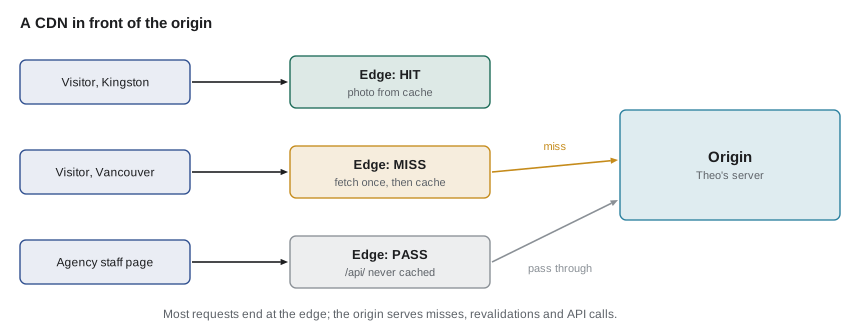
A CDN usually does more than cache. It terminates TLS close to the visitor, which shortens the handshake that JS-250 measured; it compresses responses; it absorbs traffic spikes and many kinds of denial-of-service attack; and it can apply rules at the edge, such as redirects and security headers. For the Food Hub, the most useful effect is simple: the photos and the portal's files are served from the edge, and Theo's server spends its time on pages and API requests.
What the CDN may cache
A CDN is a shared cache in the sense of JS-250 lesson 6, and it follows the same HTTP rules. It caches a response only if its Cache-Control allows a shared cache to store it, for as long as max-age or, if present, s-maxage says, because s-maxage applies only to shared caches. Many CDNs also honour CDN-Cache-Control, a header defined in RFC 9213 that only CDNs read, so a site can tell the CDN to keep a page for an hour while telling browsers to revalidate it every time.
| Path | Response headers | At the CDN | In the browser |
|---|---|---|---|
| /assets/*-[hash].js, .css, .woff2 | public, max-age=31536000, immutable | Kept a year | Kept a year |
| /images/* (editor photos) | public, max-age=604800 | Kept a week | Kept a week |
| /, /programs, /recipes/* | no-cache; CDN-Cache-Control: max-age=300 | Kept 5 minutes, purged on publish | Revalidated each visit |
| /volunteer/index.html, config.json, sw.js | no-cache | Revalidated each time | Revalidated each visit |
| /api/* | private or no-store | Never cached; passed to the origin | Per the API's own rules |
| /account/*, sign-in | no-store | Never cached | Never stored |
The rules for hashed assets, photos and personal responses are the ones Mira set in JS-250. The new line is for the public HTML pages, which change only when Dev publishes something. Browsers keep revalidating them, so a visitor always sees the newest page, but the CDN may answer for five minutes without asking Theo's server, and the publishing step will tell the CDN to drop its copies straight away.
// Decide what a CDN does with a response, using RFC 9111 and RFC 9213 headers.
function edgeTtl(headers) {
  const parse = (h) => Object.fromEntries((h ?? '').split(',').map((p) => p.trim()).filter(Boolean)
    .map((p) => { const [k, v] = p.split('='); return [k.toLowerCase(), v === undefined ? true : Number(v)]; }));
  const cdn = parse(headers['cdn-cache-control']);
  const cc = parse(headers['cache-control']);
  if (Object.keys(cdn).length) {                       // CDN-Cache-Control wins at the CDN
    if (cdn['no-store'] || cdn.private) return 'not cached';
    return `cache ${cdn['max-age'] ?? 0} s (CDN-Cache-Control)`;
  }
  if (cc['no-store'] || cc.private) return 'not cached';
  if (cc['no-cache']) return 'store, revalidate every time';
  if (cc['s-maxage'] !== undefined) return `cache ${cc['s-maxage']} s (s-maxage)`;
  if (cc['max-age'] !== undefined) return `cache ${cc['max-age']} s (max-age)`;
  return 'heuristic or not cached';
}

console.log('asset   ', edgeTtl({ 'cache-control': 'public, max-age=31536000, immutable' }));
console.log('page    ', edgeTtl({ 'cache-control': 'no-cache', 'cdn-cache-control': 'max-age=300' }));
console.log('recipes ', edgeTtl({ 'cache-control': 'max-age=60, s-maxage=600' }));
console.log('api     ', edgeTtl({ 'cache-control': 'private, no-cache' }));
console.log('sign-in ', edgeTtl({ 'cache-control': 'no-store' }));asset cache 31536000 s (max-age) page cache 300 s (CDN-Cache-Control) recipes cache 600 s (s-maxage) api not cached sign-in not cached
What this code does
The function parses both headers into objects and gives CDN-Cache-Control priority, because only CDNs read it. Without it, the CDN follows Cache-Control, preferring s-maxage over max-age since s-maxage is meant for shared caches. Private and no-store responses are never cached at the edge, which keeps personal data out of a cache that many people share.
Cache keys
A cache stores responses under a cache key, by default the request's URL, sometimes with parts of the request such as the Accept-Encoding header that Vary names. The key decides when two requests can share one response. If it includes too little, different visitors can get each other's responses. If it includes too much, the cache fills with copies of the same file and the hit rate falls. The common case on the public site is marketing parameters: a link Dev shares in the newsletter adds ?utm_source=newsletter, which changes nothing about the page but, left in the key, makes every newsletter link a cache miss.
// Build a cache key: drop tracking parameters and sort the rest.
function cacheKey(url, headers = {}) {
  const u = new URL(url);
  const params = [...u.searchParams].filter(([k]) => !k.startsWith('utm_') && k !== 'fbclid');
  params.sort(([a], [b]) => a.localeCompare(b));
  const query = new URLSearchParams(params).toString();
  const encoding = /\bbr\b/.test(headers['accept-encoding'] ?? '') ? 'br' : /gzip/.test(headers['accept-encoding'] ?? '') ? 'gzip' : 'identity';
  return `${u.host}${u.pathname}${query ? '?' + query : ''} [${encoding}]`;
}

const h = { 'accept-encoding': 'gzip, deflate, br' };
console.log(cacheKey('https://riverside-food-hub.example/recipes/lentil-soup?utm_source=newsletter', h));
console.log(cacheKey('https://riverside-food-hub.example/recipes/lentil-soup', h));
console.log(cacheKey('https://riverside-food-hub.example/recipes?tag=vegan&page=2', h));
console.log(cacheKey('https://riverside-food-hub.example/recipes?page=2&tag=vegan', { 'accept-encoding': 'gzip' }));riverside-food-hub.example/recipes/lentil-soup [br] riverside-food-hub.example/recipes/lentil-soup [br] riverside-food-hub.example/recipes?page=2&tag=vegan [br] riverside-food-hub.example/recipes?page=2&tag=vegan [gzip]
What this code does
URL and URLSearchParams split the address into parts, so tracking parameters can be removed and the remaining ones sorted into a fixed order. The Accept-Encoding header is reduced to the one encoding the cache will actually store, rather than the full header text, which varies between browsers. The first two requests now share a key, and so do the two recipe-list requests apart from their encoding.
Purging and stale content
Long cache lifetimes need a way to say "that has changed". Hashed assets never need one, because a change gives them a new URL. Pages and photos do. CDNs offer purging: removing cached copies of specific URLs, of everything with a given prefix, or, on many CDNs, of everything tagged with a label that the origin sent in a header when the response was cached. Tags fit the public site well: every recipe page is tagged recipes, so publishing a recipe purges the list pages and that recipe's page in one request.
Two more directives help when the origin is slow or down. stale-while-revalidate, from JS-250, lets the edge answer with a slightly stale copy while it fetches a fresh one. stale-if-error (RFC 5861) lets it keep serving a stale copy for a time if the origin returns an error or cannot be reached, so a brief outage of Theo's server would leave the public pages readable.
// Purge by tag: which cached URLs does publishing a recipe remove?
const cached = [
  { url: '/', tags: ['home'] },
  { url: '/recipes', tags: ['recipes'] },
  { url: '/recipes?tag=vegan', tags: ['recipes'] },
  { url: '/recipes/lentil-soup', tags: ['recipes', 'recipe:lentil-soup'] },
  { url: '/recipes/barley-stew', tags: ['recipes', 'recipe:barley-stew'] },
  { url: '/programs', tags: ['programs'] },
];

function purge(tags) {
  const hit = cached.filter((c) => c.tags.some((t) => tags.includes(t)));
  return hit.map((c) => c.url);
}

console.log('edit lentil soup  ->', purge(['recipe:lentil-soup']).join(' '));
console.log('new recipe added  ->', purge(['recipes']).join(' '));
console.log('home page change ->', purge(['home']).join(' '));edit lentil soup -> /recipes/lentil-soup new recipe added -> /recipes /recipes?tag=vegan /recipes/lentil-soup /recipes/barley-stew home page change -> /
What this code does
Each cached response carries the tags the origin gave it, so purging by tag removes every response that has any of the given tags. Editing one recipe needs only that recipe's tag, while adding a recipe changes every list page and so purges the whole recipes tag. Purging the narrowest tag that covers a change keeps the rest of the cache warm.
Static hosts
Instead of putting a CDN in front of its own server, a site can be deployed to a static host, a service that stores the files and serves them from its own CDN. GitHub Pages, Netlify, Vercel and Cloudflare are common examples. Cloudflare has two products that do this: Pages, and Workers with static assets, which Cloudflare now recommends for new projects because one deployment can serve files and run code; Pages projects continue to work. The services differ in prices and limits, but the useful features are similar, and they are worth knowing because the studio's own pipeline will copy several of them.
| Feature | What it means |
|---|---|
| Deploy from a repository | A push to a branch builds and deploys the site |
| Atomic deploys | Each deployment is a complete, separate copy; the switch to it happens all at once, so nobody sees half a site |
| Instant rollback | Any earlier deployment can be made live again with one click, because it still exists |
| Preview deployments | Each branch or pull request gets its own temporary URL |
| Custom domains and TLS | The host issues and renews certificates for the site's own domain automatically |
| Headers and redirects files | Caching headers and redirects are written in a file in the repository |
| Edge functions | Small pieces of code run at the edge for redirects, authentication or personalization |
The studio's decision for the Food Hub is a mixture. The public site and the portal stay on Theo's server, because the portal must share its origin with the API for its session cookies, and a CDN goes in front of the whole domain. Dev's previews, which only he and the studio need to see, go to a static host: every pull request on the public site's repository gets a preview URL on a separate preview domain, with a robots noindex header so search engines ignore it. Lesson 7 builds both.
Single-page apps and fallbacks
The portal is a single-page app with client-side routes such as /volunteer/shifts/2028-12-16. There is no file by that name, so a static server would answer 404 when someone reloads the page or opens a shared link. The fix is a fallback rule: requests under /volunteer/ that do not match a file are answered with index.html, and the app's router takes over. The rule must not apply to the assets folder, though. A missing JavaScript chunk answered with HTML makes the browser try to run HTML as JavaScript and fail with a confusing error, where a plain 404 would be clear.
// A single-page app fallback that does not hide missing assets.
const files = new Set(['/volunteer/index.html', '/volunteer/config.json', '/volunteer/sw.js',
  '/volunteer/assets/main-ZDU7IKHH.js', '/volunteer/assets/shifts-B3kQ9xZa.js']);

function serve(path) {
  if (files.has(path)) return `200 ${path}`;
  if (path === '/volunteer/' || path === '/volunteer') return '200 /volunteer/index.html';
  if (path.startsWith('/volunteer/assets/')) return '404 (missing asset, not the app)';
  if (path.startsWith('/volunteer/') && !/\.[a-z0-9]+$/i.test(path)) return '200 /volunteer/index.html (app route)';
  return '404';
}

for (const p of ['/volunteer/', '/volunteer/shifts/2028-12-16', '/volunteer/assets/shifts-B3kQ9xZa.js',
                 '/volunteer/assets/shifts-OLDHASH.js', '/volunteer/missing.png', '/elsewhere']) {
  console.log(p.padEnd(39), serve(p));
}/volunteer/ 200 /volunteer/index.html /volunteer/shifts/2028-12-16 200 /volunteer/index.html (app route) /volunteer/assets/shifts-B3kQ9xZa.js 200 /volunteer/assets/shifts-B3kQ9xZa.js /volunteer/assets/shifts-OLDHASH.js 404 (missing asset, not the app) /volunteer/missing.png 404 /elsewhere 404
What this code does
Real files are served first. Paths under /volunteer/ that look like app routes, with no file extension, get index.html so the router can handle them. Missing assets and other missing files get a real 404, so a stale chunk name shows up as a clear error instead of HTML parsed as JavaScript.
The stale chunk name is not a made-up case. When a new build is deployed, a volunteer who opened the portal ten minutes earlier still has the old index.html, which may later ask for a chunk from the old build by its old hashed name. If the deployment deleted the old files, that request fails. Atomic static hosts avoid this by keeping every deployment's files available, and the studio's pipeline will do the same by keeping the previous two builds' assets on the server for a week after each release.
Domains, DNS and certificates
Moving traffic through a CDN or to a static host means changing DNS: the domain's records are pointed at the CDN, which then connects to the origin. Theo already lowers the record's time to live to 300 seconds a week before any change, a habit from the site's launch in WEB-101, so that a mistake can be corrected within five minutes rather than a day. The origin should also be protected, so that it accepts requests only from the CDN and the public cannot bypass the CDN's protections.
Every hostname needs a TLS certificate, and certificates are getting shorter-lived. Under the CA/Browser Forum's schedule, the longest a publicly trusted certificate may be valid fell to 200 days in March 2026 and to 100 days in March 2027, and will fall to 47 days in March 2029. Let's Encrypt, which issues the studio's certificates, planned to shorten its 90-day certificates to 64 days in February 2027 and to 45 days in February 2028. At those lifetimes nobody renews certificates by hand; the CDN, the static host and Theo's server all renew theirs automatically with the ACME protocol, and the monitoring in lesson 9 checks every certificate's expiry date.
Worked problem
How much work does the CDN take off the origin?
In a typical October week the public site and the portal receive about 140,000 requests a day, totalling about 9,000 MB. Suppose the CDN answers 92 in 100 requests and 97 in 100 of the bytes from its cache, because the large files, photos and scripts, are the ones cached longest. How many requests and megabytes a day still reach Theo's server?
Show solution
- Requests reaching the origin: 140,000 × 8/100 = 11,200.
- Bytes reaching the origin: 9,000 × 3/100 = 270 MB.
- Requests saved: 140,000 − 11,200 = 128,800 a day.
- Bytes saved: 9,000 − 270 = 8,730 MB a day.
Answer: About 11,200 requests and 270 MB a day, instead of 140,000 requests and 9,000 MB. Most of the remaining requests are API calls and page revalidations, which are small.
Common mistakes
MistakeCaching personal or signed-in responses at the CDN.
InsteadMark them private or no-store, and never let the edge cache /api/ or account pages.
MistakeLeaving tracking parameters in the cache key.
InsteadStrip utm_ and similar parameters so links from newsletters share the cached copy.
MistakeAnswering missing asset requests with index.html.
InsteadApply the single-page fallback only to app routes, and return 404 for missing files.
MistakeDeleting the previous build's files during a deployment.
InsteadKeep earlier builds' assets for a while so open tabs can still load their chunks.
MistakeRenewing certificates by hand.
InsteadAutomate renewal with ACME and monitor expiry dates, because lifetimes are shrinking.
Summary and key terms
- Static files are the same for every visitor, so they can be served from a content delivery network's edge servers close to visitors, with cache hits answered at the edge and misses fetched once from the origin.
- A CDN follows HTTP caching rules as a shared cache, using s-maxage and the CDN-only CDN-Cache-Control header, and never caching private or no-store responses.
- Cache keys should drop tracking parameters and normalize encodings.
- Changed pages are removed by purging, often by tag, and stale-if-error keeps pages readable during an origin outage.
- Static hosts add atomic deploys, instant rollback, preview URLs and automatic certificates.
- A single-page app needs a fallback to index.html for routes but real 404s for missing assets.
- Certificates are renewed automatically as lifetimes shrink.
- Static file
- A file served exactly as stored, the same for every visitor.
- Content delivery network (CDN)
- A network of edge servers that cache and serve a site's responses close to visitors.
- Origin
- The site's own server, from which the CDN fetches responses it does not have.
- Cache hit
- A request answered from the cache without contacting the origin.
- Cache key
- The value, usually based on the URL, under which a cache stores a response.
- Purge
- Removing cached copies from a CDN so the next request fetches a fresh response.
- Atomic deploy
- A deployment that switches from one complete version to another all at once.
- Preview deployment
- A temporary deployment of a branch or pull request at its own URL, for review.
Practice problems
Work each problem on paper first, then reveal the answer to check.
Why can the CDN keep the public HTML pages for five minutes while browsers revalidate them every time?
Show answer
CDN-Cache-Control gives the CDN its own lifetime, which browsers ignore, and publishing purges the CDN's copies.
Why must /api/ responses never be cached at the edge?
Show answer
They are personal or change constantly, and a shared cache could serve one person's response to another.
What goes wrong if the portal's fallback rule also covers /volunteer/assets/?
Show answer
A missing chunk would be answered with HTML, and the browser would fail trying to run it as JavaScript.
Why will nobody renew the Food Hub's certificates by hand?
Show answer
Their lifetimes are short enough that renewal must be automated with ACME, and monitored.
Try it yourself
Strip tracking parameters
Complete normalize(url) so that it returns the path and query of the URL with every parameter whose name starts with utm_ removed and the remaining parameters sorted by name.
If no parameters remain, return just the path, with no question mark.
function normalize(url) {
  return url;
}

console.log(normalize('https://riverside-food-hub.example/donate?utm_medium=email&utm_source=newsletter'));
console.log(normalize('https://riverside-food-hub.example/recipes?tag=soup&utm_campaign=fall&page=3'));
console.log(normalize('https://riverside-food-hub.example/programs'));
Try it yourself
Serve or fall back
Complete respond(path, files) for the portal. Return 200 <path> if the path is in the set of files; 200 index if the path starts with /volunteer/ and its last segment has no dot; and 404 for anything else.
This means missing files such as /volunteer/assets/old.js get a 404 rather than the app.
function respond(path, files) {
  return '404';
}

const files = new Set(['/volunteer/index.html', '/volunteer/assets/main-ZDU7IKHH.js']);
for (const p of ['/volunteer/assets/main-ZDU7IKHH.js', '/volunteer/checkin', '/volunteer/shifts/2028-12-16', '/volunteer/assets/old.js', '/recipes']) {
  console.log(p, respond(p, files));
}
Lesson quiz · 5 questions
Score 60% or more to complete this lesson.
Create a free account to save your progress, take quizzes and earn a certificate.