
JS-260 · Lesson 6 of 12 · 27 min
Containers with Docker
▶ Video coming soon A video version of this lesson is on the way.
On Thursday, October 19, Gareth asks Mira to run the partner service's tests on his laptop, a machine she has never set up. It takes her forty minutes. His PostgreSQL is a different major version, so one migration behaves differently; his Node.js is 28, which prints a warning the tests treat as a failure; and the service expects a timezone database setting that she had added to her own laptop months ago and forgotten. "That forty minutes is what every new person, every CI machine and every server pays," Gareth says. Today's lesson is about containers, which package a program together with the environment it needs.
Images and containers
A container image is a package that holds a program and everything it needs to run except the operating system's kernel: the runtime, such as Node.js, system libraries, the program's dependencies and its files, plus settings such as which command to start. A container is a running instance of an image: an ordinary process on the host machine, isolated by the kernel so that it sees its own filesystem, its own network interface and its own process list. Because the image carries its environment with it, the same image behaves the same on a laptop, in CI and on a server.
| Virtual machine | Container | |
|---|---|---|
| Includes | A whole operating system with its own kernel | The program and its user-space environment; shares the host's kernel |
| Starts in | Tens of seconds | Well under a second |
| Size | Gigabytes | Tens to hundreds of megabytes |
| Isolation | Strong, by hardware virtualization | Good, by kernel features; weaker than a VM |
| Typical use | Running different operating systems, strong separation | Packaging and running applications consistently |
Docker made containers popular, and the formats it introduced are now open standards maintained by the Open Container Initiative, so images built with Docker run under other tools such as Podman and on every major cloud platform. Images are stored in registries, such as Docker Hub or GitHub's container registry, and identified by a name, a tag such as 27-bookworm-slim, and a digest, the SHA-256 hash of the image's contents, which never changes.
A Dockerfile for the partner service
An image is built from a Dockerfile, a list of instructions that start from a base image and add to it. Each instruction that changes files creates a layer, and the image is the stack of layers. Mira writes one for the partner service.
# syntax=docker/dockerfile:1
# Dockerfile for the partner order service

# Stage 1: install the exact production dependencies.
FROM node:27-bookworm-slim AS deps
WORKDIR /app
COPY package.json package-lock.json ./
RUN npm ci --omit=dev

# Stage 2: the image that runs.
FROM node:27-bookworm-slim
ENV NODE_ENV=production
WORKDIR /app
COPY --from=deps /app/node_modules ./node_modules
COPY package.json ./
COPY src ./src
USER node
EXPOSE 3100
HEALTHCHECK --interval=30s --timeout=3s --retries=3 \
  CMD ["node", "src/healthcheck.mjs"]
CMD ["node", "src/server.mjs"]
What this code does
The first stage starts from the official Node.js 27 image on Debian, copies only the package files and installs the exact production dependencies with npm ci. The second stage starts again from the same base, copies in the installed dependencies and the source, switches to the unprivileged node user and declares the port, a health check and the start command. Nothing from the first stage reaches the final image except node_modules, so the tools used during installation stay out of it.
Several choices in that file are deliberate, and each prevents a problem the studio has seen or read about.
- A specific base image. node:27-bookworm-slim names the Node.js major version, matching production and .nvmrc, and a slim Debian release. A tag like node or node:latest changes meaning over time, so builds a month apart would differ. For full reproducibility the base can be pinned by digest as well, and updated deliberately.
- Multi-stage build. Installing in one stage and copying only the result into the next keeps build tools, caches and anything else used during installation out of the final image, which makes it smaller and gives an attacker less to work with.
- Package files before source. Copying package.json and package-lock.json and running npm ci before copying src means a change to the code does not repeat the installation, as the next section shows.
- A non-root user. The official Node.js images include a user named node. Running as that user means a flaw in the service cannot write to system files inside the container.
- The exec form of CMD. Written as a JSON array, the command runs node directly as the container's main process, so it receives the stop signal that the service's graceful shutdown from JS-230 listens for. Written as a plain string, it would run under a shell, which may not pass the signal on.
- A health check that needs no extra tools. The slim image has no curl, so the health check is a tiny Node.js script that requests /healthz and exits with 0 or 1.
A .dockerignore file, which works like .gitignore, keeps files out of the build context, the folder sent to the builder. Without one, COPY src or a careless COPY . could add a local node_modules, the .git folder, or worst of all a .env file with real credentials, which would then live in a layer of the image for anyone who pulls it.
# .dockerignore
node_modules
.git
.env
.env.*
coverage
test-results
*.log
Dockerfile
What this code does
Each line names files or folders that the builder never sees, so they cannot be copied into the image by accident. Excluding node_modules matters because the image installs its own dependencies for Linux, and a laptop's copy could contain packages built for another system. Excluding .env files keeps local credentials out of every layer.
Layers and the build cache
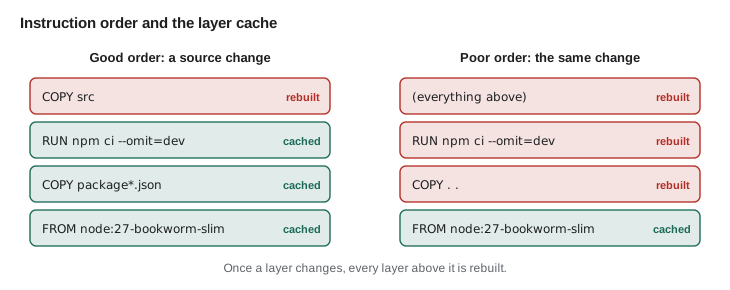
When Docker builds an image, it reuses a layer from an earlier build if the instruction is the same, the layer below it is the same and, for COPY, the copied files have the same contents. As soon as one layer has to be rebuilt, every layer above it is rebuilt too. The order of the instructions therefore decides how much work a small change causes.
// Model Docker's layer cache: each layer's key depends on its parent's key and its inputs.
function fnv1a(text) {
  let h = 0x811c9dc5;
  for (const ch of text) { h ^= ch.codePointAt(0); h = Math.imul(h, 0x01000193) >>> 0; }
  return h.toString(16).padStart(8, '0');
}
function keys(steps, files) {
  let parent = 'node:27-bookworm-slim';
  return steps.map((s) => {
    const inputs = (s.copies ?? []).map((f) => files[f]).join('|');
    parent = fnv1a(`${parent}\n${s.text}\n${inputs}`);
    return { text: s.text, key: parent };
  });
}
function rebuilt(steps, before, after) {
  const a = keys(steps, before), b = keys(steps, after);
  return b.filter((l, i) => l.key !== a[i].key).map((l) => l.text);
}

const good = [{ text: 'COPY package*.json', copies: ['package.json', 'package-lock.json'] }, { text: 'RUN npm ci' }, { text: 'COPY src', copies: ['src'] }];
const poor = [{ text: 'COPY .', copies: ['package.json', 'package-lock.json', 'src'] }, { text: 'RUN npm ci' }];
const v1 = { 'package.json': 'p1', 'package-lock.json': 'l1', src: 's1' };
const codeChange = { ...v1, src: 's2' };
const depChange = { ...v1, 'package-lock.json': 'l2' };

console.log('good order, code change:      ', rebuilt(good, v1, codeChange).join(', '));
console.log('good order, dependency change:', rebuilt(good, v1, depChange).join(', '));
console.log('poor order, code change: ', rebuilt(poor, v1, codeChange).join(', '));good order, code change: COPY src good order, dependency change: COPY package*.json, RUN npm ci, COPY src poor order, code change: COPY ., RUN npm ci
What this code does
Each layer's key is a hash of its parent's key, its instruction and the contents of any files it copies, so a change anywhere flows upward through the stack. In the good order, editing the source changes only the last key, while changing the lockfile rebuilds the installation and the copy above it. In the poor order, any source edit changes the first layer's key, so npm ci runs again on every build.
Building and running
Building, tagging and running the image are single commands. The studio tags each image with the service's version and with the short git commit it was built from, so that any running container can be traced to exact source. The output below is representative: this course was prepared without a Docker engine, but the commands and the shape of their output are those of current Docker releases.
docker build -t partner-orders:1.12.0 -t partner-orders:git-4e1d2c9 .
docker images partner-orders
docker run --rm -p 127.0.0.1:3100:3100 --env-file .env.local partner-orders:1.12.0[+] Building 41.6s (12/12) FINISHED
=> [deps 3/4] COPY package.json package-lock.json ./
=> [deps 4/4] RUN npm ci --omit=dev
=> [stage-1 4/6] COPY --from=deps /app/node_modules ./node_modules
=> [stage-1 6/6] COPY src ./src
=> exporting to image
=> => naming to docker.io/library/partner-orders:1.12.0
REPOSITORY TAG IMAGE ID SIZE
partner-orders 1.12.0 9c41e0d2b7a3 241MB
partner-orders git-4e1d2c9 9c41e0d2b7a3 241MB
{"level":"info","msg":"configuration ok","port":3100}
{"level":"info","msg":"listening","address":"0.0.0.0:3100"}What this code does
docker build reads the Dockerfile in the current folder and tags the result with both the version and the commit. docker images lists the local images with their sizes. docker run starts a container from the image, publishes its port only on the local address, passes settings from an environment file at run time, and removes the container when it stops.
Two details in the run command matter. Settings come from --env-file at run time, not from the Dockerfile, so the same image runs with staging's or production's configuration as lesson 3 requires; an ENV line in the Dockerfile with a secret in it would bake the secret into a layer. And -p 127.0.0.1:3100:3100 publishes the port only on the host's local address, matching the systemd setup from JS-230, where only Theo's web server on the same machine should reach the service.
// Compare image sizes: one stage with everything, or two stages.
const layers = {
  base: 74,           // node:27-bookworm-slim, in MB
  devDependencies: 168,
  npmCache: 39,
  prodDependencies: 61,
  source: 1,
};
const single = layers.base + layers.devDependencies + layers.prodDependencies + layers.npmCache + layers.source;
const multi = layers.base + layers.prodDependencies + layers.source;
console.log('single stage, npm install with dev tools:', single, 'MB');
console.log('two stages, npm ci --omit=dev only:      ', multi, 'MB');
console.log('saved:', single - multi, 'MB', `(${Math.round((1 - multi / single) * 100)} in 100)`);single stage, npm install with dev tools: 343 MB two stages, npm ci --omit=dev only: 136 MB saved: 207 MB (60 in 100)
What this code does
The sizes are typical figures for a service like this one rather than measurements. A single-stage image that installs everything keeps the test and build tools and npm's download cache in its layers. The multi-stage image carries only the base, the production dependencies and the source, which is less than half the size to store, pull and scan.
Choosing a base image
The base image is most of the final image and most of its security updates. The official node images come in variants: the default, based on full Debian with build tools; slim, based on a minimal Debian; and alpine, based on the smaller Alpine Linux, which uses a different C library that occasionally causes problems with native packages. Smaller still are distroless and hardened images, which contain only what is needed to run Node.js, without a shell or package manager. Since December 2025, Docker's catalogue of more than a thousand hardened images has been free and open source under the Apache 2.0 licence, built on Debian or Alpine, each with a software bill of materials and signed build provenance (lesson 8 explains both).
Whatever the base, it must be rebuilt regularly. An image is a snapshot: the libraries inside it receive no fixes until it is rebuilt from an updated base. The studio's pipeline rebuilds the partner service's image weekly even when the code has not changed, and scans it for known vulnerabilities, so that fixes in Debian and Node.js reach production.
Compose: the whole system on a laptop
The partner service needs a PostgreSQL database to run its tests. Docker Compose describes several containers that work together in one YAML file, so a single command starts the service and a database of the same major version as Theo's managed one, with the schema migrations applied. This is what would have saved Gareth's forty minutes.
# compose.yaml: the partner service and its database for development and CI
services:
  db:
    image: postgres:18-bookworm
    environment:
      POSTGRES_DB: foodhub
      POSTGRES_USER: partner_app
      POSTGRES_PASSWORD: local-only-password
    healthcheck:
      test: ["CMD-SHELL", "pg_isready -U partner_app -d foodhub"]
      interval: 2s
      retries: 15
    volumes:
      - dbdata:/var/lib/postgresql

  app:
    build: .
    env_file: .env.local
    environment:
      DATABASE_URL: postgres://partner_app:local-only-password@db:5432/foodhub
    ports:
      - "127.0.0.1:3100:3100"
    depends_on:
      db:
        condition: service_healthy

volumes:
  dbdata:
What this code does
Two services are defined: the database from the official PostgreSQL image, with a health check, and the app built from the Dockerfile in the same folder. depends_on with service_healthy makes Compose wait until PostgreSQL accepts connections before starting the app, which connects to it by the service name db. The password is a throwaway for local use only, because this database never holds real data.
With that file in the repository, setting up a new laptop or a CI job is docker compose up. The same file runs in the pipeline in lesson 7, where the tests run against the same PostgreSQL version as production, which is exactly what failed on Gareth's laptop.
Containers and shutdown
Container platforms stop containers the same way systemd stops services: they send SIGTERM, wait, and then send SIGKILL, which ends the process immediately. Docker's default wait is 10 seconds. The partner service's graceful shutdown from JS-230 stops accepting new connections and finishes requests in progress, so it must finish within that time, and its open server-sent events streams must be closed rather than waited for.
// Graceful shutdown inside the stop timeout (fake clock, milliseconds).
const STOP_TIMEOUT = 10000;
const inFlight = [{ id: 'POST /orders', endsAt: 1200 }, { id: 'GET /kitchen/days', endsAt: 300 }];
const streams = ['board stream (kitchen tablet)', 'partner page stream'];

function shutdown(signalAt) {
  const log = [`${signalAt} ms SIGTERM: stop accepting new connections`];
  for (const s of streams) log.push(`${signalAt} ms close ${s} (clients will reconnect)`);
  let last = signalAt;
  for (const r of inFlight) { const done = Math.max(r.endsAt, signalAt); last = Math.max(last, done); log.push(`${done} ms finished ${r.id}`); }
  log.push(last - signalAt <= STOP_TIMEOUT ? `${last} ms exit 0, within the ${STOP_TIMEOUT / 1000} s timeout` : `${signalAt + STOP_TIMEOUT} ms SIGKILL`);
  return log;
}
console.log(shutdown(100).join('\n'));100 ms SIGTERM: stop accepting new connections 100 ms close board stream (kitchen tablet) (clients will reconnect) 100 ms close partner page stream (clients will reconnect) 1200 ms finished POST /orders 300 ms finished GET /kitchen/days 1200 ms exit 0, within the 10 s timeout
What this code does
When the signal arrives the service stops taking new work and closes its long-lived streams straight away, since they never finish on their own. It then waits only for the requests already in progress, the longest of which ends 1.1 seconds later. Exiting well inside the 10-second timeout means the platform never needs SIGKILL, which would cut off requests halfway.
What the studio decided
Containers solve the studio's immediate problem, which is that the partner service and its database run differently on every machine. From this lesson, every laptop and the CI pipeline use the Compose file, and the pipeline builds the image on every change. Production stays as it is for now: the partner service runs under systemd on Theo's server from the artifact described in lesson 2, built inside the same image so its native dependencies match. Running the image itself in production is planned for 2029, once the team has a few months' experience with it, and lesson 7's pipeline is written so that either kind of artifact can be deployed.
Worked problem
How much does the cache save on each build?
Building the partner service image from scratch takes: pulling the base 12 s, npm ci 68 s, copying dependencies 6 s, copying the source 1 s and exporting 4 s. In a typical week Mira pushes 25 changes that touch only src and 1 that changes package-lock.json. With the good instruction order, a source-only change reuses everything up to the source copy. How long does the week's building take with the good order and with the poor order, where every change reruns npm ci?
Show solution
- Full build: 12 + 68 + 6 + 1 + 4 = 91 s.
- Good order, source change: copy source 1 s + export 4 s = 5 s; 25 × 5 = 125 s.
- Good order, dependency change: npm ci 68 + copy 6 + 1 + 4 = 79 s (base cached).
- Good order total: 125 + 79 = 204 s.
- Poor order: every change reruns npm ci and what follows, 79 s; 26 × 79 = 2,054 s.
Answer: About 3.4 minutes a week with the good order against about 34 minutes with the poor one, and each pipeline run finishes in seconds rather than more than a minute.
Common mistakes
MistakeUsing node or node:latest as the base image.
InsteadName the Node.js major version and the distribution, and pin by digest for full reproducibility.
MistakeCopying the whole folder before running npm ci.
InsteadCopy the package files first, install, then copy the source, so code changes reuse the installation.
MistakePutting secrets in ENV lines or copying .env into the image.
InsteadPass configuration at run time and list .env files in .dockerignore.
MistakeRunning the service as root.
InsteadSwitch to an unprivileged user such as node.
MistakeWriting CMD as a plain string.
InsteadUse the JSON array form so the process receives SIGTERM directly.
Summary and key terms
- A container image packages a program with its runtime, libraries and dependencies, and a container is an isolated process running from it, so the same image behaves the same everywhere.
- Images are built from a Dockerfile in layers, stored in registries and identified by tags and immutable digests.
- The partner service's Dockerfile uses a specific Node.js 27 base, a multi-stage build, package files before source for good caching, a non-root user, an exec-form command and a health check script; .dockerignore keeps local files and secrets out.
- Configuration is passed at run time.
- Base images must be rebuilt regularly to pick up fixes, and slim, distroless or hardened images reduce what is included.
- Docker Compose runs the service with a matching PostgreSQL for development and CI, and shutdown must finish within the stop timeout.
- Container image
- A package of a program and its user-space environment, built in layers.
- Container
- A running, isolated instance of an image.
- Dockerfile
- The instructions for building an image from a base image.
- Layer
- The set of file changes made by one Dockerfile instruction; reused by the build cache when unchanged.
- Multi-stage build
- A Dockerfile with several stages, copying only what is needed into the final image.
- Registry
- A service that stores and serves container images, such as Docker Hub.
- Digest
- The SHA-256 hash that identifies an image's exact contents.
- Docker Compose
- A tool that runs several related containers from one YAML file.
Practice problems
Work each problem on paper first, then reveal the answer to check.
Why does the Dockerfile copy package.json and package-lock.json before the source?
Show answer
So that changing the code does not invalidate the npm ci layer, which is reused from the cache.
What is wrong with putting the board token secret in an ENV line?
Show answer
It would be stored in a layer of the image, visible to anyone who can pull it.
Why does the health check run a Node.js script instead of curl?
Show answer
The slim base image does not include curl, and Node.js is already there.
Why must the service's shutdown finish within about 10 seconds in a container?
Show answer
Docker sends SIGKILL after its default stop timeout of 10 seconds.
Try it yourself
Which layers rebuild?
A Dockerfile's steps are given in order, each with the list of files it copies. Complete rebuilt(steps, changed) so that it returns the names of the steps that must be rebuilt when the files in changed have changed.
A step is rebuilt if it copies a changed file, and once one step is rebuilt, every later step is rebuilt too.
function rebuilt(steps, changed) {
  return [];
}

const steps = [
  { name: 'COPY package*.json', copies: ['package.json', 'package-lock.json'] },
  { name: 'RUN npm ci', copies: [] },
  { name: 'COPY src', copies: ['src'] },
  { name: 'COPY public', copies: ['public'] },
];
console.log(rebuilt(steps, ['src']).join(', '));
console.log(rebuilt(steps, ['package-lock.json']).join(', '));
console.log(rebuilt(steps, ['README.md']).length);
Try it yourself
Read an image reference
Complete parseRef(ref) so that it returns { name, tag, digest } for references such as node:27-bookworm-slim or partner-orders@sha256:9c41.... A missing tag means latest, and a missing digest is null.
Then risky(ref) should return true if the reference has no digest and its tag is latest.
function parseRef(ref) {
  return { name: ref, tag: 'latest', digest: null };
}
function risky(ref) {
  return false;
}

for (const r of ['node:27-bookworm-slim', 'node', 'postgres:18-bookworm@sha256:4b1f9a', 'ghcr.io/brightwater/partner-orders@sha256:9c41e0']) {
  const p = parseRef(r);
  console.log(p.name, p.tag, p.digest, risky(r) ? 'risky' : 'ok');
}
Lesson quiz · 5 questions
Score 60% or more to complete this lesson.
Create a free account to save your progress, take quizzes and earn a certificate.