
FAT-210 · Lesson 8 of 12 · 20 min
Programming the control unit
Ravi Menon keeps a rule taped above his desk at Bramwell: 'The wiring is the easy part.' Sasha finds out why on her first programming job, adding twenty devices to the Tamarind House panel for a second fit-out. The wiring takes a day. The programming takes a day too, and checking the programming takes a third. 'Every address you add needs a type, a label, a zone, its outputs and any special options,' Ravi says. 'Get one wrong and nothing looks wrong until the day the building needs it.' This lesson covers how a site program is organized, what each part of it does, how logic links inputs to outputs, and how program changes are controlled, backed up and protected.
What a site program contains
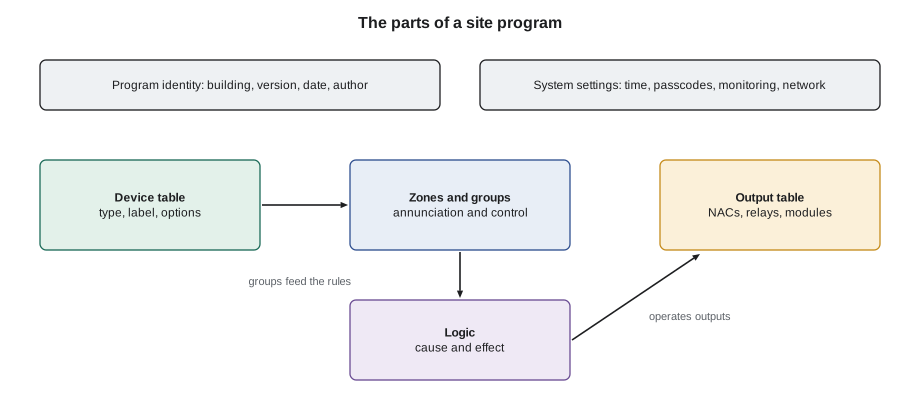
Every addressable panel stores a site program, also called the database or configuration, that turns a box of identical-looking hardware into the fire alarm system for one building. The program has several parts, and every manufacturer organizes them in much the same way. The device table lists every address with its type, label and options. The zone or group table collects devices into the areas used for annunciation and control. The output table lists every notification circuit, relay and control module with its function. The logic, sometimes called cause and effect or control-by-event, says which outputs operate for which inputs. System settings cover times, passcodes, network addresses, monitoring and display behaviour. And the program carries an identity: the building, the date, the version and who wrote it.
Device types, labels and options
The device type tells the panel how to treat each input. For a detector, the type sets the alarm threshold, the pre-alarm level and whether alarm verification can be applied. For a module, the type sets the kind of signal its contacts produce: alarm, waterflow, supervisory, trouble or a non-fire status. Waterflow inputs are usually a distinct type so the panel can show them separately and apply the right silence behaviour; supervisory types may be latching or non-latching. The type must match the device that is physically installed: a panel that expects a heat detector at an address and finds a smoke detector reports a type mismatch trouble.
The label is what responders read, so it is written for them. A good label names the floor, the area and the device in a consistent order, uses room numbers and names that match the signs on the doors, and fits the panel's display width without being cut off. Labels like 'DET 14' or 'NEW DEVICE' tell a firefighter nothing. Bramwell's style puts the floor first, then the area, then the device: 'FL4 ELEV LOBBY SMOKE' or 'FL3 RM 312 HEAT'. The same style is used on every panel the company programs, so its technicians and the local fire department can read any of them at a glance.
# Label check: length, required floor prefix and banned placeholder text
MAX_LEN = 32
BANNED = ("NEW DEVICE", "SPARE", "TBD", "DET ")
labels = {
    "1-001": "FL1 MAIN LOBBY SMOKE",
    "1-047": "FL4 ELEV LOBBY SMOKE",
    "1-048": "NEW DEVICE",
    "1-049": "FL4 OPEN OFFICE NORTH WALL BY PRINTER SMOKE",
    "2-031": "FL4 WATERFLOW",
    "2-032": "DET 32",
}
for addr, text in labels.items():
    issues = []
    if len(text) > MAX_LEN:
        issues.append(f"{len(text)} characters, display shows {MAX_LEN}")
    if not text.startswith("FL"):
        issues.append("no floor prefix")
    if any(text.startswith(b) or text == b.strip() for b in BANNED):
        issues.append("placeholder text")
print(f"{addr} {text:45s} {'; '.join(issues) if issues else 'OK'}")1-001 FL1 MAIN LOBBY SMOKE OK 1-047 FL4 ELEV LOBBY SMOKE OK 1-048 NEW DEVICE no floor prefix; placeholder text 1-049 FL4 OPEN OFFICE NORTH WALL BY PRINTER SMOKE 43 characters, display shows 32 2-031 FL4 WATERFLOW OK 2-032 DET 32 no floor prefix; placeholder text
Three labels fail: one is a placeholder, one is too long for the display and would be cut off mid-word, and one tells responders nothing about where the device is. Fixing labels is quick at the keypad or in the programming software, and it is one of the most useful things a technician can do on any service call.
Options fine-tune individual devices. A smoke detector may have alarm verification enabled, a day and night sensitivity schedule, or a pre-alarm that alerts staff before a full alarm. A heat detector in a kitchen may have a higher fixed-temperature setting where the device allows it. Duct detectors may be set to report as supervisory if the mechanical code and the authority allow, and to operate only their fan's shutdown. Every option changes how the system responds, so options are recorded in the sequence of operations and the device table, not just set at the keypad.
Zones, groups and outputs
Addressable panels report by device, but responders and control functions still think in areas. The program groups devices into zones for annunciation, such as 'Floor 4', and often into other groups for control, such as 'devices served by AHU-2' or 'lobby smoke detectors for elevator recall'. A device can belong to several groups. Outputs are defined in the same way: each notification circuit, relay and control module has a function and a label, such as 'NAC 4, floor 4 horn-strobes' or 'RLY 2-060, AHU-2 shutdown'. The logic then links groups of inputs to groups of outputs, which keeps the program readable even in a building with thousands of devices.
Good grouping follows the building's physical systems. When Tamarind House's fourth-floor fit-out changed which air handler served the fourth floor, the devices in the 'AHU-2' group had to change too. Because the program used groups rather than listing every detector in each fan shutdown rule, the change was one edit to the group, not forty edits to individual rules.
Logic: linking inputs to outputs
Panel logic is a set of rules of the form 'when this happens, do that'. The simplest rule says that any alarm operates all notification circuits. More specific rules handle control functions: any smoke detector in the AHU-2 group shuts down AHU-2; the main lobby smoke detector recalls the elevators to the alternate floor; any other lobby detector recalls them to the main floor. Rules can combine inputs with AND and OR, count how many devices are active, add timers, and respond to the type of signal. Most panels show the logic as a list of equations or a grid, and their programming software checks the syntax before the program is downloaded.
# A small rule engine: which outputs operate for the active inputs (illustrative program)
groups = {
    "ALL_ALARM": {"1-001", "1-047", "1-050", "2-031"},
    "AHU2": {"1-047", "1-050"},
    "LOBBY_MAIN": {"1-001"},
    "LOBBY_OTHER": {"1-047"},
}
rules = [
    ("any", "ALL_ALARM", "NAC 1-6 evacuation signal"),
    ("any", "AHU2", "RLY 2-060 AHU-2 shutdown"),
    ("any", "LOBBY_MAIN", "Elevator recall to alternate floor"),
    ("any", "LOBBY_OTHER", "Elevator recall to main floor"),
    ("count2", "ALL_ALARM", "Second alarm message to monitoring"),
]
def evaluate(active):
    out = []
    for kind, group, output in rules:
        hits = len(groups[group] & active)
        if (kind == "any" and hits >= 1) or (kind == "count2" and hits >= 2):
            out.append(output)
    return out
for active in ({"1-047"}, {"1-001"}, {"1-047", "1-050"}):
    print(sorted(active), "->")
    for o in evaluate(active):
print(" ", o)['1-047'] ->
NAC 1-6 evacuation signal
RLY 2-060 AHU-2 shutdown
Elevator recall to main floor
['1-001'] ->
NAC 1-6 evacuation signal
Elevator recall to alternate floor
['1-047', '1-050'] ->
NAC 1-6 evacuation signal
RLY 2-060 AHU-2 shutdown
Elevator recall to main floor
Second alarm message to monitoringRunning the rules for three cases shows what the program does: a fourth-floor lobby alarm recalls the elevators to the main floor and shuts down AHU-2; a main lobby alarm sends them to the alternate floor; and two alarms on the fourth floor add the second-alarm message. Writing out cases like this, before going to site, is how experienced programmers find gaps in their logic.
Special functions
Panels include functions that aren't part of the normal alarm response but are used every week. Walk test lets one technician test devices alone: the panel records each activation, briefly pulses the notification appliances or keeps them silent, and doesn't call the monitoring station. Drill sounds the evacuation signal for a fire drill without an alarm input. Disable takes a device, zone or output out of service. Day and night modes change detector sensitivity or staging with a schedule. Each of these is programmed with access levels, and each is a way the system can be left in an unsafe state, so the panel shows a trouble or status indication whenever any of them is active.
CAN/ULC-S536, the inspection and testing standard, and the fire code expect that devices disabled for maintenance are recorded and restored, and that the monitoring centre is told before a test so it doesn't dispatch the fire department. Most service companies, including Bramwell, run a sign-off checklist at the end of every visit that confirms no device, zone or output is left disabled and the panel shows normal.
Change control, backups and security
Every program change starts with a copy of the program that is actually in the panel, uploaded from the panel on site, not the copy in the office that may be out of date. The technician makes the changes, compares the new program with the old one so every difference is deliberate, downloads it, and tests every device and output the change affected. Many panels need to be taken out of normal operation during a download, so the monitoring station and the building are told first, and the fire watch rules apply if the system will be out of service for long. Afterwards the new program, with a version number and date, is saved in the building's records and in Bramwell's archive.
# Compare the uploaded program with the new one so every change is deliberate
old = {"1-047": ("smoke", "FL4 ELEV LOBBY SMOKE", "AHU1"),
       "1-050": ("smoke", "FL4 OPEN OFFICE N SMOKE", "AHU1"),
       "2-031": ("waterflow", "FL4 WATERFLOW", "-")}
new = {"1-047": ("smoke", "FL4 ELEV LOBBY SMOKE", "AHU2"),
       "1-050": ("smoke", "FL4 OPEN OFFICE N SMOKE", "AHU2"),
       "1-051": ("smoke", "FL4 MEETING RM 410 SMOKE", "AHU2"),
       "2-031": ("supervisory", "FL4 WATERFLOW", "-")}
for addr in sorted(set(old) | set(new)):
    a, b = old.get(addr), new.get(addr)
    if a == b:
        continue
    if a is None:
        print(f"ADDED    {addr}: {b}")
    elif b is None:
        print(f"REMOVED  {addr}: {a}")
    else:
        for name, x, y in zip(("type", "label", "group"), a, b):
            if x != y:
print(f"CHANGED {addr} {name}: {x} -> {y}")CHANGED 1-047 group: AHU1 -> AHU2
CHANGED 1-050 group: AHU1 -> AHU2
ADDED 1-051: ('smoke', 'FL4 MEETING RM 410 SMOKE', 'AHU2')
CHANGED 2-031 type: waterflow -> supervisoryThe comparison shows the intended changes, the new meeting room detector and the move of two detectors to the AHU-2 group, and one change nobody intended: the fourth-floor waterflow module's type has been changed from waterflow to supervisory, probably by a slip in the software. Downloaded as is, it would have silenced the fourth floor's sprinkler alarm. Catching that kind of error is the whole point of the comparison.
Panels are now networked computers, and their programs and passcodes need protecting like any other critical system. Programming software is kept on controlled laptops, default passcodes are changed, remote access is limited to what the owner has approved, and unused network ports on the panel are disabled. Panel manufacturers now publish security guidance for their products, and many owners include the fire alarm panel in their IT security policies, with the same rules for passwords, remote access and software updates as any other building system.
Worked problem
A program that tested perfectly and was still wrong
After the second fit-out, Sasha tests the twenty new devices: each one alarms at the panel with the right label. A week later, a detector in the new meeting room operates during a real smoke event from a toaster and AHU-2 keeps running, pushing smoke onto the floor. What went wrong?
Show solution
- Testing that each device reports with the right label proves the inputs, not the outputs they should operate.
- The new detector was added to the zone for annunciation but not to the AHU-2 group used by the shutdown rule.
- The program comparison would have shown the new device without the group, if it had been read carefully.
- The test plan should have operated each new device and confirmed every output in the sequence, including the fan shutdown.
Answer: Sasha adds the device to the AHU-2 group, downloads the corrected program, and retests every new device with the fan running and someone watching it stop. Bramwell adds a column to its test sheet for each output a device must operate.
Common mistakes
MistakeEditing the office copy of the program instead of the one in the panel.
InsteadUpload the current program from the panel first.
MistakeWriting labels that responders can't use.
InsteadName the floor, area and device in a consistent style.
MistakeTesting new devices only for their alarm at the panel.
InsteadConfirm every output each device must operate.
MistakeDownloading without comparing old and new programs.
InsteadReview every difference before downloading.
MistakeLeaving default passcodes and open network ports.
InsteadSecure the panel as a critical system.
Summary and key terms
- The site program holds devices, groups, outputs, logic, settings and its own identity.
- Device types set how each input is treated and must match the installed device.
- Labels are written for responders, in a consistent style that fits the display.
- Groups keep logic readable and make building changes easy to program.
- Special functions such as walk test, drill and disable are protected and always visible on the panel.
- Every change starts from the panel's own program, is compared, tested, versioned and secured.
- Site program
- The database that defines one building’s fire alarm system in the panel.
- Device type
- The program setting that tells the panel how to treat an address.
- Group
- A set of devices or outputs used together in the logic.
- Control-by-event
- Programming that operates outputs in response to defined inputs.
- Walk test
- A test mode that records device activations without a full alarm response.
- Program comparison
- Checking the differences between the old and new programs before download.
Practice problems
Work each problem on paper first, then reveal the answer to check.
Why should a technician upload the program from the panel before editing?
Show answer
The office copy may not match what is actually in the panel.
A label reads 'NEW DEVICE'. What should it say?
Show answer
The floor, area and device type, in the site style.
Why use groups in logic rules?
Show answer
So a building change is one edit to the group instead of many rule edits.
What must the panel show while a device is disabled?
Show answer
A trouble or status indication until it is restored.
Lesson quiz · 5 questions
Score 60% or more to complete this lesson.
Create a free account to save your progress, take quizzes and earn a certificate.