
FAT-210 · Lesson 1 of 12 · 20 min
The fire alarm control unit
Sasha Vukovic starts her second year at Bramwell Fire Protection in front of a training panel bolted to the shop wall. It is a full-size addressable control unit with its door open, two loops of devices wired across a sheet of plywood, a row of horn-strobes along the top and a little annunciator mounted beside it. Gerry Tremaine taps the cabinet. 'Last year you learned what every device does. This year you learn what the panel does with them,' he says. 'Every signal in the building ends up here, and every horn, door holder and fan shutdown starts here. If you can read a panel, program it and prove it works, you can run a fire alarm job.' This course follows the control unit from the inside out: its parts, the circuits it supervises, the programming that links inputs to outputs, the displays that tell people what is happening, and how panels work together in large buildings. It ends with Sasha programming and testing the replacement panel at Tamarind House.
What a control unit does
The fire alarm control unit is the brain of the system. CAN/ULC-S527, the Canadian standard for control units, and CAN/ULC-S524, the installation standard, both treat it as the equipment that receives signals from initiating devices, processes them, and operates the outputs the building needs. It does four jobs all the time. It monitors every initiating circuit or addressable device for alarm, supervisory and trouble conditions. It supervises its own wiring, power supplies and internal parts, so that a fault shows up as a trouble before it hides a fire. It operates notification appliances and control functions when a signal arrives. And it displays and records what happened, so that people on site, the fire department and the signal receiving centre know what is going on.
A control unit is listed as a complete product. The cabinet, the circuit boards, the power supply, the battery charger, the display and the modules that plug into it were tested together, and the installation manual says which devices, modules and wiring arrangements are compatible. Swapping a board from another model, or adding a module the manual doesn't list, voids that listing. Gerry's first rule for the year is simple: the panel's installation manual and its compatibility list sit on the job with the drawings, and nothing gets connected that isn't in them.
The parts inside the cabinet
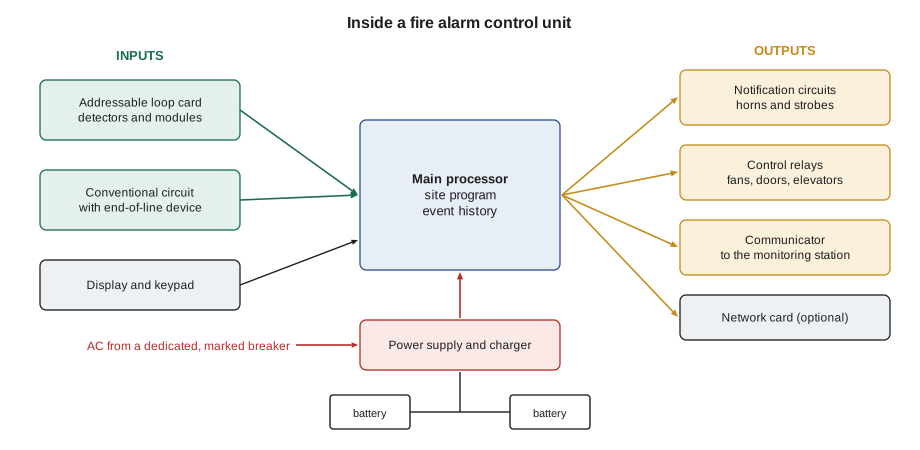
Open any modern panel and the same parts appear, even if the layout differs between makers. The main board, or central processor, runs the operating software and the site-specific program. The power supply converts the building's AC supply to the DC voltage the system uses, usually nominal 24 V, and charges the standby batteries in the bottom of the cabinet. Circuit boards or modules provide the field connections: initiating circuits for conventional devices, loop cards for addressable devices, notification appliance circuits for horns and strobes, and relays for control functions such as fan shutdown or door release. A display and keypad give the operator control. A communicator or interface sends signals off site. Many panels also have a network card that links them to other panels, and a printer or event history in memory.
| Part | What it does | What a technician checks |
|---|---|---|
| Main board (processor) | Runs the software and the site program | Software version, program date, event history |
| Power supply and charger | Converts AC to 24 V DC; charges batteries | AC input, DC output, charger voltage, current draw |
| Standby batteries | Run the system when AC fails | Date code, voltage under load, terminals |
| Loop or initiating cards | Connect addressable loops or conventional zones | Loop current, device count, faults |
| Notification circuits | Power horns, strobes and speakers | Circuit load, end-of-line or class, synchronization |
| Relays and control outputs | Operate fans, doors, elevators and releasing | Contact ratings, supervision, labels |
| Display and keypad | Show events and accept commands | Access levels, time and date, LED test |
| Communicator or network card | Report off site or link panels | Path supervision, account number, network status |
Three kinds of signal
Everything the panel reports falls into one of three kinds of signal, and the panel treats each one differently. An alarm signal means a fire may be present: a detector, a pull station or a waterflow switch has operated. Alarm signals start the building's fire response. A supervisory signal means something that protects the building is off-normal: a sprinkler valve is partly closed, a dry-pipe system has lost air pressure, or a fire pump is running. Supervisory signals call for attention but don't evacuate the building. A trouble signal means the fire alarm system itself has a problem: an open wire, a missing device, a ground fault, a failed battery or a lost communication path. Trouble signals warn that part of the system may not work when it is needed.
Each kind of signal has its own indication on the panel, usually a red alarm LED, a yellow or amber supervisory LED and a yellow trouble LED, and its own sound from the panel buzzer. The panel also latches alarm and supervisory signals: once received, they stay displayed until the condition is cleared and someone resets the system, even if the device returns to normal. Trouble signals normally restore by themselves when the fault is fixed. CAN/ULC-S527 sets these behaviours for listed control units, so a technician who knows one listed panel can read any other.
When several signals arrive together, the panel puts them in order of importance. Alarms come first, then supervisory signals, then troubles, and the display shows the highest-priority event at the top with a count of the others. In a real fire, a panel may show dozens of alarms within minutes as smoke spreads, and the first alarm is usually the most useful one, because it shows where the fire started. Most panels keep the first alarm on the display, or mark it clearly, for that reason. Gerry tells Sasha to read a panel from the top down: what kind of event, how many of each, and which came first.
# How a panel orders the events it is holding (illustrative)
PRIORITY = {"alarm": 1, "supervisory": 2, "trouble": 3}
events = [
    ("10:02:14", "trouble", "2-047 input module, floor 5 tamper, open"),
    ("10:03:40", "alarm", "1-012 smoke, floor 2 east corridor"),
    ("10:03:58", "alarm", "1-015 smoke, floor 2 elevator lobby"),
    ("10:04:05", "supervisory", "2-031 valve tamper, floor 2"),
    ("10:04:30", "alarm", "1-021 pull station, floor 2 east stair"),
]
ordered = sorted(events, key=lambda e: (PRIORITY[e[1]], e[0]))
counts = {k: sum(1 for e in events if e[1] == k) for k in PRIORITY}
print("Alarms:", counts["alarm"], " Supervisory:", counts["supervisory"], " Troubles:", counts["trouble"])
print("First alarm:", next(e for e in ordered if e[1] == "alarm")[2])
print()
for t, kind, text in ordered:
print(f"{t} {kind.upper():12s} {text}")Alarms: 3 Supervisory: 1 Troubles: 1 First alarm: 1-012 smoke, floor 2 east corridor 10:03:40 ALARM 1-012 smoke, floor 2 east corridor 10:03:58 ALARM 1-015 smoke, floor 2 elevator lobby 10:04:30 ALARM 1-021 pull station, floor 2 east stair 10:04:05 SUPERVISORY 2-031 valve tamper, floor 2 10:02:14 TROUBLE 2-047 input module, floor 5 tamper, open
The output shows the order an operator sees: the first alarm on floor 2 at the top, the later alarms under it, then the supervisory signal and finally the trouble that came in before the fire. The trouble is old news, but it still matters: a tamper switch input that has gone open on floor 5 means the panel can't report that valve, and someone has to fix it once the fire is over.
Operator controls and access levels
The keypad on a panel looks simple, but each key is protected by an access level, because the wrong press at the wrong time can put a building at risk. The lowest level, available to anyone who opens the door or uses a key, usually allows only acknowledging a signal and silencing the panel's own buzzer. The next level, for trained building staff or firefighters, adds silencing the notification appliances and resetting the system. Higher levels, protected by a passcode, allow disabling devices, changing times and dates, and running walk tests. The highest level, for the service company, allows changing the site program itself.
Each control does something specific. Acknowledge tells the panel that a person has seen the event; it stops the panel buzzer for that event but changes nothing in the building. Signal silence turns off the audible notification appliances, and on many systems the strobes too, after the building has been evacuated or the cause found; it does not reset devices or stop control functions. Reset clears latched signals and restores devices to normal, but if the condition is still present, such as smoke still in a detector chamber, the alarm comes straight back. Disable takes a device or circuit out of service so it can't report; it is used during maintenance and must always be recorded and reversed.
Saskatoon Fire Department crews use the panel's silence and reset controls at the end of an incident, and building staff at Tamarind House are trained only to acknowledge and call. CAN/ULC-S524 requires the control and display functions to be in a place acceptable to the authority, and the panel's door lock and passcodes are how the building limits who can use the higher controls. A panel left with the default passcode, or with the code written on the door, defeats the access levels entirely.
Power for the panel
A fire alarm panel needs two independent sources of power: a primary supply from the building's electrical system, and a secondary supply, usually batteries in the cabinet or a nearby enclosure, that takes over automatically if the primary fails. The primary supply comes from a dedicated branch circuit, with a breaker that is marked as the fire alarm circuit and locked or guarded so nobody switches it off by mistake. FAT-130 covers the electrical theory, battery sizing and voltage drop calculations in detail. What matters for this course is that the panel supervises both supplies: losing AC power, a low battery, a disconnected battery or a failed charger all produce trouble signals, and the panel keeps working on batteries for the standby time and alarm time the code requires.
Listings, compatibility and software
Modern panels are computers, and their behaviour depends on software as much as wiring. The operating software, often called firmware, comes from the manufacturer and is part of the listing; a firmware upgrade is a change to the listed product and is done only with the versions the manufacturer has listed. The site program, sometimes called the configuration or database, is written for each building by the installer or service company. It says what each address is, what each device does, which outputs operate for which inputs, and what each event looks like on the display. A panel can be perfectly wired and still dangerous if the site program is wrong.
For that reason every program change is controlled. The technician saves a copy of the existing program before changing it, records what was changed and why, tests every input and output the change affects, and leaves a dated copy of the new program with the building's records. Many panels log each program download with the date, the technician's login and a checksum. Lesson 8 covers programming in detail and lesson 12 follows a complete program from blank database to acceptance test.
Worked problem
Reading the panel on a service call
Sasha arrives at Willowbank School on a service call. The panel shows: 'TROUBLE 2', 'SUPERVISORY 0', 'ALARM 0'. The two troubles are 'AC POWER FAIL' and 'BATTERY LOW'. The school's custodian says the power went out briefly during a storm an hour ago. What is going on, and what should Sasha do first?
Show solution
- There are no alarms or supervisory signals, so nothing suggests a fire or a closed valve.
- AC power fail means the panel isn't getting its primary supply, so it is running on batteries now.
- Battery low is the result: the batteries have been carrying the load and their voltage is dropping.
- The building's power is back, so the panel's own breaker, fuse or transformer is the likely problem.
Answer: Sasha checks the fire alarm breaker in the electrical room and finds it tripped. She resets it, confirms the panel shows AC restored and the charger working, and records that the batteries need to be load tested on the next visit, because a deep discharge can shorten their life.
Common mistakes
MistakePressing reset before reading the display.
InsteadRead every event and note the first alarm before resetting anything.
MistakeTreating signal silence as if it stops the fire response.
InsteadSilence turns off audible appliances only; control functions and latched signals stay.
MistakeInstalling a module or firmware version the panel isn't listed for.
InsteadUse only the parts and versions in the panel's compatibility documents.
MistakeLeaving devices disabled after maintenance.
InsteadRecord every disable and restore it before leaving the site.
MistakeLeaving the default passcode in the panel.
InsteadSet site passcodes and give them only to the people who need them.
Summary and key terms
- The control unit monitors devices, supervises its own wiring and power, operates outputs, and displays and records events.
- CAN/ULC-S527 covers control units; CAN/ULC-S524 covers how they are installed.
- Signals are alarm, supervisory or trouble, and the panel shows them in that order of priority.
- Alarm and supervisory signals latch until reset; troubles usually restore when the fault clears.
- Acknowledge, silence, reset and disable each do something different and are protected by access levels.
- The panel's software and site program are part of the system and every change is controlled.
- Fire alarm control unit
- The equipment that receives signals, operates outputs and displays system status.
- Supervisory signal
- A signal that a fire protection feature, such as a sprinkler valve, is off-normal.
- Trouble signal
- A signal that the fire alarm system has a fault, such as an open circuit or power failure.
- Latching
- Holding a signal on the display until the condition clears and the system is reset.
- Signal silence
- A control that turns off audible notification while leaving other functions in place.
- Site program
- The building-specific database that defines what each device and output does.
Practice problems
Work each problem on paper first, then reveal the answer to check.
A panel shows three alarms, one supervisory and two troubles. Which event should be at the top of the display?
Show answer
The first alarm received.
What does pressing acknowledge do?
Show answer
It tells the panel a person has seen the event and stops the panel buzzer for it; nothing in the building changes.
A detector still has smoke in it when the panel is reset. What happens?
Show answer
The alarm comes straight back.
Why must a firmware upgrade use a listed version?
Show answer
The firmware is part of the listed product; an unlisted version voids the listing.
Lesson quiz · 5 questions
Score 60% or more to complete this lesson.
Create a free account to save your progress, take quizzes and earn a certificate.