
BAS-430 · Lesson 8 of 12 · 20 min
Vendor and contractor access
▶ Video coming soon A video version of this lesson is on the way.
Declan took the vendor session, because most of it was about contracts. He started by putting two lists side by side. The first was every outside company that had touched Ninefield's building systems in 2026: Tarrant Chiller Service for the chillers, Signalpoint Fire Systems for the fire alarm, Ironmark Security for card access, Lumacor Controls for the lighting, the drive supplier, the fault detection vendor whose quote was in his folder, the building's IT provider, and, for the fourth-floor fit-out, Brackley Interiors and its electrical subcontractor Kelso Electric. The second list was every company that had touched Harcastle's. The two lists had one name in common at the top.
"Us," Declan said. "To Ilona and to Gus, Quillon is a vendor. Everything in this session applies to us first."
Why vendor access is a risk
Lesson 1 told the Target story: credentials issued to an HVAC contractor for billing and project management became the way into a national retailer's payment systems. The contractor was not careless by the standards of the time, and the credentials were not meant to reach anything important. The harm came from three gaps that are common in buildings today: the vendor's own computer was not well protected, the credentials were enough on their own to log in, and nothing stopped them from reaching further than their purpose required.
Vendors and contractors need access to do their jobs, and buildings depend on them. The risk comes from how that access is given and kept.
- Many vendors, each with their own staff, laptops and practices, most of which the owner never sees.
- Access that is set up for a project and never removed: Harcastle's November 2 review found three balancing-firm accounts left from 2024.
- Remote access tools or cellular modems installed by vendors for their own convenience, sometimes without the owner's knowledge.
- Shared vendor logins used by whoever is on call at the vendor that week.
- Laptops and USB drives that move from site to site, carrying whatever they picked up at the last one.
- A vendor's own breach, which can expose every customer it can reach.
Principles for vendor access
Quillon's rules for vendor access are the same as its rules for its own staff, with two additions: access is off by default, and the owner approves each use.
- Named accounts. Each vendor technician has a personal account. A vendor that sends a different person every quarter gets a different account for each, or an account that the vendor's own administrator must request for a named person each time.
- Least privilege. A chiller technician reaches the chillers and the plant graphics, not the tenant floors or the access control interface. A balancing technician gets a commissioning page for the boxes, as Brenna Fairweather did at Marlow Lane (BAS-410), not an engineering role.
- Off by default. Accounts are disabled between visits and switched on for a session, with an expiry time, after the owner approves the request.
- MFA on every vendor login, especially remote ones.
- Through the site's own path. Remote vendor sessions come through the site's VPN and jump host or the owner's gateway, never through a tool the vendor installed.
- Logged and reviewed. The start, end and actions of each session are recorded, and someone checks them.
- Removed when the work ends. At the end of a project or contract, the vendor's accounts, credentials, certificates and remote paths are removed, and shared credentials the vendor knew are changed.
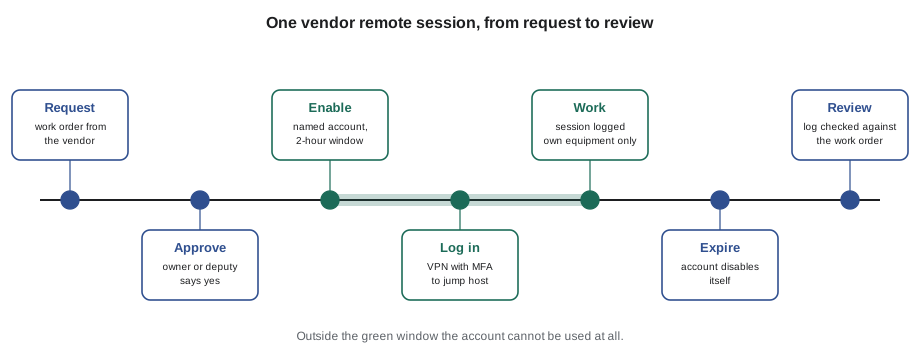
Harcastle's gateway already works this way: a facilities staff member must approve each contractor session before it opens. Ninefield's does not yet, and the vendor list Declan had drawn up showed why it mattered. Tarrant had asked in October for remote access to the chiller cards so that Owen Kessock could check alarms and trends each quarter without driving across town.
Worked problem
How much does session-based access reduce exposure?
Tarrant asks for remote access to Ninefield's chiller cards. Option A is an account that is always enabled. Option B enables Owen's personal account only for approved sessions: four quarterly checks of 2 hours each, plus an allowance of 8 hours a year for alarm calls. For how many hours a year is the account usable under each option, and what fraction of the year is option B?
Show solution
- Option A: 24 × 365 = 8,760 hours a year.
- Option B: 4 × 2 + 8 = 16 hours a year.
- Fraction: 16 ÷ 8,760 ≈ 0.0018, or about 2 in 1,000 of the year.
Answer: Option B leaves the account usable for 16 hours a year instead of 8,760. If Owen's password were stolen, it would almost always be useless, and with MFA as well it would be useless even during a session.
Declan's proposal to Ilona, going with the December retro-commissioning proposal, is option B. Owen's sessions come through Ninefield's VPN, with MFA once it is switched on, to the jump host that lesson 3 proposed, with access limited to the plant controller and the two chiller cards. Quillon's service desk enables the account when Ilona or her deputy approves a request, and it disables itself after the agreed window.
Vendor cloud services and remote tools
More and more vendors offer remote service through their own cloud platforms: a small gateway in the building connects outward to the vendor, and the vendor's technicians log into the platform. Lesson 3 covered the technical side. The contractual side matters as much.
- Who holds the administrator account for the site on the platform? It should be the owner, or the owner's appointed contractor, not the vendor.
- Can the owner see who has access and when they use it? The platform should give the owner a list of users and a session log.
- Can the owner switch it off? There should be a simple way to disable the gateway's connection, and a documented way to remove it.
- What does the vendor promise about its own security? The contract should cover MFA for the vendor's staff, how quickly the vendor fixes vulnerabilities in the platform, and how quickly it tells the owner of a breach.
Remote control programs installed directly on a front-end workstation or server by a vendor, so that a technician can take over the screen from home, are the pattern behind the Oldsmar advisories. Quillon removes any it finds after agreeing with the owner, replaces them with the site's approved path, and treats an unexplained one as a possible incident until it is explained.
Contractors on site
Not all vendor access is remote. Contractors on site plug laptops into network switches and controllers, carry USB drives and open panels. The June 13 alert at Tilden in lesson 7 came from exactly this, as lesson 10 explains. Quillon's site rules, which it asks clients to apply to every contractor, including Quillon itself, are short.
- Laptops that connect to the controls network are company-managed, kept up to date, protected by security software and used for controls work only.
- Contractors connect only at points the owner or the controls contractor provides for the purpose, not at whichever switch port is nearest.
- USB drives are avoided where a file can be transferred another way; where they are needed, they are scanned before use and used only for the job.
- Mechanical rooms, network closets and panels are locked, and keys or cards are issued to named people and logged.
- Temporary accounts for commissioning, balancing or testing have an end date and are removed at the end of the work. Brenna's account at Marlow Lane was removed at the end of balancing and the removal recorded in the commissioning issues log (BAS-410).
Security in contracts
Most vendor security is settled, or not, when the contract is written. Declan keeps a short list of security clauses that Quillon asks owners to include in specifications and service contracts for anyone who will touch the building system, and that Quillon accepts in its own contracts.
VENDOR SECURITY CLAUSES: Quillon checklist (for specifications and service contracts)
1. Named individual accounts only; no shared logins; MFA for remote access.
2. Access only through the owner's approved remote access path; no remote
   control software, modems or cloud gateways without written owner approval.
3. Access limited to the vendor's own equipment and functions.
4. All default credentials changed before connection; credentials handed
   over to the owner (not kept by the vendor) at the end of the work.
5. Vendor tells the owner of any security incident affecting the site or the
   vendor's systems that connect to it, within an agreed time
   (typical: 24 to 72 hours).
6. Vendor tells the owner of vulnerabilities in its products and supplies
   fixes for the supported life of the product.
7. Firmware and software updates agreed with the owner and the controls
   contractor before installation, with a backup and a point check.
8. At the end of the work: accounts removed, certificates revoked, remote
   paths closed, site data returned or deleted, confirmed in writing.
9. Same requirements passed on to any subcontractor.
Clause 7 is the rule Tarrant and Quillon agreed at Ninefield in August. Clause 8 is the one most often forgotten, because by the end of a job everyone's attention is on the next one.
Buying decisions are part of vendor security too. National cybersecurity agencies, including Canada's Cyber Centre, published joint guidance in 2025 encouraging owners of operational technology to ask suppliers about security before they buy: whether products support strong authentication and secure protocols, how vulnerabilities are handled, how long products will be supported, and whether default credentials can be changed. A specification that asks those questions, as Tamsworth's draft for Sandmere began to do in lesson 6, makes good security the expected standard rather than an extra.
Keeping a vendor access register
Every site needs one place that lists who outside the owner's own staff can reach its building systems, and how. At Ninefield, Callie's draft register had nine lines when the session finished, four of them with question marks.
NINEFIELD: vendor access register (draft, Callie)
Vendor              Reaches                    How                    Status
Quillon             Whole BAS (service)        VPN, personal accts    MFA to add
Tarrant Chiller     CH-1, CH-2 cards, plant    Proposed: VPN + jump    proposal
                    controller (read/limited)  host, per session       (Dec)
Signalpoint Fire    FA panel only (BAS reads   On site only            confirm: no
                    hardwired contacts)                                remote path?
Ironmark Security   Access control system      Own network; BAS gets   confirm
                    (separate)                 events by suite/time
Lumacor Controls    Lighting gateway           On site only            confirm
Drive supplier      Penthouse drives (MS/TP)   On site only            ok
Fault detection     Trend data (read only)     Not connected (quote)   n/a
vendor
Building IT         Firewall, VPN, switches    Own admin accounts      confirm MFA
provider
Generator service   Generator controller       Cellular modem?         confirm
company
When a vendor reports a breach
Sometimes the vendor is the one that has the incident. A remote service platform used by many buildings is breached; a contractor's laptop with site credentials is stolen from a van; a supplier announces that its update server delivered a tampered file. The owner may hear about it from the vendor, from the news or not at all, which is why clause 5 in Declan's list asks vendors to tell owners within an agreed time.
When it happens, the vendor access register is what makes a quick response possible. It shows at once which sites the vendor could reach and how. The steps are the same each time: disable the vendor's access to the site until the vendor confirms what was affected; change every credential the vendor knew, starting with any shared ones; check the front end's audit trail and the remote access logs for the vendor's accounts over the period in question; compare the configuration of the vendor's equipment with its last backup; and record what was done as an incident under the plan in lesson 10. Access is restored only when the vendor has explained what happened and what it changed.
Quillon applies the same steps to itself. If a Quillon laptop with access to the password manager is lost, the service desk revokes the laptop's access, the technician's hardware key is replaced, and every site the technician could reach is listed from the register so that their logs can be checked. The test of a vendor program is not whether incidents happen, but whether anyone can say within an hour what a lost laptop or a breached vendor could reach.
Common mistakes
MistakeLeaving a vendor account enabled between visits.
InsteadDisable it and enable it for approved sessions with an expiry time.
MistakeLetting a vendor install its own remote control tool or modem.
InsteadVendor remote access comes only through the owner's approved path, with the owner's written approval.
MistakeForgetting that the controls contractor is a vendor too.
InsteadApply every rule to Quillon's own access first.
MistakeEnding a project without closing its access.
InsteadRemove accounts, revoke certificates, close remote paths and change shared credentials, and confirm it in writing.
Summary and key terms
- Vendors and contractors are necessary and are one of the commonest ways into building systems, as the Target breach showed.
- Give each vendor technician a named account, limited to their equipment, protected by MFA, off by default and enabled per approved session.
- Remote vendor access uses the site's own path, such as a VPN and jump host, not tools the vendor installs.
- For vendor cloud platforms, the owner should hold the administrator account, see who has access and be able to switch it off.
- On site, require managed laptops, designated connection points, care with USB drives, locked rooms and temporary accounts with end dates.
- Put security in contracts: accounts, MFA, notification of incidents and vulnerabilities, agreed updates and clean offboarding.
- Keep a vendor access register for every site.
- Vendor access
- Access to a system by people from outside companies such as equipment suppliers and service contractors.
- Session-based access
- Access enabled only for an approved period and disabled automatically afterwards.
- Offboarding
- Removing a person's or company's accounts, credentials and access paths when their work ends.
- Vendor access register
- A site record of every outside company that can reach the building system, what it reaches and how.
- Supply chain risk
- Risk that comes through suppliers, their products, their staff or their own systems.
Practice problems
Work each problem on paper first, then reveal the answer to check.
Why is Quillon on its own vendor list?
Show answer
To its clients, Quillon is a vendor with some of the most powerful access to their systems, so its access must meet the same rules.
A vendor account is usable 8,760 hours a year. With session-based access it is usable 20 hours. What fraction of the year is that?
Show answer
20 ÷ 8,760 ≈ 0.0023, about 2 in 1,000.
What should happen at the end of a contractor's project?
Show answer
Remove accounts, revoke certificates, close remote paths, change any shared credentials they knew, return or delete site data, and confirm in writing.
Why does the owner, not the vendor, need the administrator account on a vendor's cloud platform?
Show answer
So the owner can see who has access, when it is used, and switch it off, especially if the vendor relationship ends.
Lesson quiz · 5 questions
Score 60% or more to complete this lesson.
Create a free account to save your progress, take quizzes and earn a certificate.