
BAS-430 · Lesson 4 of 12 · 21 min
Accounts, passwords and least privilege
▶ Video coming soon A video version of this lesson is on the way.
Sophie had been through this once already. On November 2 she and Callie had gone line by line through Harcastle's front-end user list, removing or changing 19 of its 41 accounts, including the shared "trades" account used by eleven people and three balancing-firm accounts left over from 2024 (BAS-320). When Margit asked her to take the accounts session, Sophie brought Ninefield's user list instead. "Harcastle was the front end," she said. "Tonight is everything else that has a login. There are more of them than you'd think."
This lesson covers who can log into a building system, how they prove it, what they are allowed to do once they are in, and how all of that is kept current. BAS-320 introduced roles and audit trails on the front end. Here the same ideas apply to every device and service in the system.
Every login in a building system
A front end's user list is the visible part. A complete account inventory for a building system includes:
- Front-end users: operators, managers, contractors, each in a role (BAS-320).
- Front-end and server administrators: the people who can change roles, install software and manage the operating system of the server.
- Controller accounts: many supervisory controllers, plant controllers and gateways have their own web or configuration login, often with a built-in administrator account.
- Engineering tool access: the passwords or keys that let a configuration tool download programs to controllers.
- Network equipment: switches, firewalls and the VPN appliance, usually managed by the owner's IT provider.
- Service accounts: logins used by software rather than people, such as the edge gateway's account for reading the front end, an analytics platform's data account, or an integration between the lighting gateway and the front end.
- Vendor accounts: the chiller service company, the drive supplier, the lighting controls supplier and anyone else with their own access (lesson 8).
- Emergency accounts: a sealed administrator login kept for when everything else fails.
Every one of these is a door, and every door with a default or shared key is a door left open.
Default credentials
Most building controllers, gateways and network devices leave the factory with a built-in account and a default password that is printed in the manual and known to anyone who has read it. The Mirai botnet (lesson 1) needed nothing more than devices that still had theirs. Changing every default credential at installation is the most basic step in device security, and it is easy to forget because the device works perfectly well without it.
Quillon's commissioning checklist has had a line for this since Margit started the security file: every device with a login has its default password changed before it is connected to the site network, the new credential is stored in the company password manager under the site and device, and the change is recorded on the checklist with the technician's initials. Where a device allows the built-in account to be renamed or disabled in favour of personal accounts, that is done too. During point-to-point checkout, a second person confirms the line, because this is exactly the kind of step that is skipped when a job runs late.
Some older devices cannot have their default credentials changed, or keep a second hidden account the owner cannot touch. Those devices must be treated as having no password at all: they belong deep inside a protected zone, reachable only from the hosts that need them, and they go on the list for replacement.
Personal accounts, not shared ones
BAS-320 made the case against shared accounts from the audit trail's point of view: a shared account records the account, not the person. From the security side there are more reasons. A shared password is known to many people, so it leaks; it cannot be changed without telling everyone; it cannot be removed when one person leaves without disrupting everyone else; and it is usually written down somewhere, because nobody can remember who last changed it.
Ninefield's front end had two. One was "nightops", used by the four security guards who watch the building overnight, to acknowledge alarms and call the on-call technician. The other was a tenant account for the seventh floor, set up so the tenant's office manager could request after-hours heating and cooling. In September that account had been at the centre of a billing dispute: the tenant was charged for after-hours time that nobody on the floor remembered asking for, and the audit trail could only say that "tenant7" had made the requests.
Some devices, such as a gateway with one administrator login, genuinely allow only one account. In that case the credential is unique to that device, stored in the password manager, used only by people who need it, and changed after any contractor uses it or anyone who knew it leaves.
Worked problem
Ninefield's account review
Sophie's export of the Ninefield front end listed 26 accounts. The review found: 4 accounts for people who no longer needed access (3 from the previous contractor and 1 former member of Ilona's staff); 2 shared accounts (nightops and tenant7); and 20 accounts that were personal and current. The fix was to remove the 4 leavers' accounts, replace nightops with personal accounts for the 4 guards, and replace tenant7 with personal accounts for the 3 tenant staff allowed to request after-hours service. How many accounts will there be afterwards, and how many of them will be shared?
Show solution
- Start with 26 accounts.
- Remove 4 leavers: 26 − 4 = 22.
- Remove the 2 shared accounts: 22 − 2 = 20.
- Add 4 guard accounts and 3 tenant accounts: 20 + 4 + 3 = 27.
Answer: 27 accounts, none shared. The total goes up by one, which is normal: removing shared accounts usually means more accounts, each with one person behind it. The seventh floor's next after-hours request will show a name.
Passwords that work
Password advice changed a great deal in the last few years. The US National Institute of Standards and Technology's digital identity guidelines, SP 800-63B-4, published in final form in July 2025, are widely followed in Canada as well as the US, and they turned several old habits upside down. BAS-320 summarized them for front-end users. The main points, applied to building systems, are these.
- Length matters most. At least 15 characters when a password is the only thing protecting an account, and at least 8 when it is combined with a second factor. Systems should accept at least 64 characters, so that long passphrases work.
- No composition rules. Rules such as one capital letter, one number and one symbol make passwords harder to remember without making them much harder to guess, and people respond with predictable patterns.
- No forced periodic changes. Passwords are changed when there is evidence or reasonable suspicion that they have been exposed, not every 90 days. Routine forced changes push people toward small, guessable edits.
- Check against a blocklist. New passwords are compared with lists of commonly used and previously breached passwords, and rejected if they appear.
- Support password managers. Allow pasting, and do not cut passwords short or block certain characters.
- No hints and no security questions, whose answers are often easy to find.
- Limit failed attempts. The guidance limits consecutive failed attempts on an account, to no more than 100, using delays or temporary locks.
The last point needs care in a building. An operator account that locks itself after a few wrong attempts can stop someone from dealing with an alarm at three in the morning. Delays that grow with each failure, alerts to an administrator, and a monitored emergency account are better choices for operator logins than a hard lock that only an administrator can clear.
Many older controllers cannot meet these rules: they limit passwords to 8 or 12 characters, or have no blocklist. That is one more reason those devices belong behind a firewall that admits only the hosts that need them, and one more line on the replacement list.
The password manager
Quillon stores every site credential in a company password manager, a tool that keeps passwords encrypted, generates long random ones, and shares them with the people who need them. Each site has its own folder; access to a folder is granted by role; the manager itself is protected by MFA; and it logs who opened which entry and when. A technician who leaves loses access to the whole manager on their last day, and the entries they used most are reviewed and changed where needed. Passwords never go in the job binder, the handover manuals or a spreadsheet, a rule BAS-410 also made for Marlow Lane's documents.
Multi-factor authentication
MFA asks for two or more different kinds of proof: something you know (a password), something you have (a phone app or a hardware key), or something you are (a fingerprint used to unlock that phone or key). A stolen password alone is then not enough to log in. Not all second factors are equal.
| Second factor | How it works | Strength |
|---|---|---|
| Text message code | A code sent to a phone number | Better than nothing; codes can be intercepted or the number moved to another phone |
| Authenticator app code | A code that changes every 30 seconds, generated by an app on the user's phone | Good; a user can still be tricked into typing the code into a fake page |
| Push approval | The app asks the user to approve each login | Good, if users are trained to refuse approvals they did not start |
| Hardware security key or passkey | A key or device that proves the user's identity to the real site only | Strongest; resistant to fake login pages (phishing-resistant) |
MFA belongs first on the accounts that reach the most: remote access, the password manager, email, the front-end administrator accounts and any vendor cloud service. NIST's current guidance expects a phishing-resistant option to be offered for higher-assurance logins, and hardware keys are now cheap enough to issue to every technician. Quillon issued them in 2025 for its password manager and its VPN accounts; the dozen users of Ninefield's VPN, which has no second factor yet, will need app codes or keys when MFA is switched on.
Least privilege
Least privilege means each person or service has the access their job needs and no more. On the front end it means roles, as BAS-320 described: operators can acknowledge alarms and adjust setpoints within limits; managers can view and approve; engineering access is for the few who change programs. Elsewhere in the system the same principle applies.
- Administrator rights on the front-end server are for administering it, not for daily use. Sophie's daily account on the Harcastle server is an ordinary engineering account; she uses the administrator account only to install updates.
- Service accounts get exactly the access their software needs. The edge gateway for Thistledown's feed will read 18 zones' values through a read-only account; it cannot write, and it cannot log into the front end's screens.
- Vendor accounts reach only their own equipment, for a limited time (lesson 8).
- Separation of duties: the person who writes a program change should not be the only one who tests and approves it. Quillon's practice of having a second technician verify each program change, from BAS-220, is a security control as much as a quality one.
- Time limits: elevated access, such as an engineering role granted to a contractor for a commissioning week, expires automatically.
Keeping accounts current
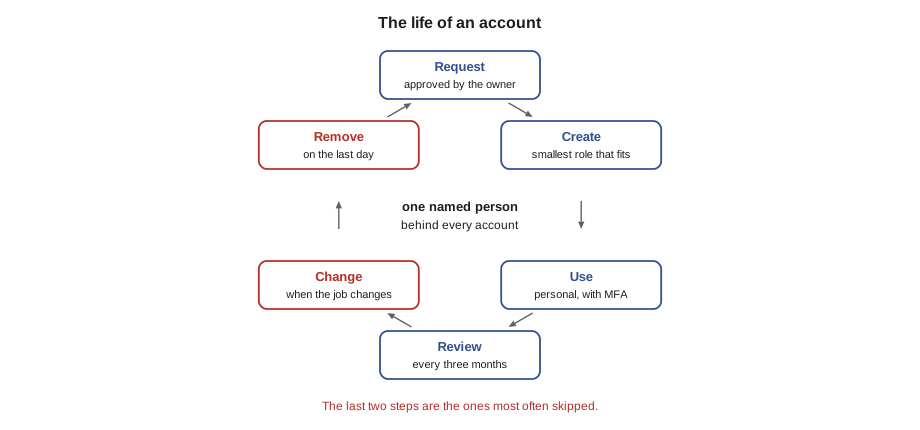
Accounts are created in a hurry and removed slowly. The usual name for the process that prevents drift is joiners, movers and leavers.
- Joiners: accounts are requested by the person's manager, approved by the owner, and created with the smallest role that fits.
- Movers: when someone changes job, their access is changed to fit the new one. The old role is removed, not kept alongside.
- Leavers: access is removed on the day the person leaves. Quillon's service desk keeps a list of who has access where, so that a departing technician's accounts at every site can be removed the same day (BAS-320).
- Reviews: at least every three months, the owner and the contractor go through each user list together. Harcastle's November 2 review found 19 problems in 41 accounts, which is typical of a first review and much better on the second.
Two kinds of account are easy to miss in reviews. Service accounts belong to software, so no person leaves and nobody thinks to remove them; each one should have a named owner and a note of what uses it. Emergency accounts must exist but should never be used day to day. Quillon keeps each site's emergency administrator credential sealed in the password manager with an alert to Margit and the site's owner whenever it is opened, and changes it after every use.
Common mistakes
MistakeLeaving a device's default password in place because the device works.
InsteadChange every default credential before connecting a device, store the new one in the password manager and record the change.
MistakeForcing operators to change passwords every 90 days with complex composition rules.
InsteadFollow current guidance: long passwords, a blocklist, no composition rules and changes only when exposure is suspected.
MistakeHard-locking an operator account after three failed attempts.
InsteadUse growing delays and alerts, so an operator is not locked out during an alarm.
MistakeForgetting service accounts during a review.
InsteadGive every service account a named owner and a documented purpose, and review it with the user accounts.
Summary and key terms
- A building system has many logins beyond the front end: servers, controllers, engineering tools, network devices, service, vendor and emergency accounts.
- Change every default credential before a device joins the network, and isolate devices whose defaults cannot be changed.
- Use personal accounts; replace shared ones, which leak, cannot be removed for one person and break the audit trail.
- Follow NIST SP 800-63B-4: length over complexity, a blocklist, no forced periodic changes, support for password managers and limits on failed attempts.
- Use MFA first on remote access, the password manager, email and administrator accounts; hardware keys are the strongest option.
- Apply least privilege and separation of duties to every account, including service and vendor accounts.
- Manage joiners, movers and leavers, and review every account list regularly.
- Default credential
- The built-in account name and password a device has when it leaves the factory.
- Shared account
- A login used by more than one person, which breaks accountability and is hard to secure.
- Password manager
- Software that stores credentials encrypted, generates strong ones and shares them by role with logging.
- Least privilege
- Giving each person or service only the access needed for their job.
- Service account
- An account used by software, such as a gateway or integration, rather than by a person.
- Phishing-resistant authentication
- Login methods, such as hardware security keys and passkeys, that cannot be captured by a fake login page.
Practice problems
Work each problem on paper first, then reveal the answer to check.
Why is a device that cannot change its default password treated as having no password?
Show answer
The default is published in its manual and known widely, so it protects nothing. The device must be isolated and replaced in time.
What does NIST SP 800-63B-4 say about forced password changes every 90 days?
Show answer
It advises against routine forced changes; passwords are changed when exposure is known or suspected.
Why did replacing two shared accounts at Ninefield increase the total number of accounts?
Show answer
Each shared account was replaced by personal accounts for every person who used it: 4 guards and 3 tenant staff.
What makes a hardware security key stronger than an authenticator app code?
Show answer
It proves identity only to the genuine site, so a fake login page cannot capture and reuse it.
Lesson quiz · 5 questions
Score 60% or more to complete this lesson.
Create a free account to save your progress, take quizzes and earn a certificate.