
BAS-430 · Lesson 10 of 12 · 21 min
Incident response for operational technology
▶ Video coming soon A video version of this lesson is on the way.
Prakash told the June 13 story himself, because he had been the one on the phone. He had been in his garden when Nell called at 9:16. "She said three things," he told Callie. "IT has an alert about a strange device on Tilden's controls network. The building looks normal. What do you want me to do? And the right answer to the third one was not 'pull every plug', which is what I wanted to say."
Lesson 7 showed how the alert was raised. This lesson follows the response, and uses it to explain how incident response works for operational technology: who decides what, in what order, and how the people involved make sure the building stays safe while they find out what happened.
What counts as an incident
Not every alert is an incident, and not every incident is an attack. A cybersecurity incident is an event that actually or potentially harms the confidentiality, integrity or availability of a system or its data, or breaks the site's security policies. An unknown device on a controls network, a controller program changed with no change record, a ransomware infection on the front-end server, a lost engineering laptop with site credentials on it, and a vendor's notice that its own systems were breached are all incidents. Most turn out to be mistakes; they are still handled as incidents until the facts are known, because the first hour decides how much harm is done.
Current guidance
Two US publications, widely used in Canada as well, set out current practice.
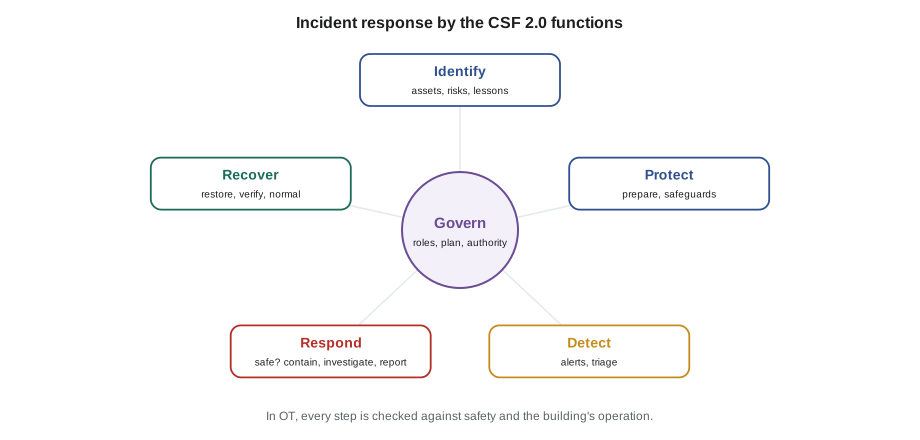
- NIST SP 800-61 Revision 3, published in April 2025, replaced the 2012 incident handling guide. It treats incident response as part of an organization's overall cybersecurity risk management, organized around the six functions of the NIST Cybersecurity Framework 2.0 (lesson 11): Govern, Identify, Protect, Detect, Respond and Recover. Preparation is spread across governing, identifying and protecting; detecting, responding and recovering follow; and lessons learned feed back into the rest.
- NIST SP 800-82 Revision 3, the Guide to Operational Technology Security, published in September 2023, explains how security practice must be adapted for OT, including incident response. Its central point is that in OT, safety and the continued operation of the process come first, and every response action must be judged against them.
That second point changes the instincts of anyone trained in office IT. Disconnecting a laptop from the network is almost always safe. Disconnecting a plant controller, shutting down a supervisory controller or restarting a front end may not be, and in a building it can stop heating in January, cooling in a server room, or exhaust from a laboratory.
The incident response plan
A plan written before an incident is what lets people act quickly and correctly during one. For a building system, Quillon's template has eight parts.
- Scope: which systems the plan covers and which it does not, such as the fire alarm system, which has its own procedures.
- Roles and contacts: the owner's decision maker, the building operator, the owner's IT, the controls contractor's on-call technician, key vendors, the insurer, legal advice and the authorities, with phone numbers that do not depend on the systems that might be down.
- Decision authority: who may disconnect what. At Harcastle, IT may disable a network port or a remote access account at once; isolating a whole building's controls segment needs Nell or Gus; shutting down equipment is always an operations decision.
- Severity levels: what makes an incident minor, serious or critical, and who must be called at each level.
- Playbooks: short step lists for the most likely incidents: unknown device on the network, unexpected changes, ransomware on the front end or an operator workstation, lost or stolen laptop, vendor breach notice.
- Safety and manual operation: how to keep the building safe if systems must be disconnected (lesson 9).
- Evidence and reporting: what to preserve, what must be reported, to whom and by when.
- Review: when the plan is tested and updated.
The plan is printed as well as stored online, and kept where the operators can reach it during a night shift.
June 13: the response
Here is what happened after Nell's call, laid out the way Quillon's incident record laid it out.
| Time | What happened | Who |
|---|---|---|
| 9:08 | Unknown device starts discovery and reads on the Tilden controls segment | (seen later in sensor data) |
| 9:12 | Monitoring sensor alert to IT security on call | Sensor |
| 9:16 | Jarrah calls Nell; Nell checks the Tilden graphics: all equipment normal, no alarms, no changes in the audit trail | Jarrah, Nell |
| 9:20 | Nell calls Prakash; three-way call agrees severity serious, not critical: building safe, cause unknown | Nell, Jarrah, Prakash |
| 9:24 | Jarrah finds the switch port the device is on: a spare port in the Tilden basement mechanical room | Jarrah |
| 9:30 | Decision: disable that one port; leave the rest of the network and all equipment running; Nell keeps watch on the graphics | Nell (operations), Jarrah (IT) |
| 9:38 | Port disabled; sensor shows the discovery traffic stopping | Jarrah |
| 9:50 | Custodian on duty reports letting a contractor into the mechanical room at about 8:50 | Nell |
| 10:30 | Prakash on site; finds the contractor, a fume hood supplier's technician, at a laboratory on the second floor | Prakash |
| 11:00 | Sensor data confirms only discovery and reads, no writes; audit trail shows no changes; three controllers that were read checked against their reference programs: unchanged | Prakash, Jarrah |
| 13:00 | Incident closed as no harm; follow-up actions agreed | Nell, Jarrah, Prakash |
The technician had come in on a Saturday to commission the airflow monitor on a new fume hood. The monitor would not connect to its own network, so he plugged his laptop into the nearest switch he could find, which was the controls switch, and ran his commissioning tool's discovery to find the monitor. The tool found 47 other devices and started reading their lists of objects. He had no idea he was on Harcastle's building automation network, and nobody had told him not to plug in there.
Several things went right, and they are worth naming. The monitoring sensor existed and someone read its alert. The first action was to check the building, not the network. Severity was set deliberately and agreed. The containment was the smallest action that stopped the activity: one port, not the whole segment. The people who decided were the ones the plan said should decide. Evidence was kept: the sensor's capture, the switch logs and the audit trail were saved before anyone tidied up. And the investigation checked rather than assumed, comparing the controllers that had been read with their reference programs, which is the Oldsmar lesson from lesson 1 applied.
Worked problem
Detection and containment times
Using the incident record, how long did it take to detect the activity, to contain it, and to close the incident?
Show solution
- Detection: activity began at 9:08 and the alert was raised at 9:12, so 4 minutes.
- Containment: from the alert at 9:12 to the port being disabled at 9:38 is 26 minutes, or 30 minutes from the start of the activity.
- Closure: from 9:12 to 13:00 is 3 hours 48 minutes.
Answer: 4 minutes to detect, 26 minutes from alert to containment and under 4 hours to close. Times like these are recorded for every incident, because the trend over several incidents shows whether the program is improving.
The follow-up actions were mostly not technical. Every unused port on the Tilden and Morrow House controls switches was disabled. A labelled contractor connection point, on a separate network with internet access but no route to the controls, was added in each mechanical room. Custodial staff were asked to call the facilities on-call before letting any contractor into a mechanical room on a weekend. And the fume hood supplier's contract was given the vendor rules from lesson 8.
Containment in a building
Containment means stopping an incident from spreading or doing more harm. In office IT, the standard move is to isolate affected machines. In a building, every containment option must first be checked against what it will do to the equipment and the people.
| Containment option | Effect on the building | Usually decided by |
|---|---|---|
| Disable one user account or vendor session | None | IT or the controls contractor |
| Disable one switch port | Stops only that device | IT, telling operations |
| Disconnect remote access for everyone | Operators and contractors lose remote access; on-site staff needed | Owner, with IT |
| Isolate the front end from the controllers | Controllers keep running; alarms, central schedules and trends stop | Operations, with the controls contractor |
| Isolate a building's controls network from the campus | Building runs on local control; central monitoring lost | Operations decision maker |
| Shut down equipment | Loss of heating, cooling, ventilation or exhaust | Operations only, with safety in mind |
The general rule is to use the least disruptive option that stops the harm, and to have operators watching the building while it is done. If an incident involves changes to equipment, such as setpoints or schedules altered without authority, operators may need to put affected equipment in a safe state by local control first, then contain the network path.
Investigating and recovering
Once the incident is contained, the questions are what happened, how, and whether anything was changed or taken. Evidence should be preserved before systems are cleaned or rebuilt: logs exported, the front end's audit trail saved, images of affected computers taken by someone who knows how, and notes kept of every action and its time. In a building, the engineering evidence matters as much as the computer evidence: controller programs compared with reference copies, setpoints and schedules compared with the last approved backup, priority arrays checked for unexpected overrides.
Recovery follows lesson 9: restore from clean backups, rebuild rather than clean, change exposed credentials and reconnect in stages while watching the monitoring. The incident is closed only when the building is back to normal operation and the follow-up actions are assigned.
Reporting
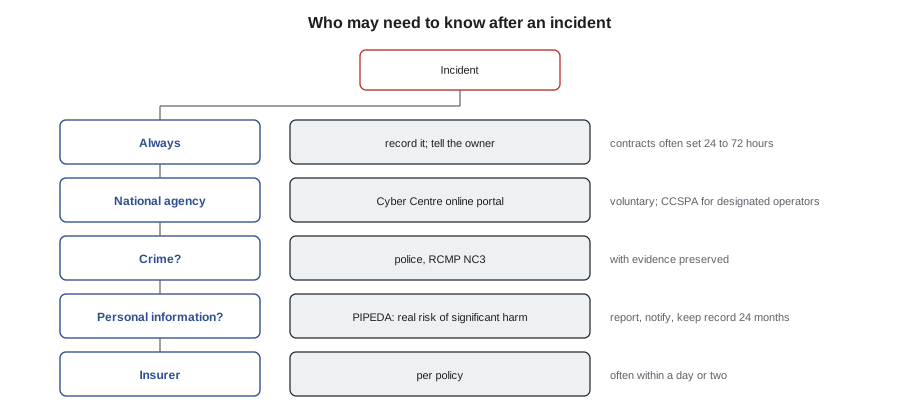
Some incidents must be reported to authorities or to the people affected, and many more are worth reporting voluntarily, because national agencies use reports to warn others. Reporting duties depend on the country, the sector and what was affected, and they are changing. The incident response plan should name who checks the duties and who makes the reports, with legal advice where needed.
In Canada, any organization can report a cyber incident to the Canadian Centre for Cyber Security through its online reporting portal; the Cyber Centre can offer advice and uses reports to warn others. Incidents that involve a crime can also be reported to the police, including the RCMP's National Cybercrime Coordination Centre. Bill C-8, which received royal assent in June 2026, enacted the Critical Cyber Systems Protection Act. It will require designated operators in federally regulated sectors (finance, telecommunications, energy and transportation) to run cybersecurity programs and report significant incidents, with its obligations being brought into force in phases by regulation. Most building owners are not designated operators, but a building that serves one may be asked to meet its requirements by contract.
Personal information adds another duty. Under the federal private-sector privacy law, PIPEDA, an organization that has a breach of security safeguards involving personal information under its control must report it to the Office of the Privacy Commissioner of Canada and notify the affected individuals as soon as feasible, if the breach creates a real risk of significant harm. It must also keep a record of every breach of security safeguards, whether or not it was reportable, for 24 months. Building systems can hold personal information: card access events with names, after-hours requests with names, occupancy data linked to people, and the contact details of operators and tenants.
Contracts may also require reporting: to the building owner by the controls contractor, to tenants by the owner, to the insurer under a cyber insurance policy, often within a day or two. Quillon's own service contracts commit it to tell the owner of any incident affecting their site within 24 hours of becoming aware of it (a typical value; contracts vary).
Practising the plan
A plan that has never been tried usually fails on something small: a phone number that changed, a decision nobody felt entitled to make, a backup nobody knew how to reach. A tabletop exercise, in which the people named in the plan sit together and talk through a realistic scenario step by step, finds those problems cheaply. Canada's Cyber Centre recommend regular exercises for exactly this reason.
Harcastle's first tabletop is planned for January 2027 with Gus, Nell, Jarrah and Quillon, using a scenario Margit is writing: ransomware on the front-end server at 4:00 on a February morning, with an outdoor temperature well below freezing. The questions it is meant to answer are the hard ones. Who decides to isolate the central plant's network? How do the operators know the boilers are healthy without the graphics? How long can Morrow House go without a central schedule? Who calls the insurer?
Common mistakes
MistakePulling every network cable at the first alert.
InsteadCheck the building first, then use the least disruptive containment that stops the harm, decided by the people the plan names.
MistakeCleaning up before saving the evidence.
InsteadExport logs, save the audit trail and note every action with its time before changing anything.
MistakeAssuming the cause from the first report.
InsteadCheck rather than assume: compare programs with reference copies, read the logs, and keep observations separate from guesses.
MistakeLeaving reporting duties to be worked out during the incident.
InsteadName in the plan who checks reporting duties and who makes each report, with contacts and deadlines.
Summary and key terms
- An incident is any event that harms or may harm a system's confidentiality, integrity or availability; handle it as one until the facts are known.
- NIST SP 800-61r3 (2025) organizes incident response around the CSF 2.0 functions; SP 800-82r3 (2023) adapts security for OT, where safety and continued operation come first.
- A plan names roles, contacts, decision authority, severity levels, playbooks, manual operation, evidence and reporting, and is kept on paper too.
- Check the building first; contain with the least disruptive option; preserve evidence; investigate by checking, not assuming.
- Report to the Cyber Centre and the police where appropriate; know that the CCSPA applies to designated operators; check PIPEDA's real risk of significant harm test and keep breach records for 24 months.
- Practise the plan with tabletop exercises.
- Cybersecurity incident
- An event that actually or potentially harms the confidentiality, integrity or availability of a system or its data, or breaks security policy.
- Containment
- Actions that stop an incident from spreading or doing more harm.
- Playbook
- A short, pre-written list of steps for responding to a particular kind of incident.
- Severity level
- A rating of an incident's seriousness that decides who is called and how fast.
- Tabletop exercise
- A discussion-based rehearsal in which the people in a response plan talk through a realistic scenario.
- Evidence preservation
- Saving logs, records and images before systems are changed, so that what happened can be established.
Practice problems
Work each problem on paper first, then reveal the answer to check.
Why was disabling one switch port better than isolating Tilden's whole controls segment on June 13?
Show answer
It stopped the activity with no effect on the building, while isolating the segment would have cut central monitoring for no extra benefit.
What should operators do first when an alert says something unusual is happening on the controls network?
Show answer
Check that the building and its equipment are safe and behaving normally, and keep watching while others investigate.
An alert is raised at 2:40 and the account involved is disabled at 3:25. What is the time from alert to containment?
Show answer
45 minutes.
Name three playbooks a building's incident response plan should include.
Show answer
Unknown device on the network; unexpected program or setpoint changes; ransomware on the front end; lost laptop; vendor breach notice.
Lesson quiz · 5 questions
Score 60% or more to complete this lesson.
Create a free account to save your progress, take quizzes and earn a certificate.