
BAS-430 · Lesson 2 of 12 · 22 min
The building network and its exposure
▶ Video coming soon A video version of this lesson is on the way.
On Friday, November 6, an email reached Ilona Vescovi from Thistledown Analytics, the tenant planning to move onto Ninefield's fourth floor in the spring. Thistledown's IT manager had attached a security questionnaire about the building systems the company's floor would depend on: the air handlers, the box controllers, the server room cooling unit, the card readers and the data feed that Quillon's edge gateway would send to Thistledown's workplace platform. Ilona forwarded it to Declan, who forwarded it to Margit, who read the first question and laughed. It said: "Please provide a current diagram of the building automation network, showing every connection to other networks and to the internet."
"We have pieces of that," Margit told Callie. "Prakash's numbering plan from BAS-310. Sophie's integration notes. Declan's drawings for the podium rooftop units. Your fourth-floor points list. What we don't have is one drawing that shows every way in. You're going to make it."
This lesson covers what Callie needed to know to make that drawing: how building networks are usually arranged, how to take an inventory, how to describe the layers of a building system, and the ways a building network ends up exposed. Lesson 12 returns to the finished drawing.
Start with an inventory
You cannot protect what you do not know is there. Every security program for operational technology starts with an asset inventory: a list of every device that is part of the building system or connected to it, and of every connection it has. National cybersecurity agencies, including Canada's Cyber Centre working with CISA and other partners, published joint guidance in 2025 that puts the inventory first for exactly this reason.
Quillon already kept an addressing register for each site (BAS-310) and recorded firmware with every backup (BAS-210). A security inventory adds a few columns to those records.
ASSET INVENTORY: required columns (Quillon security file)
Asset ID ............. site tag, e.g. NF-PH-SUP-01
Function ............. what it does, e.g. supervisory controller, penthouse
Make / model ......... as on the nameplate
Firmware / software .. version at last check, and date checked
Network .............. IP address and subnet, or MS/TP network and MAC
Device instance ...... BACnet device instance, if any
Location ............. room and enclosure
Connections .......... every other network or service it talks to
Remote access ........ none / VPN / vendor gateway / cellular / other
Accounts ............. local accounts that exist on the device
Owner ................ who is responsible for it (client, Quillon, vendor)
Criticality .......... high / medium / low (effect if it fails or is misused)
Support status ....... supported / end of support date / unsupported
The inventory is built from records first and then checked in the field, because records drift. A box controller replaced by a fit-out contractor, like VAV-7-14 at Ninefield in July, may arrive with a factory default address and no entry in anyone's register. The annual discovery sweep that Prakash added to Ninefield's service visit (BAS-310) finds BACnet devices that answer on the controls network. It does not find a cellular modem bolted inside a generator panel, or a small network switch someone tucked above a ceiling tile. Those are found by walking the site and asking each contractor what they have installed.
Callie's first pass at Ninefield, from records alone, listed 16 devices on the BACnet/IP side: the front-end server, the penthouse supervisory controller, the two plant controllers, the two chiller cards, nine floor routers and the lighting gateway. Below them sat the MS/TP trunks with about 140 box controllers, the penthouse drives, the podium trunk with RTU-1, and the protocol converter still serving RTU-2 to RTU-4. Around them were the VPN appliance that Ninefield's IT provider runs, the building's internet router and firewall, Ironmark's access control panels, Signalpoint's fire alarm panel and the generator.
Layers of a building system
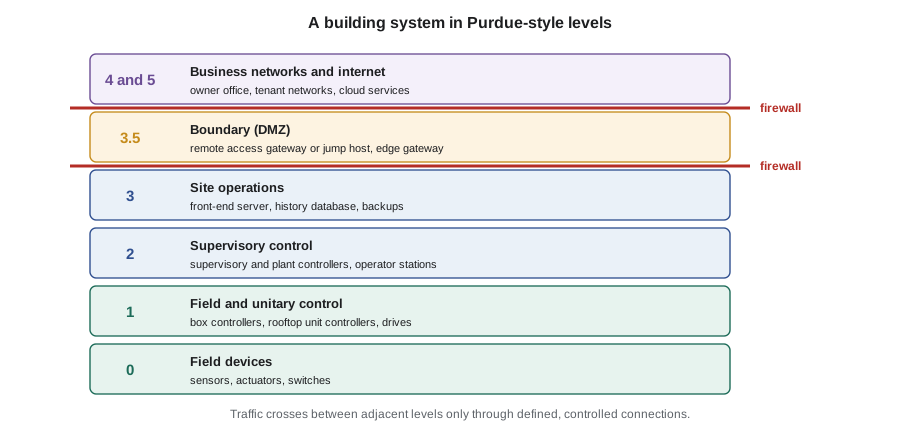
Industrial security people describe control systems in layers, using a reference model first drawn up at Purdue University in the early 1990s for manufacturing. The Purdue model, as it is usually called, was never written for buildings, and it does not fit cloud services neatly, but an adapted version is a useful way to talk about where devices sit and which ones should be allowed to talk to which.
| Level | In a factory | In a building | Ninefield examples |
|---|---|---|---|
| 0 | Sensors and actuators | Field devices | Temperature sensors, valve and damper actuators, current switches |
| 1 | Basic control | Field and unitary controllers | VAV box controllers, the RTU-1 controller, drives on MS/TP |
| 2 | Supervisory control | Supervisory and plant controllers, operator workstations | Penthouse supervisory controller, plant controllers, front end used by operators |
| 3 | Site operations | Site servers and engineering | Front-end server and its history database, engineering laptop connections, backups |
| 3.5 | Demilitarized zone (DMZ) | The boundary between building and business | Remote access gateway or jump host, the edge gateway for the tenant feed |
| 4 and 5 | Business network and internet | Owner and tenant IT, cloud services | Ilona's office network, Thistledown's network, the analytics platform |
The value of the model is in the boundaries. Traffic should move between neighbouring levels through defined, controlled connections. A person on the business network at level 4 should not be able to reach a box controller at level 1 directly; they should go through something at level 3.5 that checks who they are and limits what they can reach. Data leaving the building, such as Thistledown's feed, should leave from level 3.5 too, pushed outward by a gateway rather than pulled in by an outside service.
Many real buildings blur the levels. A supervisory controller may serve web pages to phones; a cloud analytics platform may want data from level 2; a smart thermostat may speak straight to its maker's cloud from level 1. The model does not forbid those designs, but it makes you notice them and decide deliberately how each crossing is controlled.
The controls network: VLANs and subnets
Above the MS/TP trunks, most building systems now run on Ethernet. The controls devices should be on their own network, separate from the office, guest and tenant networks. In practice this is usually done with a virtual LAN (VLAN): the owner's switches label traffic for the controls network so that it stays apart from other traffic on the same physical switches, and the controls VLAN gets its own IP subnet.
A VLAN on its own is a separation, not a security control. If the router that joins the VLANs passes all traffic between them, a device on the office network can still reach every controller. The separation becomes protection only when the traffic between VLANs passes through a firewall with rules that allow only what is needed, which is the subject of lesson 3. Harcastle's 2024 project did exactly this: each building's controls got its own segment, and the college's firewalls allowed only the BACnet traffic needed between the front end and the BBMDs on each segment.
Worked problem
Is one subnet big enough?
Ninefield's controls VLAN uses a subnet with a /24 mask (255.255.255.0). How many device addresses does it provide, how many are used by the 16 BACnet/IP devices Callie listed plus the VPN appliance and two managed switches, and how many remain for the edge gateway and future devices?
Show solution
- A /24 mask leaves 8 bits for hosts: 2⁸ = 256 addresses.
- Two are reserved, one for the network and one for broadcast, so 254 are usable.
- Used: 16 + 1 + 2 = 19 addresses.
- Remaining: 254 − 19 = 235 addresses.
Answer: 254 usable, 19 in use, 235 to spare. Size is not the problem; the question is what else is allowed to reach the subnet. Lesson 3 adds a separate small subnet for the gateways at level 3.5.
How building networks become exposed
A building network is exposed when someone who should not reach it can. Callie's drawing had to show every path, and the binder listed the common ones.
Direct internet exposure
The worst case is a controller, router or front end that can be reached straight from the internet. It usually happens for convenience: a port forward set up so a technician can log in from home, like the one Quillon found at Ninefield; a controller given a public IP address because that was easiest; a vendor who installed a remote control program on the front-end workstation. BAS-320 explained why a web front end exposed this way is unsafe even with a password, and BAS-310 explained why a BACnet controller exposed this way has no protection at all. The defensive rule is absolute: no building controller, router, BBMD or front end is reachable directly from the internet. Remote access goes through something that identifies the user first.
Owners can confirm this without any special tools by asking the IT provider to list every inbound rule and port forward on the internet router and firewall, and every device on the controls network that has a route to the internet. Each answer goes in the inventory. Margit adds that the question should be asked again after every change, because exposures are usually created by someone fixing an unrelated problem in a hurry.
Exposure through BBMDs
BAS-310 explained that a BACnet Broadcast Management Device (BBMD) relays broadcasts between IP subnets, using a broadcast distribution table (BDT) that lists its peer BBMDs, and that it can also accept registrations from foreign devices: single devices on other subnets that ask to receive the network's broadcasts. Foreign device registration was designed for a technician's laptop or a single remote device, and it asks for no proof of who is registering.
That makes a BBMD a gateway into the whole BACnet internetwork. Any device that can reach a BBMD's UDP port and register as a foreign device can discover every BACnet device behind it, read their values and, on most classic systems, write to them. A BBMD reachable from the internet effectively puts the entire building online. Even inside the owner's network, a BBMD that accepts registrations from anywhere lets a device on the office network join the controls network without crossing the firewall's intended rules.
The defensive settings are simple. BBMDs sit only on the controls network. The BDT lists only the known peer BBMDs. Foreign device registration is turned off unless something needs it, and when it is needed, the firewall allows registrations only from known addresses. Firewalls between controls subnets allow UDP 47808 only between the listed BBMDs, as Harcastle's do.
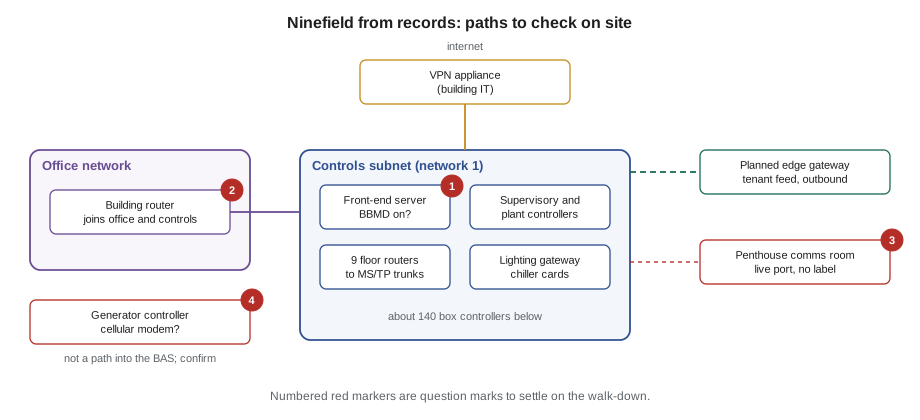
Callie's records check at Ninefield turned up one surprise. The front-end server had its BBMD function switched on, with foreign device registration enabled. Every Ninefield BACnet/IP device was on the one controls subnet, so no BBMD was needed at all. Nobody at Quillon had set it up. Margit's best guess was that the previous contractor had used it so a laptop at home could register through the old port forward. With the port forward gone it could no longer be reached from outside, but it still accepted registrations from any device that could reach the server. Disabling it went on Callie's list for the case study, after a check that nothing on site used it.
Exposure through other networks
A controls network joined to the office network without a firewall is exposed to everything that reaches the office network: phishing emails, infected laptops, guests on the wrong Wi-Fi. This is the usual path for ransomware, which spreads across a flat network and encrypts any Windows machine it can reach, including front-end servers and engineering workstations. A tenant network joined to the building's network, even by a single cable patched for convenience, exposes the building to the tenant and the tenant to the building, which is why Thistledown asked the question at all.
Exposure through other connections
- Cellular modems. Equipment vendors sometimes fit a cellular modem so they can monitor a chiller, generator or elevator. The modem is a path that bypasses the building's firewall entirely. Callie's walk-through list for Ninefield included a question for the generator service company, because the 2012 generator's controller might have one.
- Wireless. Wi-Fi access points in mechanical rooms, wireless sensor receivers and the Bluetooth set-up interface on some thermostats and actuators all extend the network beyond its cables.
- Physical access. Network switches in unlocked closets, spare switch ports, MS/TP trunks running through tenant ceilings, and controllers in unlocked panels in corridors give anyone with a laptop and a few minutes a way in. BAS-210's panel standards and locked enclosures are security controls too.
- Removable media and laptops. USB drives and engineering laptops that move between sites carry whatever is on them.
- Remote access tools and cloud gateways. Each one is an approved path in, and each must be managed as lesson 3 and lesson 8 describe.
Not all of these paths are equally dangerous. A cellular modem that connects only to a generator's own controller, with no link to the BAS, is a risk to the generator but not a path into the building system. It still belongs in the inventory, because the owner should know it exists and who controls it.
Drawing the network
A security drawing of a building network is different from a riser diagram. It shows logical connections rather than cable routes, and its purpose is to answer three questions at a glance: what is on the controls network, what is it connected to, and where are the boundaries? Quillon's drawings follow a few conventions.
- Each network or subnet is a box, labelled with its purpose and address range.
- Each device that crosses a boundary, such as a router, firewall, gateway or modem, is drawn on the boundary line, not inside a box.
- Every connection to another network or to the internet is a labelled line saying what it carries, who owns it and how it is protected.
- Anything unknown or unconfirmed is drawn in a different colour with a question mark, so it is not mistaken for fact.
- The drawing carries a date and the name of the person who checked it, because it is only true until the next change.
Callie's draft had five question marks on it by the end of the first evening. Margit was pleased. "The question marks are the useful part," she said. "A drawing with none is either brilliant or wrong, and they're usually wrong."
Common mistakes
MistakeThinking a VLAN alone protects the controls network.
InsteadA VLAN separates traffic; a firewall with allow-only rules between the VLANs is what protects it.
MistakeBuilding the inventory only from a discovery sweep.
InsteadDiscovery finds devices that answer BACnet. Walk the site and ask each contractor about modems, switches, wireless and gateways.
MistakeLeaving foreign device registration enabled on a BBMD just in case.
InsteadTurn it off unless something needs it, and then allow registrations only from known addresses.
MistakeTreating any path to the internet as acceptable if it has a password.
InsteadNo controller, BBMD, router or front end should be reachable directly from the internet. Remote users come through something that identifies them first.
Summary and key terms
- Security starts with an inventory of every device and connection, checked in the field as well as in the records.
- The Purdue model, adapted to buildings, places field devices, controllers, supervisory systems, site servers, a DMZ and business networks in levels; the important decisions are at the boundaries.
- Controls devices belong on their own VLAN and subnet, protected by a firewall between networks.
- No building device should be reachable directly from the internet.
- A BBMD accepts foreign device registrations without proof of identity, so it must sit only on the controls network, with a short BDT and registrations off or restricted.
- Other exposures include flat connections to office or tenant networks, cellular modems, wireless, physical access, removable media and remote access tools.
- A security drawing shows logical connections and boundaries, marks unknowns clearly and is dated.
- Asset inventory
- A list of every device in or connected to a system, with its function, software, network, connections, owner and criticality.
- Purdue model
- A reference model that describes control systems in levels, from field devices up to business networks.
- DMZ
- A small network between the control system and the business network where boundary services such as remote access gateways sit.
- VLAN
- A virtual LAN: a way of keeping one network's traffic separate from others on the same switches.
- Port forward
- A router rule that sends traffic arriving from the internet to a device inside the network.
- Foreign device registration
- A BACnet/IP feature that lets a single device on another subnet register with a BBMD to receive broadcasts.
Practice problems
Work each problem on paper first, then reveal the answer to check.
Why must an asset inventory be checked in the field?
Show answer
Records drift, and some devices, such as cellular modems, small switches and wireless receivers, do not answer a BACnet discovery sweep.
At which Purdue level would you put a remote access jump host?
Show answer
Level 3.5, the DMZ between the building system and the business network.
Why was the BBMD on Ninefield's front-end server unnecessary?
Show answer
All Ninefield BACnet/IP devices are on one subnet, so broadcasts reach them without a BBMD.
A chiller vendor's cellular modem connects only to the chiller's own panel. Does it belong in the inventory?
Show answer
Yes. It is a path into the chiller that bypasses the building firewall, and the owner should know who controls it, even though it is not a path into the BAS.
Lesson quiz · 5 questions
Score 60% or more to complete this lesson.
Create a free account to save your progress, take quizzes and earn a certificate.