
BAS-430 · Lesson 5 of 12 · 21 min
Patching and firmware management
▶ Video coming soon A video version of this lesson is on the way.
In August 2026, the maker of Harcastle's front-end software published a security bulletin. A weakness in the version the college was running could let someone who reached the server's web interface run commands on it without logging in. The maker released a fixed version the same day, and a few days later the advisory appeared in the Cyber Centre's regular round-up of control system advisories, which republishes the ICS advisories issued by the US agency CISA. Harcastle's front end was not reachable from the internet, but it was reachable from the college's remote access gateway and from every device on the central plant's controls segment.
Sophie tested the fixed version on Quillon's test server the following week, agreed a window with Nell, and applied it at 6:00 on Tuesday, August 25, before the building operators started their day. By 7:40 the front end was back, every graphic and trend checked, and the change recorded. "Two hours of work for a fix that was released in a day," Sophie told Callie when the binder reached that page. "That's what patching looks like in a building when it goes right. Most of this lesson is about why it often doesn't."
Vulnerabilities and advisories
A vulnerability is a weakness in software, firmware or configuration that could be used to cause harm. Every product has them; what matters is how quickly they are found, fixed and the fix applied. When a vulnerability is reported, the maker usually investigates, prepares a fix and publishes a security advisory, also called a bulletin, that says which versions are affected, how serious the weakness is, and what to do.
Advisories use a few common labels worth knowing.
- A CVE identifier, such as CVE-2026-12345 (a made-up example), gives each publicly known vulnerability a unique name, so that advisories from different sources can be matched.
- A CVSS score, from 0.0 to 10.0, rates the severity of the weakness itself. Scores of 9.0 and above are labelled critical. The score describes the vulnerability, not your site; a critical flaw in a service you do not use matters less than a medium one on your internet-facing VPN.
- Known exploitation: some advisories and lists say whether a vulnerability is already being used in real attacks. The US agency CISA's Known Exploited Vulnerabilities (KEV) catalog is the best-known list, and Canadian defenders use it too. A vulnerability that is being used gets priority regardless of its score.
- Mitigations: what to do if the fix cannot be applied at once, such as disabling a feature or blocking a port.
In Canada, the Canadian Centre for Cyber Security (the Cyber Centre) publishes alerts and advisories, including regular round-ups of industrial control system advisories, and businesses can subscribe to them. Many of the control system advisories originate with the US Cybersecurity and Infrastructure Security Agency (CISA), whose ICS advisories cover building automation products sold in both countries. Product makers publish their own bulletins, usually on a security page of their website, and the best source for any product is the maker itself.
Quillon subscribes to the security notices of every manufacturer whose products it installs, and to the Cyber Centre's alerts and advisories. Each week, the service desk compares new notices with the firmware and software columns of every site's inventory (lesson 2). An advisory that matches a site goes to the site's technician and the client contact the same day.
Why patching is harder in a building
Office IT has largely automated patching: computers update themselves overnight and restart. Building systems resist that for good reasons.
- Availability. Restarting a front-end server stops alarm handling; updating a plant controller's firmware stops the plant it controls for several minutes.
- Dependencies. A new front-end version may need a newer operating system, may not support older controller firmware, and may need a newer engineering tool (BAS-320). One update can force several others.
- Testing. An update that changes how a product behaves can break a sequence, a graphic or an integration. The only safe assumption is that it will until proven otherwise.
- Support contracts. Many front ends need a current software maintenance agreement for updates. When Ninefield's agreement lapsed, its front end stopped receiving them; the renewal planned for January 2027 will bring it up to date, which is two versions and several security fixes away.
- Old equipment. Some controllers are no longer supported and will never get another fix. Others can be updated only on site with a laptop and a cable.
None of these is a reason not to patch. They are reasons to patch deliberately, with a process.
A patch process for building systems
Quillon's process has eight steps. It is written for the front end, servers, network devices and controller firmware alike.
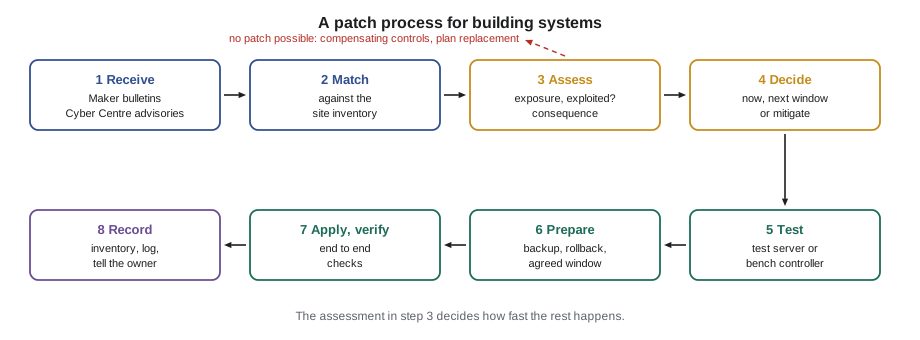
- 1. Receive. Advisories arrive from the makers and the national agency subscriptions.
- 2. Match. Compare the affected versions with the inventory. If the inventory does not record firmware versions, this step cannot be done, which is the best argument for keeping it current.
- 3. Assess. Consider how exposed the affected device is, whether the vulnerability is known to be exploited, and what would happen if it were misused.
- 4. Decide. Patch urgently, schedule for the next window, or apply mitigations and plan the patch later. Record the decision and who made it.
- 5. Test. Install on a test system or a bench controller first, and check that programs, graphics, trends, alarms and integrations still work.
- 6. Prepare. Take a backup of everything that will change, confirm the rollback plan, and agree a maintenance window with the owner's operators.
- 7. Apply and verify. Install, then check the system end to end, as Sophie did at Harcastle: front end up, devices online, a sample of graphics and trends live, alarms arriving, schedules running.
- 8. Record. Update the inventory and the change log, close the advisory on the tracking list and tell the owner.
| Situation | Typical timing |
|---|---|
| Internet-facing device (VPN appliance, remote access gateway) with a known exploited vulnerability | Within days, as an emergency change |
| Critical vulnerability in a device reachable from other networks, such as a front end | Within a few weeks, in the next agreed window |
| Vulnerability in a device inside a protected zone, not known to be exploited | At the next planned maintenance visit |
| No fix available, or the device is unsupported | Mitigate now; plan replacement |
Remote access appliances deserve special mention. VPNs and gateways face the internet by design, attackers look for their vulnerabilities constantly, and several of the most damaging intrusions of recent years began with an unpatched VPN appliance. At Ninefield, the VPN belongs to the building's IT provider, and Quillon's handover notes now ask the provider to confirm that it follows the maker's advisories.
When you cannot patch
Sometimes the fix cannot be applied: the product is no longer supported, the update needs a hardware replacement, or the owner will not accept the downtime until a planned shutdown. In that case the risk is reduced in other ways, called compensating controls.
- Isolate the device further: tighten firewall rules so only the hosts that need it can reach it.
- Disable the vulnerable feature, such as a web server on a controller that is configured through its engineering tool anyway.
- Watch it more closely: add its traffic to the monitoring described in lesson 7.
- Plan its replacement, with a date, and record the accepted risk and who accepted it.
At Ninefield, until the January renewal, the front end's web interface will be reachable only from the jump host once that exists, and in the meantime only through the VPN, with the VPN's users limited to the people who need it.
Firmware
Firmware is the software built into a device, such as a controller, a drive, a router or a gateway. Updating it needs more care than updating a server, because a failed update can leave a device unable to start, and a controller that does not start stops its equipment. BAS-210 told the Morrow House story: in 2023 a replacement controller arrived with newer firmware than the old one, the backup would not load, and the residence's fan coils were rebuilt by hand over two days in December. Since then Quillon records the firmware version with every backup, and checks it before any replacement.
Quillon's firmware rules add a few security points to that habit.
- Get firmware only from the maker's own site or support channel, never from a forum or a file someone emailed.
- Check that the file is genuine. Makers publish a checksum or sign their firmware; the engineering tool or the device checks the signature. A file whose checksum does not match is deleted, not installed.
- Update one device first, check it thoroughly, then the rest in small groups, so that a bad update affects one piece of equipment, not a whole floor.
- Keep the previous firmware file and the backup taken before the update, so the device can be returned to its old state.
- Record the new version in the inventory the same day.
Equipment from other trades follows the same rules but needs agreement first. When Tarrant Chiller Service integrated Ninefield's chiller cards in August (BAS-310), the handover rule was that firmware updates to the cards would be agreed by Tarrant and Quillon, with a backup and a point check after each one.
Worked problem
Fitting firmware updates into a window
Twelve box controllers on one Ninefield floor need a firmware update. Each update takes about 6 minutes to download and restart, and Quillon checks each controller for 3 minutes afterwards. Updates are done one at a time, because a trunk carries one download at a time. Before starting, a backup of all twelve takes 15 minutes. The agreed window is 6:00 to 8:00. Does the work fit?
Show solution
- Updates and checks: 12 × (6 + 3) = 12 × 9 = 108 minutes.
- Add the backup: 108 + 15 = 123 minutes.
- The window is 120 minutes, so the work overruns by 3 minutes.
Answer: It does not quite fit. Doing the backup the afternoon before, or updating one controller first as a test and the other eleven at the next visit, brings the window to 108 minutes or less. Plan for some delay as well: an estimate with no spare time usually runs late.
End of support
Every product eventually stops receiving updates. The front-end server's operating system has an end-of-support date set by its maker; controllers and gateways reach end of life when their makers stop making them. After that date, any new vulnerability will stay open forever. The inventory's support status column makes these dates visible, so that replacements can be planned and budgeted rather than discovered.
Tilden Hall's AHU-2 controller, from the 2009 conversion, is unsupported but sits on a protected controls segment, and it is due to be replaced with the air handler in summer 2027. That is an accepted risk with a date, recorded in the file. An unsupported front-end server on an office network with no end date in sight would not be acceptable.
PATCH AND FIRMWARE LOG: Harcastle front end (extract)
Date        Item                 From -> To   Reason              Window       By  Verified
2026-08-25  Front-end software   v4.2 -> v4.3  Vendor security    06:00-07:40  SA  graphics, trends,
                                              bulletin (critical)                   alarms, schedules OK
2026-08-25  Server OS updates    monthly set  Routine             same window  SA  restart OK
Backups taken before change: front end config + database (1.6 GB), 05:40.
Rollback plan: restore previous version from backup; tested on Quillon test server 2026-08-18.
Keeping the tracking list
Advisories arrive faster than windows, so Quillon keeps one tracking list per site of every advisory that matched something in its inventory. Each line records the advisory, the affected device, the risk decision from step 4, any compensating controls applied in the meantime, the planned date and, once it is done, the date it was closed. The list is reviewed with the client at every service visit, and anything older than its target from the timing table is raised with the client contact in writing, with a plain sentence about what it means for the building.
The tracking list is also how a site's security posture is shown to someone else. When Thistledown asked in its questionnaire how the building's systems are kept up to date, the most convincing answer was not a policy but the list itself: the advisories received this year, what was decided for each, and when each was closed. Ninefield's list, started by Callie from the maker's security page, had six open lines for the front end, all waiting for the January renewal, and one for the VPN appliance that the building's IT provider confirmed it had already applied in the spring.
Common mistakes
MistakeWaiting for a convenient time to patch an internet-facing VPN appliance.
InsteadTreat a known exploited vulnerability on an internet-facing device as an emergency change.
MistakeInstalling a fixed version directly on the live front end.
InsteadTest it first, back up, agree a window, then verify end to end afterwards.
MistakeDownloading controller firmware from wherever it can be found.
InsteadUse only the maker's own source and check the checksum or signature before installing.
MistakeLeaving an unpatchable device as it is with no record.
InsteadApply compensating controls, record the accepted risk and who accepted it, and plan a replacement date.
Summary and key terms
- Makers publish advisories for vulnerabilities; CVE identifiers name them, CVSS scores rate severity, and known exploitation raises priority.
- The Cyber Centre's alerts and advisories, including control system round-ups, and makers' own bulletins are the main sources; match each against the site inventory.
- Building systems need deliberate patching because of availability, dependencies, testing and support contracts.
- Follow a process: receive, match, assess, decide, test, prepare, apply and verify, record.
- Patch internet-facing devices fastest; use compensating controls when a patch is not possible.
- Get firmware only from the maker, check it is genuine, update one device first and record versions with every backup.
- Track end-of-support dates and plan replacements before devices become permanently unpatched.
- Vulnerability
- A weakness in software, firmware or configuration that could be used to cause harm.
- Security advisory
- A notice from a maker or agency describing a vulnerability, the affected versions and what to do.
- CVE
- Common Vulnerabilities and Exposures: a unique identifier for a publicly known vulnerability.
- CVSS
- Common Vulnerability Scoring System: a 0.0 to 10.0 severity rating for a vulnerability.
- Compensating control
- A measure that reduces risk when the main fix, such as a patch, cannot be applied.
- Firmware
- The software built into a device such as a controller, drive, router or gateway.
Practice problems
Work each problem on paper first, then reveal the answer to check.
A vulnerability with a CVSS score of 6.5 is known to be exploited and affects the site's internet-facing VPN. Another scores 9.8 but affects a feature disabled on every site controller. Which comes first?
Show answer
The VPN. It faces the internet and the vulnerability is being used; the critical score of the second matters less because the feature is disabled.
Why can the patch process not start properly without a current inventory?
Show answer
Step 2 matches the advisory's affected versions with the devices on site, which needs the firmware and software versions recorded.
What compensating controls apply to Ninefield's front end until its January upgrade?
Show answer
Reachable only through the VPN (and later the jump host), with users limited to those who need it, and closer monitoring.
Why are firmware updates done one device first?
Show answer
A bad update then affects one piece of equipment, not a whole floor, and the problem is found before the rest are updated.
Lesson quiz · 5 questions
Score 60% or more to complete this lesson.
Create a free account to save your progress, take quizzes and earn a certificate.