
BAS-430 · Lesson 3 of 12 · 21 min
Segmentation, firewalls and secure remote access
▶ Video coming soon A video version of this lesson is on the way.
Callie's network drawing for Ninefield showed what was there. The next session was about what should be there, and Margit brought Prakash in for it, because he had been the Quillon technician on site the afternoon in 2024 when the BBMDs went in after Harcastle's segmentation project, and had worked with the college's IT department on every network change since. He drew two boxes on the whiteboard, labelled them CONTROLS and EVERYTHING ELSE, and drew a single thick line between them. "That line is the whole lesson," he said. "Everything else is deciding what's allowed to cross it, and making sure nothing crosses it that we didn't decide."
Lesson 2 described how building networks are arranged and how they become exposed. This lesson covers the two main defences against exposure: dividing the network into zones with controlled paths between them, and giving remote users a safe way in.
Zones and conduits
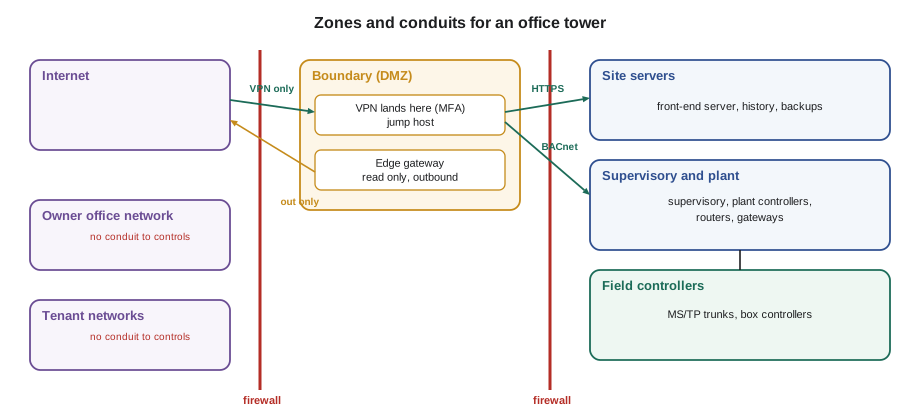
Segmentation means dividing a network into parts and controlling the traffic between them. The ISA/IEC 62443 standards, covered in lesson 11, describe this with two words worth learning now. A zone is a group of devices that share a purpose and a level of risk and can be protected the same way. A conduit is a controlled communication path between zones, with a defined list of what may pass through it.
For a typical office tower like Ninefield, a sensible first set of zones is short:
- Field and terminal controllers: the MS/TP trunks and everything on them.
- Supervisory and plant: the supervisory controller, plant controllers, chiller cards, floor routers and lighting gateway on the controls subnet.
- Site servers: the front-end server and its database and backups.
- Boundary (the DMZ): the remote access jump host and the edge gateway for the tenant feed.
- Outside the building system: the owner's office network, tenant networks, other building systems such as access control, and the internet.
The MS/TP trunks need no firewall of their own, because nothing reaches them except through their routers on the controls subnet, but their routers and the cabling still need physical protection. The access control and fire alarm systems stay in zones of their own with only the narrow interfaces BAS-340 described. The value of naming the zones is that every conduit between them can then be written down, checked and reviewed.
What a firewall does
A firewall is a device or a piece of software that sits on the boundary between networks and decides, packet by packet or connection by connection, what may pass. Most firewalls used today are stateful: once they allow a connection to start, they remember it and allow the replies, so rules only need to describe who may start a conversation.
Each rule names a source, a destination, a service (a protocol and port, such as TCP 443 for secure web pages or UDP 47808 for BACnet/IP), an action (allow or deny) and whether to log the match. Rules are checked in order, and the first rule that matches decides.
Three principles turn a firewall from a box into a protection.
- Default deny. The last rule denies everything. Traffic passes only if an earlier rule allows it. A firewall whose last rule allows everything is a router with extra steps.
- Allow-lists, not block-lists. Rules name exactly what is permitted, from which addresses to which addresses, rather than trying to list everything bad.
- Filter both directions. Outbound rules matter as much as inbound ones. A box controller has no reason to reach the internet; if it tries, the firewall should stop it and log the attempt. The few things that do need to reach out, such as the front end checking a time server or the edge gateway sending data to its broker, get rules of their own.
Rules also decay. A temporary rule added for a commissioning week is forgotten; a server is replaced and the old address stays allowed. Quillon asks each site's IT provider for a rule review at least once a year and after any project, comparing every rule with the conduit list. A rule that nobody can explain is removed.
BACnet and firewalls
BACnet/IP uses UDP, usually on port 47808, and several of its habits need thought at a firewall.
- UDP has no connection for a stateful firewall to track in the usual way, so most firewalls treat replies by a short timeout. Rules should name the specific hosts allowed to exchange BACnet, such as the front end and the supervisory controller, rather than whole subnets.
- Broadcasts do not cross routers or firewalls at all. Between subnets, BACnet relies on BBMDs, so the firewall rule allows UDP 47808 only between the BBMD addresses in the BDT, exactly as Harcastle's college firewalls do.
- Classic BACnet has no authentication, so a firewall that allows 47808 from a host allows that host to read and write anything. Some firewalls designed for operational technology can look inside BACnet messages and allow reads while blocking writes, or allow writes only to certain objects from certain hosts. These features are useful at high-consequence boundaries but need careful testing, because a blocked write that the front end depends on looks like a controls fault.
- BACnet/IP should never be allowed from the internet or from office and tenant networks. People reach the building system through the front end or a jump host, and the jump host, not their laptop, talks BACnet.
- BACnet messages carry addresses inside them, so address translation (NAT) between BACnet devices causes trouble. Where a site seems to need NAT on a BACnet path, that is usually a sign the design needs another look.
Modbus TCP, on TCP port 502, has the same lack of authentication and gets the same treatment: allowed only between the specific hosts that need it.
NINEFIELD: controls boundary firewall, DRAFT rule set (Callie, for review)
#  Source               Destination           Service            Action  Log
1  VPN users (Quillon,  Jump host (DMZ)       TCP 443 (HTTPS),   allow   yes
   Ninefield operators)                       remote desktop
2  Jump host (DMZ)      Front-end server      TCP 443            allow   yes
3  Jump host (DMZ)      Controls subnet       UDP 47808,         allow   yes
                                              vendor tool ports
4  Edge gateway (DMZ)   Front-end server      TCP 443 (read API) allow   yes
5  Edge gateway (DMZ)   Cloud broker (named)  TCP 8883 (MQTT/TLS) allow  yes
6  Front-end server     Time servers (named)  UDP 123 (NTP)      allow   no
7  Front-end server     Vendor update site    TCP 443            allow   yes
                        (named, during
                        maintenance window)
8  Office network       Controls subnet       any                deny    yes
9  Tenant networks      Controls subnet       any                deny    yes
10 Controls subnet      Internet              any                deny    yes
11 any                  any                   any                deny    yes
Notes: no inbound rule from the internet except to the VPN appliance.
Rule 7 is disabled outside agreed maintenance windows.
Worked problem
Following the rules
Using the draft rule set, decide what happens to each connection attempt: (a) Ilona's office PC tries to open the front-end server's web page directly; (b) a VAV controller tries to reach an address on the internet; (c) the edge gateway sends data to its named cloud broker on TCP 8883; (d) a Quillon technician on the VPN opens the jump host.
Show solution
- (a) Source office network, destination controls subnet: rule 8 matches first, so it is denied and logged. Ilona reaches the front end through the VPN and jump host, or through a published operator page in the DMZ if one is added later.
- (b) Source controls subnet, destination internet: rule 10 denies it and logs it. A log entry like that is worth investigating, as lesson 7 explains.
- (c) Rule 5 allows it and logs it.
- (d) Rule 1 allows it and logs it; the VPN has already checked the technician's identity with MFA.
Answer: Denied, denied, allowed, allowed. Every allowed path is one the conduit list names, and every denial is logged.
Physical and switch-level controls
A firewall protects the paths between zones, but somebody can still walk up to a switch inside the controls zone and plug in. The owner's network team can add protections at the switches themselves: disabling every unused port, limiting each port to the device that is meant to be there, and, on newer equipment, requiring devices to authenticate before a port will pass traffic. Network closets and panels stay locked, and spare ports in places such as tenant ceilings are disabled rather than left live. These measures are cheap, and they turn a laptop plugged in where it should not be from a silent intrusion into a dead port and, ideally, an alert.
Secure remote access
Remote access is where most building systems meet the internet, and it is the path most often abused. BAS-320 described the three common arrangements from the user's side. Here they are again from the defender's side.
| Arrangement | How it is protected | Main risks | Defender's checks |
|---|---|---|---|
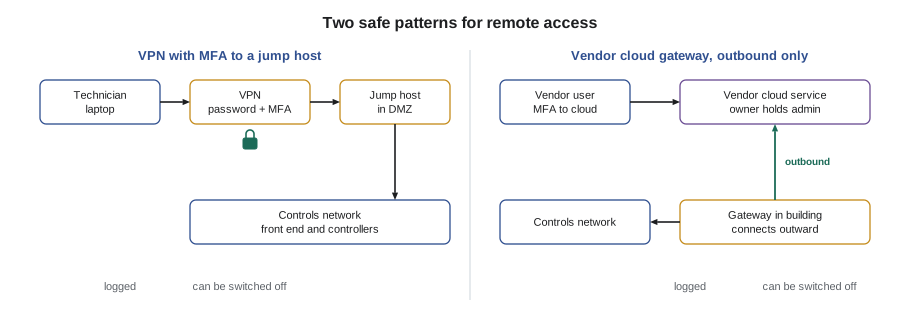
| VPN with MFA, landing on a jump host | The VPN identifies the user with MFA and places them in the DMZ; the jump host holds the engineering tools and is the only machine that reaches the controls zone | VPN appliance needs patching; a VPN that lands users on the whole controls network gives too much | VPN patched; users land only in the DMZ; jump host locked down; sessions logged |
| Owner's remote desktop or access gateway | The owner's IT team runs a gateway; users log in with MFA and work on a machine inside; sessions may need approval | Depends on the owner's IT practice; approvals can be skipped under pressure | Approval step kept; named accounts; recordings or logs reviewed |
| Vendor cloud gateway | A small device or software agent in the building connects outward to the vendor's cloud; users log into the cloud service with MFA | Security depends on the vendor's cloud; access can be switched on without the owner knowing; many users across many sites | Owner holds the admin account; gateway outbound only; vendor's security commitments in the contract; access list reviewed |
A jump host, sometimes called a bastion host, is a hardened computer in the DMZ that remote users log into before they touch the building system. It runs only the tools needed, such as the front end's engineering software and the controller configuration tools; it cannot browse the internet or read email; it is patched and monitored; and it records who logged in and, where practical, what they did. Its value is that the building's controllers trust one well-protected machine instead of every laptop that a technician or vendor might connect from.
Whatever the arrangement, Quillon's rules for remote access are the same, and they extend the BAS-320 list.
- Every remote user has a personal account; no shared remote logins.
- Every remote login uses multi-factor authentication. BAS-320 called MFA the single most effective protection against stolen passwords, and the Target and Oldsmar cases show why.
- Users land in the DMZ, not on the controls network, and reach only what their role needs.
- Vendor and contractor access is off by default and switched on for a session, as lesson 8 describes.
- All sessions are logged, and the logs are kept and read.
- Remote access can be shut off quickly, for one user or for everyone, without waiting for a change to the front end.
- No consumer remote control programs installed on the front end or operator workstations, and no port forwards.
Margit added one rule of her own after reading the Oldsmar advisories. "Remote access has to be something the owner chose and knows about," she said. "If I find a remote control program on a front end and the owner says they've never heard of it, that's an incident until proven otherwise, even if it turns out to be the last contractor's convenience."
Harcastle and Ninefield
Harcastle already met most of these rules. Its IT department runs the campus remote access gateway with MFA, each contractor session needs approval by a facilities staff member, and the controls segments accept connections only from the gateway's internal servers and the front end. Ninefield's VPN, run by the building's IT provider, checks passwords but not yet a second factor, and it lands users on the controls subnet itself rather than on a jump host. Both points went on Callie's list. The VPN supports MFA already, so adding it is a configuration change and a short training note for the dozen people who use it; the jump host is a small project for the new year.
Common mistakes
MistakeEnding a firewall rule set with allow any.
InsteadEnd with deny any and log it. Traffic passes only when an earlier rule names it.
MistakeAllowing UDP 47808 between whole subnets.
InsteadAllow BACnet only between the specific hosts that need it, such as listed BBMDs and the front end.
MistakeLetting VPN users land directly on the controls network.
InsteadLand them in the DMZ on a jump host and allow only the paths their role needs.
MistakeTreating a vendor cloud gateway as the vendor's business.
InsteadIt is a path into the owner's building. The owner should hold the admin account, review who has access and know when it is used.
Summary and key terms
- Segmentation divides a network into zones of similar purpose and risk, joined by conduits that carry only defined traffic.
- A firewall decides what may cross a boundary; use default deny, allow-lists and filtering in both directions, and review rules regularly.
- Allow BACnet/IP and Modbus TCP only between specific hosts; never from the internet, office or tenant networks.
- Switch-level controls and locked closets stop unauthorized devices inside a zone.
- Remote access should identify each user with MFA, land them in a DMZ, reach only what their role needs, be logged and be quick to switch off.
- A jump host lets the controllers trust one hardened machine instead of every remote laptop.
- Vendor cloud gateways should connect outbound only, with the owner holding the admin account.
- Zone
- A group of devices with a shared purpose and level of risk, protected the same way.
- Conduit
- A controlled communication path between zones, with a defined list of permitted traffic.
- Stateful firewall
- A firewall that tracks connections it has allowed so that replies pass automatically.
- Default deny
- A firewall policy in which anything not explicitly allowed is blocked.
- Jump host
- A hardened computer in the DMZ that remote users must log into before reaching the control system; also called a bastion host.
- Multi-factor authentication (MFA)
- Login that requires two or more different kinds of proof, such as a password and a code from a phone app or a hardware key.
Practice problems
Work each problem on paper first, then reveal the answer to check.
Why does a firewall's last rule matter so much?
Show answer
It decides what happens to everything no earlier rule named. With deny any, unknown traffic is blocked; with allow any, the firewall protects almost nothing.
A firewall allows UDP 47808 from the office network to the controls subnet so an energy analyst can run a BACnet tool. What is a safer design?
Show answer
Give the analyst a read-only data feed or a front-end account reached through the jump host, so no office device talks BACnet to the controllers.
Why should outbound traffic from controllers be blocked?
Show answer
Controllers have no need to reach the internet; blocking and logging outbound attempts stops misuse and reveals devices that are misconfigured or compromised.
What two changes did Callie list for Ninefield's VPN?
Show answer
Turn on MFA, and land users on a jump host in a DMZ instead of directly on the controls subnet.
Lesson quiz · 5 questions
Score 60% or more to complete this lesson.
Create a free account to save your progress, take quizzes and earn a certificate.