
MSBA-251 · Lesson 9 of 12 · 18 min
Power Pages for external users
▶ Video coming soon A video version of this lesson is on the way.
Not everyone who works on Lumenvale's buildings works for Lumenvale. Specialist contractors inspect the elevators, service the fire alarm panels, certify the fume hoods every year and repair the commercial kitchen equipment at Ridgeview. Each visit generated a flurry of emails: a work order sent as a PDF, a contractor asking which door to use, a report emailed back weeks later, and an invoice that had to be matched to a job by hand. Delphine wanted contractors to see the jobs assigned to their company, confirm a visit date, upload their report and mark the job done, without being given access to the colleges' internal systems.
Apps built in Power Apps are for people inside the organization, signed in with organizational accounts and licensed accordingly. For people outside, Power Platform offers Power Pages: a low-code service for building secure business websites on Dataverse. This lesson covers how Power Pages fits an intelligent solution. AB-410's skills list mentions Power Pages in its audience profile, describing builders who integrate agents and Copilot features into canvas apps, model-driven apps and Power Pages sites, so a builder should understand where a site fits and how its security works.
What a Power Pages site is
A Power Pages site is a website hosted by Microsoft, connected to a Dataverse environment. Its pages can show and edit Dataverse data through lists and forms, include text, images and navigation, and be styled with themes. Visitors can be anonymous, for public information, or authenticated, signing in with an identity provider. Makers design sites in the Power Pages design studio, which has workspaces for pages, styling, data, setup and security, and can use Copilot to generate pages, forms and text from descriptions. Professional developers can extend sites with custom code, including Liquid templates, JavaScript and web APIs.
| Workspace | What a maker does there |
|---|---|
| Pages | Create pages, add sections, text, images, lists and forms, and arrange navigation |
| Styling | Choose and adjust a theme: colors, fonts, buttons |
| Data | Work with the Dataverse tables, views and forms the site uses |
| Set up | Configure site settings, identity providers, domain names and integrations |
| Security | Manage web roles, table permissions, page permissions and site visibility |
Designing the contractor site
Signe and Maribeth built Facilities Contractors in the Facilities Dev environment, inside the same solution as the apps. The site had four pages for signed-in contractors: My Jobs, a list of work orders assigned to the contractor's company that were not completed; Job Details, showing the location, access instructions and a contact; Confirm Visit, a form to propose or confirm a date; and Upload Report, a form to attach a report and mark the job completed. A public home page explained how to request an account.
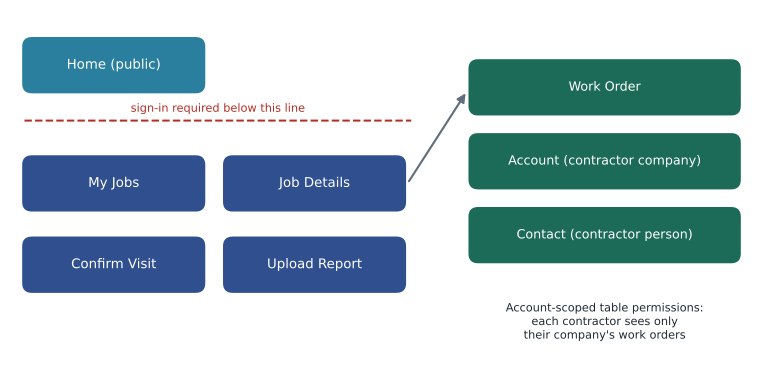
Each contractor person was a contact in Dataverse, linked to an account for their company. Work orders assigned to a contractor carried a lookup to the contractor account. That data design was what made the security possible.
Authentication
Authenticated visitors sign in through an identity provider. Power Pages supports Microsoft Entra ID for partners who have organizational accounts, external identity services such as Microsoft Entra External ID for customers and partners, and other providers through standard protocols such as OpenID Connect and SAML 2.0. Microsoft has been moving customers to Microsoft Entra External ID for consumer and partner sign-in. Each signed-in user is linked to a contact row in Dataverse.
Lumenvale chose Microsoft Entra External ID, so contractors could sign in with their work email and a one-time code or their own Microsoft account, and the colleges' identity team could apply MFA. New accounts were created by invitation: the facilities coordinator sent an invitation from the contact record, so only known contractors could register. Self-registration was turned off.
Web roles and table permissions
Power Pages security rests on two ideas. A web role groups site users, for example Contractor or Contractor Administrator. Table permissions define what a web role can do with a Dataverse table: read, create, write, delete, append and append to, within a scope. The scope decides which rows the permission covers.
| Scope | Rows covered | Example |
|---|---|---|
| Global | All rows of the table | Public list of campus addresses |
| Contact | Rows linked to the signed-in contact | A contact's own profile |
| Account | Rows linked to the signed-in contact's account | Work orders assigned to the contractor's company |
| Self | The signed-in contact's own contact row | Updating one's phone number |
| Parent | Rows related to rows the user can already access through a parent permission | Attachments on work orders the contractor can see |
For Facilities, the Contractor web role had Account-scoped read and write permission on Work Order, through the relationship between Work Order and the contractor account, and a Parent-scoped permission on notes and files attached to those work orders so contractors could upload reports. No contractor could see another company's jobs, and no contractor could see the internal priority notes, which lived in a separate table without any table permission. Signe tested by signing in as two different contractor contacts and confirming each saw only their own company's jobs.
Worked problem
Choosing a table permission scope
The elevator contractor has three technicians, each a contact linked to the company account. The company's office manager also needs to see every job assigned to the company and confirm visits. Which scope should the permission on Work Order use?
Show solution
- The jobs are assigned to the company, not to an individual technician.
- Every contact at the company should see the company's jobs.
- Account scope covers rows related to the signed-in contact's account through the chosen relationship.
- Give the permission to the Contractor web role and assign that role to all four contacts.
Answer: Account scope on Work Order, through the work order's contractor account relationship.
Lists, forms and site visibility
A list on a page displays rows from a Dataverse view, with search, sorting and paging; it shows only rows the visitor's table permissions allow. A form on a page creates or edits a row using a Dataverse form, again within table permissions. A multistep form guides a visitor through several steps. Site visibility can be private, so only specified people in the organization can see the site while it is being built, or public. The Facilities Contractors site stayed private until testing was complete.
Power Pages also includes security features that internal apps do not need in the same way: a security scan in the design studio, a web application firewall option, settings for content security policy, rate limiting of forms and CAPTCHA for anonymous forms. Rupert asked the colleges' security team to review the site before it went public.
Copilot and agents on sites
Power Pages includes Copilot for makers, which drafts pages, forms and text, and can add AI features for visitors. A site can host a Copilot Studio agent that answers visitors' questions from approved knowledge, or summarize data on a page. Lumenvale's public student site already had an agent for general questions; for contractors, Delphine asked only for a short FAQ. Signe noted that an agent answering contractors about access instructions for specific buildings would need careful knowledge design so it never revealed details meant only for internal staff.
Licensing
Power Pages is licensed by site visitor capacity: packs of authenticated users per site per month and anonymous users per site per month, available as prepaid capacity or pay-as-you-go. Internal users who already hold suitable Power Apps or Dynamics 365 licenses can use sites in some cases. The Facilities Contractors site expected about 40 contractor users signing in each month and very few anonymous visitors, so Rupert budgeted for one authenticated user pack.
| Visitor type | How counted | Facilities estimate |
|---|---|---|
| Authenticated | Unique signed-in users per site per month | About 40 contractor contacts |
| Anonymous | Unique anonymous visitors per site per month | A few, viewing the home page |
Apps or a site?
The choice between an app and a site depends on who the user is. Internal staff use Power Apps apps. External people use a Power Pages site. One solution can include both, using the same tables with different security: Dataverse security roles for internal users, web roles and table permissions for site visitors. The Facilities solution now had three front ends on one data model: Facilities Hub for dispatchers, Field Tech for technicians and Facilities Contractors for outside companies.
Forms on a site
Forms are where contractors change data, so they need care. A Power Pages form is based on a Dataverse form and can be set to insert, edit or read only. The maker chooses which columns appear, which are required, what happens on success, for example redirecting to the job list with a message, and whether attachments are allowed. Validation from the Dataverse form and table, such as required columns and business rules scoped to the table, still applies. For the Upload Report form, Signe allowed PDF and image attachments only, set a size limit, and made Report Date and Outcome required.
| Form | Mode | Key settings |
|---|---|---|
| Confirm Visit | Edit | Proposed date and time, access notes; on success return to My Jobs |
| Upload Report | Edit | Report date, outcome, attachment required; PDF and images only |
| Update Contact Details | Edit (Self scope) | Phone and email only |
| Request Access | Insert (anonymous) | Company, name, email; CAPTCHA on; creates a request for the coordinator |
Notifications and the internal side
A site does not work alone. When a contractor confirmed a visit, a cloud flow triggered on the change in Dataverse, notified the dispatchers in Teams and added the visit to the facilities calendar. When a report was uploaded, the flow set the work order to Completed pending review and asked the dispatcher to check the report. The contractor never saw internal notes, and the dispatchers never had to retype anything from an email. Delphine said this was the part she valued most: the contractors' updates arrived in the same place as her own team's work.
Rupert added one more control. Because the site's identity was separate from the colleges' staff accounts, he reviewed contractor access every quarter with Delphine, removing contacts who had left their companies. Power Pages makes this straightforward because each user is a Dataverse contact, so access can be reviewed with an ordinary view.
Page permissions and anonymous access
Table permissions protect data; page permissions protect pages. A page can be restricted to certain web roles so that unauthenticated visitors cannot open it at all. For the contractor site, all pages except Home and Request Access were restricted to the Contractor web role. Anonymous visitors could only see the public text and the access request form. Even so, Signe kept the rule that table permissions are the real protection, because a page permission alone does not stop data being reached through other means such as the site's web API if it is enabled.
Testing the site as an outsider
Signe tested the site from outside the colleges' network, on a personal phone, as each type of visitor: anonymous, a newly invited contractor completing registration, a contractor with an active account, and a contractor whose access had been removed. She checked that anonymous visitors could not reach any job data, that registration worked only with a valid invitation, that each contractor saw only their own company's jobs, and that a removed contractor was refused at sign-in. Running the design studio's security scan before going public found one configuration warning about a site setting, which Rupert fixed.
Common mistakes
MistakeSharing an internal canvas app with outside contractors.
InsteadUse a Power Pages site for external users, with web roles and table permissions.
MistakeUsing Global scope on a table that holds company-specific data.
InsteadUse Account, Contact, Self or Parent scope so visitors see only their own rows.
MistakeLeaving self-registration open on a site for known partners.
InsteadUse invitations so only expected people can create accounts.
MistakeMaking a site public before security testing.
InsteadKeep the site private, test as several visitor accounts, run the security scan, then go public.
During testing, the elevator contractor was the first to use the site. Their office manager confirmed four visits in the first week and uploaded two inspection certificates. Delphine forwarded the confirmation email to Rupert with one word: "Finally."
Summary and key terms
- Power Pages builds secure business websites on Dataverse for external users, designed in the design studio and extensible with code.
- Visitors are anonymous or authenticated through identity providers such as Microsoft Entra External ID; each signed-in user is a Dataverse contact.
- Web roles group visitors; table permissions grant privileges on tables within Global, Contact, Account, Self or Parent scope.
- Lists and forms show and edit data within table permissions; site visibility and security features protect sites before and after launch.
- Power Pages is licensed by authenticated and anonymous visitor capacity, and one solution can serve internal apps and an external site from the same tables.
- Power Pages
- A Power Platform service for building secure, low-code business websites on Dataverse.
- Web role
- A group of site users to which table and page permissions are assigned.
- Table permission
- A Power Pages rule granting a web role privileges on a Dataverse table within a scope.
- Account scope
- A table permission scope covering rows related to the signed-in contact's account.
- Site visibility
- Whether a Power Pages site is private to specified internal users or public.
Practice problems
Work each problem on paper first, then reveal the answer to check.
Why did the team use invitations for contractor accounts?
Show answer
So only known contractors could register; self-registration was turned off.
Which scope lets every contact at a contractor company see the company's jobs?
Show answer
Account scope through the work order's contractor account relationship.
How is Power Pages licensed?
Show answer
By authenticated and anonymous visitor capacity per site per month, prepaid or pay-as-you-go.
Lesson quiz · 5 questions
Score 60% or more to complete this lesson.
Create a free account to save your progress, take quizzes and earn a certificate.