
MSBA-251 · Lesson 1 of 12 · 20 min
Planning an intelligent app
▶ Video coming soon A video version of this lesson is on the way.
By the middle of October 2026 the Registrar Transcripts solution at Lumenvale Community Colleges was in testing, and the Power Platform clinic had a waiting list. The request at the top of Rupert Ellingsworth's list came from the Lakeshore campus in Boise. Its facilities team looked after three campuses, eleven buildings, two greenhouses and a fleet of trades workshops full of equipment that broke in interesting ways. Work requests arrived by email, by phone, on sticky notes and through a shared spreadsheet called Facilities_WO_2026.xlsx. Technicians printed the morning list, wrote on it all day and typed their notes back in at four o'clock, when they remembered.
Delphine Okoro-Vance, the facilities coordinator, made the case at a CoE hub meeting, with the backing of her manager, Octavia Brenner-Lau, the facilities operations manager, whose inspection solution Signe had designed earlier in the autumn. Her team closed about 300 work orders a month. Nobody could say how long the average one took, which buildings generated the most calls, or whether the same boiler had failed three times since spring. When a technician was off sick, his notes went home in his truck. She wanted an app, and she wanted it to be clever: it should sort incoming requests, warn the dispatcher about repeat failures, and let a technician photograph a faulty part and get a sensible description of the problem.
Rupert agreed, with one condition. Signe Tavernier-Mbeki, one of the colleges' two professional developers, would lead a short builder track for the project. Maribeth Ferreira-Quon, who had built the transcript solution and was now the registrar champion, would join to learn the more advanced parts of Power Apps. Arlo Hemsworth, a senior maintenance technician at Lakeshore, agreed to test everything on his phone in a boiler room with poor signal. Signe framed the track around the Microsoft exam for this level of work, AB-410: Building Intelligent Applications, which replaced PL-200 at the end of August 2026. This course follows that project, lesson by lesson, from plan to finished solution.
What makes an app intelligent
Every Power Apps app stores data, shows it on screens and lets people change it. An intelligent app adds features that reason about the data or the user's words instead of only storing them. Microsoft uses the phrase for business apps that build generative AI into the places where work happens: a form that fills itself in from an email, a grid that understands a question typed in plain language, a column that classifies each new record, or an agent that can take an action on a user's behalf and ask for approval when the stakes are high.
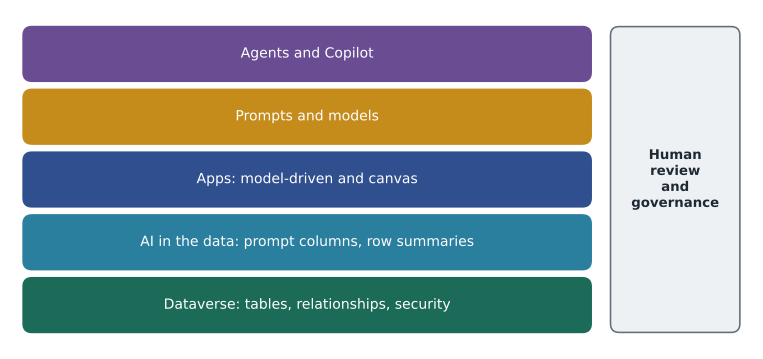
The intelligence is not a separate product bolted on at the end. In Power Platform it comes from several layers that a builder combines.
| Layer | What it does | Example in the facilities app |
|---|---|---|
| AI-assisted building | Copilot and AI tools help the maker design data, apps and flows faster | Describing the work-order process to plan designer to get a first data model |
| AI in the data | Prompt columns, row summaries and formula columns compute values from records | A column that suggests a priority from the request text |
| AI in the app | Microsoft 365 Copilot in apps, smart form fill, natural-language grid search, generative pages | A dispatcher asks "show open heating jobs at Lakeshore older than a week" |
| Prompts and models | Reusable prompts and prebuilt or custom AI models called from apps and flows | A prompt that turns a technician's photo note into a clean fault description |
| Agents | Copilot Studio agents and app skills that act on the user's behalf | An agent that drafts the weekly repeat-failure report for review |
A good builder treats each layer as an option to be justified, not a feature to be collected. Signe's rule for the track was simple: every AI feature must save someone time, reduce an error or reveal something people could not see before, and every one must have a human check where a wrong answer would cost money or safety.
Starting from the problem
Before anyone opened a designer, Signe ran a requirements session with Delphine, Arlo and two dispatchers. She asked the same questions she would ask for any solution, because AI does not change what makes a project succeed.
| Question | What the facilities team said |
|---|---|
| Who uses it, and where? | Two dispatchers at a desk; about 18 technicians on phones across three campuses; managers who want reports |
| What is the process today? | Request arrives, dispatcher logs it in the spreadsheet, assigns a technician, technician works and reports back, dispatcher closes it |
| What goes wrong? | Lost requests, duplicate entries, no history per asset, notes typed in late or never, no view of repeat failures |
| What data matters? | Requests, work orders, buildings and rooms, assets such as boilers and fume hoods, technicians, parts used, photos |
| What must never go wrong? | Safety-critical jobs such as gas smells or fume hood failures must never sit unassigned |
| How will we know it worked? | Every request logged within an hour; average time to close known; repeat failures visible per asset |
From those answers Signe wrote a short list of personas: the dispatcher, who works at a desk all day and needs dense screens, quick search and keyboard shortcuts; the technician, who works with gloves, in noise and sometimes with no signal, and needs big buttons, photos and offline access; and the manager, who wants dashboards and the weekly report. Personas drive almost every later decision, from app type to performance targets.
Choosing the components
Power Apps offers two main kinds of app, and AB-410 expects a builder to choose between them on the evidence. A model-driven app is assembled from Dataverse components: tables, forms, views, charts, dashboards and a site map. The layout is generated by the platform, so it is consistent and responsive with little effort, and it suits data-heavy, process-driven work done at a desk. A canvas app starts from a blank canvas or a template; the maker places every control and writes Power Fx formulas for behavior. It suits task-focused experiences, mobile use and custom layouts.
| Need | Model-driven app | Canvas app |
|---|---|---|
| Dense data entry and review at a desk | Strong fit | Possible, more work |
| Pixel-level control of layout | Limited (generative pages help) | Strong fit |
| Phone use with photos and barcodes | Possible | Strong fit |
| Many tables and relationships | Strong fit | Possible |
| Data source other than Dataverse | Dataverse only (generative pages can use connectors in preview) | Many connectors |
| Consistent security and business rules | Inherits Dataverse rules | Inherits Dataverse rules when Dataverse is the source |
The facilities project needed both. The dispatch office would get a model-driven app called Facilities Hub, with forms and views for requests, work orders and assets, plus a dashboard for managers. Technicians would get a canvas app called Field Tech, designed for phones, that shows a technician's assigned jobs, captures notes and photos, and works offline. Both apps would share the same Dataverse tables, so a technician's note appears in the dispatcher's view the moment it syncs.
Around the apps Signe listed the other components. Cloud flows would notify technicians of new assignments and escalate unassigned safety jobs. A prompt would suggest a category and priority for new requests. An agent could come later, once the data was trustworthy. A Power Pages site was a possibility for outside contractors who carry out specialist work such as elevator inspections. Signe deliberately kept the first release small: two apps, a few flows, one prompt.
Recommending environments and extensibility
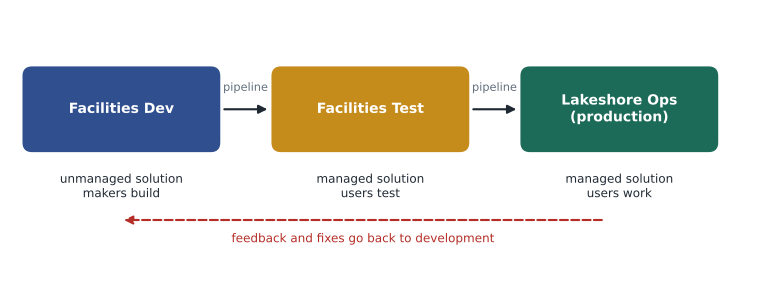
AB-410's first domain also asks builders to recommend environment types and extensibility options. Rupert's environment strategy from the transcript project gave a pattern: separate development, test and production environments, grouped and managed. For this project he created Facilities Dev as a developer environment for Signe and Maribeth, Facilities Test as a sandbox for Arlo and the dispatchers, and used the existing Lakeshore Ops production environment, which was already a managed environment, as the target. The solution would be built in Dev inside a solution called Facilities Work Orders, so it could move between environments in one piece.
Extensibility means going beyond what the low-code tools do on their own. The options form a ladder, and a builder should climb only as far as needed.
| Need | Option | Who usually builds it |
|---|---|---|
| Calculate or validate data | Business rules, formula columns, Power Fx | Maker |
| Reuse logic in canvas apps | Named formulas, user-defined functions, components | Maker |
| Call an outside service | Standard or premium connector; custom connector | Maker, with IT for custom connectors |
| Custom user interface element | Power Apps component framework (PCF) code component | Pro developer |
| Server-side logic on data events | Dataverse plug-in or low-code plug-in | Pro developer or advanced maker |
| Full custom front end on Power Platform | Code apps, or generative pages with generated code | Pro developer, or maker with AI tools |
For Facilities, the only pro-code item on the first plan was a custom connector to the colleges' building management system, which records boiler alarms. Signe put it in a later phase. Everything else could be done with the low-code tools and AI features covered in this course.
Built-in agents and AI options
One objective in the exam's first domain is to evaluate built-in agents to include in a business solution. Before building anything custom, a builder checks what Microsoft already provides. Microsoft 365 Copilot can work inside model-driven apps and answer questions grounded in the records on screen and in the user's wider work data, respecting the app's security. Microsoft also provides agents and app skills that can fill forms from emails, summarize long activity histories and explore data in grids. If a built-in capability does the job, it is cheaper to run and easier to govern than a custom one.
Signe and Delphine walked through the wish list with that in mind. Summarizing a work order's history: built in, through Copilot in the model-driven app. Searching open jobs in plain language: built in, through natural-language grid search. Suggesting a category and priority from free text: not built in for their own categories, so a custom prompt. Describing a fault from a photo: a prompt with an image input, tested carefully before anyone relied on it. A weekly repeat-failure report: possibly an agent later, but a Power BI report might be enough.
Worked problem
Sizing the value of the first release
Dispatchers spend about 9 hours a week retyping technicians' notes and chasing missing ones. The new apps are expected to cut that to 2 hours. Dispatcher time costs about 41 dollars an hour including benefits, and the team works 48 weeks a year. What is the yearly value of the time saved?
Show solution
- Hours saved each week: 9 minus 2 equals 7 hours.
- Hours saved each year: 7 times 48 equals 336 hours.
- Value: 336 times 41 dollars equals 13,776 dollars.
- List the harder-to-price benefits separately: no lost safety requests and a history per asset that will show which equipment to replace.
Answer: About 13,776 dollars a year in dispatcher time, plus safety and asset benefits that leadership cares about more.
An ALM strategy from day one
The last objective in this part of the exam is to deploy a solution and an ALM strategy. Application lifecycle management (ALM) is how a solution moves from idea to production and is then changed safely. For a Power Platform builder it means: build in a development environment inside an unmanaged solution; use environment variables and connection references for anything that differs between environments; export or deploy a managed solution to test and then production through pipelines; and never edit production directly. Rupert had already set up a pipeline from Registrar Dev to Registrar Prod, and he copied it for Facilities.
The AB-410 exam at a glance
Signe kept the exam in view throughout. In the study guide for skills measured as of December 18, 2026, AB-410 has three domains. Creating a foundation for intelligent applications, which covers solution design, data models and security, weighs 25 to 30 percent. Creating intelligent applications, which covers model-driven and canvas apps, weighs 25 to 30 percent. Building business application logic and automation, which covers cloud flows, prompts and models, business rules, business process flows and calculated, rollup and formula columns, weighs 40 to 45 percent. The passing score is 700. This course concentrates on the app-building domain and the AI features inside apps; companion courses in the program cover Dataverse modeling, automation and the exam itself.
| Domain | Weight | Where this course helps |
|---|---|---|
| Create a foundation for intelligent applications | 25 to 30 percent | Planning (this lesson), security on forms and apps |
| Create intelligent applications | 25 to 30 percent | Lessons 2 to 5 and 7 to 11 |
| Build business application logic and automation | 40 to 45 percent | Prompts and models (lesson 6); flows from apps (lesson 3) |
Common mistakes
MistakeStarting with the AI feature and looking for a problem it could solve.
InsteadStart with the process and the personas, then add AI where it saves time, reduces errors or reveals patterns.
MistakeBuilding one app for every persona.
InsteadDesk and field users have different needs; two apps on the same Dataverse tables often serve them better.
MistakeWriting custom code before checking built-in options.
InsteadCheck built-in Copilot features, agents and low-code tools first, and climb the extensibility ladder only as far as needed.
MistakeBuilding directly in production because the app is small.
InsteadUse a solution, development and test environments and a pipeline even for small apps.
At the end of the session Signe photographed the whiteboard: two apps, one set of tables, three flows, one prompt, three environments. Delphine asked when the clever part would start. "It starts with the forms," Signe said. "If the data is messy, the AI will be confidently wrong."
Summary and key terms
- An intelligent app combines Dataverse data and security with AI in the data, in the app, in prompts and models and in agents.
- Requirements and personas come first; they decide app type, AI features and performance targets.
- Model-driven apps suit dense, process-driven desk work; canvas apps suit task-focused and mobile experiences; one solution can use both.
- Builders recommend environment types, climb the extensibility ladder only as far as needed and check built-in agents before building custom ones.
- An ALM strategy with solutions, separate environments and pipelines applies from the first day.
- Intelligent app
- A business app that uses generative AI and AI models where work happens, for example to fill forms, classify records or act through agents.
- Persona
- A short description of a type of user, their tasks and their working conditions, used to guide design.
- Model-driven app
- An app assembled from Dataverse tables, forms, views, charts, dashboards and a site map, with a generated layout.
- Canvas app
- An app whose layout and behavior the maker designs control by control, using Power Fx formulas.
- ALM
- Application lifecycle management: the practices for building, testing, deploying and changing a solution safely.
Practice problems
Work each problem on paper first, then reveal the answer to check.
Name two personas for the facilities project and one design need for each.
Show answer
Dispatcher: dense screens and fast search at a desk. Technician: large controls, photos and offline use on a phone. Manager: dashboards and reports.
Why did the team check built-in Copilot features before designing a custom prompt?
Show answer
Built-in capabilities are cheaper to run and easier to govern; custom work is only justified where they do not fit, such as the colleges' own categories.
What are the three AB-410 domains and their weights?
Show answer
Foundation 25 to 30 percent; intelligent applications 25 to 30 percent; business logic and automation 40 to 45 percent.
Lesson quiz · 5 questions
Score 60% or more to complete this lesson.
Create a free account to save your progress, take quizzes and earn a certificate.