
MSBA-251 · Lesson 12 of 12 · 18 min
Case study: a service technician app
▶ Video coming soon A video version of this lesson is on the way.
On Thursday, November 19, 2026, two weeks before the planned production deployment, Rupert held a design review for the Facilities Work Orders solution in the CoE hub meeting. Signe presented; Maribeth, Delphine and Arlo answered questions; Kwabena and Dr. Philippa Ondaatje-Ruiz, the colleges' privacy officer, asked them. The review followed a checklist that Rupert uses for every solution going to a managed production environment. This final lesson walks through that review as a case study, bringing together every part of the course, and then sets a capstone task for you: designing the next app for the same team.
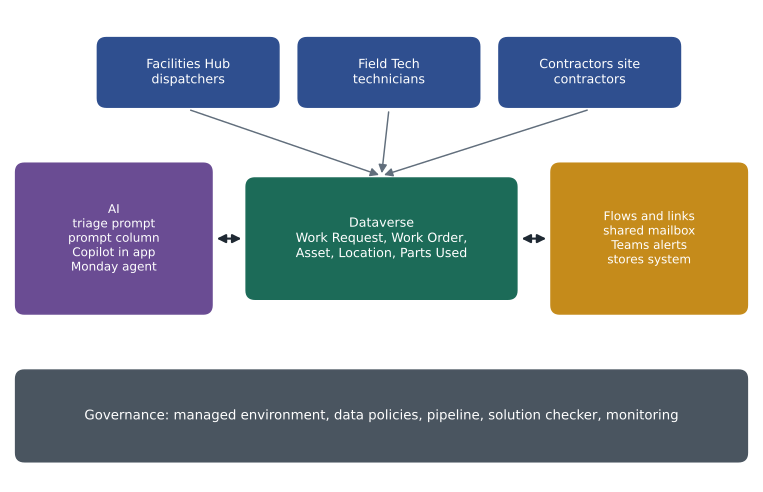
The solution at a glance
| Component | Type | Users | Lessons |
|---|---|---|---|
| Facilities Hub | Model-driven app with a generative page (dispatch board) and dashboard | Dispatchers, coordinator, managers | 2, 4, 5 |
| Field Tech | Canvas app, phone layout, offline-enabled | About 18 technicians | 3, 7, 8, 11 |
| Facilities Contractors | Power Pages site, invitation only | About 40 contractor contacts | 9 |
| Triage Work Request | Prompt with JSON output and Dataverse knowledge | Used by Field Tech, Facilities Hub and a flow | 6 |
| Work order summary | Prompt column on Work Order | Managers | 6 |
| Flows | Email triage, assignment notification, safety escalation, parts request | Automatic | 3, 6 |
| Monday repeat-failure agent | Copilot Studio agent with approval in the agent feed | Coordinator | 5 |
| Security | Facilities Dispatcher, Facilities Technician, Facilities Manager roles; Contractor web role | All | 2, 9 |
Review question 1: does it solve the problem?
Rupert started with the requirements from the first session. Every request logged within an hour: in UAT, phone and email requests averaged six minutes from arrival to a logged work request, because the email flow created rows automatically. Safety jobs never unassigned: the escalation flow alerted dispatchers within one minute of a Critical request, and the test plan had five cases for it, all passing. Time to close known: every work order now had Started On and Completed On values. History per asset: the Asset form showed every work order, and the Monday agent drafted a note when an asset had three jobs in 60 days.
Review question 2: is the AI used responsibly?
Dr. Ondaatje-Ruiz asked three questions. What data does each AI feature use? The triage prompt uses only the request text, location and category descriptions. Copilot in Facilities Hub uses records and Microsoft 365 data that the user can already see. The agent reads work orders and assets and can only draft notes and propose requests. Where can AI make a decision that matters? Nowhere without a person: priority suggestions are confirmed by a dispatcher or technician, AI-created requests are flagged for review, and agent actions that write data wait for approval in the agent feed. How will errors be found? The prompt test set is rerun on every change, and a sample of 20 AI-suggested priorities is reviewed each month.
| AI feature | Human check | Monitoring |
|---|---|---|
| Triage prompt in apps | User confirms category and priority | Monthly sample of 20 decisions |
| Triage prompt in email flow | Needs Review flag; dispatcher confirms | Critical alerts reviewed weekly |
| Smart form fill | User reviews suggested values | Feedback from dispatchers |
| Copilot in Facilities Hub | Answers cite records; read only | Questions logged in usage reports |
| Monday agent | Approval for any action that writes data | Agent feed history |
Review question 3: is it secure?
Rupert walked through security by persona. Dispatchers have organization-level read and write on work orders and requests, read on assets and locations, and no delete. Technicians have user-level write on work orders assigned to them, read on assets and locations for their campus through business units, and create on Parts Used. Managers have read across everything and access to the Costing form. Contractors see only their company's jobs through Account-scoped table permissions. Contractor rates are protected by column security. Kwabena asked whether technicians could see each other's notes; the answer was yes for the same campus, which Delphine confirmed was intended, so jobs could be handed over.
Review question 4: will it work where people work?
Arlo answered this one. Field Tech opens in about three seconds on mobile data, works offline in the plant rooms, syncs when he walks upstairs, and shows a clear banner when a job has been reassigned. The QR code scan finds the right asset first time. Large buttons work with gloves. Maribeth reported the accessibility results: the App checker shows no issues, a TalkBack test passed all steps, and priority is shown as text and an icon as well as color.
Review question 5: is it ready to run?
The last part of the checklist covered operations. The solution is managed in test and will be deployed to Lakeshore Ops through the pipeline; nobody will edit production directly. Environment variables hold the shared mailbox address and the Teams channel, so nothing is hard-coded. Connection references use a service account for flows. The solution checker shows no critical or high issues. Copilot Credits are allocated to the environment with an alert. Playwright regression tests run after each deployment. Signe is the technical owner and Delphine the business owner, with a support rota for the first month. Training is a twenty-minute session per team and a one-page guide.
| Checklist item | Status |
|---|---|
| Requirements traced to passing tests | Done |
| Security tested with each persona and a contractor account | Done |
| Accessibility checker and screen reader test | Done |
| Performance targets met on devices | Done |
| AI features have human checks and a monitoring plan | Done |
| Solution checker clean of critical and high issues | Done |
| Environment variables and connection references set for production | Done |
| Owners, support rota and training ready | Done |
| Privacy officer sign-off | Given at the review |
The review approved deployment, with one condition from Dr. Ondaatje-Ruiz: the photo feature must tell technicians not to photograph students or staff. Signe added a one-line reminder on the camera screen that afternoon. The production deployment was scheduled for the first week of December, with Lakeshore first and the other two campuses a week later.
Lessons the team drew
At the end of the review Rupert asked each person for one lesson. Signe: "Design for the worst place the app will be used, not the best." Maribeth: "The AI was the easy part; the data model and the security took the time." Delphine: "Ask the people who do the job, then watch them do it." Arlo: "Test it in the boiler room." Kwabena's was about measurement: with Started On and Completed On on every job, he could finally build the report the colleges' leadership had asked for since 2023.
Capstone task
The CoE's next request comes from the same facilities team: a preventive maintenance app. Today, preventive maintenance (scheduled checks such as monthly fire extinguisher inspections, quarterly boiler servicing and annual fume hood certification) is tracked in a separate spreadsheet. Delphine wants scheduled checks generated automatically, assigned to technicians, completed on their phones with a checklist, and reported to managers, including which checks are overdue. Use what you learned in this course to design it.
| Task | What to produce |
|---|---|
| 1. Personas and requirements | Three personas and five requirements, including one that must never be broken |
| 2. Data model additions | New tables and relationships needed alongside Asset and Work Order |
| 3. App choices | Which parts are model-driven, canvas or a generative page, and why |
| 4. AI features | At most two AI features, each with a human check |
| 5. Offline and performance | The offline profile for technicians and two performance targets |
| 6. Security | Role changes and any external access |
| 7. Testing | Five test cases, including one for an AI feature |
Worked problem
Model answer (outline)
Outline a strong answer to the capstone task.
Show solution
- Personas: maintenance planner (desk), technician (phone, often offline), manager (tablet). Requirements include: every scheduled check is generated on time; overdue safety checks are escalated; checklists capture pass or fail per item with a photo for failures. Never broken: an annual fume hood certification may not be marked complete without the certificate attached.
- Data: Maintenance Plan (asset, frequency, checklist template), Checklist Template and Checklist Item, and the generated Work Order with Checklist Results. Reuse Asset, Location and Work Order rather than creating parallel tables.
- Apps: add a Planning area to Facilities Hub with forms and views for plans; a generative page showing a calendar of upcoming checks; add a Checklist screen to Field Tech rather than building a new app.
- AI: a prompt that turns a technician's failure notes into a clear defect description, confirmed by the technician; optionally a row summary on Asset. Do not let AI mark checks as passed.
- Offline: add Checklist Templates and Items in full, and the user's scheduled work orders for the next 14 days. Targets: checklist screen opens in under 2 seconds; no delegation warnings.
- Security: planners need write on Maintenance Plan; technicians read only on plans; contractors see certification jobs for their company through the existing site.
- Testing: plan generation on schedule; overdue escalation; offline checklist completion; certificate required for fume hood completion; prompt test set for defect descriptions with agreed answers.
Answer: A strong design extends the existing solution, reuses tables, keeps AI in a supporting role with human confirmation, and traces each requirement to a test.
Where this course fits
AB-410 tests the full range of building intelligent applications: foundations and data models, model-driven and canvas apps, and business logic and automation, which carries the largest weight at 40 to 45 percent. This course covered the app-building domain and the AI features inside apps, with planning, prompts and models along the way. The companion courses in the program cover Dataverse data modeling and security, automation with Power Automate and agent flows, and environments, governance and ALM, followed by an exam readiness course. Signe's advice to Maribeth before she booked the exam: build something real, test it where people work, and read the current skills measured, because the platform changes every month.
What went into the first month plan
Approval for production was not the end of the work. The team agreed a plan for the first month after deployment. During the first week, Signe and Maribeth would hold a short daily check-in with the dispatchers and a technician from each campus. Monitor sessions would be run on request for any reported problem. The prompt's monthly review would start at the end of the first month, and Kwabena would publish a short report each Friday with counts of jobs logged, closed and overdue, and the number of AI suggestions changed by users. Any change requested in the first month would go through the normal pipeline, with a fortnightly release.
| Measure | Baseline before | Target after one month |
|---|---|---|
| Requests logged within an hour | Unknown | At least 95 percent |
| Critical requests assigned within 30 minutes | Unknown | 100 percent |
| Jobs with Started On and Completed On | None | At least 98 percent |
| Dispatcher retyping time per week | About 9 hours | About 2 hours |
| AI priority suggestions changed by users | Not applicable | Tracked; reviewed monthly |
Kwabena's report would also show the measures that had no baseline, because the spreadsheet had never recorded them. Delphine said that alone justified the project: for the first time she would be able to show the colleges' leadership how long repairs took and which buildings needed investment.
A reflection on scope
The Facilities Work Orders solution did not do everything on Delphine's first wish list. There was no integration with the building management system yet, no invoice processing and no technician-facing agent. Rupert explained why to the CoE: a first release that works well and is trusted creates demand and goodwill for the next one, while a first release that tries to do everything tends to be late and fragile. The capstone task above is the next step, and the integration and invoices are on the list after that.
Maribeth closed the review by booking a date for her AB-410 exam in the new year, after the companion courses. Rupert added the Facilities solution to the CoE catalog as an example for other departments, with the design review checklist attached.
Common mistakes
MistakeBuilding a new app for every new request from the same team.
InsteadExtend existing apps and tables where the users and data overlap.
MistakeLetting AI mark safety checks as complete.
InsteadKeep AI in a supporting role, with people confirming decisions that matter.
MistakeTreating go-live as the end of the project.
InsteadPlan owners, support, monitoring of AI features and regular performance checks.
Summary and key terms
- The Facilities Work Orders solution combines a model-driven app, a canvas app, a Power Pages site, prompts, flows and an agent on one Dataverse model.
- A design review checks that the solution meets requirements, uses AI responsibly, is secure, works where people work and is ready to operate.
- Every AI feature has a human check and a monitoring plan; agents act only with approval for actions that write data.
- Go-live readiness includes traced tests, accessibility and performance results, a clean solution checker, environment variables, owners and training.
- New requirements are best met by extending the existing solution and reusing its data and security.
- Design review
- A structured check of a solution against requirements, security, AI use, usability and operational readiness before release.
- Preventive maintenance
- Scheduled inspection and servicing of equipment to prevent failures.
- Business owner
- The person in the business who is accountable for a solution and approves its release.
- Technical owner
- The person accountable for a solution's technical health, changes and support.
Practice problems
Work each problem on paper first, then reveal the answer to check.
Name the five questions in Rupert's design review.
Show answer
Does it solve the problem? Is AI used responsibly? Is it secure? Will it work where people work? Is it ready to run?
Why should the preventive maintenance design extend Field Tech rather than create a new app?
Show answer
The same technicians and much of the same data are involved, so extending the app avoids duplication and keeps one place for their work.
What condition did the privacy officer set at the review?
Show answer
The camera screen must remind technicians not to photograph students or staff.
Lesson quiz · 5 questions
Score 60% or more to complete this lesson.
Create a free account to save your progress, take quizzes and earn a certificate.